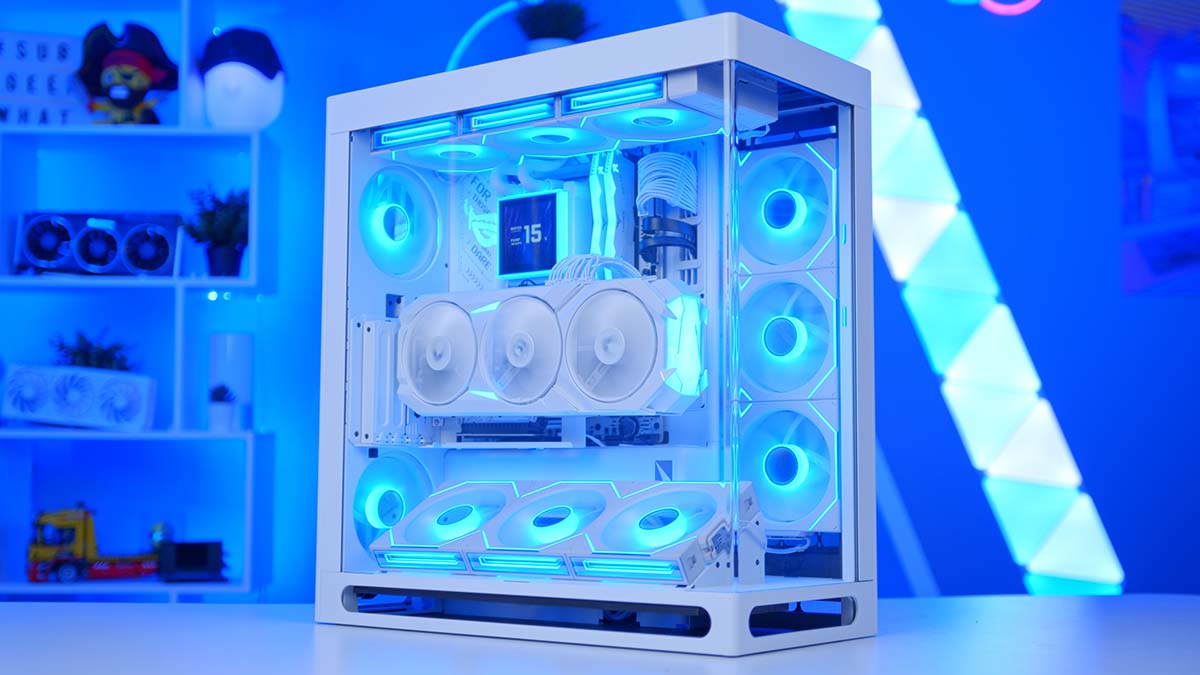
Vertical GPU mounts have always come with a catch. Turn the graphics card to face the glass and its fans end up pressed against the side panel, fighting for air, all for the sake of a better view. HAVN’s HS 360 VGPU is designed to fix exactly that, and it’s the case at the heart of this build. Inside, the Ryzen 7 9850X3D teams up with PowerColor’s RX 9070 XT for an all-white gaming PC that’s right at home at high-refresh 1440p, with plenty left in the tank for 4K.
Below you’ll find the full parts list, then a closer look at each component and why it made the cut, an NVIDIA alternative worth considering, and how the finished system handles the latest games.
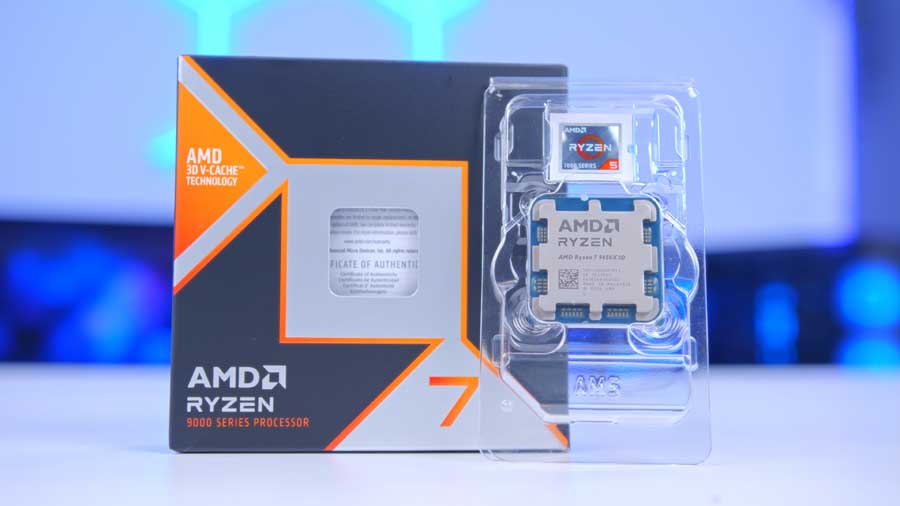
AMD Ryzen 7 9850X3D
Skip to SectionAMD’s fastest eight-core gaming chip, with 96MB of 3D V-Cache and a 5.6GHz boost clock, 400MHz higher than the 9800X3D.
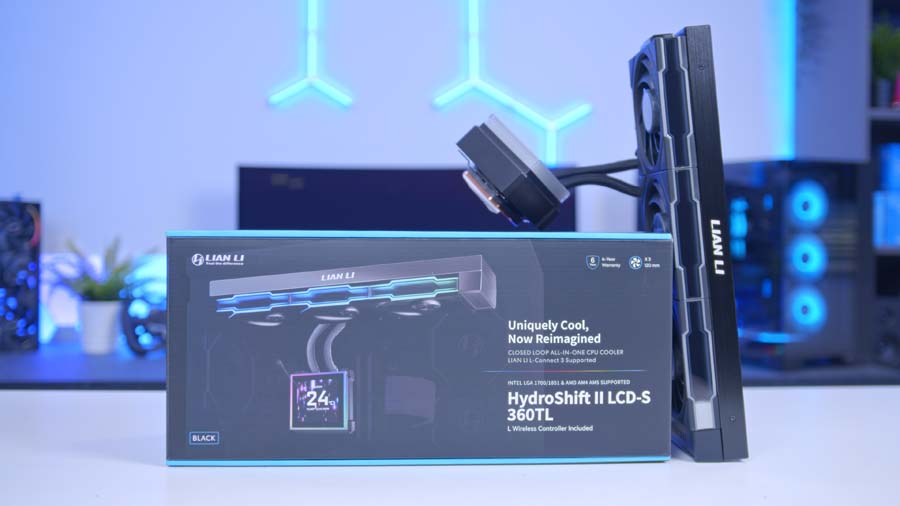
Lian Li HydroShift II LCD-S 360TL White
Skip to SectionA white 360mm AIO with a magnetic 3.4-inch square IPS screen on the pump and three pre-fitted UNI FAN TL FLEX fans that link together for tidy cabling.
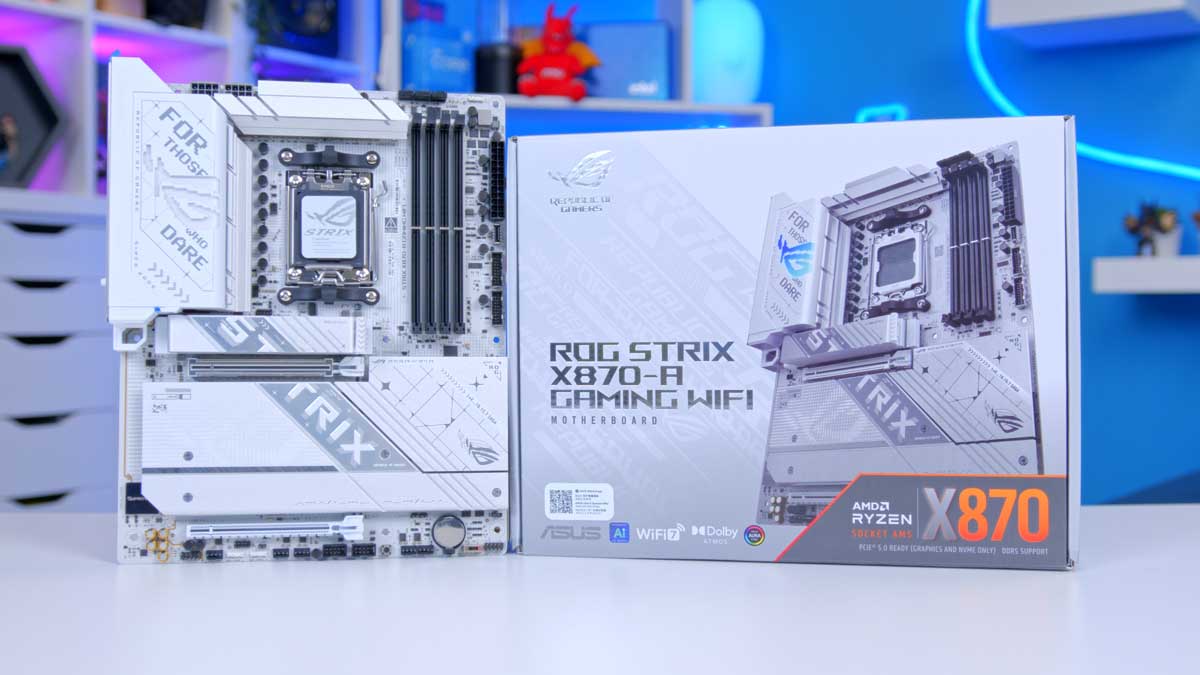
ASUS ROG STRIX X870-A GAMING WIFI
Skip to SectionA white ATX X870 board with a 16+2+2 phase VRM, four M.2 slots, Wi-Fi 7 and dual USB4, plus ASUS’s tool-free Q-Release features throughout.

TEAMGROUP T-Force Delta RGB DDR5 32GB White
Skip to SectionA 32GB dual-channel DDR5 kit running at 6000MT/s with CL30 timings, finished with white heatspreaders and a wide RGB lightbar.

Samsung 990 PRO 1TB
Skip to SectionSamsung’s long-running flagship PCIe 4.0 drive, rated for up to 7,450MB/s reads and backed by a five-year warranty.
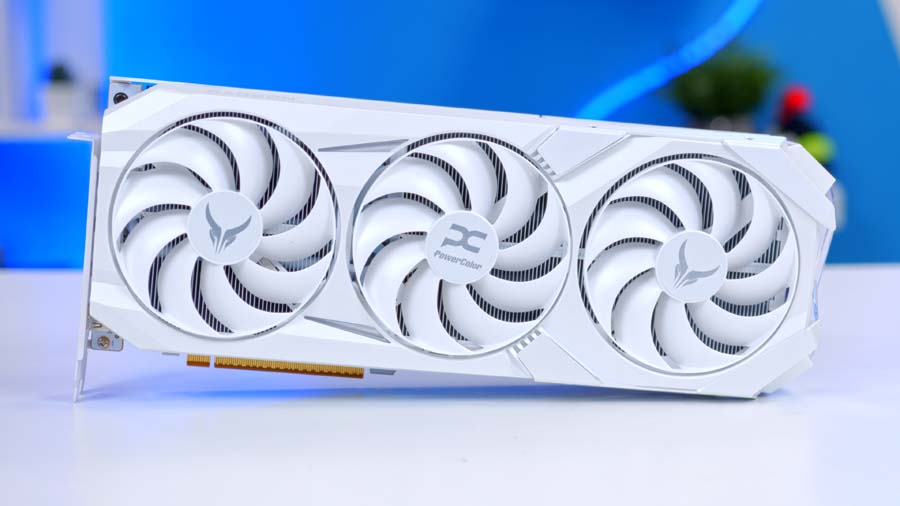
PowerColor Red Devil RX 9070 XT White
Skip to SectionAMD’s RDNA 4 flagship in PowerColor’s angular Red Devil design, finished in white, with 16GB of GDDR6 and FSR 4 support. Quick at high-refresh 1440p, with enough in reserve for 4K.
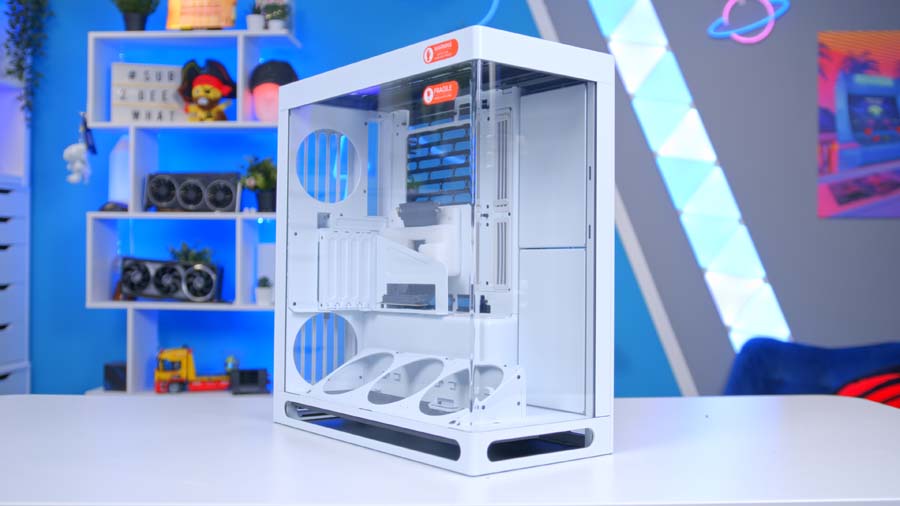
HAVN HS 360 VGPU White
Skip to SectionHAVN’s smaller, lighter follow-up to the HS 420, built around a vertical GPU with directed airflow, panoramic glass and back-connect motherboard support.

Corsair RM850e White
Skip to SectionA fully modular, all-white ATX 3.1 power supply with Cybenetics Gold efficiency and plenty of headroom for a 9850X3D and RX 9070 XT.
AMD Ryzen 7 9850X3D
Looking for the fastest gaming CPU you can drop into an AM5 board without paying for a 12 or 16-core Ryzen 9? This is it. The 9850X3D keeps the 9800X3D’s eight cores, sixteen threads and 96MB of L3 cache, then pushes the boost clock up to 5.6GHz, 400MHz higher than before.
From Our Full Review
☆☆☆☆☆
4.0/5

Pros and Cons
Pros
- Strong 1% lows
- 2nd Gen 3D V-cache
- Strong architecture
Cons
- Weak synthetic benchmarks
- High power draw
- Weaker thermal efficiency
Bottom Line
So, the TLDR is that the 9850X3D is, as expected, faster than the 9800X3D, but not by much. Ranging on average 3-5% faster, the 9850X3D does offer stronger performance, but in far less dominating fashion than expected. The problem? The CPU it refreshed is sort of, well, just as good?
Read The Full ReviewAll that cache is the secret to X3D’s success in games. Keeping more data right next to the cores means less time waiting on system memory, and the payoff is biggest in high-refresh gaming, where the CPU has the most say over your frame rate.
CPU Comparison
AMD Ryzen X3D Desktop CPU Comparison
Hover rows for highlight. Drag :: to reorder columns, or tap/click a header title to sort.
| ⠿ CPU | ⠿ Cores | ⠿ Threads | ⠿ Base Clock | ⠿ Max Boost | ⠿ TDP | ⠿ Total Cache | Where to Buy |
|---|---|---|---|---|---|---|---|
AMD Ryzen 9 9950X3D Zen 5 flagship X3D desktop CPU |
16 | 32 | 4.3 GHz | 5.7 GHz | 170W | 144MB | |
|
AMD Ryzen 9 9900X3D 12-core Zen 5 X3D for mixed gaming and production |
12 | 24 | 4.4 GHz | 5.5 GHz | 120W | 140MB | |
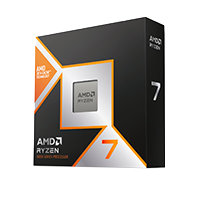
AMD Ryzen 7 9850X3D Newest Ryzen 7 X3D in the lineup |
8 | 16 | 4.7 GHz | 5.6 GHz | 120W | 104MB | |
|
AMD Ryzen 7 9800X3D High-FPS Zen 5 gaming CPU |
8 | 16 | 4.7 GHz | 5.2 GHz | 120W | 104MB | |
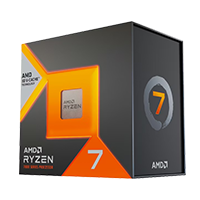
AMD Ryzen 7 7800X3D Mainstream Zen 4 gaming favourite |
8 | 16 | 4.2 GHz | 5.0 GHz | 120W | 104MB |
In our full review, the 9850X3D finished around 3-5% ahead of the 9800X3D on average, while drawing noticeably more power to get there. Not a huge jump, then. If you already own a 9800X3D, keep it. Buying fresh? It’s the one we’d pick, and the table above shows how it lines up against the rest of AMD’s X3D range.
Lian Li HydroShift II LCD-S 360TL White
For cooling, we’re using Lian Li’s HydroShift II LCD-S 360TL, a 360mm AIO with a screen where you’d normally find a logo. The 3.4-inch square IPS display attaches to the pump magnetically, and through L-Connect 3 it can show temperatures and clock speeds, or a custom image or GIF if you’d prefer something more personal.
Is 360mm more than a 120W chip needs? Sure… but the upside is that the fans rarely have to spin up, so the system stays nice and quiet under load. The three UNI FAN TL FLEX fans come pre-installed on the radiator and slot together to share one cable run. With this much glass on show, that tidiness counts.
Want to save some money here? A good dual-tower air cooler will handle the 9850X3D just fine, and the HS 360 VGPU takes coolers up to 185mm tall, so there’s no shortage of options.
ASUS ROG STRIX X870-A GAMING WIFI
The ROG STRIX X870-A GAMING WIFI is about as good a match for this case as you’ll find. Its white PCB and heatsinks look fantastic through the panoramic glass, and the spec sheet backs it up: a 16+2+2 phase VRM, four M.2 slots (two PCIe 5.0, two PCIe 4.0), Wi-Fi 7, Intel 2.5GbE and a pair of USB4 ports on the rear I/O.
ASUS’s Q-Release features make it a breeze to build with, from the button that frees the graphics card to the tool-free M.2 latches. One tip if you’re planning something similar: put your main SSD in the top M.2 slot. The second Gen5 slot shares lanes with the main x16 slot, so filling it drops the graphics card to x8.
Motherboard Specifications
- Model ASUS ROG STRIX X870-A GAMING WIFI
- Chipset / Socket AMD X870 / AM5
- Form Factor ATX (305mm x 244mm)
- CPU Support AMD Ryzen 9000 / 8000 / 7000 Series (AM5)
- Memory Support 4 x DDR5 DIMM, up to 256GB, up to DDR5-8000+ (OC)
- VRM Design 16+2+2 phase VRM, dual 8-pin CPU power
- Reverse Connect No, standard front-connect layout
- Graphics Card Compatibility 1 x PCIe 5.0 x16 slot (PCIe Slot Q-Release)
- Expansion Card Compatibility 1 x PCIe 4.0 x16 (x4 mode, chipset)
- M.2 Compatibility 4 x M.2: 2 x PCIe 5.0 x4, 2 x PCIe 4.0 x4 (M.2 Q-Release / Q-Latch)
- SATA Storage 2 x SATA 6Gb/s ports
- Networking Wi-Fi 7 + Bluetooth 5.4 + Intel 2.5GbE LAN
- Rear I/O 2 x USB4 40Gbps (Type-C), 6 x USB 10Gbps (5 x Type-A, 1 x Type-C), 4 x USB 5Gbps Type-A, HDMI, DisplayPort, optical S/PDIF, BIOS FlashBack and Clear CMOS buttons
- Front I/O Headers 1 x USB-C 20Gbps header, 2 x USB 5Gbps headers, 2 x USB 2.0 headers
- Audio ROG SupremeFX 7.1 (Realtek ALC4080)
- Colour White PCB and heatsinks
Do you need X870E? For a single-GPU gaming build like ours, no. Every X870 board comes with USB4 and PCIe 5.0 graphics and storage as standard, and the extra lanes an X870E chipset adds only start to matter if you want to fill every slot.
TEAMGROUP T-Force Delta RGB DDR5 32GB White
TEAMGROUP’s T-Force Delta RGB kit gives us 32GB of DDR5 across two sticks, running at 6000MT/s with CL30 timings. That speed lets AM5’s memory controller run in sync with the RAM (1:1, for the spec fans), keeping latency down. X3D chips are less fussy about memory than most, too, thanks to all that extra cache.
The white heatspreaders and wide RGB lightbar blend straight into the rest of the build. As with any dual-channel kit, install the sticks in slots A2 and B2, then enable EXPO in the BIOS. Skip that step and the kit runs at its slower default speed.
Samsung 990 PRO 1TB
Samsung’s 990 PRO has been around for a while now, but it remains one of the quickest PCIe 4.0 drives you can buy, rated for up to 7,450MB/s reads and 6,900MB/s writes. In games, you’d struggle to tell it apart from a Gen5 drive.
Capacity is where we’d consider spending more. With big releases regularly topping 100GB, 1TB fills up fast, so if you’ve got a large library, the 2TB model or a second drive in one of the X870-A’s spare M.2 slots is well worth budgeting for.
PowerColor Red Devil RX 9070 XT White
Taking pride of place in that vertical mount is PowerColor’s Red Devil RX 9070 XT in white, and that angular, all-white shroud looks right at home next to the case and motherboard. Underneath, it’s AMD’s fastest RDNA 4 card, with 64 compute units and 16GB of GDDR6, and it shines at 1440p on a high-refresh monitor while still having the muscle for 4K in plenty of games. FSR 4 has also given AMD an upscaler that’s well worth switching on.
From Our Full Review
☆☆☆☆☆
4.4/5

Pros and Cons
Pros
- Competitive pricing vs 5070 Ti
- Exceptional performance at 4K
- Updates to FSR and FMF
Cons
- Ray tracing struggles without Frame Gen
- Frame Gen only available in select titles
Bottom Line
The AMD Radeon RX 9070 XT is a genuine must-have, delivering unexpectedly exceptional 4K and 1440p framerates while undercutting the RTX 5070 Ti by a whopping $150 at its $599 MSRP. Thanks to advances in FSR and Frame Generation, it now handles ray tracing far better than previous-gen AMD cards, though demanding titles like Alan Wake 2 still lean heavily on Frame Gen to stay smooth. The Gigabyte AORUS Elite variant pushes the price up a fair bit, but at its $599 MSRP this card is an absolute no-brainer for affordable, buttery-smooth 4K gaming.
Read The Full ReviewJay’s review found the RX 9070 XT beating the RTX 5070 Ti in most games despite costing less, and that value is a big part of why it keeps turning up in our builds. Ray tracing remains its weak spot, though, at least without frame generation helping out.
Alternative GPU Choice
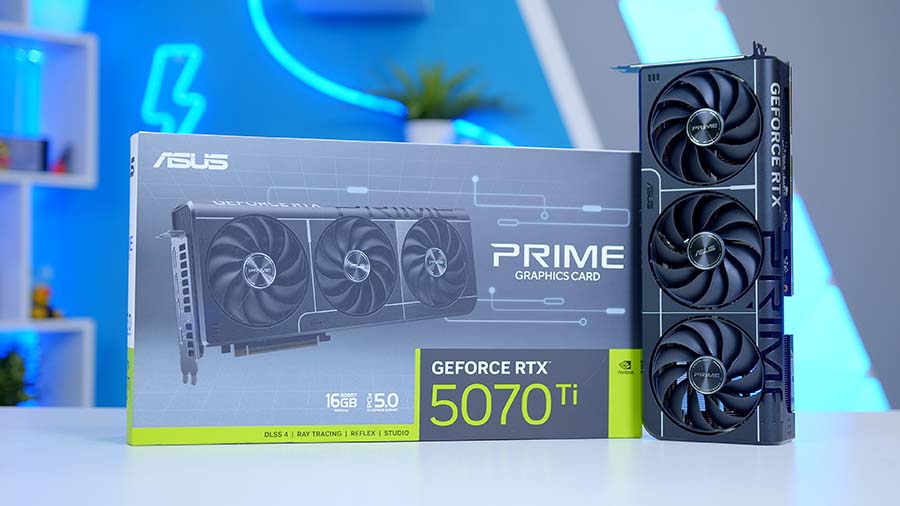
Asus GeForce RTX 5070 Ti Prime OC 16GB
If you’d rather go green than red, the RTX 5070 Ti is the closest swap for the PowerColor Red Devil RX 9070 XT. Rasterised performance lands in a similar place, so the real difference is the feature set: DLSS 4 with Multi Frame Generation, stronger ray tracing, and wider support across creative and AI apps. The RM850e’s native 12V-2×6 cable means it drops straight into this build, too.
The card links up to the motherboard through the HS 360’s included PCIe 5.0 riser, so mounting it vertically doesn’t cost any bandwidth. At 340mm long it fits comfortably within the HS 360’s 360mm limit, and power comes in through three 8-pin connectors, so there’s no 16-pin cable to worry about. Prefer to stick with NVIDIA? The RTX 5070 Ti above is the card we’d pick instead.
HAVN HS 360 VGPU White
Now for the star of the show. The HAVN HS 360 VGPU is a smaller, lighter version of the HS 420, around 19% smaller and almost 30% lighter, and it’s designed from the ground up around a vertical graphics card. The GPU faces the glass, with three bottom intake fans feeding it cool air from below.
From Our Full Review
☆☆☆☆☆
4.4/5

Pros and Cons
Pros
- Aesthetic
- Component compatibility
- Innovative design
Cons
- Expensive
- No pre-installed fans
- No reverse connect motherboards
Bottom Line
The HS 420 is a very impressive first case from HAVN and an excellent choice for enthusiasts building a stylish system, with a clean look, plenty of customisation and great accessibility. There are a few teething issues, including no reverse-connect motherboard support, no pre-installed fans and a high price.
Read The Full ReviewHere’s the clever part. A transparent panel beneath the intake fans steers air up towards the card, while a second, magnetic panel sits flush across the top of it to stop that air escaping. HAVN claims the setup drops GPU temperatures by up to 4°C during gaming.
Case Specifications
- Model HAVN HS 360 VGPU
- Form Factor Mid-tower, vertical GPU layout
- Motherboard Support Mini-ITX, Micro-ATX, ATX, back-connect ATX
- Case Dimensions (L x W x H) 490.9mm x 242.1mm x 520.9mm
- Front IO 1 x USB 3.2 Gen 2 Type-C, 2 x USB 3.2 Gen 1 Type-A, 1 x Audio combo
- PCI-E Slots 7 x Expansion, vertical GPU mount (PCIe 5.0 riser included)
- Colour White (also available in Black)
-
Max Clearance
GPU length: Up to 360mmCPU cooler: Up to 185mmPSU length: Up to 220mm
- Drive Support Up to 5 x 3.5-inch or 10 x 2.5-inch, 4 drive trays included
-
Fan Support
Top: 3 x 120mmSide: 3 x 120mmBottom: 3 x 120mmRear: 2 x 120mm
-
Radiator Support
Top: Up to 420mmSide: Up to 420mmBottom: Up to 420mm
- Pre-Installed Fans None (8-port PWM fan hub included)
When we reviewed the HS 420 back in 2024, one of our gripes was the lack of back-connect motherboard support. The HS 360 fixes that, taking back-connect ATX boards alongside standard ATX, micro-ATX and Mini-ITX. There’s room for up to eleven 120mm fans, radiators up to 420mm on the top, side and bottom, and graphics cards up to 360mm long. It doesn’t ship with any fans, so we’ve filled it with white Lian Li UNI FAN SL INF FLEX 120s, infinity mirror fans that interlock into tidy single-cable rows and run wirelessly through L-Connect 3.
Corsair RM850e White
Powering it all is Corsair’s RM850e, a fully modular ATX 3.1 unit with Cybenetics Gold efficiency. This is the white version, with white cables and connectors, so nothing breaks up the colour scheme. Even with the Red Devil’s factory overclock pushing it beyond AMD’s 304W reference rating, and the 9850X3D at 120W, 850W leaves comfortable headroom under a gaming load, fans and AIO pump included.
Wiring is straightforward. The 24-pin powers the motherboard, an 8-pin EPS cable feeds the CPU, and the graphics card takes all three of the RM850e’s PCIe 8-pin connectors, two from its dual 8-pin cable and one from the single cable. Make sure every plug on the card is filled. The RM850e’s 12V-2×6 cable goes unused here, but it’s handy to have if you ever switch to an NVIDIA card.
Gaming Performance
So, how does it all perform? We tested the system in six of the latest games at either 1440p or 4K, using High presets with upscaling and frame generation switched off, so every result here is raw rasterised performance. Use the tabs to switch between titles.
Performance Snapshot
Multi-Game Average FPS
1440P · Average FPS
155.4FPS
1440P · Average FPS
86.4FPS
4K · Average FPS
61.6FPS
4K · Average FPS
62.9FPS
4K · Average FPS
151.4FPS
1440P · Average FPS
113.8FPS
At 1440p, Battlefield 6 leads the way at 155.4 FPS on average, with Marvel Rivals not far behind at 113.8 FPS, so a 144Hz or 165Hz monitor makes a great partner here. Call of Duty: Modern Warfare 4 is the heaviest of the 1440p results at 86.4 FPS. That’s still smooth for the campaign, though competitive players might want to knock a few settings down.
Step up to 4K and the RX 9070 XT holds its own. Forza Horizon 6 is the standout, averaging 151.4 FPS, which is a seriously impressive result at that resolution! The more demanding titles land just above 60 FPS, with Cyberpunk 2077 at 62.9 FPS and Control Resonant at 61.6 FPS. Both are perfectly playable as they are, and switching on FSR 4 would give you plenty of extra headroom for a high-refresh 4K screen.

![FI_[DM87] HAVN BF & RTX 5090 Build](https://geekawhat.com/wp-content/uploads/2026/01/FI_DM87-HAVN-BF-RTX-5090-Build-551x431.jpg)
![FI_[DM76] HAVN BF360 5090 Build](https://geekawhat.com/wp-content/uploads/2025/10/FI_DM76-HAVN-BF360-5090-Build-1-551x431.jpg)