

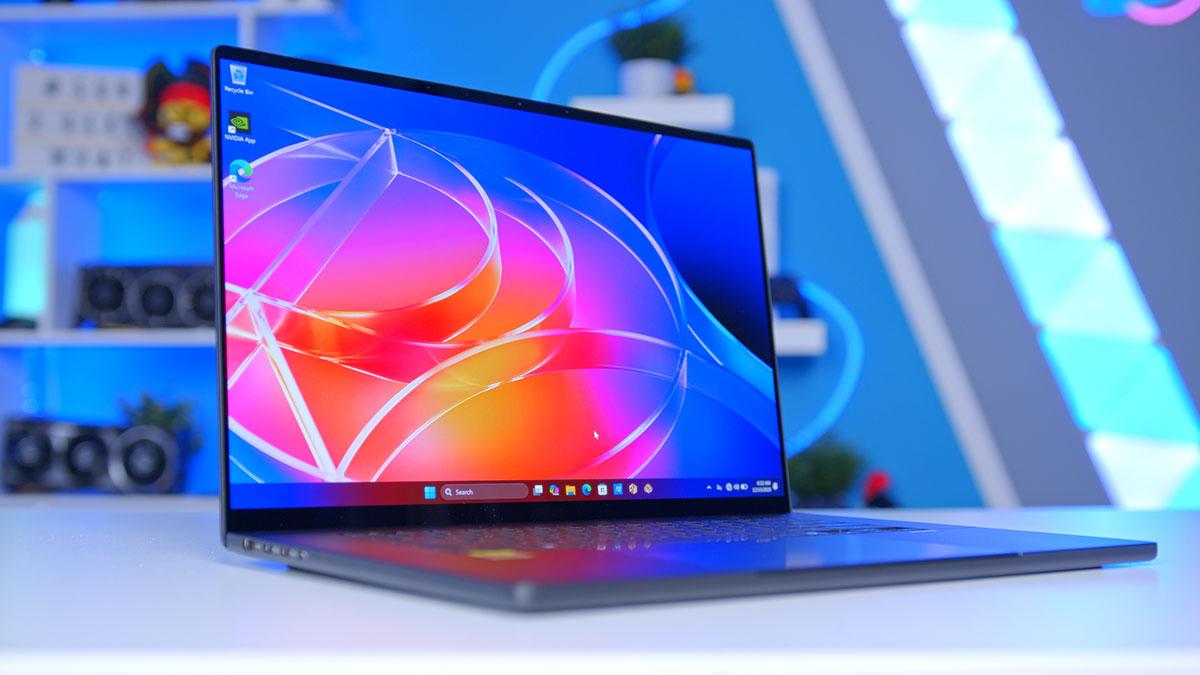
This one’s a pretty big deal, and I’m not just talking about the laptop. It’s the chip inside it. The ASUS ProArt P16 (H7607) is one of the very first laptops built around NVIDIA’s new RTX Spark platform, the company’s first system-on-chip for Windows PCs, with the CPU, GPU and memory controller all rolled into one package. NVIDIA and its laptop partners clearly see it as a shot at Apple’s grip on high-performance laptops, and on top of bags of shared memory, it promises gaming performance in the same ballpark as an RTX 5070 laptop.
For the P16 itself, it’s a complete change of direction. The last couple of generations paired an AMD Ryzen AI chip or Intel CPU with a discrete GeForce GPU. Not this time! ASUS is pitching the H7607 at AI developers and creators who want to run large models locally, and it’s calling it the world’s first PC purpose-built for personal agents. I’ve spent the best part of a week testing it against Apple’s MacBook Pro and a conventional RTX 5070 gaming laptop, so let’s find out who RTX Spark is really for, and whether it can change the game for Windows laptops.
Specifications
One chip is now doing the job two used to. The RTX Spark N1X pairs NVIDIA’s Arm-based Grace CPU with a Blackwell RTX GPU, and that GPU has exactly the same CUDA core count as a desktop GeForce RTX 5070. Now, before anyone gets carried away and starts expecting desktop RTX 5070 frame rates from a 16-inch laptop, don’t. Clocks and power limits in a chassis this thin are a whole different world. What it does tell you is which class NVIDIA’s shooting for.
Memory’s where things get interesting. There’s no VRAM here, at least not in the traditional sense. The CPU and GPU both pull from the same pool of LPDDR5X, hooked together with NVIDIA’s NVLink-C2C interconnect, and there are two capacities to choose from. Our review unit is the 64GB model with the 3K panel, but spring for the bigger tier and ASUS says you can run language models of up to 120 billion parameters, with a one-million-token context window, without touching the cloud. Most laptops can’t get anywhere near that, because the GPU’s stuck with whatever dedicated memory it shipped with.
Laptop Specifications
- Model ASUS ProArt P16 (H7607BA), 64GB / 1TB / 3K OLED
- Platform NVIDIA RTX Spark N1X Superchip
- CPU 20-core NVIDIA Grace (Arm)
- GPU NVIDIA Blackwell RTX, 6,144 CUDA cores
- Memory 64GB LPDDR5X unified (on-board)
-
Storage
Drive: 1TB M.2 NVMe PCIe 4.0Slots: 2 x M.2 2280 PCIe 5.0 x4 (incl. used)
- Display 16″ 3K (2880 x 1800) ASUS Lumina OLED, 16:10, 120Hz, 1,100 nits HDR peak, 100% DCI-P3, DisplayHDR True Black 1000, touch with stylus support
- Ports 3 x USB4 Type-C (40Gbps, display / PD), 1 x USB 3.2 Gen 2 Type-A, 1 x HDMI 2.1 FRL, 1 x SD Express 7.0 card reader, 1 x 3.5mm combo audio jack
- Wireless Wi-Fi 7 (tri-band, 2×2), Bluetooth 5.4
- Battery 99.9Wh, 4-cell Li-ion
- Webcam FHD with IR (Windows Hello)
- Audio Six speakers with Dolby Atmos, 3-mic array
- Keyboard & Touchpad Backlit chiclet, 1.7mm travel, haptic touchpad
- Dimensions (W x D x H) 354.1mm x 243.0mm x 12.9 to 15.9mm
- Weight 1.77kg
- Colour Nano Black, Neo White
Storage is more flexible than I expected for something this slim, too. ASUS’s M.2 slot count includes the one the boot drive’s already sat in, so there’s a spare PCIe 5.0 slot ready for a second SSD. AI models and 8K project folders chew through space like nobody’s business, so I’m glad it’s there.
Ports-wise, you’re well looked after. The USB4 ports all handle display output and charging, there’s a full-size USB-A for your older bits and bobs, HDMI for an external monitor and, my favourite, an SD Express card reader! Windows 11 Pro or Home comes preinstalled depending on the config, along with ASUS’s own ProArt Creator Hub, StoryCube and MuseTree apps.
Design
This is the thinnest 16-inch ProArt ASUS has ever made, and its new integrated chassis is 14% thinner and 9% lighter than the last generation. That puts a 16-inch creator laptop firmly in ultrabook territory, and lugging it between home, office and client, you feel the difference.
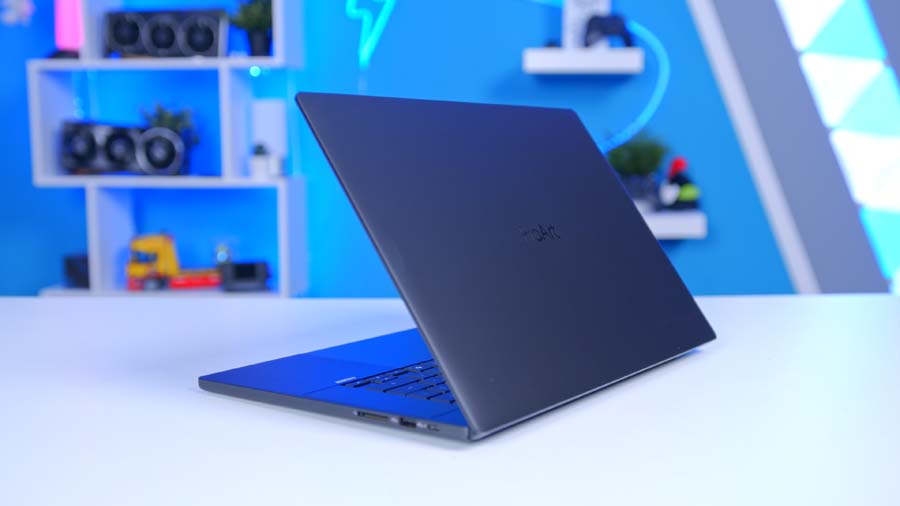
First impressions? Amazing. It’s got a unibody-style design that gets impressively close to what you’ll find on the latest MacBook, and it feels solid and premium in the hand, with nothing creaky or cheap about it. Is it quite MacBook Pro level? Not yet. Apple’s had years to perfect its aluminium unibody, and there are a couple of rough edges here I’ll come back to. But as a first stab at an RTX Spark machine, ASUS has nailed the fundamentals, and with refinement over the next generation, it’ll get a lot closer.
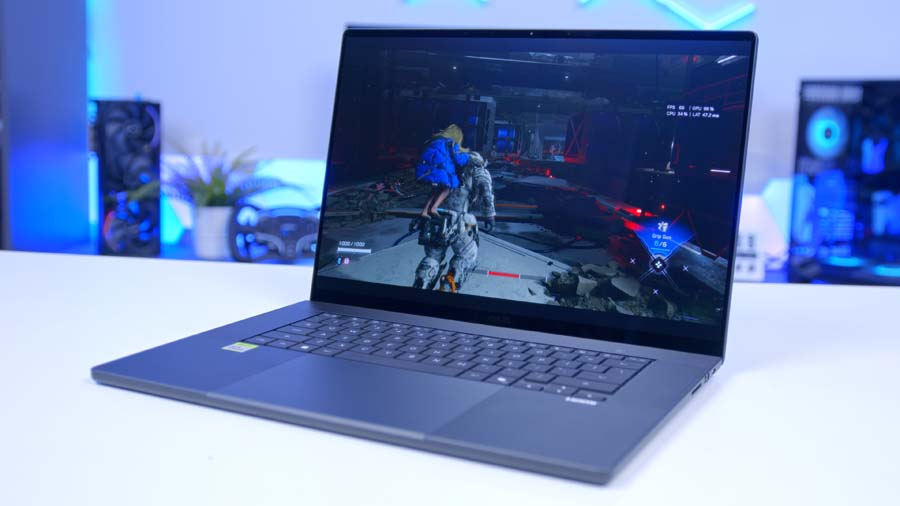
You’ve got two finishes to pick from, Nano Black and Neo White. The black one gets an AFM coating to fend off fingerprints, oils and light scratches (the eternal curse of dark laptops), while the white is sandblasted into a silver-white finish. Both get a centred ProArt logo on the lid and polished, satin-finish edges. It’s about as low-key as a premium laptop gets, and I mean that as a compliment.
Cooling’s had plenty of thought put into it. ASUS uses two fans with what it calls an inward airflow design, pulling cool air in through the keyboard as well as the regular intakes, and there’s a dust filter on those intakes to stop performance tailing off as the months go by. The hinge doubles as an exhaust too, which ASUS calls a stealth hinge, so hot air gets pushed away from the screen and not up into it. Oh, and under lighter loads, its 0dB Ambient Cooling mode switches the fans off completely. Silence while colour grading? Yes please.
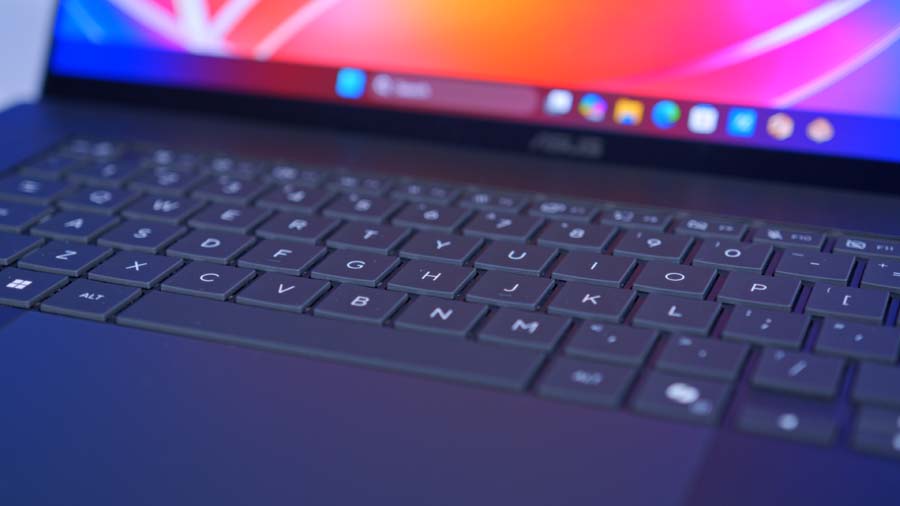
Inside, there’s a backlit chiclet keyboard and ASUS’s HapticPad, a touchpad that uses haptics in place of a physical click. And as if that wasn’t enough, the screen’s a touchscreen with stylus support, so you can sketch or retouch straight on the panel. ASUS has also put the chassis through MIL-STD 810H testing (temperature shock, altitude, humidity, vibration, drops, the works), which is reassuring for something designed to live in a backpack.
Rounding off the hardware, the speakers are tuned for Dolby Atmos with a smart amp behind them, and the webcam has IR for Windows Hello face login. All the bases covered, then, in a package that reads more premium ultrabook than mobile workstation.
What Is NVIDIA RTX Spark?
Okay, time for a slight tangent, because you can’t talk about this laptop without talking about RTX Spark. At its heart is NVIDIA’s N1X, an SoC, short for system on chip. The CPU, GPU and memory controller all live on one package, with a single pool of unified memory shared between the CPU and GPU. If that sounds familiar, it’s because Apple’s M-series chips work in much the same way.
The twist is who’s doing it this time. NVIDIA has made the graphics in gaming and creator laptops for about as long as most of us can remember, but the CPU and the platform around it have always come from Intel or AMD. Not anymore.
From DGX Spark to the Laptop Bag
If you’ve been following NVIDIA’s AI kit, some of this will ring a bell. Last year, it launched DGX Spark, a compact desktop box built around its GB10 Grace Blackwell chip, aimed at AI developers who wanted to prototype and fine-tune models without renting time in a data centre. It ran NVIDIA’s Linux-based DGX OS and lived on a desk. RTX Spark shares a lot of the same ingredients, and you can see the family resemblance. Grace CPU, Blackwell GPU, one large shared memory pool, only now it runs Windows and it’s small enough to take on the train.
Unified Memory: The Trade-Off
In a normal gaming laptop, the CPU has its own system RAM and the GPU has its own VRAM, linked over PCIe. Anything the GPU wants to work on gets copied into that VRAM first, and once it’s full… well, tough luck.
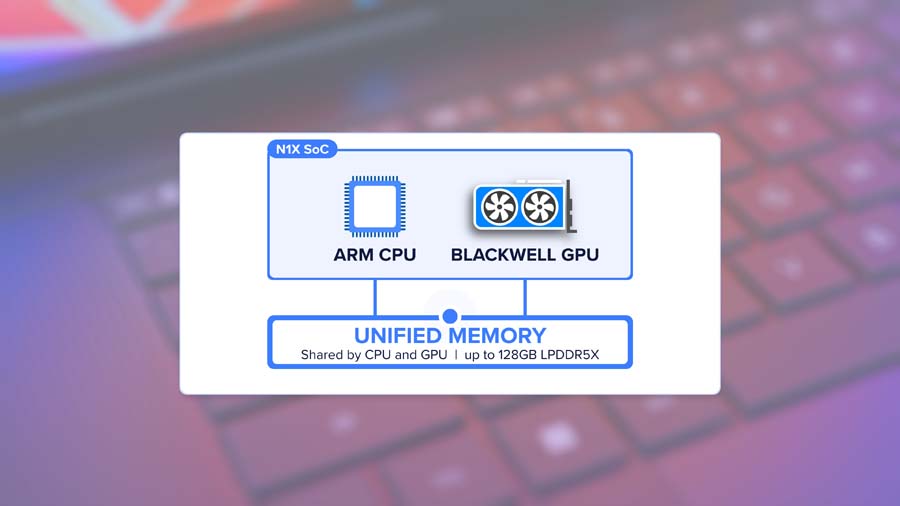
RTX Spark does away with that. There’s one pool of LPDDR5X, and the Grace CPU and Blackwell GPU are joined by NVLink-C2C, the same chip-to-chip link NVIDIA uses in its data-centre hardware. All of the data lives in one place, so there’s no copying back and forth between system RAM and VRAM, which helps performance and makes a real difference to battery life. SoCs are inherently more efficient that way.
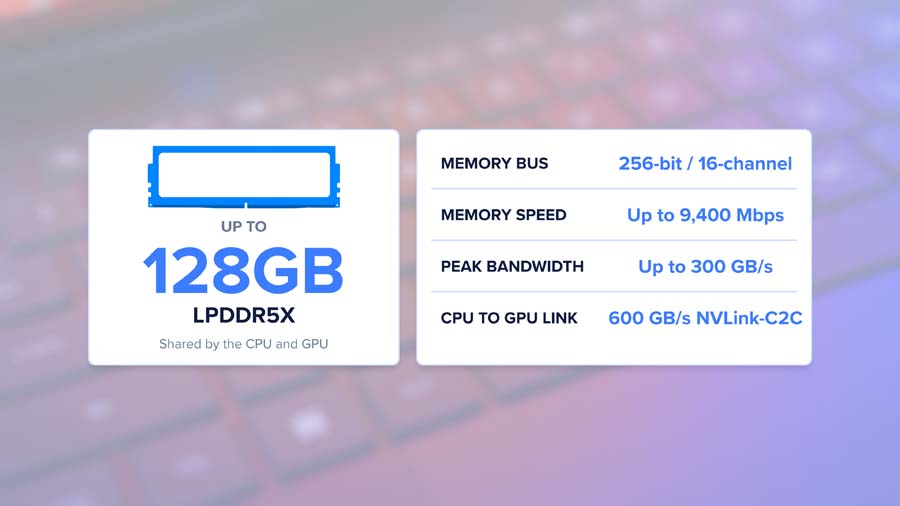
The trade-off? The Blackwell GPU is stuck with slower memory than the dedicated GDDR7 you’d find on a discrete laptop graphics card. NVIDIA also hasn’t published an official memory bandwidth figure, and with large language models, bandwidth decides how fast the words come out once the model’s loaded. Capacity gets the model in, bandwidth sets the pace.
The Grace CPU
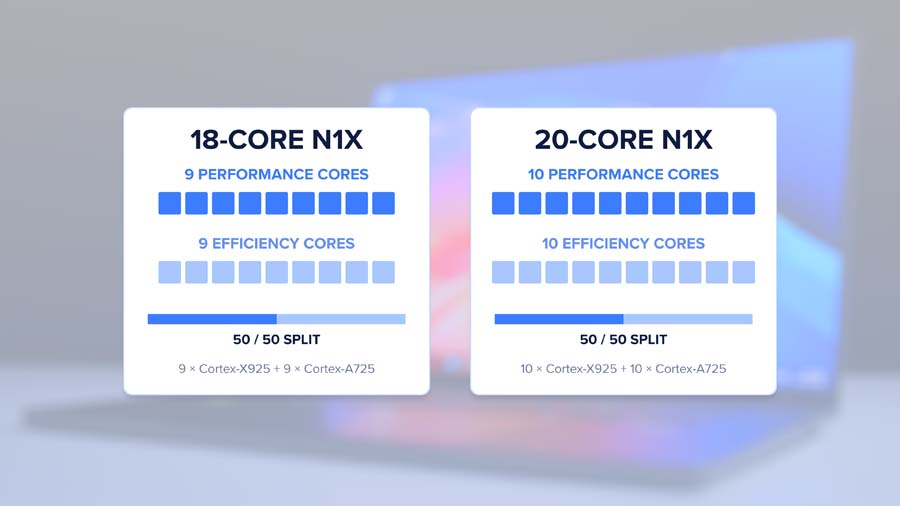
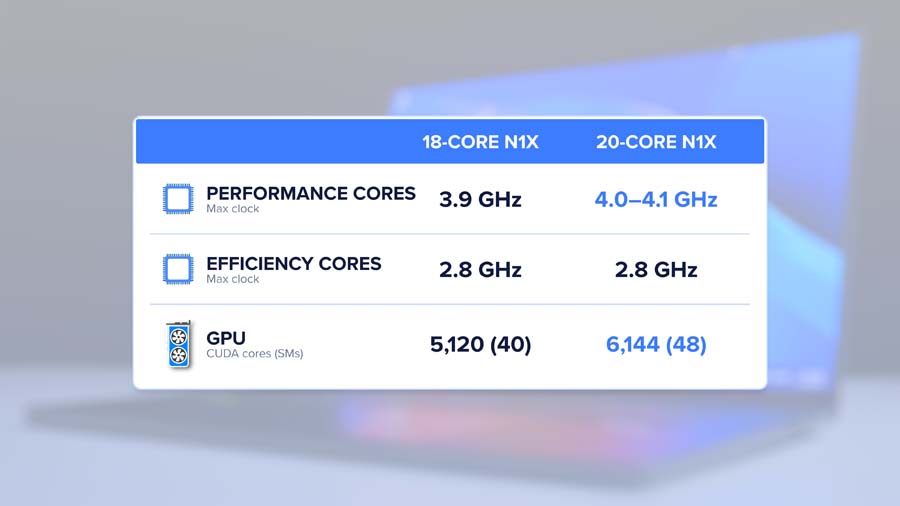
The CPU half is an Arm-based NVIDIA Grace design, built in collaboration with MediaTek, a company with years of Arm chip experience behind it. According to NVIDIA, the cores are split evenly between performance and efficiency cores, and the flagship 20-core chip in the P16 boosts up to 4.1GHz, a subtle step up from the 3.9GHz of the cut-down 18-core version.
The Blackwell RTX GPU
Onto the GPU, which comes from the same Blackwell generation as the GeForce RTX 50 series. So you get RT cores for ray tracing, DLSS, Frame Generation and Reflex, plus fifth-gen Tensor Cores with FP4 support, and that’s where NVIDIA’s eye-catching claim of up to 1 petaflop of AI performance comes from.
Quick explainer on FP4, since it gets thrown around a lot. It means storing and crunching numbers in just four bits. You trade some precision, but models shrink massively and the hardware can get through far more operations per second. Newer formats like NVIDIA’s NVFP4 are designed to keep the quality hit small, and ASUS’s MuseTree image generator uses NVFP4 to run Black Forest Labs’ FLUX models.
For creators, NVIDIA is also talking up the Blackwell video decoder, claiming the platform can handle 12K 4:2:2 footage and render 3D scenes north of 90GB with OptiX and DLSS. Big claims! And they line up neatly with what a large shared memory pool is built for.
Two Flavours, One Name
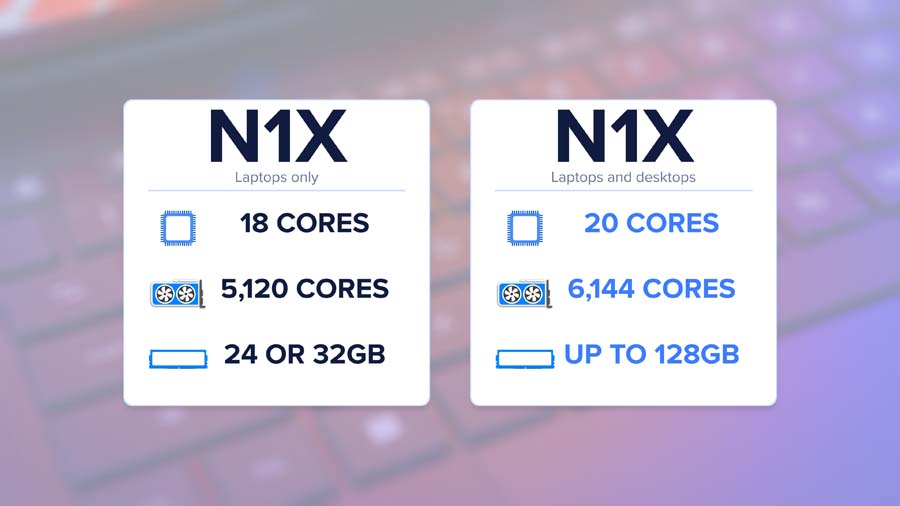
RTX Spark comes in two flavours. There’s an 18-core CPU with a GPU packing just over 5,000 CUDA cores, and the flagship 20-core CPU with a 6,144-core GPU, and that’s the one in the P16. And yes, NVIDIA calls both of them N1X. Two differing models, with the same, exact, name. No N1X Pro, Plus or Max, just N1X. I’ll be the first to admit that I downright hate this practice, but, so far, at least, retail listings have been clear on which CPU core count you’re getting. At least we get the bare minimum, hey.
The P16 isn’t flying solo, either. Microsoft has unveiled its Surface Laptop Ultra (I haven’t had one in for testing, but James himself (GeekaWhat) has seen production units in person and has said they look lovely), and MSI, HP, Lenovo and Dell all have RTX Spark machines of their own, with Acer and Gigabyte following later.
Arm vs x86, and Why Emulation Matters
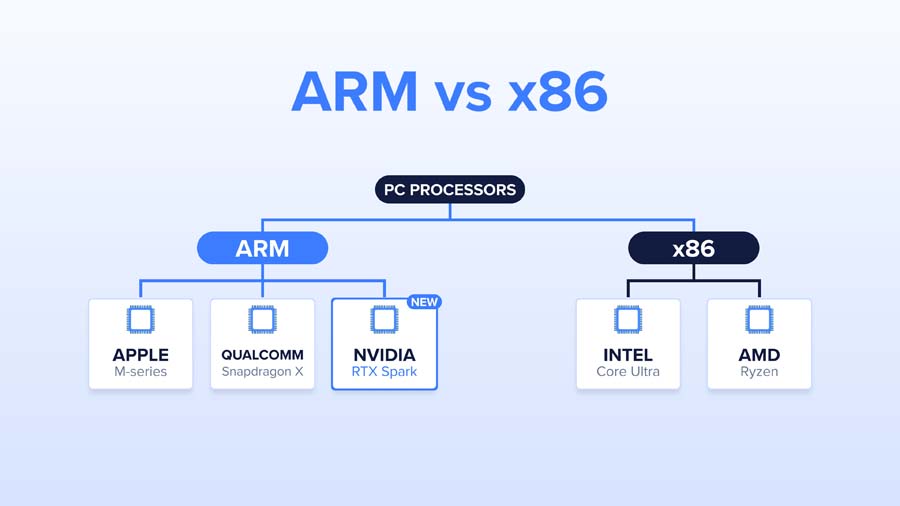
Under the hood, the biggest change is the instruction set. RTX Spark is an Arm chip, putting it in the same camp as Apple’s M-series and Qualcomm’s Snapdragon X, whereas every NVIDIA gaming or workstation laptop before it has paired an NVIDIA GPU with an x86 processor from Intel or AMD.
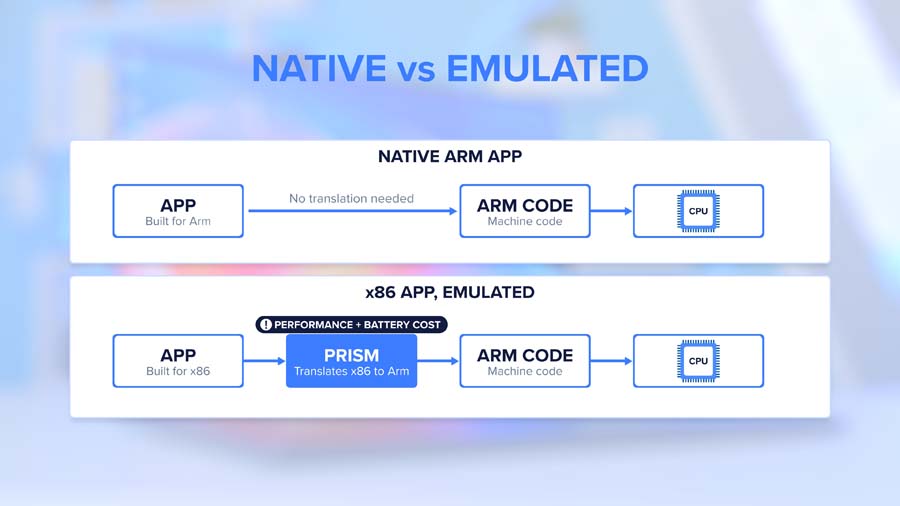
Why does that matter? Software is compiled for a particular instruction set. Apps rebuilt for Arm run natively, and anything that hasn’t been rebuilt goes through Prism, Microsoft’s translation layer, which converts x86 code into Arm64 code on the fly. Translation takes work, and that can chip away at performance and battery life. A handful of things refuse to translate at all, with anti-cheat software the best-known culprit, and that’s long been a sore point for gaming on Windows on Arm.
The good news is that NVIDIA says anti-cheat support is coming, naming Epic’s Easy Anti-Cheat and EA’s Javelin. It also says games including Fortnite, Alan Wake 2, Cyberpunk 2077, PUBG and next year’s Call of Duty are either optimised for emulation or getting native Arm versions, and studios including Riot Games, KRAFTON, NetEase and Remedy, plus Xbox, have signed on as partners. Creative software is covered from day one too, with Adobe’s Photoshop and Premiere alongside Blackmagic Design, Blender, CapCut, ComfyUI and OTOY, and Adobe claims its reworked apps run up to twice as fast.
The ace up NVIDIA’s sleeve is CUDA, which runs natively here. With so much of the AI world built on top of it, that alone will tempt plenty of developers who’ve given Windows on Arm a wide berth so far. NVIDIA’s involvement matters beyond CUDA, too. Windows on Arm has needed a heavyweight with real sway over developers and game studios, and NVIDIA fits that description better than anyone, so we’d expect the platform to mature faster from here.
Built for Agents
So where does ASUS’s world’s-first claim come from? Alongside the hardware, NVIDIA and Microsoft are building a native Windows platform for AI agents that run on the device itself, with new security features baked into the OS and an NVIDIA runtime called OpenShell. OpenShell lets you decide what an agent can and can’t access, sends queries to local models based on privacy rules you set, and masks personal info before anything heads off to a cloud model.

ASUS then layers its own Zenni Claw agent on top, along with validated ComfyUI workflows and Hermes Agent support that hooks into MuseTree. It’s an early look at where Windows is heading, and the P16 is ready for it.
Why Run AI Locally?
AI divides opinion, I know. It’s also everywhere, from the machine learning behind DLSS to the chatbots plenty of us lean on daily. NVIDIA is betting big on local AI with RTX Spark, and it’s the main reason these machines come with so much memory. It’s a bet we think is going to pay off, so let’s dig into why.
The Problem With Doing It All in the Cloud
Use ChatGPT, Codex or Claude today and nearly everything you type is sent to a data centre, processed there, and sent back. That eats into subscription allowances that aren’t cheap, and depending on your settings, your data may end up helping to train future models.

Meeting that demand means building ever-larger data centres around the world. Yet much of it comes from laptops and desktops with plenty of processing power of their own, more than enough to run many of these models locally. We’d argue that duplicated compute adds to the squeeze on memory supply, which has fed into rising prices for DDR5 and graphics cards.
Privacy, Cost and Control
Run a model on your own machine and your data stays on your machine. Full stop. If you’re working with unreleased client footage, a product under NDA, source code or confidential documents, you’re often not allowed to paste any of it into a cloud chatbot anyway. You also pick the model, the version and the settings, and nobody can quietly swap or retire it on you overnight.
Cost is the other half of it. Once you own the hardware, running a model costs electricity and not much else, and with the entire RTX Spark package drawing under 100W, that bill stays small. For video editors leaning on AI assistants alongside apps like DaVinci Resolve, that means help with the grunt work without per-use charges or sending footage off-site.

Why Memory Is the Bottleneck
Here’s the problem, and it’s the whole reason RTX Spark offers so much memory. To run a model, its weights need to sit in memory the GPU can get to. Rough maths: at 4-bit precision, every parameter takes about half a byte. So a 120-billion-parameter model, like OpenAI’s open-weight gpt-oss-120b, needs around 60GB just for the weights, before you leave any room for the context, the running memory of your conversation, which grows the longer you chat.
A typical gaming laptop’s GPU has only a small slice of that as dedicated VRAM, enough for models of around 7 to 8 billion parameters and not a lot more. Go bigger and the model spills into system RAM, and things slow to a crawl. A large unified memory pool gets rid of that ceiling altogether, and that’s the single biggest thing RTX Spark (and Apple’s M-series before it) brings to the table.
Local Models Are Closing the Gap
Local models have come a long way. The biggest cloud models still have the edge in raw capability and speed, but open models trail them by months now, not years, and for everyday tasks they’re more than up to the job. Microsoft is pushing things along with a hybrid intelligence feature in its RTX Spark updates for Windows, which picks between a local and a cloud model automatically based on the task. Plenty of people will end up running AI locally without ever thinking about it, and we reckon that’s no bad thing.
It won’t fix the memory crunch overnight, mind. If anything, demand for high-memory machines could tighten supply further in the short term. Longer term, though, moving the right workloads off the cloud and onto the hardware we already own is a sensible direction.
Meet the Rivals
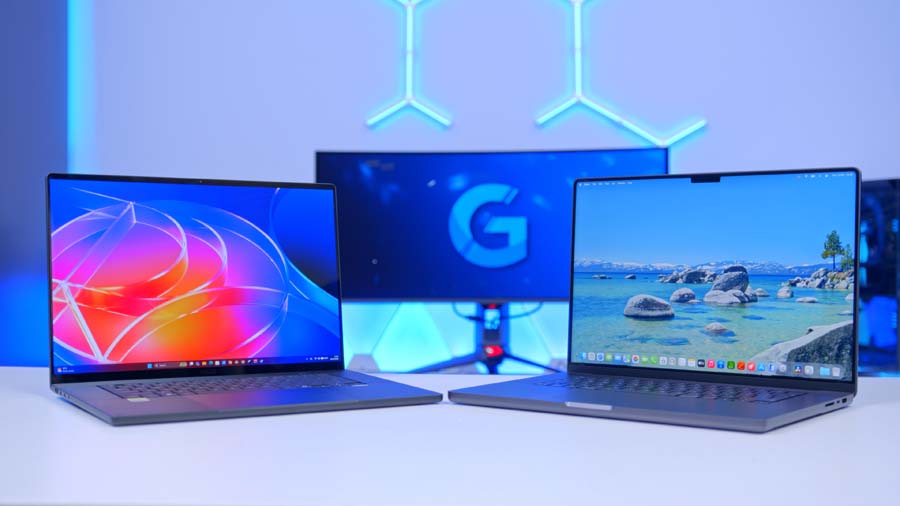
Before we get to the numbers, let’s meet the competition. To see where the P16 really sits, we tested it against two very different machines. The first is Apple’s 16-inch MacBook Pro with the M5 Pro chip, the benchmark every RTX Spark laptop will be judged against, since taking on the M-series is a big part of the platform’s pitch. The second is the GIGABYTE GAMING A16 with a Ryzen 7 260 and a GeForce RTX 5070 Laptop GPU, a conventional x86 Windows laptop with a discrete graphics card, and a handy reference for what changes when NVIDIA builds the entire platform.
Three Ways to Build a Laptop
All three are chasing similar goals, they go about it in completely different ways. The P16 and MacBook Pro both use Arm CPUs with integrated GPUs and a shared memory pool. The A16 does it old-school, with an x86 CPU, upgradeable RAM and a discrete GPU that gets its own fixed helping of fast GDDR7. Here’s how they line up on paper.
Memory
This is where they split hardest. The A16’s GPU is stuck with its own dedicated VRAM, so for local AI it’s limited to small models, no matter how much system RAM you cram in. The MacBook Pro’s M5 Pro lets the GPU tap the whole unified pool, and Apple publishes a bandwidth figure for it, but the memory options top out well short of the P16’s bigger tier. Want more on a Mac? You’ll need to step up to the pricier M5 Max. Our 64GB review unit sits level with the top M5 Pro configuration, and out of the three, only the P16’s 128GB tier can comfortably fit a 120-billion-parameter model.
The A16 does land one punch back. Its RAM sits in SO-DIMM slots, so you can upgrade it down the line. The P16 and MacBook Pro? Whatever you buy is what you’re stuck with.
Display, Build and Portability
Screens are where the P16 and MacBook Pro flex their premium credentials. ASUS goes OLED, while Apple, and Microsoft with its Surface Laptop Ultra, go mini-LED. Both run at 120Hz, and the MacBook gets brighter in SDR and HDR, but the P16’s OLED trades some of that brightness for richer colours and deeper blacks. The A16 runs a 165Hz IPS panel instead, quicker for gaming but nowhere near as rich. Gigabyte rates its sharper panel at 100% sRGB, which is fine for gaming and web work, but short of the wider DCI-P3 gamut you want when grading HDR.
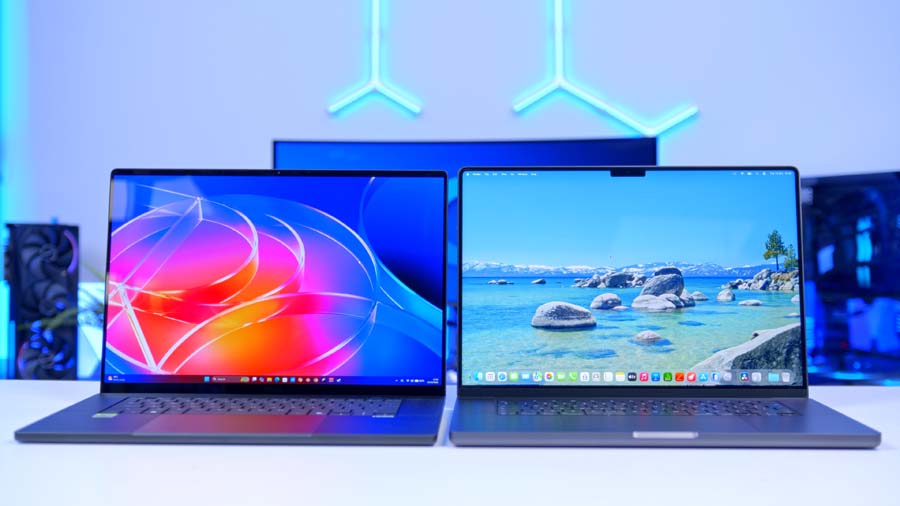
Build quality is the one area where the MacBook keeps its lead. The P16 gets impressively close, but Apple’s aluminium unibody is still the gold standard, and the A16’s plastic chassis sits a rung below both. For RTX Spark laptops to truly match the MacBook, ASUS and the other laptop makers, along with Microsoft on the software side, will need to keep closing that gap in fit, finish and polish.
Portability goes to the ASUS, and it’s the one I’d notice most day to day. At its slimmest point it’s the thinnest of the three, it’s lighter than the 16-inch MacBook Pro, and it makes the chunkier, plastic-bodied A16 look positively hefty.
Software and Ecosystem
Your current workflow makes this call for you. The A16 runs every Windows app and game going, no questions asked, because it’s good old x86. The MacBook Pro has macOS and Apple’s slick native creative apps, but no CUDA. The P16 sits in the middle, with Windows, native CUDA and a growing list of native Arm apps, plus emulation for anything that hasn’t made the jump yet.
Gaming is where the P16 pulls clear of the Mac. macOS still doesn’t support a huge chunk of the games sitting in your Steam library, and plenty of big releases never make it to Mac at all. The P16 gets you Windows and its gaming library, and as our testing shows, horsepower to rival the A16 into the bargain. The A16, meanwhile, lives in a much lower price bracket. It’s a gaming laptop first and foremost, and a capable one at that, but it’s not playing the same game when it comes to hefty local models or colour-critical work.
Performance
Gaming vs an RTX 5070 Laptop
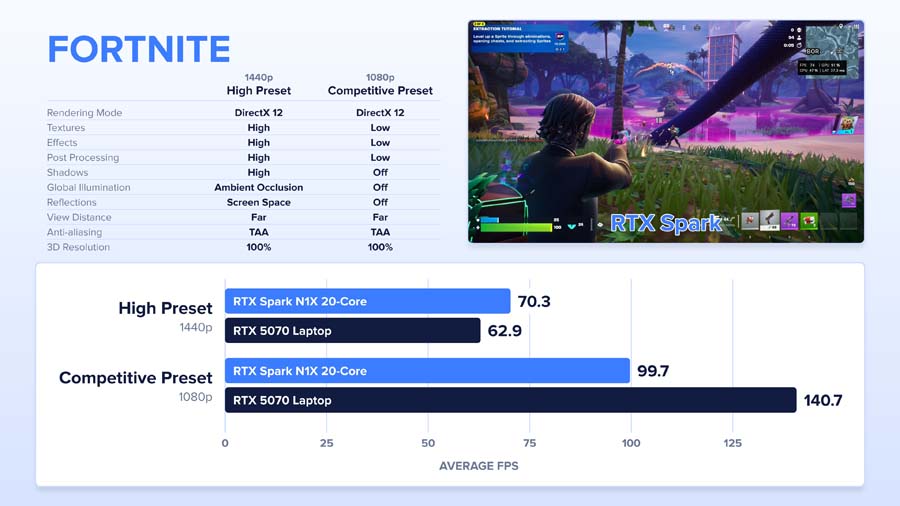
Fortnite is one of two games in our suite with a native Arm version, and at 1440p on the High preset, the P16 came out on top with a 70.3FPS average to the RTX 5070 laptop’s 62.9FPS. The picture changes at 1080p with competitive settings, where the 5070 laptop pulls well clear. Lower resolutions shift more of the work onto the CPU, and with everything sharing one package on an SoC, that’s where RTX Spark gives ground.
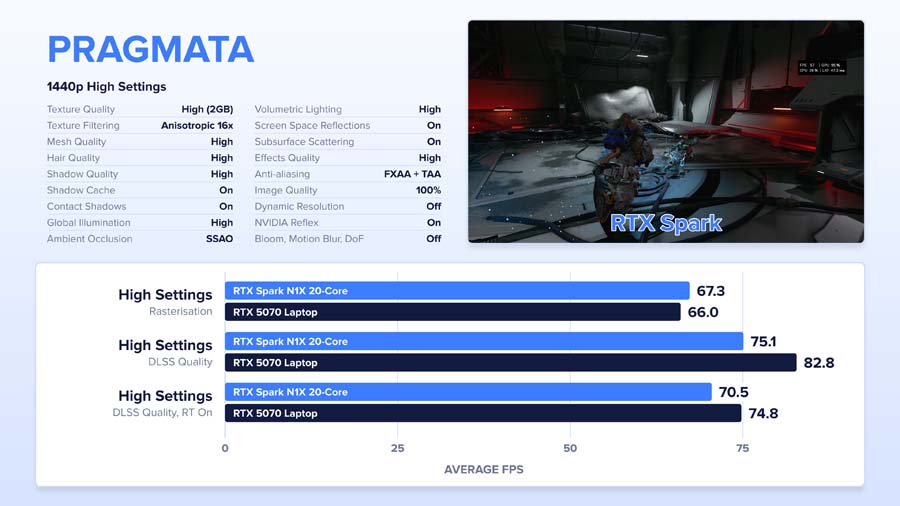
In Pragmata at 1440p High with no upscaling, the P16 nudged ahead by around 1.3FPS, landing at 67FPS. DLSS Quality swung things the other way, with the 5070 laptop moving roughly seven frames clear, though enabling ray tracing trimmed that lead by about 4FPS. It’s a win on paper for the dedicated GPU, but the P16 managed its numbers while running cooler, quieter and drawing less power.
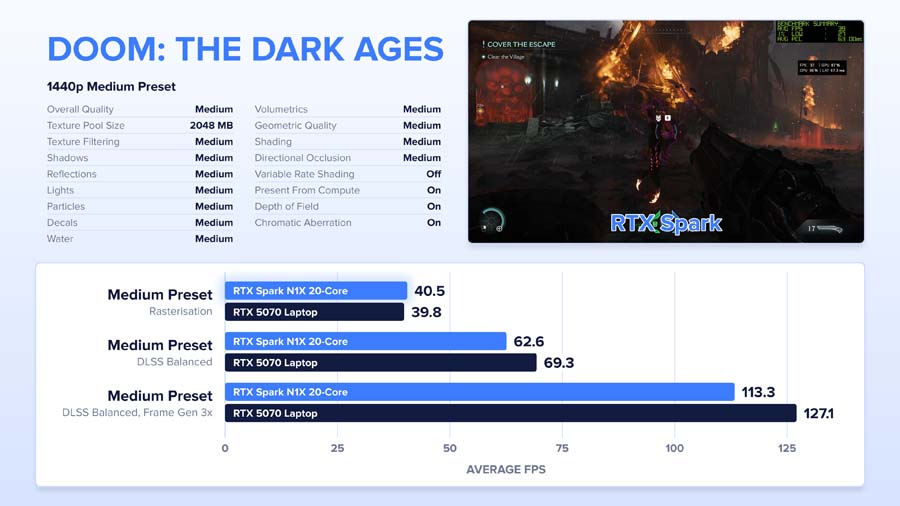
Doom: The Dark Ages at 1440p Medium couldn’t have been much closer, with the P16 on 40FPS and the 5070 laptop 0.7FPS behind. Add DLSS Balanced and the RTX 5070 laptop gained around seven frames, rising to roughly 14 frames with 3x Frame Generation.
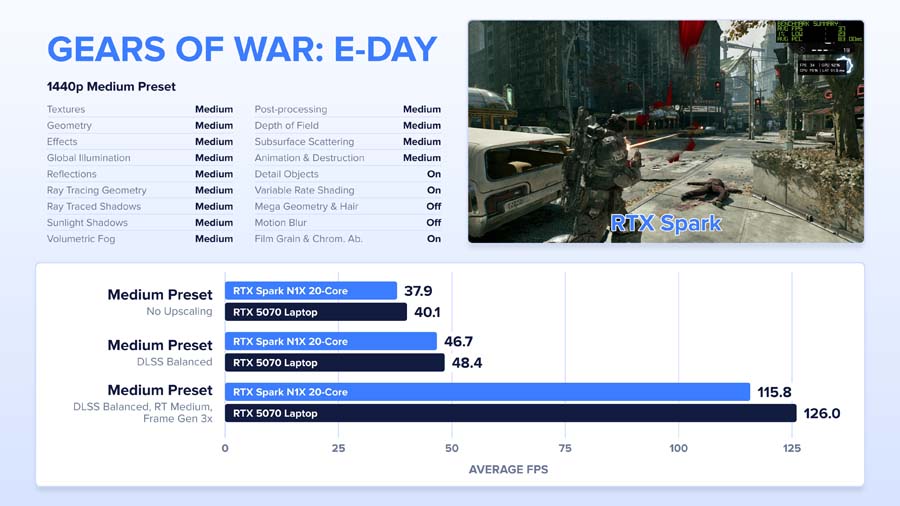
In Gears of War: E-Day, the P16 trailed by just over two frames at the Medium preset (37.9FPS vs 40.1FPS), with a near-identical gap once DLSS was on (46.7FPS vs 48.4FPS). Frame Generation at 3x stretched the raw difference but left the percentage untouched, as it multiplies whatever frames are already being rendered.
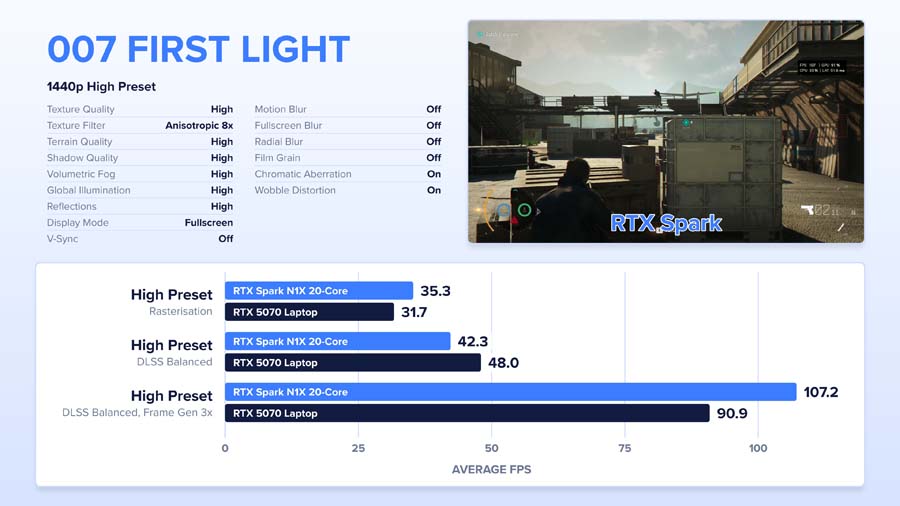
007 First Light threw up a surprise. The P16 led at 1440p High with no upscaling, slipped slightly behind with DLSS Balanced, then finished around 17FPS ahead with 3x Frame Generation.
Cyberpunk 2077 was the RTX 5070 laptop’s strongest result, with 56FPS to the P16’s 46FPS on the High preset and a wider lead with DLSS. With ray tracing set to Low and DLSS Balanced, the P16 edged back in front, before Frame Generation handed the 5070 laptop a lead of around 5FPS, from a far chunkier and noisier machine, it’s worth adding.
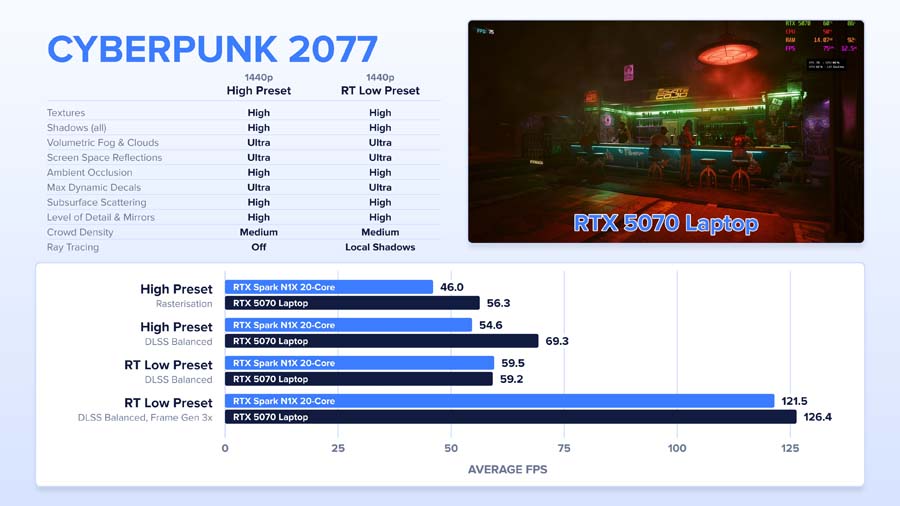
So, for the most part, it’s neck and neck, especially without upscaling. The RTX 5070 laptop tends to pull ahead once DLSS and Frame Generation come into play, but the P16 is keeping pace with a dedicated gaming laptop in a creator machine that’s far slimmer, quieter and lighter. That’s not something you could say about any Windows on Arm laptop before this one.
Native vs Emulated
Since much of our suite runs through Prism, we wanted to put a number on the cost of emulation. Marvel Rivals is available in x86 and Arm-native versions, so it’s ideal for the job. In the built-in benchmark at 1440p High, the native build averaged 48.7FPS against 41FPS emulated, and with DLSS Balanced and 3x Frame Generation, native climbed to 130FPS against 102FPS.
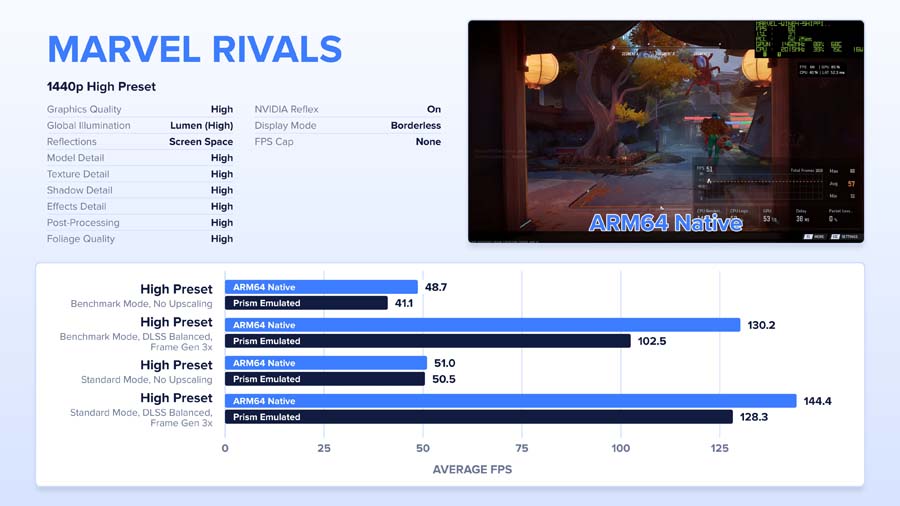
Our gameplay run painted a much closer picture, at 51FPS native and 50.5FPS emulated. With 3x Frame Generation, native pulled further ahead, at 144FPS to 128FPS. Across everything we tested, emulation behaved itself, with no crashes or strange quirks, which hasn’t always been a given on Windows on Arm.
DaVinci Resolve
Creative performance is just as big a part of RTX Spark’s pitch, so DaVinci Resolve was next, with the P16 up against the 16-inch MacBook Pro. We included the desktop purely for context. Its RTX 5080 alone can draw 300 to 400W, while the entire RTX Spark package runs under 100W, so we never expected it to be a fair fight.
Rendering a complete GeekaWhat video project (our recent best monitors video) out to H.264 took the P16 18 minutes and 36 seconds. The MacBook Pro was well ahead at 13 minutes and 17 seconds, and the desktop finished in 8 minutes and 14 seconds, a smaller margin over the laptops than we’d anticipated.
Breaking the project down told a different story. Exporting a single ProRes clip from our Blackmagic Cinema Camera A-cam to 4K H.264, the P16 took 13 minutes, beating the MacBook Pro’s 15 minutes and 39 seconds by 2 minutes and 39 seconds. Our overhead C-cam, which shoots MP4, went the same way, with the P16 on 7 minutes and 25 seconds and the MacBook Pro on 8 minutes and 33 seconds. Those are standout results, and they point away from our main camera footage as the cause of the slower full export. The Fusion graphics and raw B-roll look like the more likely bottleneck, suggesting there’s still optimisation to come from Blackmagic and NVIDIA.
Cinebench 2026
In Cinebench 2026, the P16 posted 464 points in single-thread and 6,561 in multi-thread, some way behind the MacBook Pro’s 740 and 9,630. Synthetic benchmarks only tell part of the story, though. The MacBook won comfortably here, yet lost to the P16 in both our ProRes and MP4 exports.
Battery Life
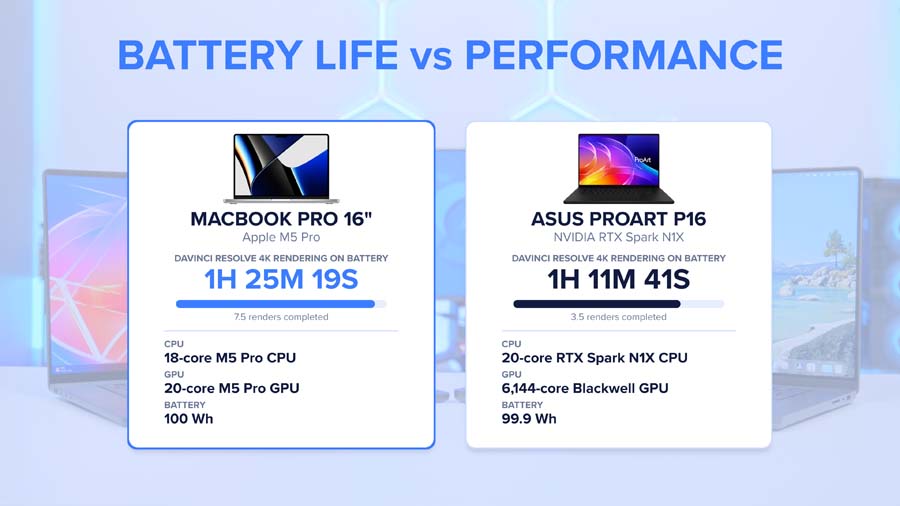
For battery testing, we looped that full Resolve project export on both machines. The 16-inch MacBook Pro lasted 1 hour and 25 minutes, and the P16 lasted 1 hour and 11 minutes. The MacBook takes this one, though not by a huge amount, and its quicker exports meant it got through more passes in that time. In everyday use, battery life on the P16 is solid, and a world away from a traditional gaming laptop.
Features We Like
ASUS Lumina OLED Touchscreen
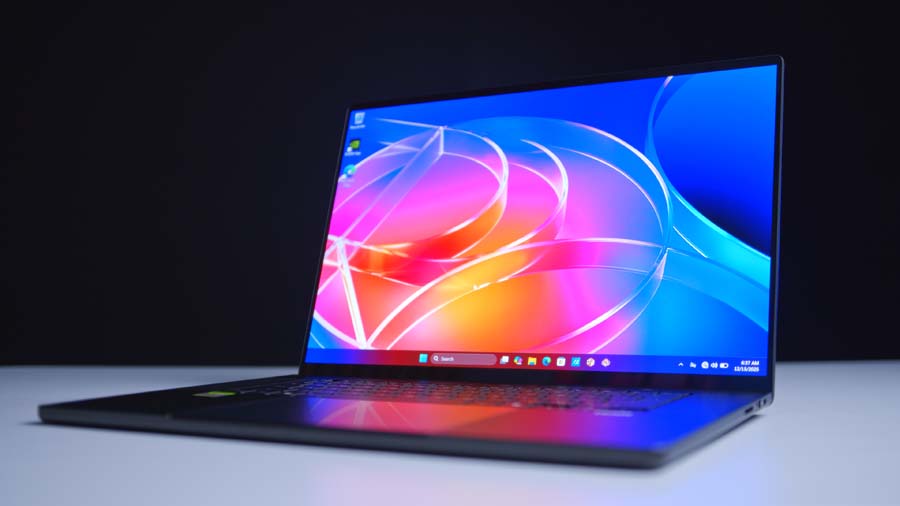
If you’re buying a ProArt, the screen had better be good, and ASUS hasn’t cut any corners here. Quite frankly, it’s superb. Inky OLED blacks, punchy colours and HDR highlights that leap off the panel. Unlike the mini-LED screens on the latest MacBooks and the Surface Laptop Ultra, it’s OLED, trading a little SDR brightness for better colours and deeper blacks, and for creative work, I’d make that trade every time. It’s Pantone Validated with full DCI-P3 coverage, so it’s ready for colour work out of the box, and the 3K resolution is pin-sharp at 16 inches.
Then there’s the touchscreen.. It’s every bit as responsive as I’d hoped, and with stylus support on top, sketching, retouching and scrubbing through timelines straight on the panel feels natural. Neither the MacBook Pro nor the A16 can do that, and it makes this one of the most versatile screens you’ll find on a creator laptop.
Gaming on the Go
The P16 brings that MacBook-style efficiency to Windows, along with gaming performance that trades blows with an RTX 5070 laptop, access to the Windows gaming library and native CUDA for creative work. For anyone who wants one machine for editing by day and gaming by night, on the road, it’s a combination you’ll only find on RTX Spark right now.
Features We Don’t Like
Hinge and Keyboard Need Refinement
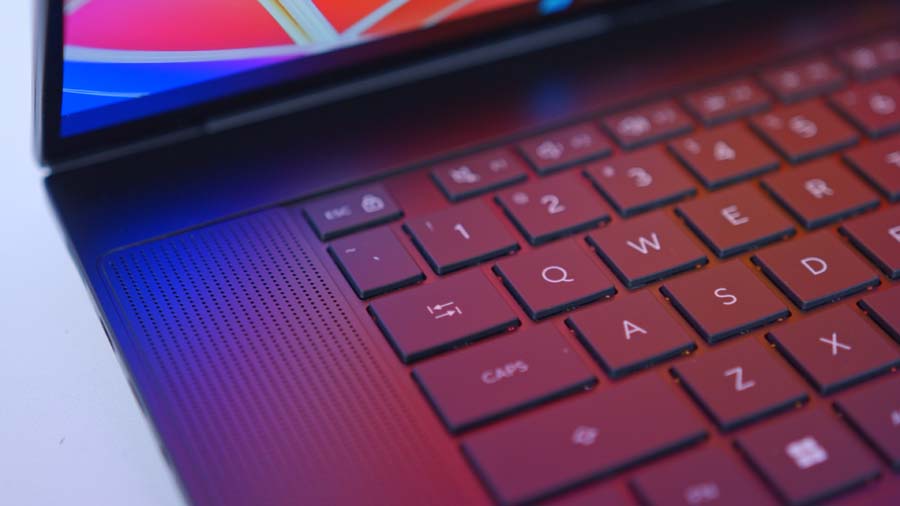
The P16 lags behind my MacBook in a couple of areas. The hinge is the main one. I’m still undecided on whether it’s firm enough for a touchscreen device, since prodding at the display needs a hinge that holds its ground. The keyboard is also going to take some getting used to after years on a MacBook. These are me being picky, and everything else about the build is very good, but on a laptop that’s squaring up to Apple, the little things matter.
It Isn’t Cheap
RTX Spark is a brand-new platform, and it’s priced like one. On top of that, memory is soldered to the board, so whatever you buy on day one, you’re living with for the life of the laptop. If there’s even a chance your models or projects will grow, the bigger tier is the one to go for, and it’ll cost you more. And if all you’re after is RTX 5070 laptop-class gaming, there are better-value options out there, like the Gigabyte A16. The P16’s price adds up when you’re using everything it offers, from the OLED touchscreen to the unified memory to the slim, quiet chassis.
Conclusion
Rounding things off, then. The ASUS ProArt P16 (H7607) and RTX Spark deliver the closest thing on the market right now to a MacBook-like experience in a Windows laptop. Apple has been so far ahead on performance per watt with its M3, M4 and now M5 chips that it’s great to see something else get this close. It beat the MacBook Pro in our ProRes and MP4 render tests, lost out on our full project export and in Cinebench, and looks promising for local AI in our early tinkering. There’s massive potential here.

Then there’s the added bonus of RTX 5070 laptop-class gaming, something macOS can’t match for game support, with emulation causing virtually no issues along the way. Does RTX Spark dethrone the MacBook Pro once and for all? No. And if RTX 5070 laptop gaming is all you want, there are better-value options. But as an all-round package, the P16 offers great performance now and brilliant potential for the future, wrapped in a slim machine with a gorgeous OLED touchscreen.
If you’re an AI developer wanting to run large models on-device, a creator whose projects keep bumping into the memory limits of a normal laptop GPU, or someone who wants a MacBook Pro-style machine that doubles up as a gaming laptop on the road, this is the one to buy, as long as you can stomach the cost that comes with a brand-new platform. RTX Spark is a big step forward, with a bit of work still to be done, and the P16 is the best showcase for it so far.

![FI_[SR190] HYTE X50 Ryzen 5 9600X & MSI RTX 5070 Ti](https://geekawhat.com/wp-content/uploads/2026/01/FI_SR190-HYTE-X50-Ryzen-5-9600X-MSI-RTX-5070-Ti-551x431.jpg)