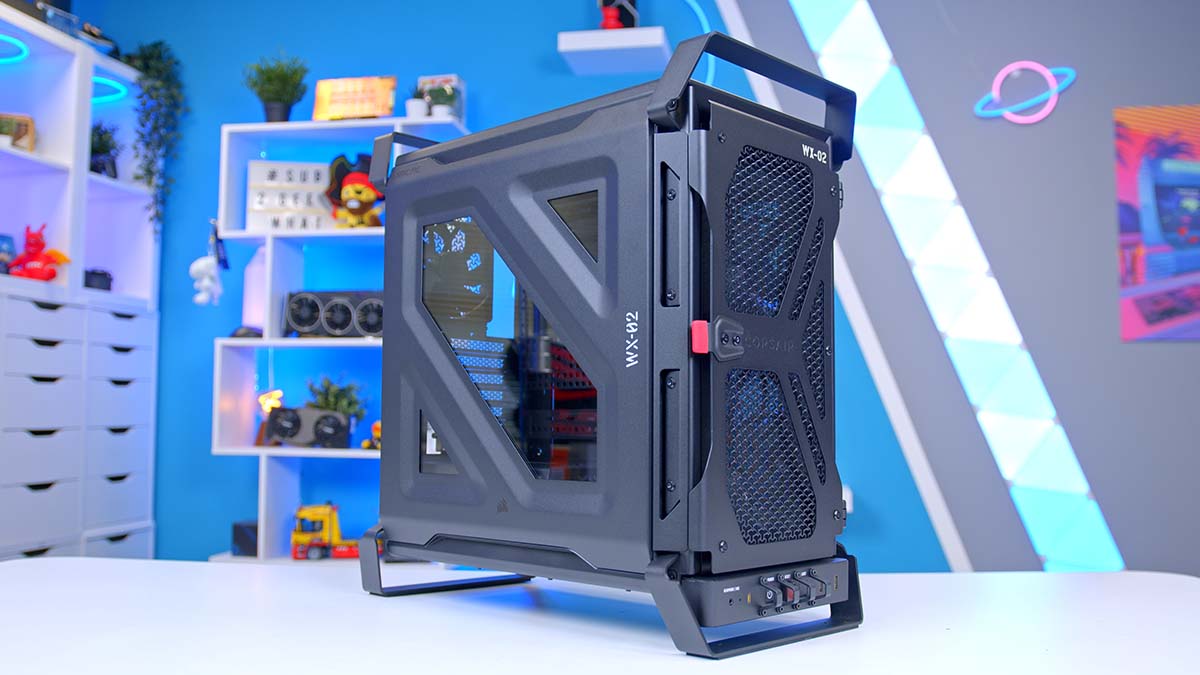
Now this is a case with a backstory. The Corsair WARTHOG is Corsair’s modern remake of the Vengeance C70, the military-themed chassis it launched back in 2012 that looked like a piece of military surplus, and one people have been asking Corsair to bring back for years. Chunky steel, built-in carry handles and a choice of Black or Olive Drab paint. Yep, it’s that kind of case.
Underneath all that steel sits something far more familiar. Corsair says the WARTHOG shares its base chassis with the FRAME 4000D, so you’re getting InfiniRail fan mounting, a RapidRoute 2.0 pegboard motherboard tray, reverse-connector motherboard support and a built-in GPU anti-sag arm, plus a few party tricks all of its own. We’re looking at the WARTHOG RS here, which turns up with a pair of 200mm RS200 intakes and an RS120 rear exhaust already fitted, while the standard WARTHOG ships with no fans at all. Let’s dig in.
Specifications
On paper, the WARTHOG is a big mid-tower with a lot of room to play with. It takes everything from Mini-ITX up to E-ATX, including the reverse-connector boards from ASUS (BTF), MSI (Project Zero) and GIGABYTE (Project Stealth), and there’s clearance for the chunkiest flagship graphics cards and tower coolers doing the rounds right now. The expansion slot bracket rotates for vertical GPU mounting too, although the PCIe riser for that is sold separately.
Case Specifications
- Model Corsair WARTHOG RS (Black)
- Form Factor Mid-Tower
- Motherboard Support Mini-ITX, Micro-ATX, ATX, E-ATX (incl. ASUS BTF / MSI Project Zero / GIGABYTE Project Stealth)
- Case Dimensions (L x W x H) 546mm x 284mm x 534mm
- Front IO 1 x USB 3.2 Gen 2×2 Type-C, 2 x USB 3.2 Gen 1 Type-A, 1 x Audio combo jack, Rear I/O light switch
- PCI-E Slots 7 x Horizontal, 3 x Vertical
- Colour Black, Olive Drab
-
Max Clearance
GPU length: Up to 405mm with the RS200 fans fitted (430mm without front fans)CPU cooler: Up to 190mmPSU length: Up to 200mm
- Drive Support 2 x 2.5-inch, 1 x 3.5-inch
-
Fan Support
Front: Up to 3 x 120mm, 2 x 140mm or 2 x 200mmTop: Up to 3 x 120mm or 2 x 140mmSide: Up to 3 x 120mm or 2 x 140mmRear: 1 x 120mm or 1 x 140mmPSU shroud: Up to 2 x 120mmBottom: 1 x 120mm
-
Radiator Support
Front: Up to 360mmTop: Up to 360mmSide: Up to 360mmRear: Up to 140mm
- Pre-Installed Fans 2 x RS200 200mm (front intake), 1 x RS120 120mm (rear exhaust)
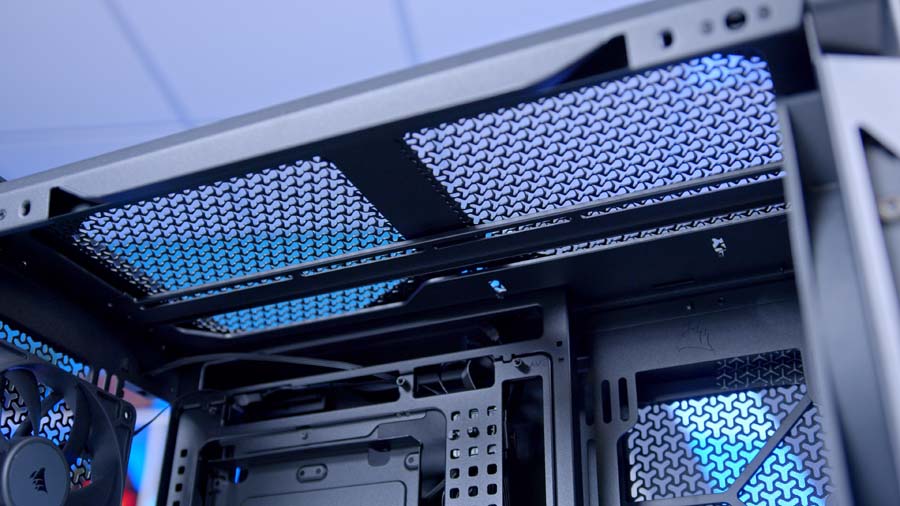
Cooling support is where the spec sheet gets a bit silly, in the best way. There are mounting points on the front, top, side, rear, PSU shroud and floor, and Corsair rates it for up to 13 x 120mm fans at once. Full-size triple-fan radiators fit in three spots, and you can run two of them together for a CPU and GPU loop, just not in the front and roof at the same time. Custom loop builders get pre-punched fill and drain ports in the top and bottom panels for Corsair’s Hydro X gear as well.
A few other bits worth knowing before you buy. The front Type-C port is the full 20Gbps variety, so fast external drives won’t be held back as long as your motherboard has the matching header, and alongside the power and reset buttons sits a switch for the rear I/O light (more on that later). Dust filters cover the front, side and bottom, the case was designed with Corsair’s side-connector SHIFT power supplies in mind, and the WARTHOG is backed by a two-year warranty.
From Vengeance C70 to WARTHOG
Right, quick history lesson. For those who weren’t building PCs at the time, the Vengeance C70 was a bit of a cult hit. It picked up a load of awards for its roomy interior and rugged, ammo-crate styling, and those top handles made it a firm favourite for anyone lugging their rig to LAN parties.
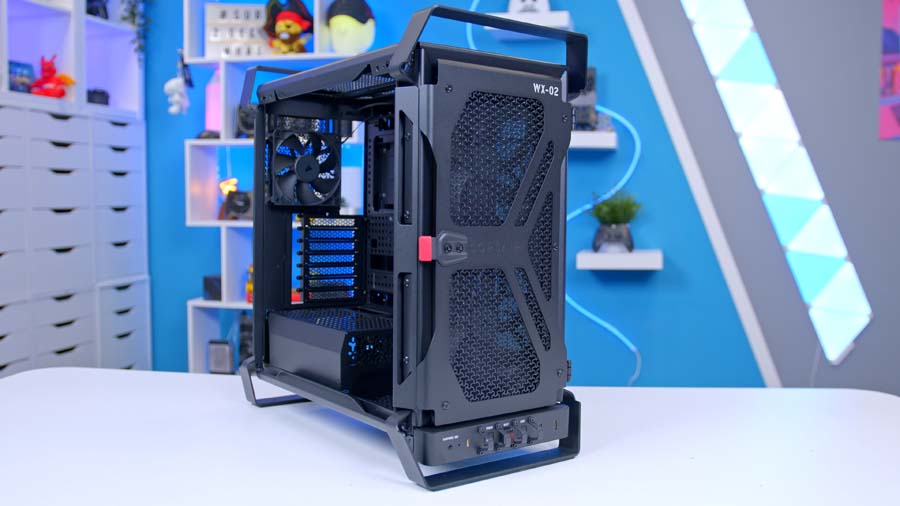
Corsair describes the WARTHOG as a remake built for modern systems, and the brief is clear once you look it over. The handles, the steel and the military theme have all made the jump, but the insides are pure 2026, with radiator and fan support the C70 could only dream of, reverse-connector motherboard support and a cable management system built around a pegboard. The name alone will ring a bell for anyone who’s spent time in Halo, too. Coincidence? I’ll let you decide.
There’s a fair bit of affection in the smaller details as well. Corsair’s own write-up openly admits LAN parties are largely a thing of the past, so the handles are there as a nod to the C70’s heritage as much as anything else. I’m glad they kept them. A case like this without handles would be like a Land Rover Defender without the boxy silhouette.
Design
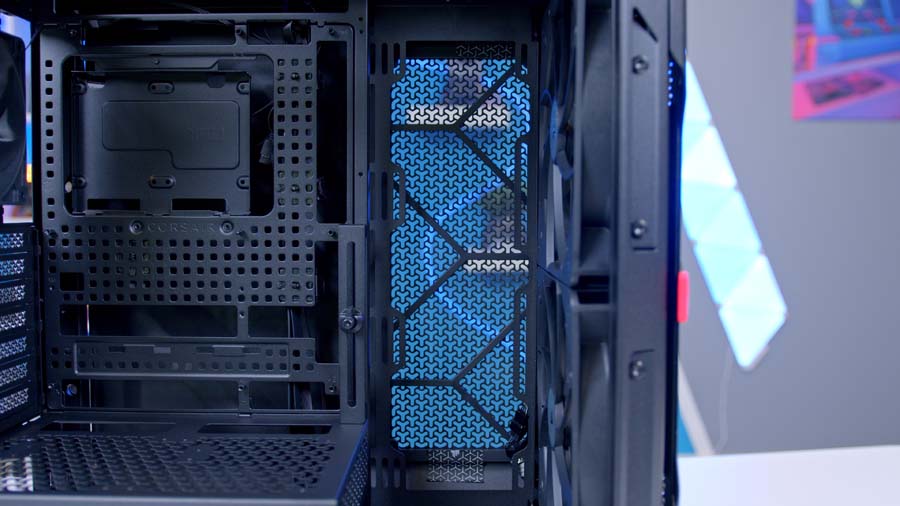
Let’s start with the outside, because that’s where the WARTHOG does most of its talking. The front and top panels are both steel with Corsair’s 3D-Y perforation pattern, the same design it debuted on the front of the FRAME 4000D, and Corsair claims the shape allows up to 12.7% more airflow than standard flat cut-outs. It looks rugged and purposeful, a world away from the usual generic mesh box, and the front swings open like a door on two hinges, held shut by magnets and opened with a pull tab, so you can reach the front filter and fans without taking anything apart.
The front I/O is my favourite part of the whole exterior. Corsair has gone full fighter jet here, with the power, reset and rear-light switches flanked by metal guards to stop accidental presses, a flip-up cover over the reset button, and a “Remove Before Build” tag as a cheeky homage to the “Remove Before Flight” tags you’ll see on aircraft. Is any of it necessary? No. Does it make me grin every time I look at it? Absolutely.
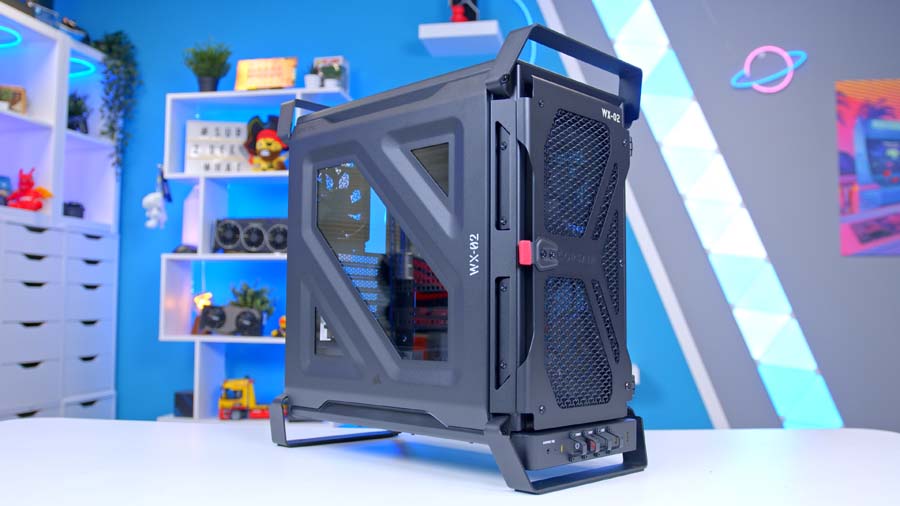
Then there are the handles. They’re steel and built into the chassis, and Corsair says they’re structural, so they’re meant to carry the full weight of the case. They’re also handy for propping the case on its side mid-build. One thing to watch: there’s also a nylon strap on the top panel, and Corsair is very clear that this is only there to help pull the top panel off. Lift your system by that and you’re asking for trouble.
Round the sides, the left panel pairs tempered glass with steel, and this is the point where opinions will split. The window is a lot smaller than the full panes we’re used to on most modern cases, so a good chunk of your hardware sits hidden behind steel. That suits the utilitarian theme, but if you’ve splashed out on a flashy GPU and want to see all of it, this isn’t the case for that. The right-hand panel is solid steel with a magnetic dust filter, and both side panels use a tilt-and-clip design, held by ball snaps at the top and resting in a channel at the bottom. Handily, they stay put if you leave them tipped out, so there’s no juggling glass mid-build.
Inside, the FRAME 4000D roots show. The RapidRoute 2.0 motherboard tray is a pegboard, dotted with squircle-shaped mounting points that the included ratcheting strap mounts clip onto, and you can move them wherever your cables need to go. Corsair has left 50mm of space behind the tray for cabling, and the tray itself is swappable, with Corsair’s standard steel and FRAME ELITE trays sold separately if you’d prefer a different look. For reverse-connector builds, there’s a magnetic strip to hide the cut-out around the 24-pin connector, and it doubles as a cover for the gap on a regular board.
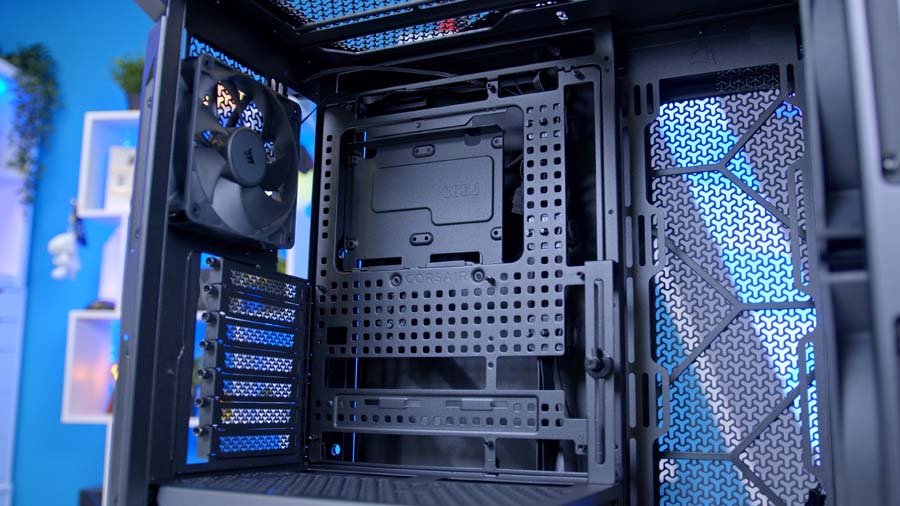
InfiniRail runs along the front and top, letting you slide the steel rails into place for the fans you’re fitting instead of hunting for fixed holes. The front handles the biggest fans of the lot, which screw directly into the rails, and the side bracket can move closer to the motherboard to clear thicker front fans or a radiator. Down below, a compact PSU shroud leaves room for a 120mm fan on the floor just in front of it, plus two more on top of the shroud feeding the GPU area.
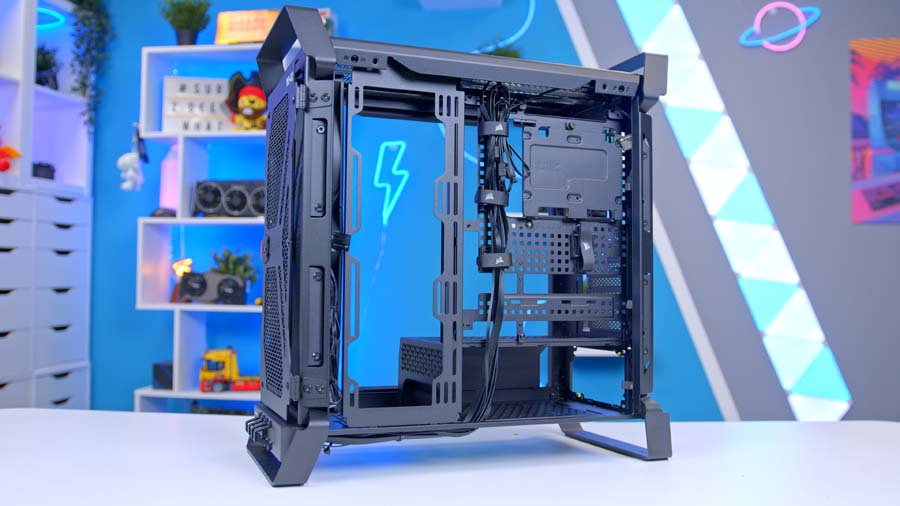
Storage is handled by a single combination drive plate that takes two 2.5-inch drives and a 3.5-inch drive together, and it also acts as a mounting spot for an iCUE LINK System Hub if you’re going down that route. If that’s not enough, Corsair’s 3D printable HDD cage is compatible too. Rounding things off, the Nano GPU anti-sag arm slides up and down to meet your graphics card, though Corsair notes its mount may need removing if you’re installing an E-ATX board.
Features We Like
Tactical Touches That Earn Their Keep
You could write off the WARTHOG’s military styling as pure costume, but plenty of it pulls its weight. The rear I/O light is the standout. Flick the switch on the front and a light shines down over the back of the motherboard, so plugging in a DisplayPort cable behind a dark desk no longer involves a phone torch clamped between your teeth. We’ve all been there. I’m honestly surprised more cases don’t do this.
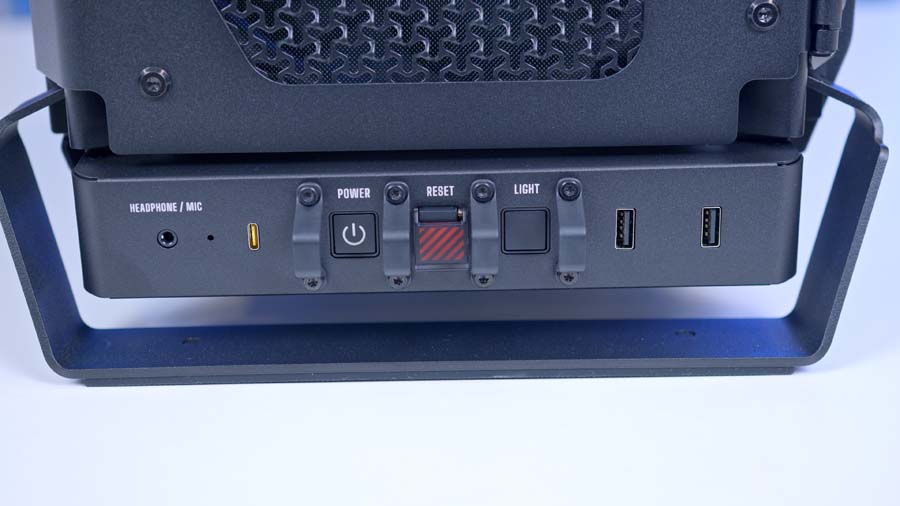
The guarded switches aren’t just for show either. With the reset button tucked under its cover, there’s no chance of a stray knee or an inquisitive pet rebooting your machine mid-game, and the steel handles make shuffling a full build around the house far less of a wrestling match.
Three Homes for a Triple-Fan Radiator
For a mid-tower, the WARTHOG gives you a remarkable amount of cooling freedom. The front, top and side can all house a triple-fan radiator, two can run at once, and with fan positions spread across six separate locations there’s scope for anything from a simple air-cooled build to a full custom loop. The pre-punched Hydro X ports are a thoughtful extra for that crowd.
InfiniRail takes the headache out of all that. Being able to slide the rails to suit whichever fan size you’re running up front means you’re not locked into one configuration, and if you change your mind about your cooling six months down the line, reshuffling things is a job for a screwdriver, not a new case.
Features We Don’t Like
You’ll Need to Bring Your Own Fans
The standard WARTHOG ships with zero fans. None. For a chassis this clearly built around airflow, and one that sits at the pricier end of the mid-tower market, that’s a tough pill to swallow. You’ll need at least a front intake and a rear exhaust before you can switch it on, and making the most of that big-fan-ready front means sourcing two large fans on top.
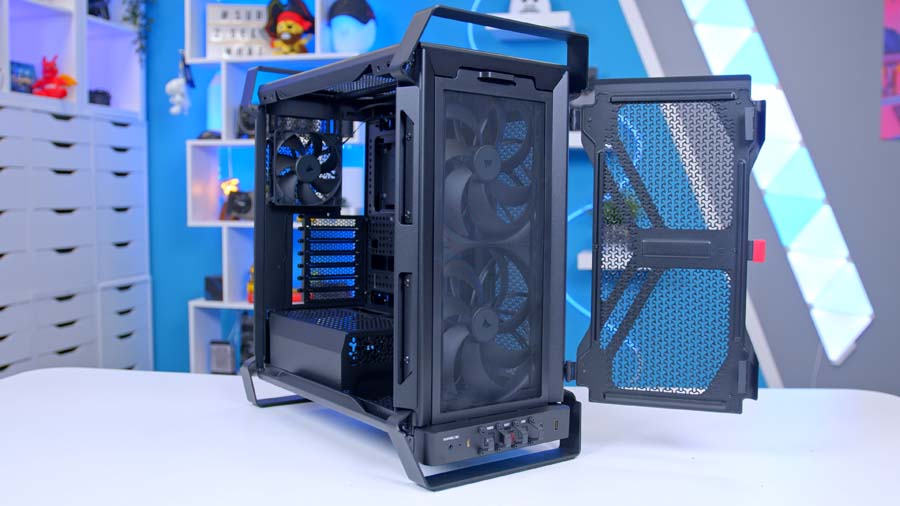
If you’ve got a drawer full of decent fans from an old build, fair enough, this won’t bother you. For everyone starting from scratch, the WARTHOG RS is the better bet, with two RS200 intakes and an RS120 exhaust pre-installed and wired straight to the motherboard.
Getting Under the Lid Takes a Few Extra Steps
Access to the top of the case is more involved than it needs to be. To remove the top panel, both side panels have to come off first, and only then can you undo the two thumbscrews at the rear and slide it free with that nylon strap. If you’re fitting a top radiator or tweaking roof fans, it’s a few more minutes of faff each time.
The front door has a similar quirk. It swings open easily enough for cleaning the filter, but lifting it off its hinges entirely needs screws removing. Neither is a dealbreaker, but on a case that’s otherwise so thoughtfully put together, they stand out.
Conclusion
It’s very hard not to like the WARTHOG, and slightly harder to justify it on pure numbers. It’s aimed squarely at builders who are tired of glass fishbowls and ARGB overload, and who want something with personality that still offers the cooling flexibility and build features of Corsair’s FRAME range. On that front, it delivers character by the bucketload.
The catch is the standard model itself. Without fans in the box, it’s only a sensible buy if you’ve already got a set ready to go, and even then the WARTHOG RS will be the smarter buy for most people. Those who want to show off every inch of their hardware should look at a panoramic glass case instead, and anyone who just wants the FRAME 4000D’s features without the theatrics can buy the FRAME 4000D. But if the C70 holds a special place in your heart, or you simply want a PC that looks ready for deployment, the WARTHOG is a hugely fun proposition.