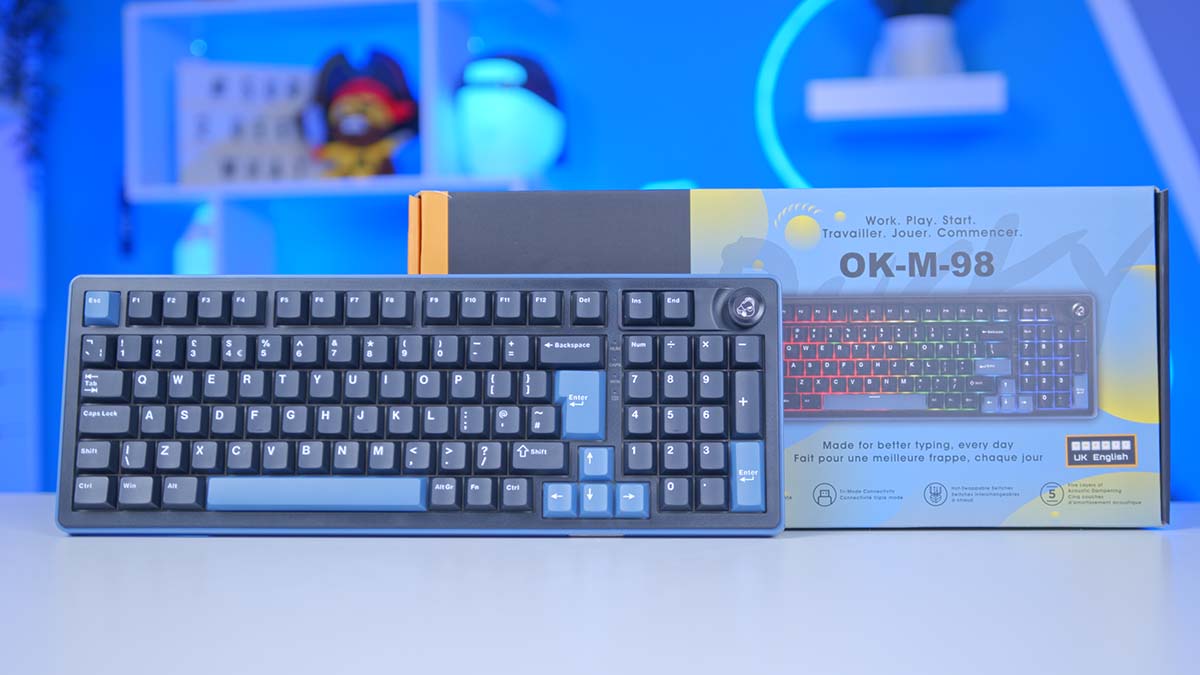
Ducky is a prime player in the mechanical keyboard space. With over 18 years of experience, you can argue that, as veterans in this industry, when a new Ducky keyboard is released, this is a pretty exciting prospect, and their latest offering definitely hits the mark.
Meet the Ducky OK-M-98, a fully mechanical 98% keyboard with hot-swappable switches, acoustically dampened internals, tri-mode connectivity, and, of course, lighting up the wazoo for those that love RGB. And to top it all off, the Ducky OK-M-98 is highly affordable.
We’ll delve into the ins and outs of this keyboard, examining its premium features and design to see how it compares to other options at a similar price point. We’ll conclude this article with our summarised thoughts on the keyboard as a whole across different use cases.
Specifications
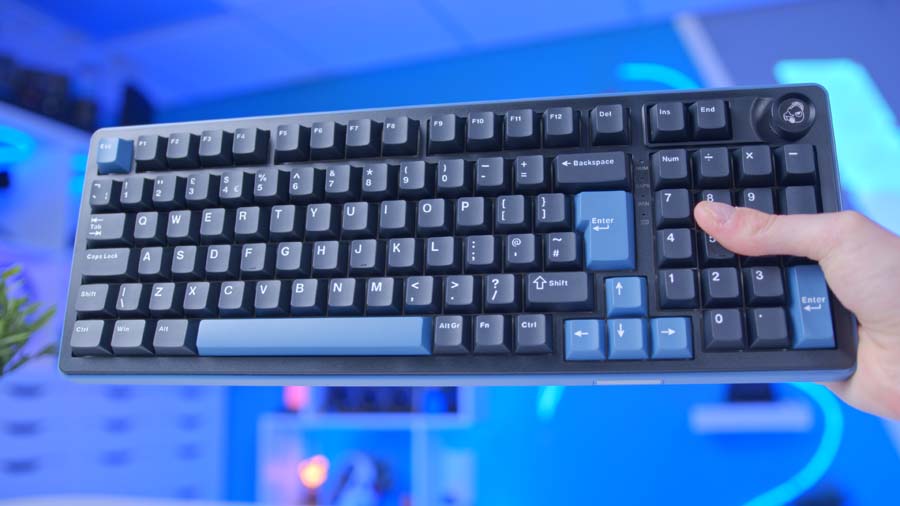
At a glance, the specs of the Ducky OK-M-98 put it alongside other premium options that we’ve reviewed in the past. As a 98% design, the OK-M-98 is quite large, measuring 394mm x 143mm x 41.5mm (W x L x H), which is just shy of the width of the AORUS 17 laptop that I’m using to test this keyboard. While Ducky does offer 75% and 65% layouts as alternatives, the 98% version is the kind of keyboard that you’re likely to keep as a permanent fixture for your home setup, rather than one you’d take on the go. It’s also worth mentioning that Ducky kindly sent us the UK ISO version of this keyboard, but depending on the region, layouts like ANSI are available as well.
One of the core focuses of the specs here is the switches. Ducky has opted for KTT switches, providing both Linear and Tactile options. There is, unfortunately, no Clicky version, but as user preferences have shifted towards Linear and Tactile over the years, it’s no surprise that Ducky have decided to go with the more popular switch options. These switches are fully hot-swappable, so if you decide that KTT aren’t for you, as long as you’ve got some 5-pin switches spare, you can swap them out very easily using the included keycap and switch puller.
Ducky OK-M-98 Specifications
- Model Ducky OK-M-98
- Layout 98% (1800), 97 Keys, ANSI
- Mounting Style Gasket Mount
- Sound Dampening Five-Layer Acoustic Dampening
- Hot-Swappable Yes (3-Pin and 5-Pin)
- Plate Polycarbonate
- Keycaps PBT
- Default Switches KTT (Linear or Tactile Options)
- Connectivity 2.4GHz Wireless, Bluetooth, USB-C Wired
- Polling Rate 1000Hz
- Lighting RGB Backlight and Side RGB
- Software VIA
- Rotary Knob Yes, Programmable (Volume and Mute)
- Battery 4000mAh
- Operating System Windows and Mac (Hardware Toggle)
- Colours Black, Black and Blue
While Ducky hasn’t disclosed what specific type of key rollover they’re using, I can confirm that this keyboard does have it. As for macro keys, Ducky hasn’t explicitly included any additional hardware keys for macros; however, the OK-M-98 is fully programmable through VIA, so users can change bindings or even override some keys to act as macros, should they wish.
For connectivity, you’re spoilt for choice on the OK-M-98. An included USB-C-to-USB-A cable lets you connect the keyboard via wired mode or charge it. Additionally, there’s a 2.4GHz dongle hidden at the back, providing a high-speed wireless option. There’s also the choice of Bluetooth if you don’t have any spare USB ports.

Last but not least is the RGB lighting. By default, all of the RGB lighting can be controlled using the ‘Fn’ key and other combinations to control speed, pattern, and brightness. However, if you’re proficient in VIA, you have the option to control the lighting of each key, providing a whole other level of customisation that is typically quite limited on similarly priced keyboards.
Design
The Ducky OK-M-98 makes a strong first impression straight out of the gate. The plastic outer chassis is a dark blue, which reappears across some of the major functional keys on the keyboard. The rest of the OK-M-98 is primarily black, which includes the majority of the keycaps.
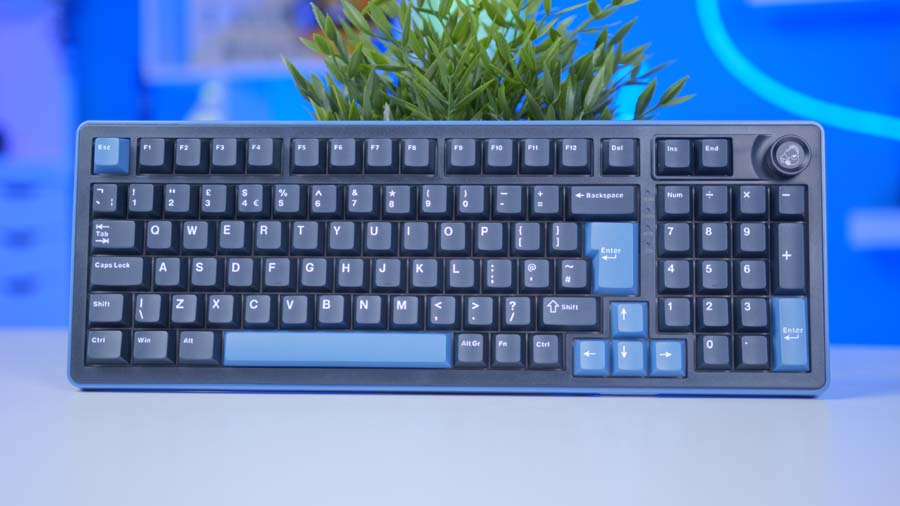
Despite being plastic, the OK-M-98 has a significant amount of heft, with very limited flex or movement in the chassis. This is down to a couple of design choices that Ducky have made regarding the internals. The first of which is the sound-dampening layers. Ducky has filled out the OK-M-98 with layers of silicone, foam, and EVA to minimise reverberation and create soft, pleasant acoustics while typing. Filling out the keyboard also adds structural integrity, increasing the design’s robustness and longevity.

The second choice Ducky has made is to gasket-mount the top plate. Gaskets have become incredibly popular in the past few years as they reduce flex and vibration and create a softer typing feel overall. Both of these design decisions culminate in providing a smooth typing experience that feels incredibly premium, despite this being an affordable keyboard.
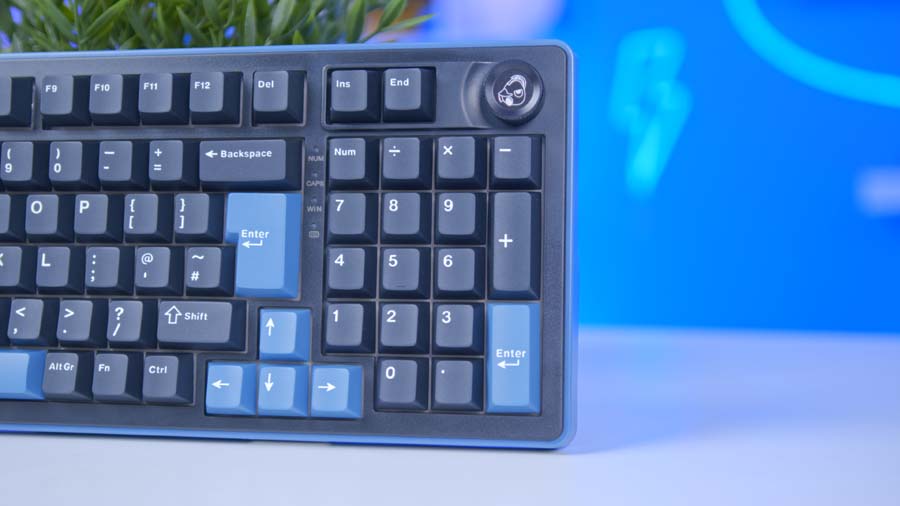
At the top-right of the OK-M-98, you’ll find a rotating knob with a printed ducky logo, which can be used to control the volume of your system. While a small feature, it’s a nice addition that lets you adjust the volume on the fly.
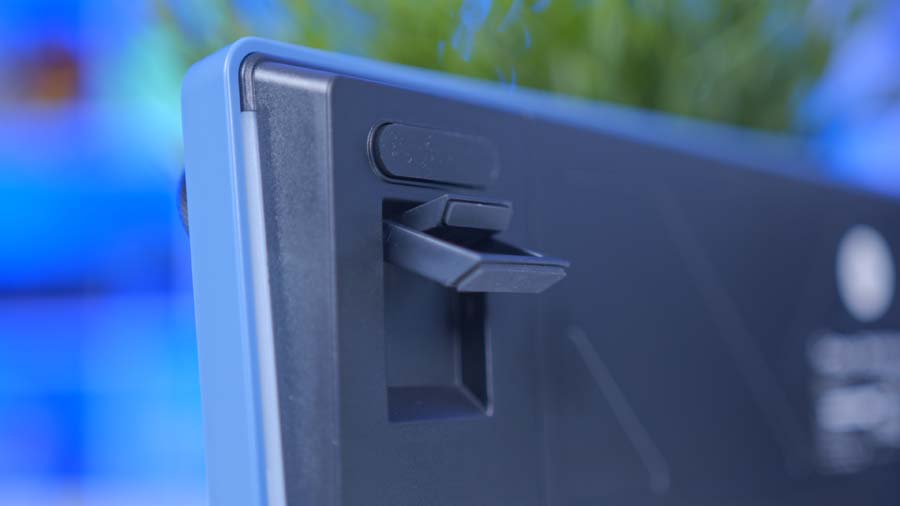
On the underside of the OK-M-98 are two kickstands. The kickstands have two levels, increasing the height to two different elevations. There’s nothing particularly fancy about the kickstands. They are plastic, but they feel strong and shouldn’t move or falter even if you’re a heavy typist.
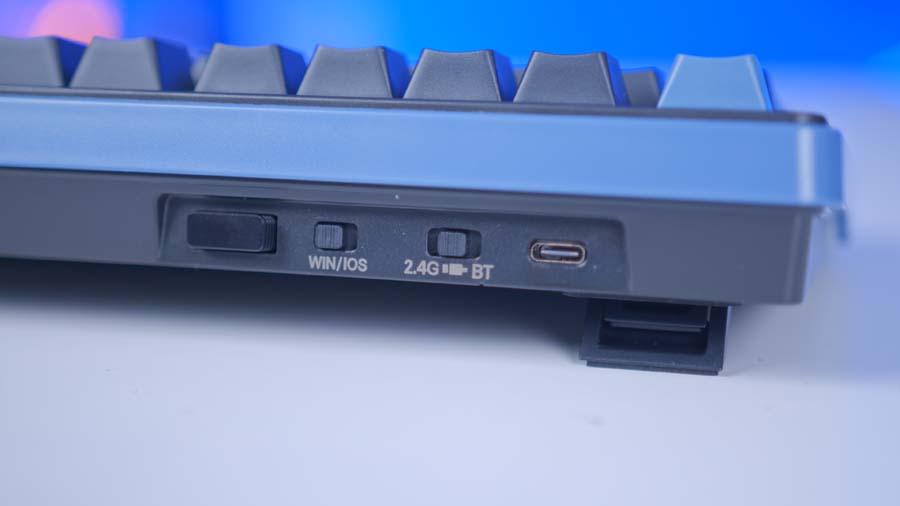
On the rear, you’ll find the connectivity switch, OS switch and 2.4GHz dongle storage. As stated in the specs section, there are three connectivity options you can switch between seamlessly by flicking the switch. The OS switch also provides the correct key assignments depending on whether you’re using Windows or MacOS.
In the box, Ducky includes a USB-C-to-USB-A cable, a keycap/switch puller, and a small brush. The small brush is a nice add-on and can be useful for removing debris from the keyboard without a deep clean. The switch puller is a bit flimsy, so for users who choose to use it to remove and swap the switches, we’d recommend exercising caution.

Overall, I think the design is solid. Ducky offers some ergonomics in the form of kickstands and foam padding to minimise noise levels. While it would be nice to see a wrist rest included or more media controls, considering the price of this keyboard, Ducky are offering a huge number of great features that really make them stand out from the competition.
Aesthetically, the OK-M-98 is a bit plain. Some will like the blue-and-black contrast, and I think Ducky has done a good job of designing a keyboard that blends well with an office or gaming setup. That being said, I’d much prefer it if you could choose the chassis colours. I understand that offering only the OK-M-98 in blue and black is likely a cost-saving measure, but some alternative colours would make the overall offer more compelling.
Keycaps
The Ducky OK-M-98 is fitted with DoubleShot PBT keycaps. This method of moulding the keycaps means you get a bright and bold legend across all the keys, and they’re also incredibly robust, designed to last through long-term use. The material used also increases resistance to keycap shine and UV wear. DoubleShot PBT is generally more expensive to process, but it’s well worth it for manufacturers prioritising quality.

The keycaps use a standard Cherry profile, so they fit around most fingers quite nicely, with minimal spill to either side. Unfortunately, Ducky doesn’t offer any alternative keycap colours or profiles on the OK-M-98 as standard, but you can easily rectify this by purchasing your own.
Switches
The switches on the OK-M-98 are definitely the star of the show. Ducky offers two options, both from KTT. KTT switches are similar to Cherry in their design, but KTT specialise in Linear and Tactile switches, offering a massive range with different actuation forces, housings, and levels of lube. It’s nice to see that Ducky are providing something a little different when it comes to the switch options. The vast majority of manufacturers opt for CherryMX, Kailh, or Gateron. And while I love all three of those brands, KTT really know their stuff when it comes to Linear and Tactile, which shows there’s more thought that’s gone into providing a well-rounded typing experience.
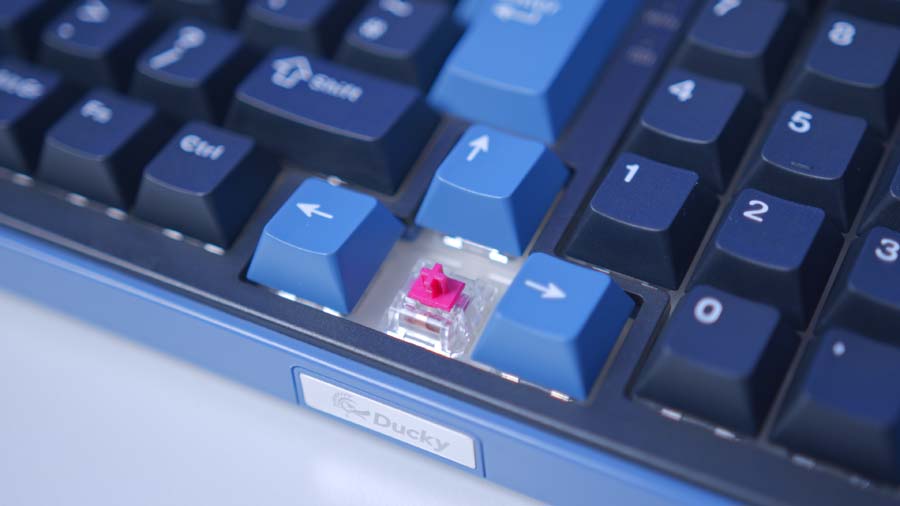
Ducky kindly sent us the Linear version, which utilises KTT’s Red Wine switches. They have an operational force of 43 gf and bottom out at 53 gf. Total travel is 4mm, which is pretty standard for most switches. The stem here uses POM plastic, which is a low-resistance, low-friction polymer designed to minimise scratching or tugging during travel.
The usage and typing experience feel incredibly premium. When each switch bottoms out, there’s effectively no resistance all the way through to the bottom housing. And because of the internal sound damping, each press gives a ‘thocky’ feedback that is pleasant and light compared to a Clicky switch.
Furthermore, the PCB used on the OK-M-98 is hot-swappable. This means that instead of being soldered to the board, users can remove the switches and replace them with other compatible designs. It’s worth noting that the PCB is a 5-pin hotswap model, so you’ll want 5-pin switches. Common examples include: Gateron Ink Black V2 (Linear), Gazzew Boba U4T (Tactile), and Kailh Box White V2 (Clicky).
Features We Like
Tri-Mode Connectivity
For years, budget keyboards have effectively had only one way to connect to your laptop or desktop, and that is through a cable. It’s fairly rare for a manufacturer to provide wireless connectivity on a sub-$100 keyboard, and when they do, you’re often losing out on other features.
Ducky makes no sacrifices with the OK-M-98, and this keyboard offers three connectivity modes, all of which are speedy across the board. This is something that we need to see more of with newer releases.
Fully Programmable
Offering customisability through VIA isn’t new; many popular budget brands like Royal Kludge, EPOMAKER, and RedThunder use it by default, allowing users to program their keyboards to suit their preferences. However, what’s great about the OK-M-98 is that Ducky isn’t thrusting their proprietary software in the face of the user.
Peripherals can come with a bit of bloatware, and if the software is particularly difficult to use or not very intuitive, it can ruin the customisation experience. But if you’ve got experience with VIA, it’s straightforward to use. It offers a gigantic amount of configuration out of the box, catering to those who want to play around with the RGB lighting or users who want more advanced settings.

Features We Don’t Like
No Included Wrist Rest
Generally, I think the ergonomics of the Ducky OK-M-98 are pretty solid. There are kickstands to improve elevation, padding to keep noise levels to a minimum, and plenty of customisation for your keybindings, so you can set up your keyboard just how you like it.
But I think the one element that would take this keyboard to the next level is an included wrist rest. It’s pretty rough typing on the edge of a desk, especially if you’re doing it for a prolonged amount of time. A wrist rest would significantly improve ergonomics, and who doesn’t want a cushioned Ducky-branded wrist rest to go with their keyboard?! Either way, it’s a shame there isn’t one included here, as it would make a world of ergonomic difference.
Plain Aesthetic
I like that Ducky have opted for a keyboard that sits in both worlds (work environments and gaming). That said, I’m not a huge fan of the limited customisation before purchase. Ducky is well known for their wonderful and wacky keycap options, alongside chassis that offer real vibrancy and versatility across a wide range of setups.
However, the OK-M-98 definitely toes the line of being a bit boring or simplistic. Again, this is likely due to a cost-saving measure, but it would be great to see alternative chassis colours before purchase, or even different keycaps, to give users the option to customise the look before it hits their doorstep.