

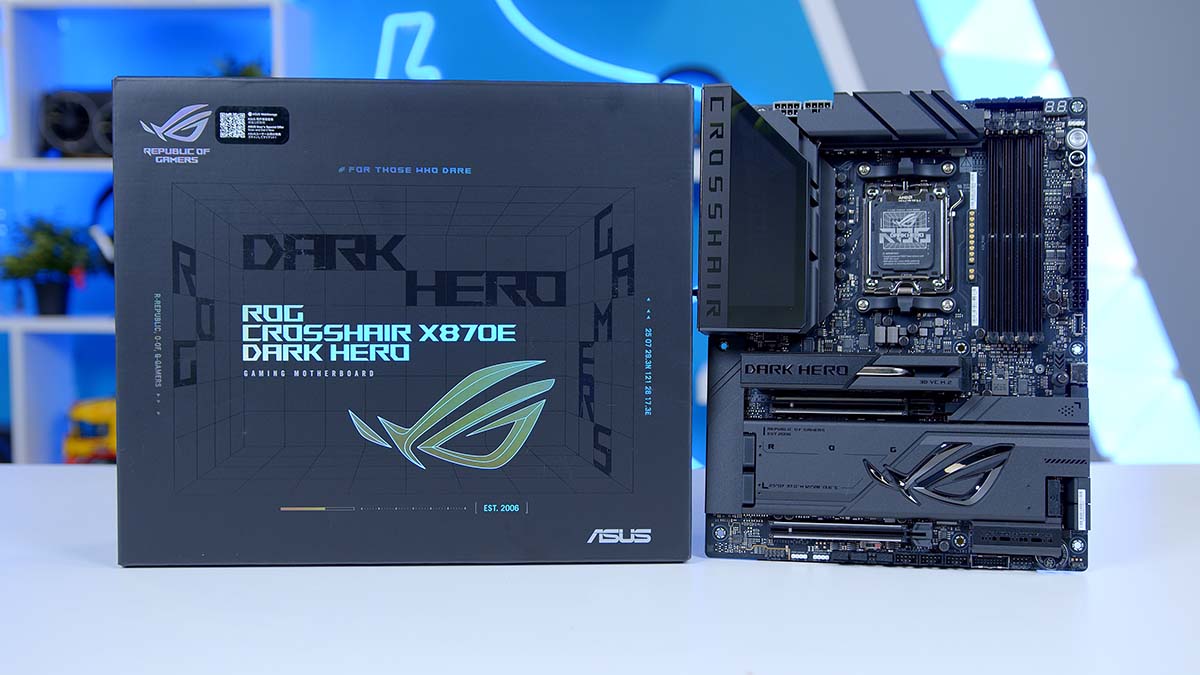
If you’re building a high-end Ryzen 9000 PC and want a motherboard that combines a blacked-out aesthetic with a loaded feature set, the ASUS ROG Crosshair X870E Dark Hero could just be the board you’re looking for. Refreshed for 2026 alongside ASUS’s new flagship Crosshair X870E Glacial, the Dark Hero is the more grounded half of the pair, and that’s saying something, because this board is seriously stacked with features and QoL improvements. The ROG Crosshair X870E Dark Hero is built around AMD’s X870E chipset, and certainly fits the bill for what you’d expect from a top-end board at face value.
The previous Hero is a board we already rated highly, so the question isn’t whether the Dark Hero is good, it’s whether the upgrades over the outgoing model justify the price hike. The original Hero arrived at a price a fair chunk cheaper than the Dark Hero lands and that gap needs to be earned by more than just a coat of black paint.
Specifications
The Dark Hero is a full ATX board measuring 305mm by 244mm, built on AMD’s X870E chipset and using the AM5 socket. X870E is the only tier in AMD’s current stack that runs a dual chipset arrangement, and it’s what allows for the wider lane allocation, the extra M.2 slots and the second full length graphics slot that the single chip X870 boards can’t offer.
Officially the board supports AMD Ryzen 9000, 8000 and 7000 series processors, though the way it behaves changes noticeably depending on which one you drop in. Ryzen 9000 and 7000 chips unlock the full arrangement, with both graphics slots running from the processor at PCIe 5.0 and the first two M.2 slots doing the same. Drop in one of the Ryzen 8000 APUs, though, and things thin out. PCIe 5.0 falls back to 4.0 throughout, and the 8500 and 8300 chips lose the second M.2 slot entirely.
Motherboard Specifications
- Model ASUS ROG Crosshair X870E Dark Hero
- Chipset / Socket AMD X870E / AM5
- Form Factor ATX (305mm x 244mm)
- CPU Support AMD Ryzen 9000 / 8000 / 7000 Series (AM5)
- Memory Support 4 x DDR5 DIMM, up to 256GB, up to DDR5-8600+ (OC) with Ryzen 9000 Series
- VRM Design 20 (110A) + 2 (110A) + 2 power stages
- Onboard Controls Start, FlexKey, ReTry, BIOS FlashBack and Clear CMOS buttons, LN2 mode jumper, Q-Code display
- Graphics Card Compatibility 2 x PCIe 5.0 x16 slots (x16 or x8/x8 modes)
- Expansion Card Compatibility Shared with the two PCIe 5.0 x16 slots, no separate expansion slots
- M.2 Compatibility 5 x M.2: 2 x PCIe 5.0 x4, 2 x PCIe 4.0 x4, 1 x PCIe 4.0 x2 (2230)
- SATA Storage 4 x SATA 6Gb/s ports
- Networking Wi-Fi 7 (MediaTek MT7927) + Bluetooth 5.4 + 10GbE and 5GbE LAN
- Rear I/O 2 x USB4 40Gbps Type-C, 9 x USB 10Gbps (6 x Type-A, 3 x Type-C), 1 x HDMI, 10GbE and 5GbE ports, 2 x audio jacks, optical S/PDIF out
- Front I/O Headers 2 x USB 20Gbps Type-C connectors (one with up to 60W PD/QC4+), 2 x USB 5Gbps headers, 3 x USB 2.0 headers
- Audio ROG SupremeFX ALC4082 (7.1-channel) with ESS ES9219 QUAD DAC
- Colour Black
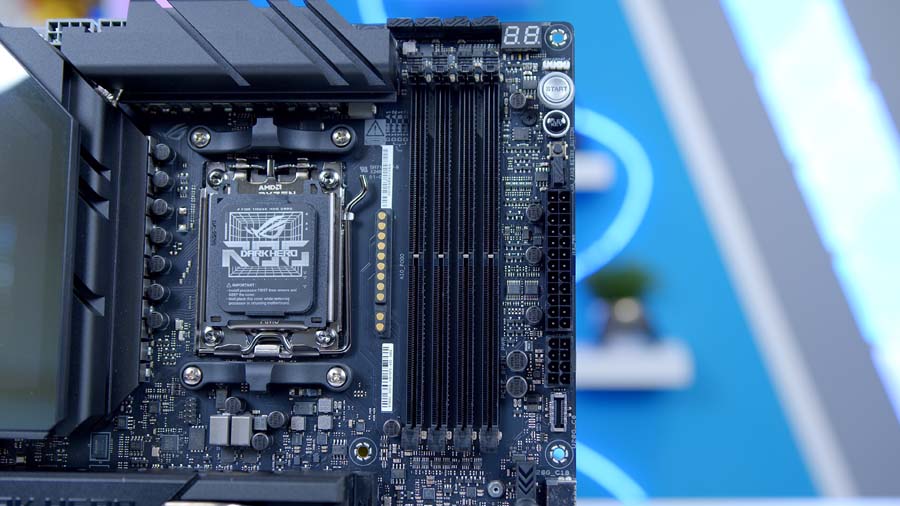
Memory support runs to four DDR5 slots and a maximum of 256GB, with speeds quoted up to DDR5-8600 and beyond through manual overclocking on Ryzen 9000 chips, or DDR5-8200 through EXPO profiles. ASUS’s marketing leans on a 9600 MT/s figure, but that only applies to Ryzen 8000 series processors, so treat it with caution if you’re building around a 9800X3D or similar.
The accessory bundle is fuller than most. Alongside the expected SATA cables, Q-Connector and Wi-Fi Q-Antenna, ASUS packs a small cooling kit consisting of a 60mm ROG assistant fan, a DDR5 fan holder and the screws to mount both, plus a thermal pad for 22110 length drives in the top M.2 slot. There’s also a ROG branded bottle opener, which tells you something about who they think is buying this.
From Our Full Review
☆☆☆☆☆
4.5/5

Pros and Cons
Pros
- Gorgeous design
- DIY-friendly features
- Overclocking support
Cons
- Downgraded IO
- No tool-less heatsink
- Very expensive
Bottom Line
The ASUS ROG Crosshair X870E Hero is a genuine enthusiast-level motherboard offering builders the best of the best when it comes to features, connectivity, expansion and performance. It brings substantial upgrades over the X670E Hero — improved overclocking, more SSD slots, more robust networking, and a host of DIY-friendly usability features — wrapped in an entirely black Dark-Hero-inspired design. Minor caveats around rear-IO downgrades and a non-tool-less centre heatsink don’t take much away from a board still recommended for top-end PC builds.
Read The Full ReviewDesign
The Dark Hero name has always signalled a stripped back take on the Crosshair look, and this generation commits to it harder than most. Where the standard Hero leans on nickel plating, contoured surfaces and liveries across the larger heatsinks, the Dark Hero flattens all of that into a single matte black tone. It’s a board designed to disappear into a build rather than anchor it.
Finish and Lighting
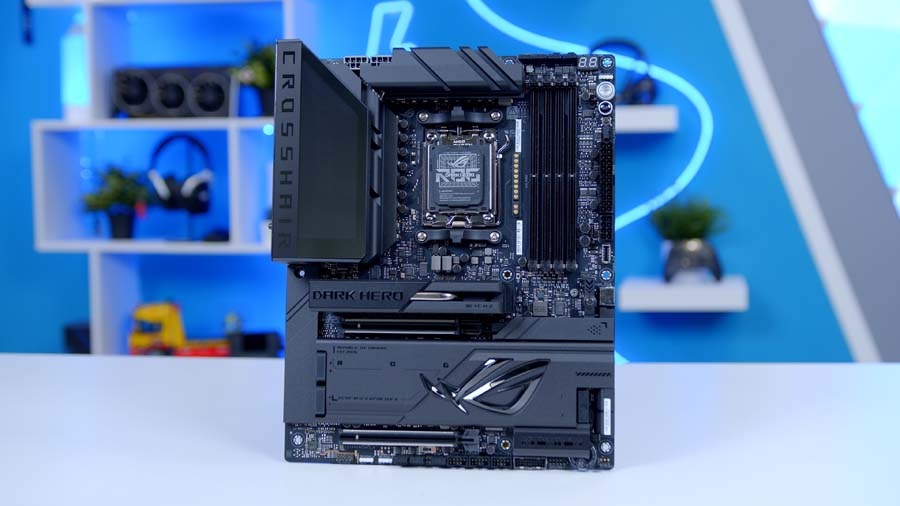
The heatsinks, input/output (IO) shroud and M.2 covers all sit at roughly the same shade, so there’s very little visual separation across the board when it’s sitting still. The one deliberate break is the ROG logo on the IO cover, which uses ASUS’s Polymo Lighting II module. It’s a step up on the older single zone logos, throwing a more dynamic pattern across the shroud rather than just glowing, and it’s the only lighting on the board itself.
If you want more than that, there are three addressable Gen 2 headers along the board to tie fans, strips and coolers into Aura Sync. Keeping the onboard lighting to one zone means the Dark Hero works just as well in a build where you’ve switched everything off.
VRM Cooling
The Voltage Regulator Module (VRM) heatsinks are integrated into the IO cover rather than sitting as separate blocks, which gives them considerably more mass and surface area than the fin stacks you’d find on a mid range board. The two sections are joined by an L shaped heatpipe so heat can move across the assembly instead of pooling above the busiest phases, and high conductivity thermal pads bridge the heatsinks down to the power stages themselves.
It’s overbuilt for what AM5 asks of it, but it stays passive as a result, with no small fan buried in the shroud to fail three years down the line.
Storage Layout and M.2 Cooling
Five M.2 slots is a generous allocation, and the way ASUS has split them matters. The first two run from the processor at PCIe 5.0 x4, and the top slot also takes 22110 length drives, which is handy if you’ve got one of the longer enterprise style Solid State Drives (SSDs). The remaining three hang off the X870E chipset, with two at PCIe 4.0 x4 and a 2230 slot at PCIe 4.0 x2 that’s clearly there for a small boot drive or a compact add in card rather than anything performance critical. Four SATA 6Gb/s ports sit alongside them, two of which run from a separate controller.
All five slots get heatsink coverage, which isn’t a given even at this price. The primary slot is the interesting one, sitting under a 3D vapour chamber (VC) heatsink rather than a solid aluminium block. It’s aimed squarely at PCIe 5.0 drives, which run considerably hotter than the Gen 4 generation and are the most likely candidates for thermal throttling in a cramped case. There’s an M.2 heatsink backplate as well, so the top drive is cooled from both faces rather than just the top.
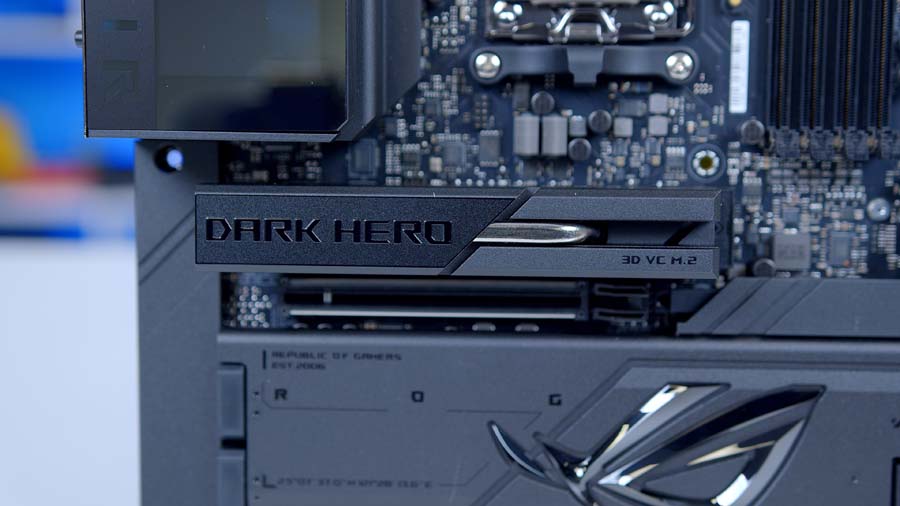
The bigger change is that every one of the five heatsinks now comes off without tools. That sounds like a small thing until you remember how the standard Hero handled it, where the top heatsink released at the push of a button but the large cover over the remaining four slots was held down by four screws. Getting at a drive meant reaching for a screwdriver and working around a graphics card, which is a poor experience on a board at that price. ASUS has extended M.2 Q-Release across the whole board here, and swapping a drive is now a matter of seconds regardless of which slot it’s in.
Expansion Slots
There are two full length slots and nothing else, both wired to the processor and both listed as PCIe 5.0 x16, running either x16 on the top slot alone or x8/x8 across the pair. There’s no separate x1 or x4 slot for smaller cards, so anything you add is going into one of the two. Both get SafeSlot reinforcement, and the top slot uses PCIe Slot Q-Release, which lets you free a heavy graphics card with one hand instead of blindly feeling for a latch behind it.
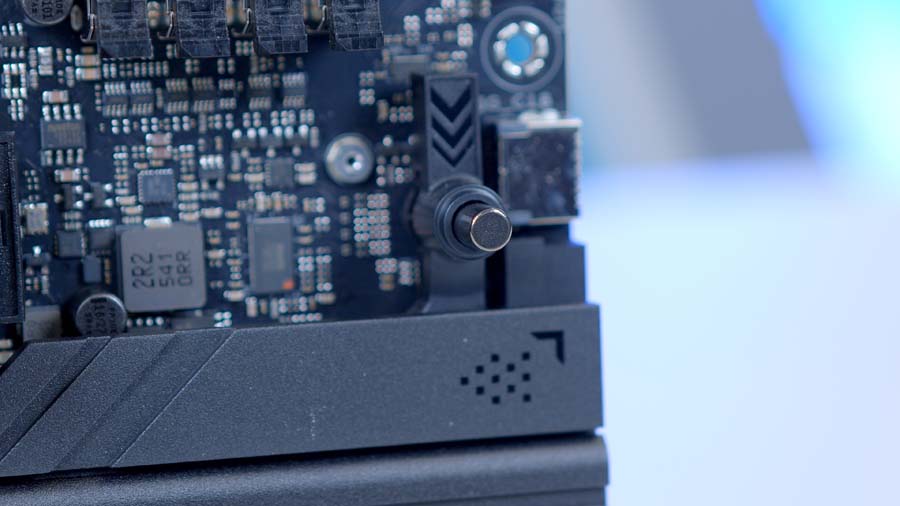
Underneath the whole board sits a full metal backplate. It stiffens the PCB against the weight of a modern graphics card as well as contributing a little extra thermal mass, and it’s the sort of thing that matters more now than it did a few generations ago.
The Bundled Cooling Kit
The 60mm ROG assistant fan and DDR5 fan holder in the box are aimed at two specific scenarios. The fan holder clips over the memory slots for anyone pushing DDR5 well past its rated speed, where the modules start generating meaningful heat of their own. The assistant fan is more of a general purpose airflow addition for the area around the socket and VRM, which gets starved in builds running an all in one liquid cooler with no case fan pointed at the top of the board.
Most will leave both in the box, but it’s cheaper than discovering you need them after the fact.
Onboard Controls & Diagnostics
The Dark Hero carries the full Extreme OC Kit, which means physical Start, FlexKey and ReTry buttons on the board plus an LN2 mode jumper for subzero work. The ReTry button in particular earns its place, forcing a hard restart when a board has locked itself up after a failed overclock rather than leaving you reaching for the power supply switch.
Diagnostics run to a two digit Q-Code display and a four colour Q-LED cluster covering processor, memory, graphics and boot device. BIOS FlashBack and Clear Complementary Metal Oxide Semiconductor (CMOS) buttons sit on the rear panel where you can reach them without opening the case.
Rear IO, Front Panel and Audio
The rear panel comes with a pre-mounted IO shield, so there’s no fighting a loose plate into a case cutout. Port count is high: eleven USB connections in total, made up of two USB4 Type-C ports and nine at 10Gbps, split between six Type-A and three Type-C. Alongside those sit the 10GbE and 5GbE ports, the Wi-Fi Q-Antenna mount, an HDMI output, the optical S/PDIF output and the audio jacks. Wireless itself is handled by a MediaTek Wi-Fi 7 module with 320MHz channel width on the 6GHz band and Bluetooth 5.4.
Front panel provision is just as strong, with twelve further USB ports available across two 20Gbps Type-C connectors, two 5Gbps headers and three USB 2.0 headers. One of those Type-C connectors supports up to 60W of Power Delivery with Quick Charge 4+, though that figure only applies if you’ve plugged in the supplementary 8-pin PCIe power connector on the board. Leave it empty and you’re capped at 27W, which is the difference between fast charging a laptop and slowly topping up a phone.
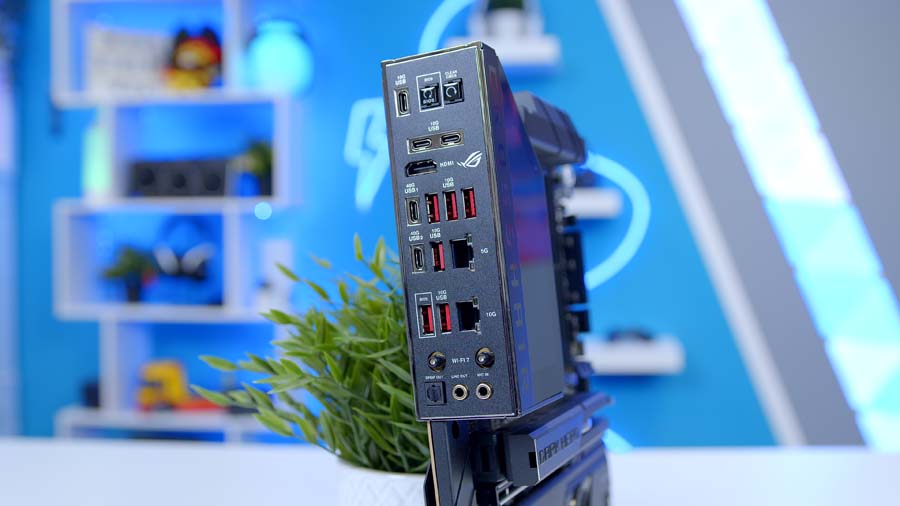
Audio is handled by ASUS’s SupremeFX setup, and the board senses what headphones you’ve plugged in so it can drive them at the right volume without you touching anything.
One omission stands out. There’s no DisplayPort connector anywhere on the back panel, so integrated graphics output is limited to HDMI or the USB4 ports running in display mode. Given its on a board that will almost always be paired with a discrete graphics card its a very minor point.
Features We Like
10 Gigabit and 5 Gigabit Ethernet Side By Side
This is the single clearest reason to pick the Dark Hero over the standard Hero. Where that board pairs 5GbE with 2.5GbE, ASUS has fitted a Realtek 10GbE controller here alongside a 5GbE one, and both are backed by LANGuard surge protection. Two wired ports at those speeds is unusual outside workstation boards, and it means you can run a link to a NAS box on one and your household network on the other without touching a PCIe slot.
It’s fair to say most people won’t have anything at home fast enough to saturate 10 Gigabit today. But this is a board you buy to sit in a machine for years, and multi-gig switches have come down enough that the situation looks very different from how it did even a couple of years ago. Having it built in means one less card, one less slot used and one less thing to think about later.
ASUS’s Q-Design Toolset
ASUS has been iterating on its DIY features for years and the Dark Hero is the first Crosshair to get the full set with no gaps in it. M.2 Q-Latch and Q-Slide mean no hunting for tiny screws when you’re fitting drives, M.2 Q-Release now lifts all five heatsinks off without tools rather than just the top one, and PCIe Slot Q-Release means you can free a heavy graphics card with one hand instead of blindly reaching for a latch behind it. The IO shield comes pre-mounted, and there’s an AIO Q-Connector for compatible ASUS coolers.
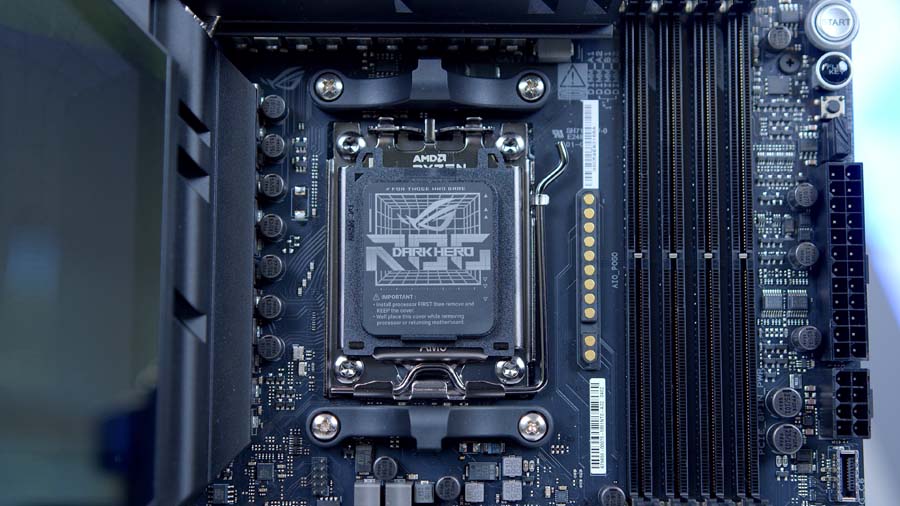
The AIO Q-Connector is worth singling out, because it tackles the messiest part of fitting a modern liquid cooler. A screen equipped all in one typically arrives trailing four separate leads: pump power, a PWM control cable, an ARGB lead and a USB connection for the display. Each one has to find its own header, and they all converge on the same crowded area at the top of the board. The Q-Connector consolidates power and control for the pump, the ARGB lighting and, on models that have one, the integrated display into a single connection, with the radiator fan PWM signals routed internally through the tube sleeving rather than running as separate cables across the case.
The catch is compatibility. It only works with select ASUS all in one coolers from the ROG range, so pair the Dark Hero with a cooler from anyone else and you’re back to routing everything individually. The board keeps its dedicated AIO Pump and W_PUMP+ headers alongside four chassis fan headers either way, so you lose nothing by not using it, but it’s a feature that rewards buying into the ecosystem rather than one that helps every build.
Features We Don’t Like
USB4 and the Second M.2 Slot Compete
The board’s USB4 controller and the second M.2 slot draw from the same pool of bandwidth, and there’s no configuration where both get everything they need. Fit a drive to M.2_2 and the slot and the USB4 ports both fall back to x2. Force the slot to full x4 in the BIOS and the USB4 ports switch off entirely. Leave the slot empty and USB4 runs as advertised.
Lane sharing is a fact of life on AM5 and it’s hardly unique to ASUS, but dual USB4 is one of the things this board is sold on, so being asked to trade it against a storage slot stings more here than it would further down the range. In practice it means putting your fastest drive in the top slot and treating M.2_2 as the one you leave alone.
The Second Graphics Slot Is More Limited Than It Looks
Both full length slots are listed as PCIe 5.0 x16, which reads well on a specification sheet. The detail buried in ASUS’s own footnotes is that when the top slot is running at the full x16, the second one drops to PCIe 3.0 x4. You can rebalance that in the BIOS to get x8/x8, but the default configuration leaves the lower slot considerably slower than its label suggests.
For most builds its a non-issue, since a single graphics card in the top slot is what almost everyone is doing. If you were planning on a capture card, a high speed network adapter or a second accelerator though, it’s worth checking what that slot will actually give you before you commit.
Conclusion
There’s very little on AM5 that betters this. The Dark Hero matches the networking and the Gen5 storage allocation of boards costing a good deal more, gives you two full length PCIe 5.0 slots where some flagships stretch to one and a half, and manages it in standard ATX rather than an E-ATX slab that a lot of cases won’t take. Measured against everything else X870E has to offer, it sits right at the top without asking flagship money for the privilege.
It suits a wide spread of builders, too. If there’s a NAS or a multi-gig switch in the house, the 10GbE port starts earning its keep the day you plug it in. If you’re chasing memory speed or running a 9950X3D flat out, the power delivery and the cooling have more in reserve than you’ll ever call on. And if you simply want a board that gets on with it, stays quiet about itself and doesn’t fight you when you swap a drive, it does that as well as anything I’ve built with.
What I keep coming back to is how little it gets wrong. The lane sharing between USB4 and the second M.2 slot needs a moment’s thought when you’re planning your storage, and MSI’s flagship asks exactly the same of you, so it’s hardly a mark against ASUS specifically. Past that I’m struggling to find much to hold against it. The things the Hero got wrong have been fixed, the things it got right have been left alone, and the result is a board I’d be glad to have in my own machine. This is the new benchmark board, a bold statement, I know.

![FI_[SR190] HYTE X50 Ryzen 5 9600X & MSI RTX 5070 Ti](https://geekawhat.com/wp-content/uploads/2026/01/FI_SR190-HYTE-X50-Ryzen-5-9600X-MSI-RTX-5070-Ti-551x431.jpg)