Corsair’s FRAME 4000 platform has always been pitched as a DIY concept case and with their latest announcement Corsair have leaned even further into this. Corsair have unveiled two new additions to the FRAME family, the 4000X RS and the FRAME 4000D Wood RS, alongside a healthy line up of new accessories. But that’s not all, Corsair have, alongside their new products, launched an accompanying FRAME configurator, allowing users to fully spec and 3D visualise their exact build config before checkout. In this article, we’ll be covering all of the new additions to the FRAME line-up and pointing out any key products you won’t want to miss.
FRAME 4000X RS
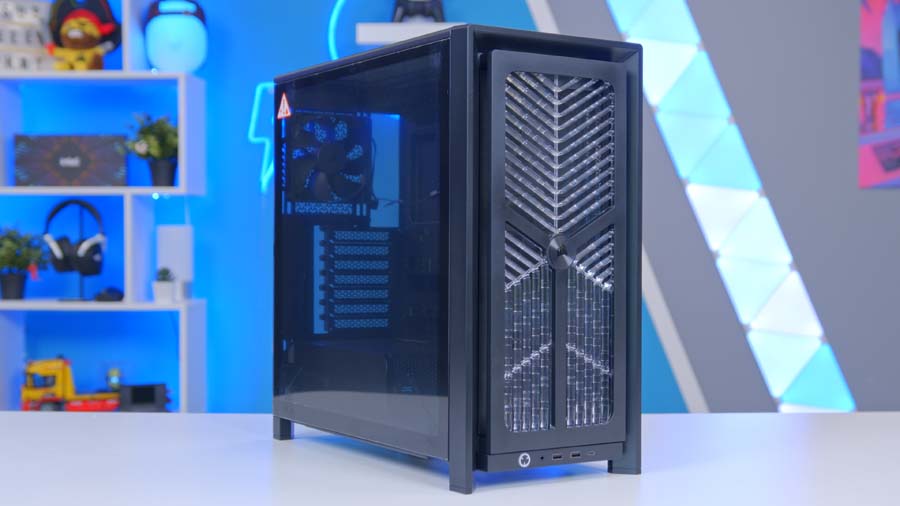
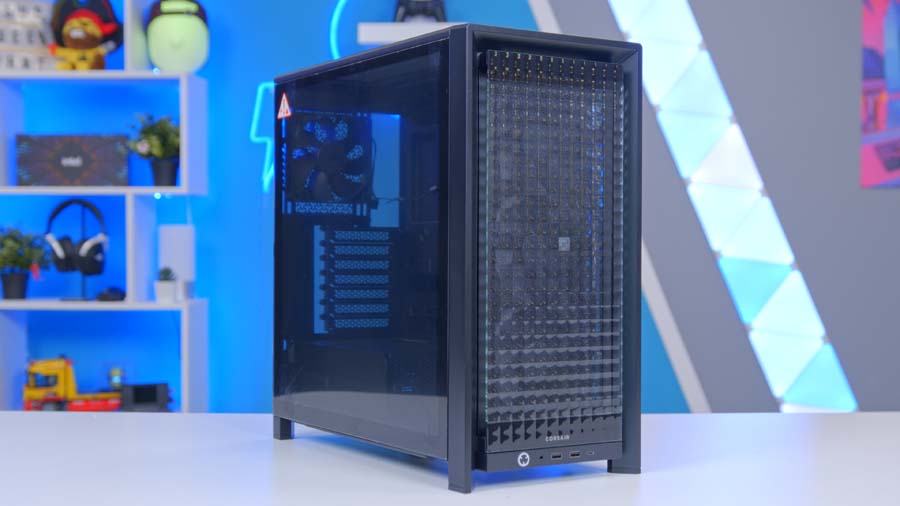
Of the two new case releases, the FRAME 4000X RS is perhaps the more showy of the two, built around the existing FRAME 4000D chassis but with sleek new panelling. The most striking of these new additions, is the new RGB Flow panel. Replacing the standard 3D-Y shape pattern from the original FRAME 4000D, the RGB Flow is a ventilated grill with built-in RGB, allowing for not only strong visuals but great airflow too. The updated side panel now features a full length tempered glass finish, rather than the previous mesh bottom third and makes showcasing your build all the more impressive. The final new panel addition is arguably the pick of the bunch, offering clear upgrades to functionality through the addition of support for 3x120mm fans and a new compact PSU shroud.
Case Specifications
- Model Corsair FRAME 4000X RS
- Dimensions (H x W x L) 486 x 239 x 488 mm
- Material Steel, Tempered Glass, Plastic
- Motherboard Support Mini-ITX, Micro-ATX, ATX, E-ATX (up to 305 x 277 mm)
- Front Panel RGB Flow (ventilated grill with built-in ARGB)
- Side Panel Full-length tempered glass
- PSU Shroud Compact (pairs with full-length glass side)
- Included Fans 4 x RS120 (3x front, 1x rear) — motherboard-connected
- Cooling Support Front: 3x 120 / 2x 140 / 2x 200 mm Top: 3x 120 / 2x 140 mm Side: 3x 120 / 2x 140 mm PSU Shroud: 2x 120 mm Bottom: 1x 120 mm Rear: 1x 120 / 1x 140 mm
- Radiator Support Front: up to 360 mm Top: up to 360 mm Side: up to 360 mm Rear: up to 140 mm
- Expansion Slots 7 x Horizontal, 3 x Vertical
- Storage 2 x 2.5″ SSD, 1 x 3.5″ HDD
- Clearances GPU: 405 mm (with front fans) CPU Cooler: 170 mm PSU: 200 mm
- Dust Filters Front, Bottom, Side
- Front I/O 2 x USB 3.2 Gen1 Type-A 1 x USB 3.2 Gen2x2 Type-C 1 x Headphone/Mic Power + Reset
- PSU Support / Warranty ATX — 2 Year Warranty
Specs remain strong across the board, with 360mm radiator support in three locations (front, top and side) and fan support for up to thirteen 120mm units. The FRAME 4000X RS ships with 3 x RS120 fans as standard installed in the front panel and 1x RS120 fan installed in the rear.
FRAME 4000D Wood RS
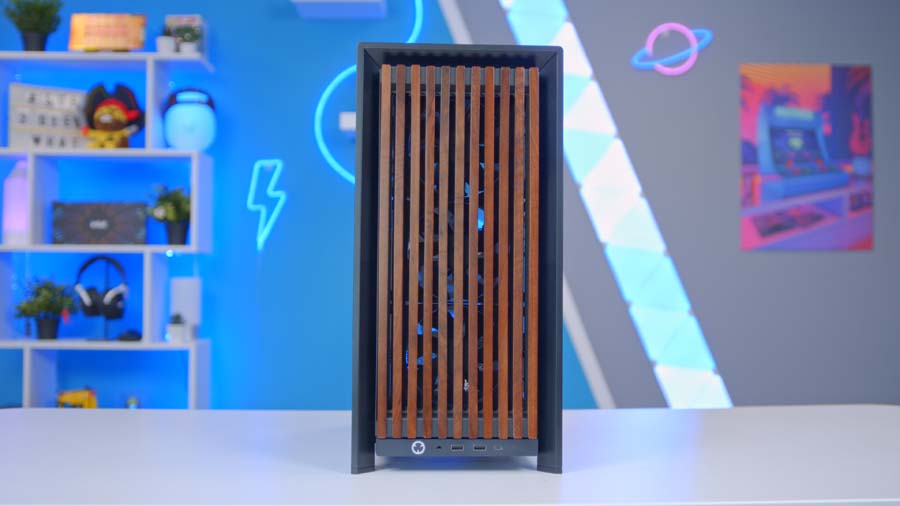
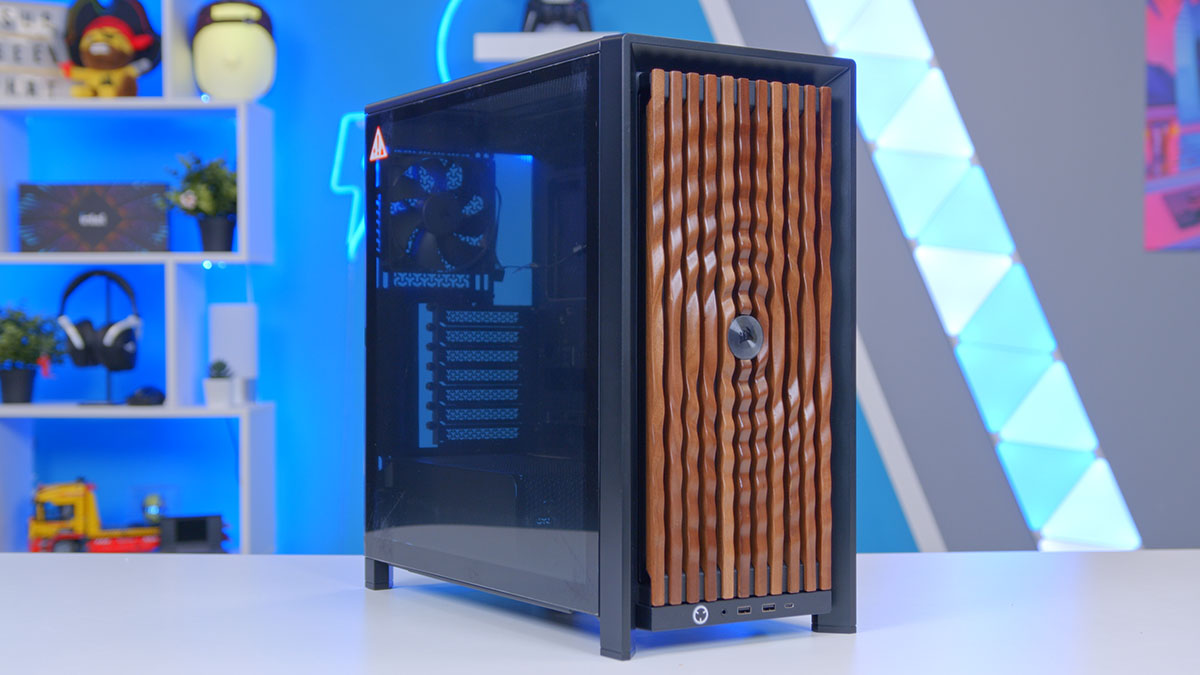
The FRAME 4000D Wood RS is perfect for those who prefer a more minimalistic approach to their PC setup. The key feature to highlight here is the addition of the real-wood front panel, FSC certified and not made with laminate or veneer, it’s the real deal. Shipping as standard with a walnut panel for those who purchase the FRAME 4000D Wood RS in black and with an oak panel for those who order in white.
Case Specifications
- Model Corsair FRAME 4000D WOOD RS
- Dimensions (H x W x L) 486 x 239 x 488 mm
- Material Steel, Tempered Glass, Solid Wood
- Motherboard Support Mini-ITX, Micro-ATX, ATX, E-ATX (up to 305 x 277 mm)
- Front Panel FSC-certified solid wood (White/Oak or Black/Walnut)
- Side Panel 3/4 Tempered Glass + Mesh (stock)
- Colourways White with Oak, Black with Walnut
- Included Fans 4 x RS120 (3x front, 1x rear) — motherboard-connected
- Cooling Support Front: 3x 120 / 2x 140 / 2x 200 mm Top: 3x 120 / 2x 140 mm Side: 3x 120 / 2x 140 mm PSU Shroud: 2x 120 mm Bottom: 1x 120 mm Rear: 1x 120 / 1x 140 mm
- Radiator Support Front: up to 360 mm Top: up to 360 mm Side: up to 360 mm Rear: up to 140 mm
- Expansion Slots 7 x Horizontal, 3 x Vertical
- Storage 2 x 2.5″ SSD, 1 x 3.5″ HDD
- Clearances GPU: 405 mm (with front fans) CPU Cooler: 170 mm PSU: 200 mm
- Dust Filters Front, Bottom, Side
- Front I/O 2 x USB 3.2 Gen1 Type-A 1 x USB 3.2 Gen2x2 Type-C 1 x Headphone/Mic Power + Reset
- PSU Support / Warranty ATX — 2 Year Warranty
Internally it’s spec-identical to the 4000X RS: same 4x RS120 fans pre-installed, same radiator support, same GPU and cooler clearances. It’s really a question of aesthetics over function and honestly, a wooden front panel on a gaming PC is a rare thing done well.
Accessories
The bigger story here though is the sheer amount of accessories added to the 4000D range, now covering nearly every external surface of the case design. The best bit? They’re all interchangeable, further backing that modular ethos for the FRAME. The ELITE tier of products are of course the standout accessories yet even they are fully interchangeable, no matter your budget Corsair have made it so you mix and match to your heart’s desire. Want to rock an ELITE WOOD front panel with standard steel motherboard tray? Go right ahead.
Front panels
FRAME 4000 RGB Flow Front Panel
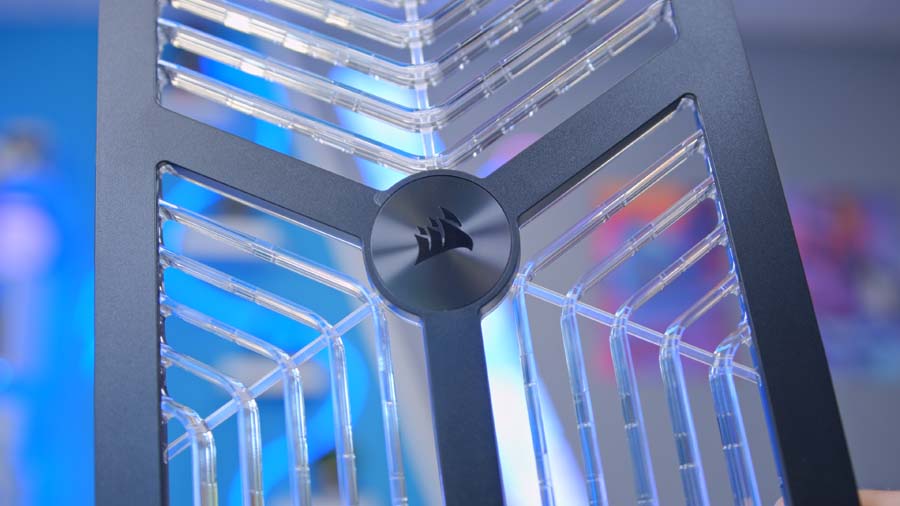
High-airflow ventilated panel with built-in ARGB lighting for a customisable look. A clear alternative to the stock 3D-Y Airflow panel for folks who want more RGB in their build. Available in Black or White.
FRAME 4000 WOOD Front Panel
Solid FSC-certified wood slats for a natural look with great airflow. Offered in Black with walnut or White with oak. Tool-less install.
FRAME 4000 ELITE WOOD Front Panel
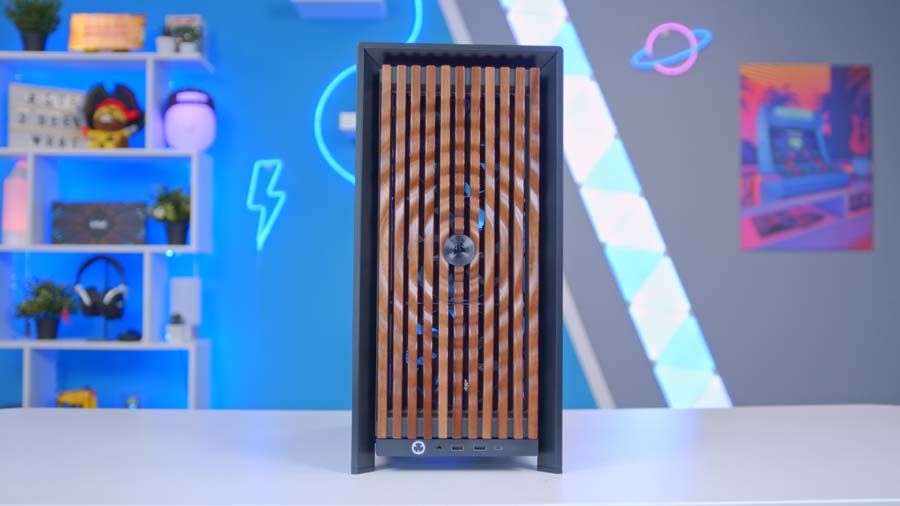
The ELITE WOOD panel takes the concept of the standard wood front and refines it. Both use genuine FSC-certified solid wood, no laminate, no veneer, but where the standard panel uses straight slats, the ELITE version features a parametric pattern milled into the wood for a more sculpted, design-led look.
FRAME 4000 Flat Glass Front Panel
A solid tempered glass front for showing off RGB intake fans behind it. Black or White.
FRAME 4000 Pixel Glass Front Panel
Tempered glass with a pixelated diffusion pattern that lets RGB lighting shine through in a more stylised way. Black or White.
Side panels
FRAME 4000 Glass + Mesh Side Panels
The stock option, with a 3/4 tempered glass top and mesh bottom section. Swappable liners let you go full ventilation, partially obscured, or blacked out completely.
FRAME 4000 Flat Steel Side Panel
A solid steel panel for a classic, closed-off look.
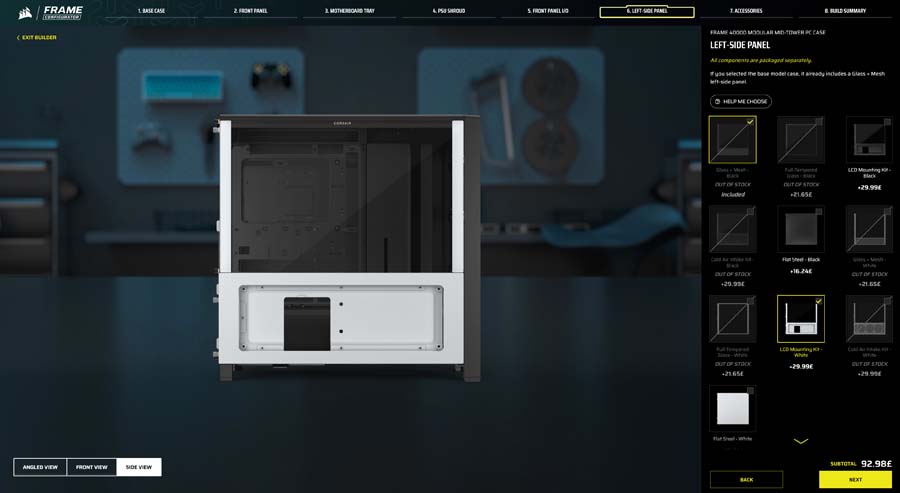
FRAME 4000 LCD Mounting Kit
Replaces the stock side with a 2/3 tempered glass panel and a slot for the XENEON EDGE 14.5″ LCD Touchscreen in the lower third. All internal cabling is included. Black or White.
FRAME 4000 Cold Air Intake Kit
A side-mounted fan array with 2/3 tempered glass up top and a bracket for 3x 120mm fans at the bottom. Installs using the existing thumbscrews. Black or White.
Motherboard Trays
FRAME Standard Steel Motherboard Tray
The included option. Light, sturdy steel, supports ATX, E-ATX, Mini-ITX, Micro-ATX and reverse-connector boards.
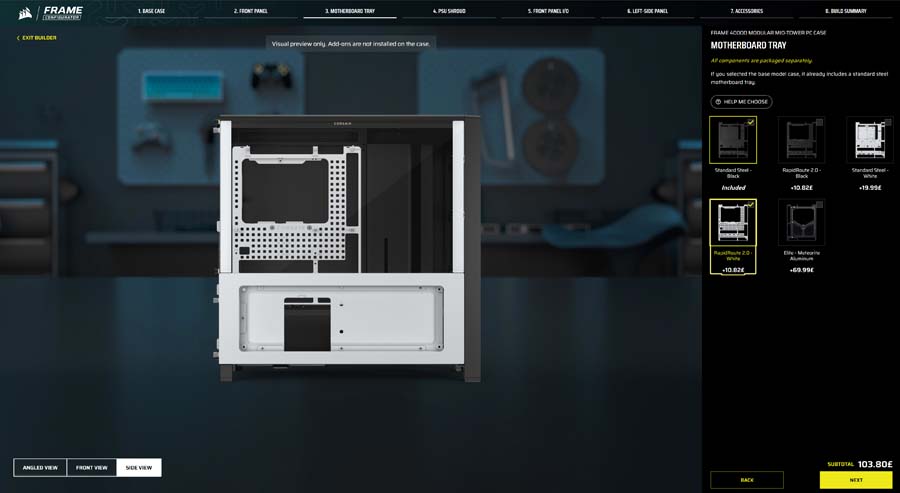
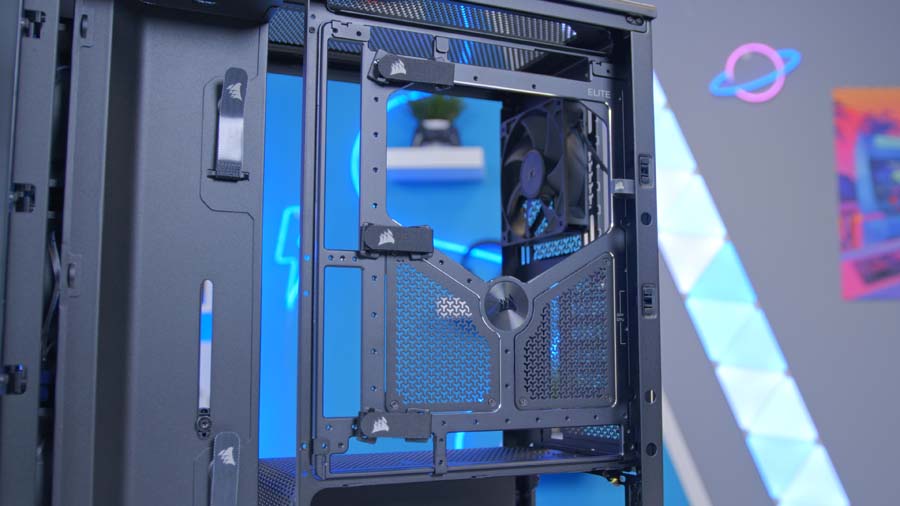
FRAME RapidRoute 2.0 Motherboard Tray
While it doesn’t carry the ELITE branding explicitly, the RapidRoute 2.0 tray slots into the premium tier by virtue of being the enthusiast cable management option. The tray uses a pegboard design with ratcheting cable ties that can be moved and rotated into whatever configuration suits your build, and the cable channels can be expanded laterally to accommodate thicker bundles.
FRAME ELITE Motherboard Tray (Meteorite Aluminium)
CNC’d from a single piece of aluminium with diamond-cut edges and a silver Meteorite finish. Supports all the same board sizes including reverse-connector ATX.
PSU Shrouds
FRAME 4000 Full-Length PSU Shroud
The included option, with a crossbar and plenty of room for tidy cable routing. Black or White. Not recommended with a full-length glass side panel.
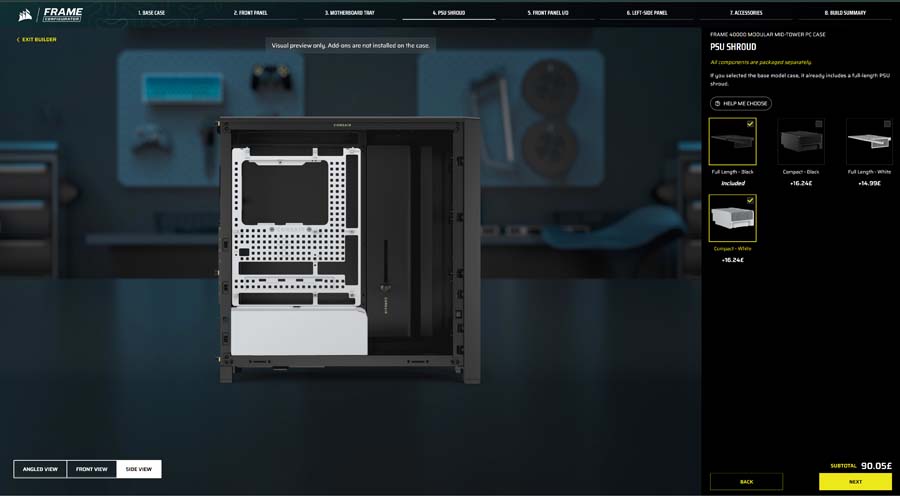
FRAME 4000 Compact PSU Shroud
A shorter, tidier shroud designed to pair with a full-length glass side so your gear is properly on display. Black or White.
Front Panel I/O
FRAME 4000 Standard Front Panel I/O
Comes with the base model. 2x USB 3.2 Gen1 Type-A, 1x USB 3.2 Gen2x2 Type-C (20Gbps), headphone/mic, and power button. Black or White.
FRAME 4000 ELITE Front Panel I/O
The premium option. 1x USB 3.2 Gen2x2 Type-C (20Gbps), 2x USB 3.2 Gen1 Type-C (5Gbps), plus a swappable MX-style Green mechanical power button with customisable ARGB lighting. Available in four colourways: White, Black, Galaxy, and Nova.
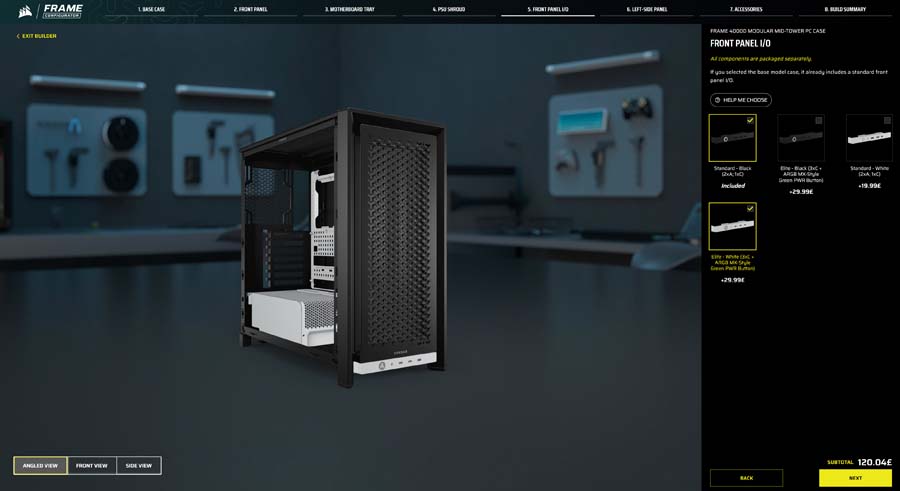
Yes, it’s a mechanical keyboard switch built into the case and because it’s MX-compatible, you can in theory swap it out for a different switch type if you want a different actuation feel (or sound). It’s a silly feature in the best way, and it comes in four colourways: White, Black, Galaxy, and Nova, giving you a bit of personality on the part of the case you actually touch every day.
FRAME Configurator
Possibly the most interesting piece of the announcement for many is the release of Corsair’s FRAME configurator, a web-based tool with real-time 3D visualisation allowing you to spec out and visualise your build ahead of checkout. Starting with the base 4000D, as parts are selected they become layered onto the preview. The configurator has functionality for rotating through three angles to see how your customised build will actually look.
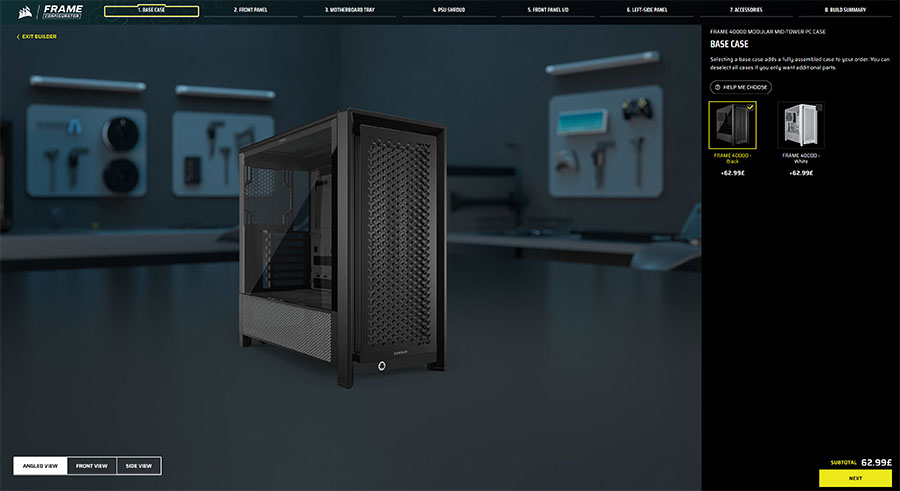
For users who already own a 4000D, you can deselect the case and a semi-transparent ghost will be used in its preview place, then layer on your chosen front panel, side panel, motherboard tray, PSU shroud, I/O, and other bits and add the lot to your basket. With the accessories shipping in separate packaging the ecosystem genuinely works as an upgrade path for existing FRAME 4000D owners, not just new buyers. If you bought a FRAME 4000D at launch, you can now effectively rebuild its exterior into something completely different without replacing the chassis. That’s genuinely rare in the case market, and the Configurator tool makes it far less of a gamble than buying accessories blind.
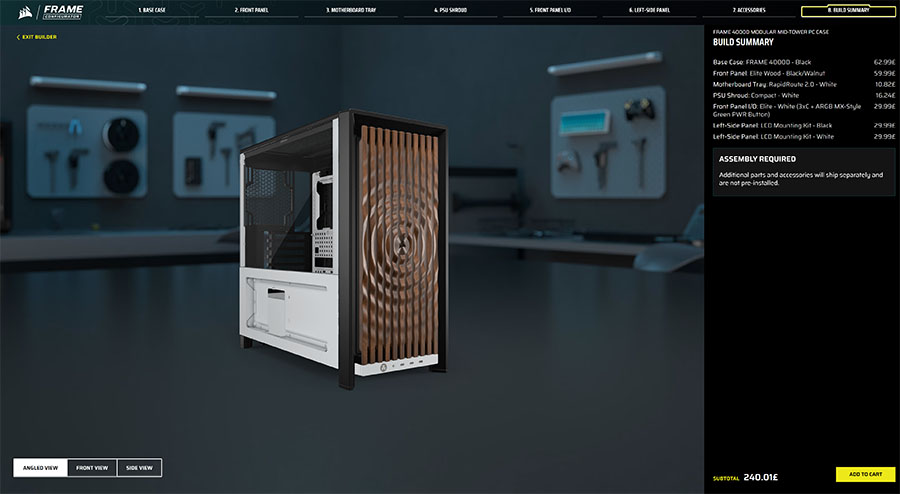
You can check out Corsair’s fancy new configurator for yourself here.

![FI_[SR190] HYTE X50 Ryzen 5 9600X & MSI RTX 5070 Ti](https://geekawhat.com/wp-content/uploads/2026/01/FI_SR190-HYTE-X50-Ryzen-5-9600X-MSI-RTX-5070-Ti-551x431.jpg)
![FI_[DP064] ASUS Prime AP303 + 9070XT](https://geekawhat.com/wp-content/uploads/2026/03/FI_DP064-ASUS-Prime-AP303-9070XT-551x431.jpg)
![FI_[DM93] Corsair 3200D Launch](https://geekawhat.com/wp-content/uploads/2026/03/FI_DM93-Corsair-3200D-LAUNCH-551x431.jpg)