
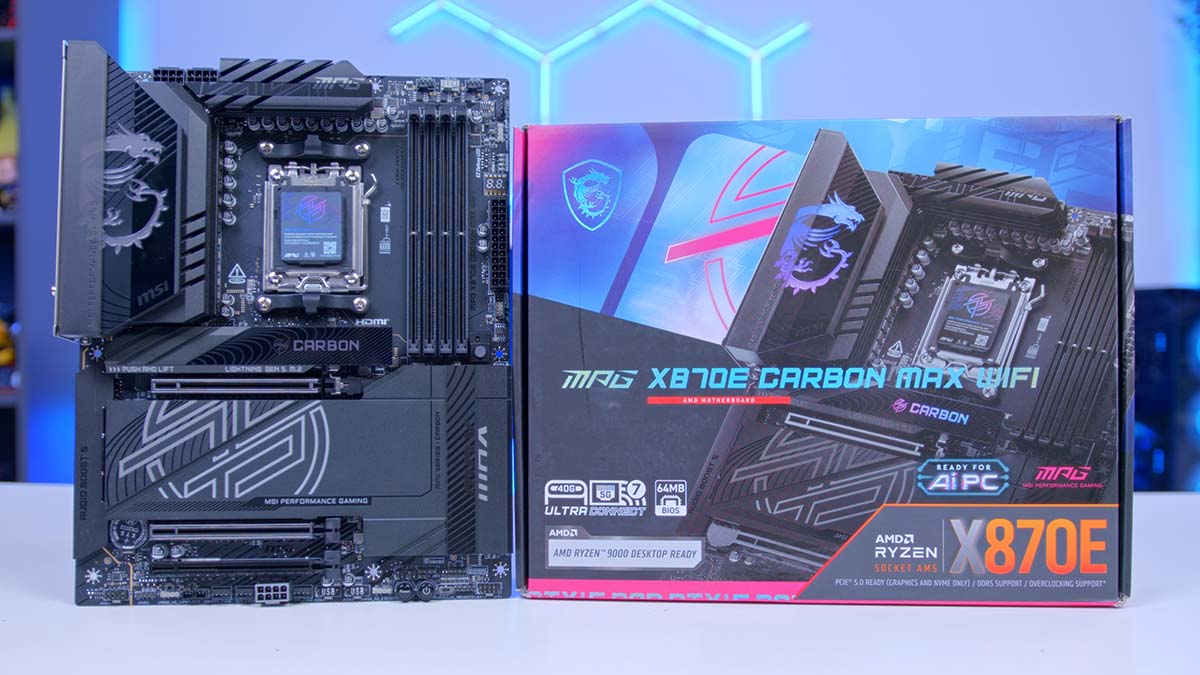
Motherboard refreshes are having a moment. MSI’s MAX series has been slowly working its way through the AM5 line-up, and this time it’s the Carbon’s turn with the MPG X870E CARBON MAX WIFI. The Carbon line has long occupied that sweet spot just below the flagships, offering most of the hardware enthusiasts care about without the eye-watering price tag of a Godlike.
If the MAX naming is new to you, here’s the short version. Instead of launching an all-new chipset or a fresh generation, MSI has been taking boards that already exist and reworking them, keeping the name and core platform but slotting in newer hardware and features. That means the X870E Carbon WiFi you may already know is still very much the foundation here. The MAX version is an evolution of it, not a replacement for the whole idea.
So what does MAX bring to the party? On paper, it’s a short list. A dedicated overclocking chip MSI calls OC Engine, a larger BIOS ROM, a reworked lane layout for the top two PCIe slots and a handful of quality-of-life extras for builders. Small changes, then. But small changes can still shift a recommendation, and one of them comes with a catch that’s simple to overlook on a spec sheet, so let’s dig in.
Specifications
At its core this is still an AMD X870E board for Socket AM5, so it’ll happily take anything from the Ryzen 7000, 8000 and 9000 Series. X870E pairs two of AMD’s Promontory 21 chips together, and that’s where the generous USB and SATA allowance comes from, as well as the USB4 support that comes as standard on every X870E board.
Power delivery is unchanged from the original Carbon, and that’s no bad thing. MSI’s Duet Rail Power System uses Smart Power Stages (SPS), all sitting on an 8-layer, server-grade printed circuit board (PCB) with 2oz thickened copper. In plain English, the voltage regulator module (VRM) here has plenty of headroom for even the hungriest Ryzen 9 chips, and that’s exactly what you want if you plan to tinker. MSI also lists Core Boost and Memory Boost among its performance features, alongside solid-pin power connectors for the main and CPU power inputs.
Motherboard Specifications
- Model MSI MPG X870E CARBON MAX WIFI
- Chipset / Socket AMD X870E / AM5
- Form Factor ATX (243.84mm x 304.8mm)
- CPU Support AMD Ryzen 9000 / 8000 / 7000 Series (AM5)
- Memory Support 4 x DDR5 UDIMM, up to 256GB, up to DDR5-8400+ (OC, 1DPC 1R), EXPO, CUDIMM (bypass mode)
- VRM Design 18+2+1 Duet Rail Power System, 110A SPS, dual 8-pin CPU power
- BIOS / Overclocking 64MB BIOS ROM, OC Engine (dedicated BCLK chip), Direct OC Jumper
- Graphics Card Compatibility 2 x PCIe 5.0 x16 slots (CPU), x16/x0 or x8/x8, Steel Armor II, EZ PCIe Release
- Expansion Card Compatibility 1 x PCIe 4.0 x16 slot (runs at x4)
- M.2 Compatibility 4 x M.2: 2 x PCIe 5.0 x4 (CPU), 2 x PCIe 4.0 x4 (chipset), 2280/2260
- SATA Storage 4 x SATA 6Gb/s ports
- Networking Wi-Fi 7 + Bluetooth 5.4 + Realtek 5GbE + Realtek 2.5GbE
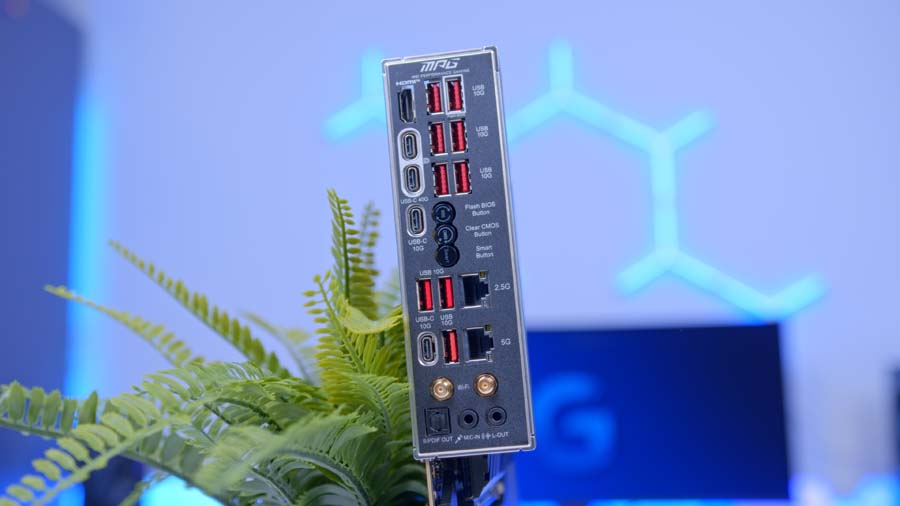
- Rear I/O 2 x USB4 40Gbps Type-C, 2 x 10Gbps Type-C, 9 x 10Gbps Type-A, HDMI 2.1, optical S/PDIF, Flash BIOS, Clear CMOS and Smart buttons
- Front I/O Headers 1 x 20Gbps Type-C, 2 x 5Gbps headers (4 ports), 2 x USB 2.0 headers (4 ports)
- Audio Realtek ALC4080, 7.1-channel, Audio Boost 5
- Colour Black (carbon black with Mystic Light RGB)
Memory support covers DDR5 with AMD EXPO (Extended Profiles for Overclocking), plus CUDIMMs in clock driver bypass mode, though MSI warns that some CPUs may not boot with them yet. The DIMM slots use single-sided latches, and the BIOS adds MSI’s High-Efficiency Mode timing presets and Latency Killer, which MSI says cuts memory latency at high frequencies.
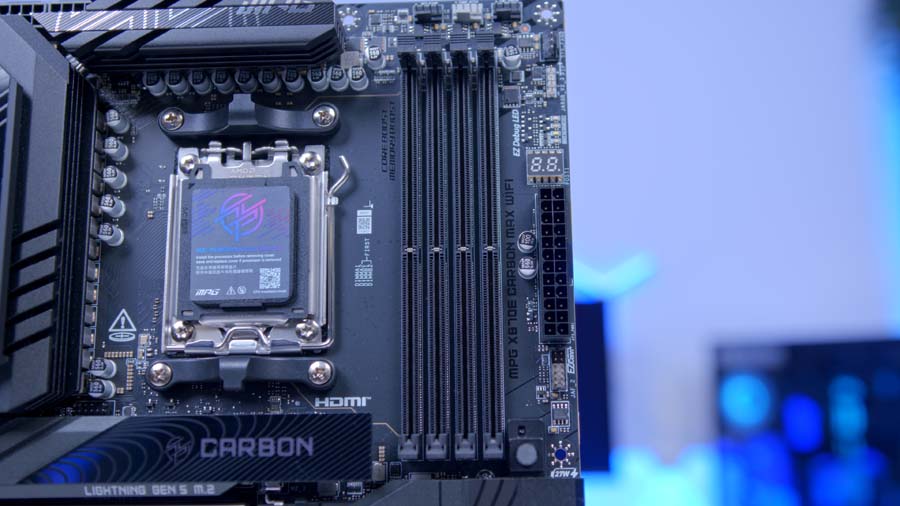
The top two full-length slots both draw PCIe 5.0 lanes from the CPU, while the third runs at PCIe 4.0 x4 from the chipset, a handy home for a capture or network card. Storage is a Carbon strong point, with Gen5 M.2 slots on the CPU, more on the chipset and RAID support across NVMe and SATA drives, although MSI limits RAID 5 to Ryzen 9000 chips.
Networking pairs two Realtek wired ports with a pre-installed Wi-Fi 7 module supporting 320MHz channels on 6GHz and Multi-Link Operation (MLO), and the EZ Antenna clips on without any screwing. The rear I/O is packed with USB, almost all of it 10Gbps or faster, and Ryzen chips with integrated graphics can output over HDMI 2.1, which MSI rates for 8K at 60Hz, or over the rear USB-C ports.
Audio runs through a Realtek codec under MSI’s Audio Boost 5 banner, with a dedicated headphone amplifier and an isolated signal path. It’s plenty for a gaming headset, and anyone with a proper DAC will bypass it anyway.
MSI MPG X870E CARBON MAX WIFI Design
Aesthetic
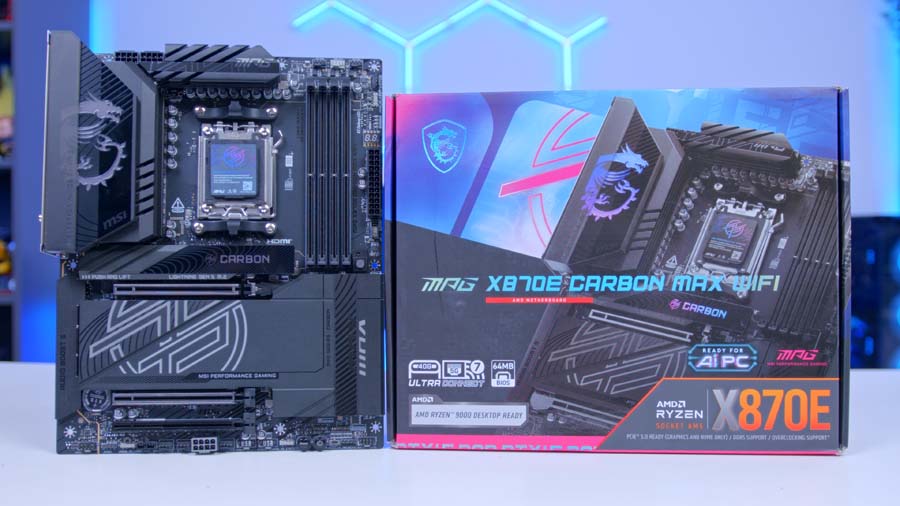
MSI sums up the look as carbon black with reflective accents over Mystic Light RGB, and it’s an understated board that’ll sit happily in a black build without fighting your GPU for attention. If you’d rather go fully dark, the EZ LED Switch kills every LED in one go, and the I/O shield comes pre-installed.
Cooling
Frozr cooling covers everything. The VRM heatsinks are linked by a heat pipe, with 7W/mK pads on the MOSFETs and extra pads on the chokes, while double-sided M.2 Shield Frozr covers give hot Gen5 SSDs a better chance of holding their speed under sustained load.
Fan control is generous too, with seven fan headers including a combo header that detects whether it’s driving a pump or a fan, a thermal sensor header, and Frozr AI Cooling, which adjusts fan speeds from both CPU and GPU temperatures.
Builder-Friendly Touches
This is where MSI keeps winning. EZ M.2 Shield Frozr II covers and EZ M.2 Clip II retention mean no tiny screws, and EZ PCIe Release frees your graphics card with one press, which anyone who’s reached under a four-slot GPU will appreciate. New for the MAX is PinSafe, a pin-less backside PCB that MSI says makes the board safer to handle during assembly.
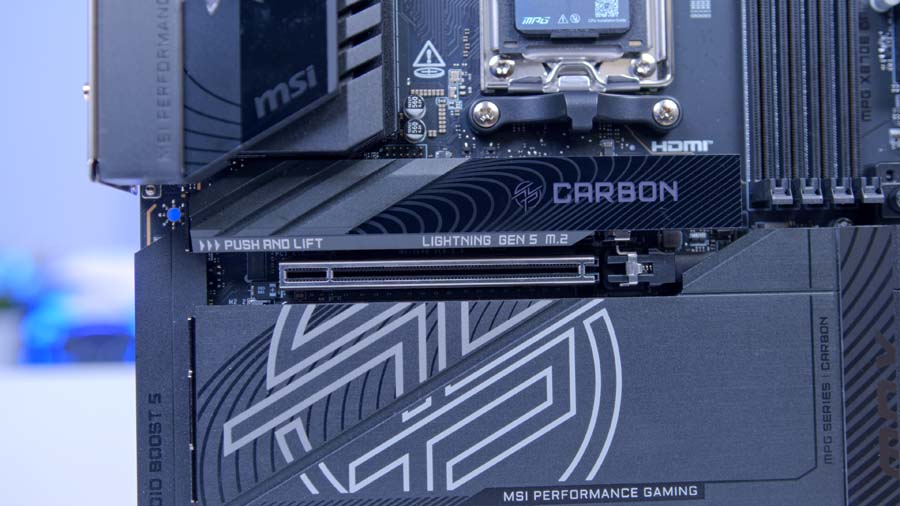
Round the back, Flash BIOS lets you update firmware with no CPU or memory installed, alongside Clear CMOS and a configurable Smart Button. Debugging is handled by EZ Debug LEDs, a digit display that doubles as a temperature readout, and a new memory detection LED that MSI says lights up when it finds faulty RAM.
Layout and Headers
MSI colour codes its headers, with the pump, ARGB and supplemental PCIe power headers in grey and the JAF_2 EZ Conn header in white. You get three ARGB Gen2 headers and a 12V RGB header, and the M.2 signal sources are printed on the PCB, which matters more than usual on this board, for reasons covered below.
MSI X870E Carbon MAX vs Carbon WiFi: What’s the Difference?
I’ve gone through MSI’s spec sheets for both boards side by side, and the table below sums up where they differ.
Motherboard Comparison
MSI X870E Carbon MAX vs Carbon Comparison
| ⠯ Motherboard | ⠯ VRM | ⠯ OC Engine | ⠯ BIOS ROM | ⠯ Top Two PCIe 5.0 Slots | ⠯ M.2_2 Shares Bandwidth With | ⠯ M.2_3 Drive Sizes | ⠯ PinSafe | ⠯ Memory Detection LED | ⠯ Networking |
|---|---|---|---|---|---|---|---|---|---|
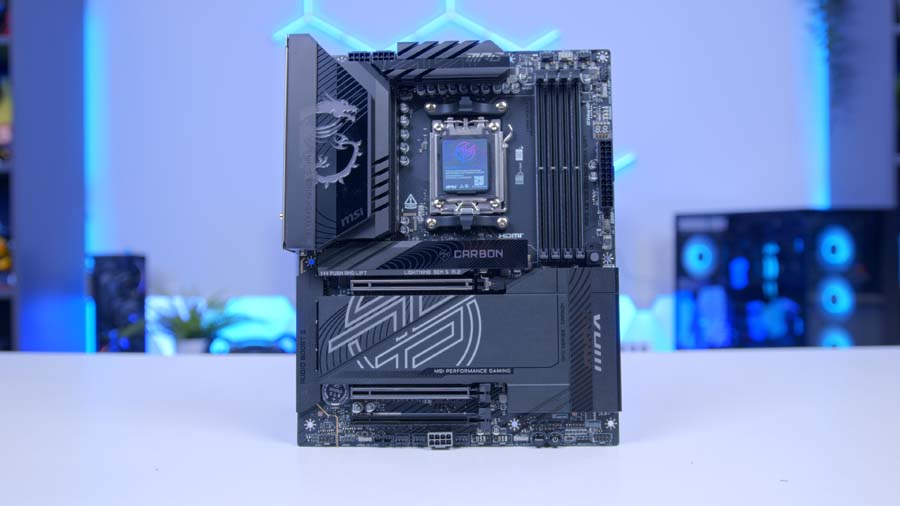
MSI MPG X870E CARBON MAX WIFI 2025 MAX refresh |
18+2+1, 110A SPS | Yes | 64MB | x16/x0 or x8/x8 | USB4 ports | 2280/2260 | Yes | Yes | 5GbE + 2.5GbE, Wi-Fi 7 |

MSI MPG X870E CARBON WIFI Original 2024 release |
18+2+1, 110A SPS | No | Not stated by MSI | x16/x0 or x8/x4 | Second PCIe x16 slot | 22110/2280 | Not listed | Not listed | 5GbE + 2.5GbE, Wi-Fi 7 |
They share the same chipset, power delivery, memory support, four M.2 slots, networking and rear I/O. The differences come down to overclocking hardware, firmware storage and how the CPU’s PCIe lanes are divided.
OC Engine and the Direct OC Jumper
The biggest addition is OC Engine, a dedicated clock generator that lets you adjust the base clock (BCLK) independently in MSI’s BIOS. On AM5, BCLK has traditionally been tied to PCIe and NVMe storage, so pushing it risked knocking your graphics card or SSDs off balance, which is why most AM5 tuning sticks to Precision Boost Overdrive, Curve Optimizer and memory. MSI says OC Engine keeps the iGPU, memory, PCIe and NVMe stable while you tune.
There’s also a new Direct OC Jumper for nudging BCLK from within your operating system, though MSI notes that pin-header accessories aren’t included in the box.
A Larger BIOS ROM
The MAX gets a larger BIOS ROM, which MSI says leaves room for a full-featured BIOS as AMD adds new AM5 processors. BIOS chips tend to fill up as CPU support grows, sometimes forcing manufacturers to trim features, so if you plan to drop in a future Ryzen, the extra headroom is reassuring.
PCIe Lanes and the USB4 Trade-Off
This is the change to understand before you buy. On the original Carbon, running two cards left the second slot with half the first’s bandwidth, shared with the M.2_2 slot. On the MAX, the top two slots split the graphics lanes evenly, and M.2_2 no longer touches them.
Instead, M.2_2 shares bandwidth with the two USB4 ports. Fill it and USB4 drops to x2 speed, and forcing the slot to full x4 in the BIOS switches USB4 off entirely. A single graphics card and one Gen5 SSD won’t notice either layout, a second high-bandwidth card favours the MAX, and two Gen5 SSDs plus full-speed USB4 favours the original.
The Smaller Changes
The MAX also adds PinSafe, the memory detection LED and a listed TPM header, and reshuffles the header colours. One step back is drive length: the original’s M.2_3 slot took longer 22110 drives, while every M.2 slot on the MAX tops out at 2280.
Which One Should You Buy?
At similar money, buy the MAX for the BIOS headroom and OC Engine. If the original is noticeably cheaper, it’s still an excellent board, as our full review found.
And if you already own the original Carbon, there’s no reason to upgrade.
From Our Full Review
☆☆☆☆☆
4.3/5

Pros and Cons
Pros
- Dual LAN support
- Excellent rear IO
- Easy to build with
Cons
- JAF header is niche
- Only one x16 slot
- Expensive
Bottom Line
The MSI MPG X870E Carbon WiFi is an excellent top-end motherboard, with dual LAN ports, a bountiful set of high-speed rear I/O, a vast selection of tool-less sockets and slots, and a range of internal headers for plenty of different build configurations. Its sleek black design with customisable RGB looks great, and the only major caveat is price, as the Carbon sits above MSI’s Tomahawk, Mortar and Pro ranges. If you’re building a PC that prioritises strong performance, it’s definitely an option we’d recommend looking at.
Read The Full ReviewFeatures We Like
OC Engine
Base clock tuning has been off limits on AM5 for most people, and OC Engine changes that by handing the CPU’s base clock to a dedicated chip, separate from everything else. Most buyers won’t touch it, but for the enthusiasts the Carbon is aimed at, paired with that overbuilt VRM, it’s a meaningful addition.
An Even PCIe 5.0 Lane Split
An even split between the top two slots gives a second card, whether that’s a capture card, fast network card or NVMe add-in board, a decent slice of CPU-fed PCIe 5.0 bandwidth, while a lone graphics card still gets the full allocation. Add Steel Armor II, which MSI says bears 21% more weight than the previous generation, and EZ PCIe Release, and expansion is about as well thought out as it gets at this level.
Features We Don’t Like
USB4 and M.2_2 Share Bandwidth
Use the second Gen5 M.2 slot and your USB4 ports slow down, or switch off entirely if you force that slot to full speed. Most people can fill M.2_1 first and use the chipset slots for everything else, but anyone planning two Gen5 SSDs and a fast USB4 dock will have to pick a priority, and that’s a frustrating compromise on a board at this level.
A Light-Touch Refresh
Beyond OC Engine and the BIOS chip, the VRM, networking, audio and USB line-up are carried straight over. That’s fine if you’re buying new, but there’s little here for existing Carbon owners, and the original remains a strong option if it’s cheaper and BCLK tuning doesn’t interest you.
Conclusion
In market terms, the Carbon MAX sits firmly at the premium end of the mainstream. It’s priced above MSI’s own MAG X870E Tomahawk MAX WIFI, which shares the OC Engine chip and the larger BIOS but makes do with a smaller VRM, a single 5GbE port and no Smart Button. Above it sit MSI’s MEG flagships, for those with deeper pockets.
The Carbon MAX suits two types of buyer best. First, enthusiasts building around a high-end Ryzen 9 or X3D chip who want to experiment with base clock and memory tuning without stretching to a flagship. Second, builders who value a smooth assembly experience and want a board that’s packed with connectivity from day one, and who’ll still be happy with it a few CPU generations down the line.
If you’re on a tighter budget and don’t need dual LAN or the extra headers, the Tomahawk MAX is the more sensible buy. And if you already own the original Carbon, keep it. But for anyone shopping for a new high-end AM5 board right now, the Carbon MAX is an easy one to recommend.