

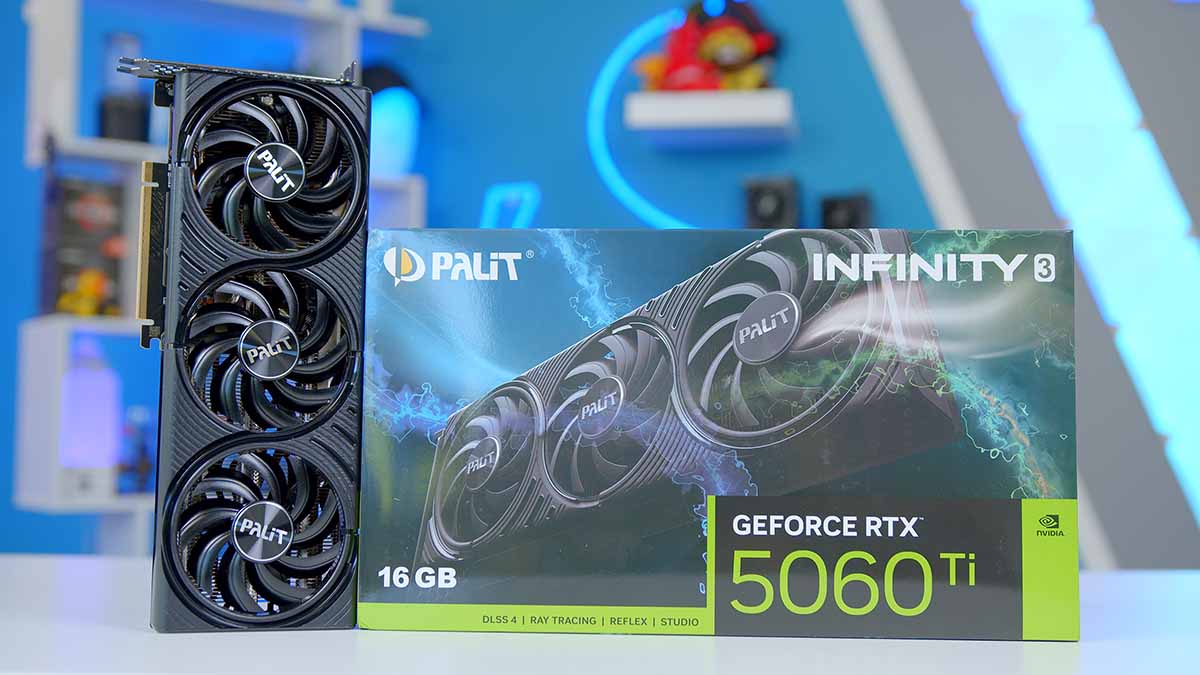
The GeForce RTX 5060 Ti is the card most of you are actually buying. It doesn’t get the launch day queues or the halo coverage, but it’s the one that ends up in first gaming PCs and long overdue upgrades, and it’s the tier where a bad memory decision does the most damage.
Which brings us to the 16GB model. NVIDIA sells two versions of this card that are identical in every way except the frame buffer, so the whole argument for the pricier one rests on what happens when a game asks for more memory than it’s been given. We’ve had it on the bench in our standard suite to find out how much that’s worth today.
NVIDIA GeForce RTX 5060 Ti 16GB Specifications
On paper, then, the Ti is the middle child of the RTX 5060 family. It picks up a chunk more cores than the plain RTX 5060 and carries the same NVIDIA Blackwell feature set as the rest of the RTX 50 range, so DLSS 4, Multi Frame Generation and the latest encoders all arrive without paying for a higher tier.
The part worth dwelling on is the memory. Both versions of the Ti run the same GPU at the same clocks, so the 16GB card isn’t quicker in any raw sense, it just stops running out of room. What it can’t escape is the width of the bus feeding that memory, and we’ll come back to what that costs.
Graphics Card Specifications
- Model NVIDIA GeForce RTX 5060 Ti 16GB
- Architecture NVIDIA Blackwell (GB206)
- CUDA Cores 4608
- Boost Clock 2.57 GHz (reference)
- Memory 16GB GDDR7
- Memory Bus 128-bit
- Memory Speed 28 Gbps
- Memory Bandwidth 448 GB/s
-
RT & Tensor Cores
RT cores: 36 (4th Gen)Tensor: 144 (5th Gen)
- Total Graphics Power 180W
- Interface PCI Express 5.0 x8
- Display Outputs 3 x DisplayPort 2.1b, 1 x HDMI 2.1b
NVIDIA GeForce RTX 5060 Ti 16GB Performance
Right, the numbers. Every graphics card we test goes through the same suite on the same bench, so the charts below stack the 5060 Ti 16GB up against everything else we’ve run rather than leaving you to guess at the context. All of it is rasterisation only, with upscaling and frame generation switched off.
Where it looks strong is the back catalogue at 1080p. Hogwarts Legacy has it finishing second out of the eighteen cards in that chart, and Marvel Rivals puts it third, with 1% lows that sit close enough to the average to feel smooth in the hand. Cyberpunk 2077 at 1080p is more of a midfield result, though the frame pacing still holds up better than several cards finishing above it.
The newer, heavier games are where it comes unstuck. Move up to 1440p and it slides a long way down the order in Battlefield 6 and Arc Raiders, and in the latter it finishes behind the 8GB version of itself, so the frame buffer clearly isn’t what’s holding this card back. The RX 9070 GRE is ahead of it in every test we ran. Treat it as a 1080p card that can stretch to 1440p in lighter or older titles, and treat the 16GB as insurance for later rather than something buying you frames today.
Conclusion
So who’s it for? If you’re building at 1440p and you’d like the system to still be fine in three years, this is the version to get. The 8GB card belongs in 1080p builds, where the money saved buys something more useful elsewhere in the parts list.
The awkward bit is the ladder above it. As the 16GB Ti drifts up towards the next tier, the case for it thins out fast, and you’re usually better off holding on and saving a little longer. Where it lands best is in prebuilts and fixed budget upgrades, which is exactly where this tier has always lived. Bought at the right price it’s an easy 1440p recommendation. Bought at the wrong one, you’re paying a mid-range premium for a card built to sit underneath the mid-range.

![FI_[SR190] HYTE X50 Ryzen 5 9600X & MSI RTX 5070 Ti](https://geekawhat.com/wp-content/uploads/2026/01/FI_SR190-HYTE-X50-Ryzen-5-9600X-MSI-RTX-5070-Ti-551x431.jpg)

![FI_[DM82] TT MineCUBE Build](https://geekawhat.com/wp-content/uploads/2025/12/FI_DM82-TT-MineCUBE-Build-551x431.jpg)
![FI_[DM85] O11D Evo RGB White + 5080](https://geekawhat.com/wp-content/uploads/2025/12/FI_DM85-O11D-Evo-RGB-White-5080-551x431.jpg)