

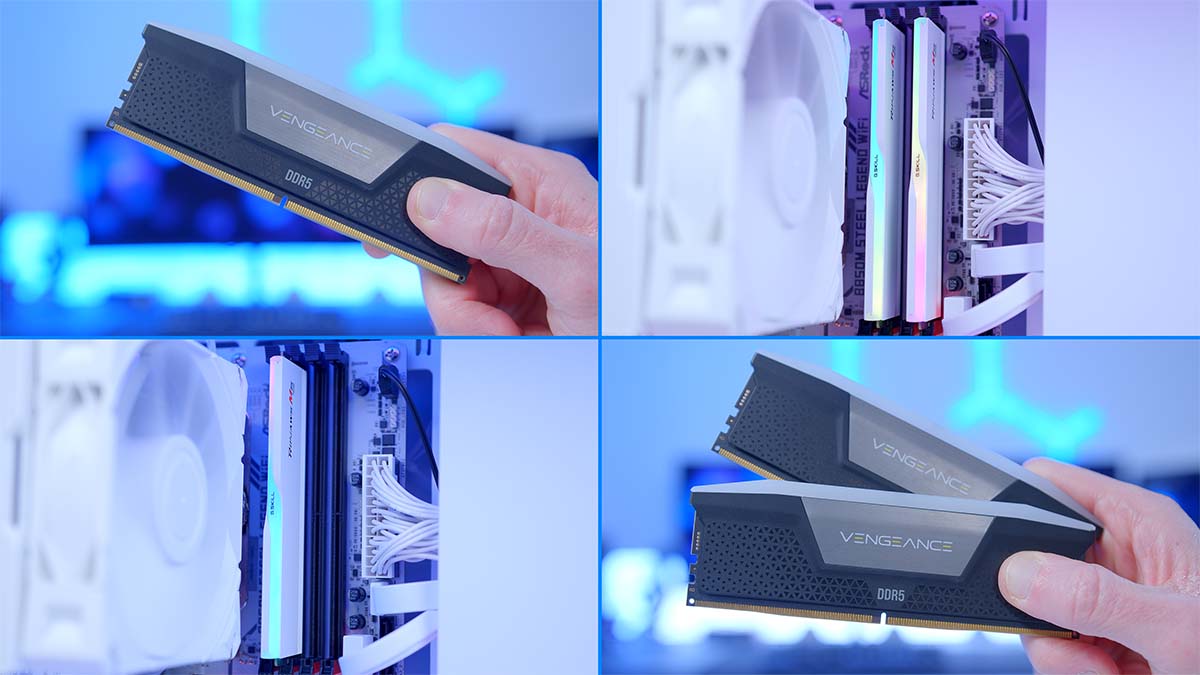
A question that has entered the minds of many budding PC builders is whether it’s feasible to cut corners and slash the cost of building a capable gaming PC by reducing the RAM capacity in a rig, whilst still maintaining enjoyable gameplay or functional applications, whilst producing creative media. So we’ve conducted a series of research to determine whether 32GB is really necessary, saving you a couple of bucks.
It’s no secret that RAM prices have skyrocketed over the past few months. A perfect storm of supply-and-demand mismatches among OEMs (Original Equipment Manufacturers), brand partners, and AI Data Centres has left consumers in the lurch. As manufacturers scramble to produce High-Bandwidth Memory (HBM) for the AI gold rush, standard DDR5 production has been pushed to the back burner.
Since October 2025, we’ve witnessed a near-exponential price hike across all capacities and speeds, and in many cases, costs have more than doubled. While new production facilities are on the horizon, they won’t be online until 2027 at the earliest. This leaves us in a precarious position: In a market where every gigabyte now carries a premium, is 16GB still the ‘safe’ baseline, or has 32GB become a mandatory investment despite the heavily inflated cost? If you’d like a deeper look at the situation, check out the video below from our GeekaWhat YouTube Channel.
The Market
Taking a look at one of the most popular DDR5 RAM kits on the market, the Corsair Vengeance RGB DDR5 6000MHz 2x16GB, we can see that over the past year, the lowest price that PriceSpy has recorded was £75.16, in May of 2025. In January 2026, the same kit is priced at around £399.95. This is a shocking 432.13% increase.
It is important to note that this price hike isn’t necessarily a result of brand-level gouging. Companies like Corsair are downstream of the actual silicon fabrication; when the cost of the raw DRAM modules from suppliers like SK Hynix or Micron triples, that cost is inevitably passed through the supply chain to the final product on the shelf.
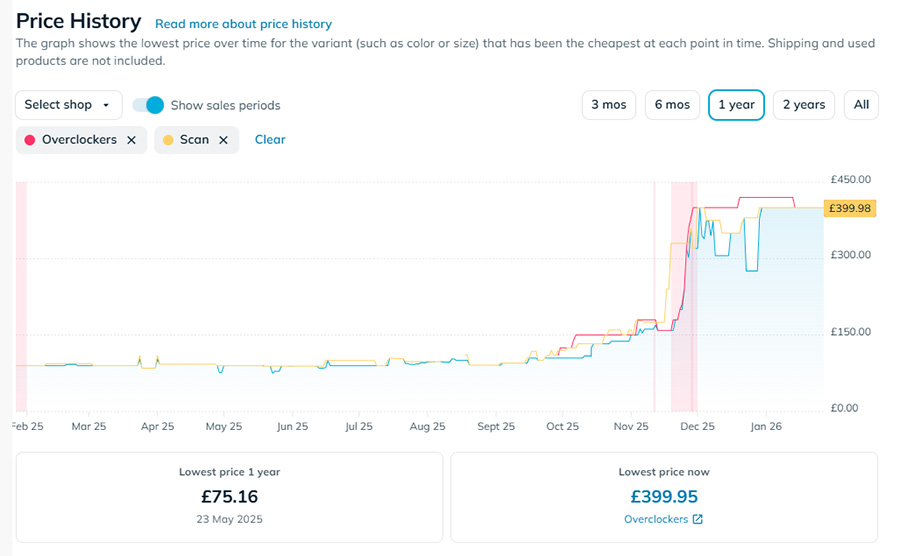
When configuring the graph using PriceSpy, we have selected only the brands we work with, as these will reflect the prices you see on the GeekaWhat channel and website. The price of RAM starts to climb in September 2025, and by October 2025, it is clear that prices are definitely rising. This situation applies to all DDR5 ram, and it has affected DDR4 RAM kits as well.
DDR4 has taken a pricing hit because many budget-conscious builders have retreated to DDR4 to control costs while still building a PC capable of running the latest releases. And now, in some cases, high-end DDR4 kits are more expensive than DDR5 was six months ago. So, options are only reducing as time progresses.
Suggested Article: Best DDR5 RAM to Buy in 2025
Use Cases
There are two major situations where RAM becomes a key consideration in a PC build: gaming and content creation. Both require applications to remain open for extended periods and to handle large amounts of data simultaneously. RAM stores this active data so your system stays fluid and responsive. Since it’s volatile, it can quickly clear and refresh information that’s no longer needed, keeping performance smooth. In short, RAM is your PC’s high‑speed workspace.
In gaming workloads, RAM stores essential data like textures, assets, and scripts so the CPU can access them quickly. This helps reduce stuttering, smooth out load times, and maintain consistent performance. It also enables multitasking, keeping Discord, YouTube, or other background apps open without impacting gameplay – as long as you have enough capacity.
For content creation, RAM acts as a temporary workspace for demanding applications. Editing high‑resolution media, running multiple creative tools, and multitasking all require sufficient memory. As long as the combined memory needs of your open applications stay within your installed RAM’s capacity, your system can handle these tasks without lag.
Both gaming and content creation use RAM heavily, but in different ways. Games need fast access to assets for smooth performance, while creative workloads need large amounts of memory to manipulate big files and run multiple tools at once.
Suggested Article: What is RAM & What Do You Need it For?
Gaming Performance Benchmarks
For this benchmark, we used an AMD Ryzen 7 9800X3D with a Lexar NM790 M.2 NVMe SSD, and for our RAM, we used G.SKILL’s Trident Z5 NEO with a speed of 6000MHz and a CAS latency of CL30 and swapped between either 16GB or 32GB so as to see the performance differences. For each resolution, we also changed the graphics card to knock CPU and GPU-based bottlenecks on the head before they appear. The graphics cards used were the AMD Radeon RX 9060 XT 16GB for 1080p, the AMD Radeon RX 9070 XT 16GB for 1440p, and the NVIDIA GeForce RTX 5080 for 4K testing.
Call of Duty: Black Ops 7 (@ 1080p High)
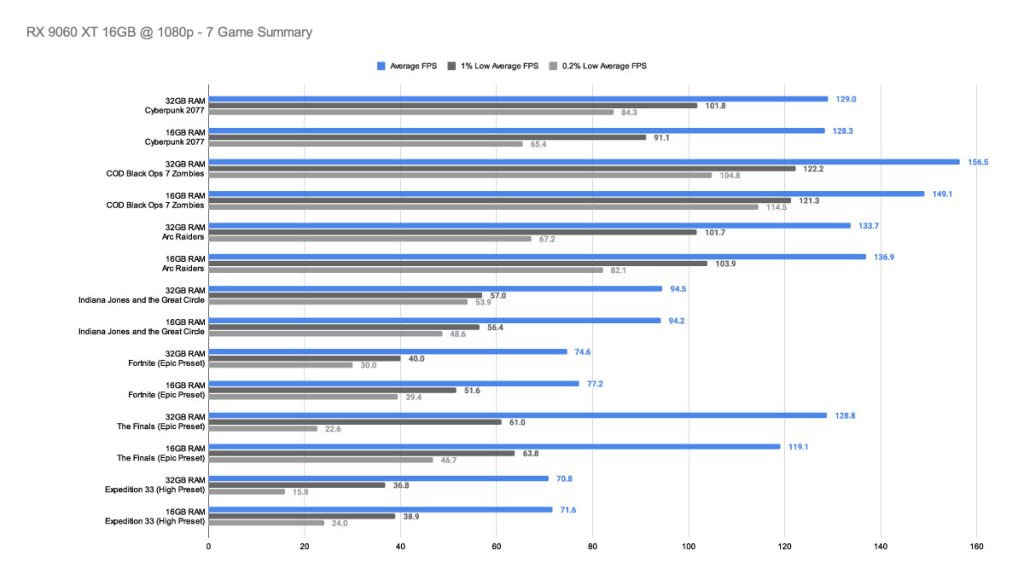
In COD, 16 GB of RAM averages 149.1 FPS, and 32GB averages 156.5 FPS; this equates to around a 5% performance uplift with double the base level of RAM. Strangely enough, there was tighter frame pacing in our 16GB runs, where the game’s overall stability seems to be slightly handled better.
Cyberpunk 2077 (@ 1080p High)
For the 16GB benchmark in Cyberpunk 2077, the average framerate was 128.3 FPS; in the 32GB runs, it was only slightly higher at 129 FPS. It’s the Lows where we see a bigger difference: 1% Lows at 101.8 FPS for 32GB, and 1% Lows at 91 FPS for 16GB. 0.1% Lows resulted in a 20 FPS difference, with the 32GB kit remaining in the lead.
Arc Raiders (@ 1080p High)
In Arc Raiders, the 16GB option leads with a framerate of 136.9 FPS. It really charges ahead in the 0.1% Lows readings, where the 16GB capacity provides 16 frames more per second than the 32GB capacity, resulting in a smoother overall gameplay experience. The 32GB kit averaged 133.7 FPS.
Indiana Jones and the Great Circle (@ 1080p High)
Lastly, for this round of testing, we come to Indiana Jones and the Great Circle. In both capacities, we saw virtually the same average frame rate of around 94 FPS, and a very close 1% Lows of around 56 FPS. Where the statistics showed any difference was the 0.1% Lows, and it was only a 5-frame difference in the worst of the worst of times.
Call of Duty: Black Ops 7 (@ 1440p High)
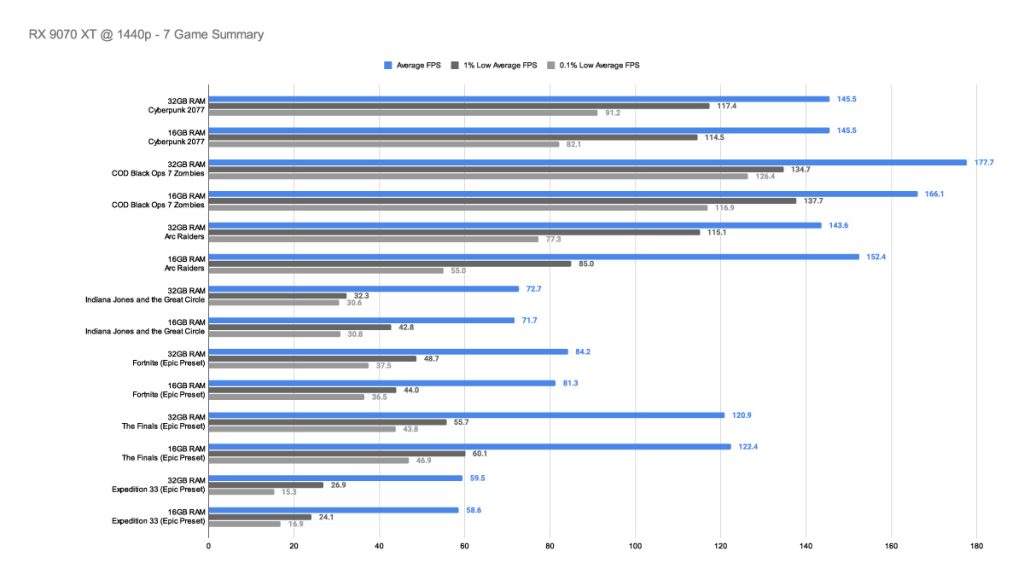
Moving on to our testing for COD, at 1440p with high graphics settings, the 32GB kit is our winner, with a framerate of 177.7, versus the 16GB kit, which totalled at about 166.1 FPS, resulting in the 32GB kit reigning in about 11 FPS more on average translating to about a 7% framerate improvement on average.
Cyberpunk 2077 (@ 1440p High)
Cyberpunk 2077 was a title that surprised us! Both RAM kits delivered the exact same average FPS to the decimal point: 145.5 FPS. The differences hide in the 1% and 0.1% lows, where the 32GB kit provides more frame stability. This benchmarking scenario suggests there was a slight CPU bottleneck, which explains the similar results.
Arc Raiders (@ 1440p High)
For Arc Raiders, the 16GB kit averages 152.4 FPS, about 9 frames higher than the 32GB kit. The issue with the 16GB kit is that the framerate is insecure. The 32GB really shines in terms of frame consistency; however, as even in the worst of times, the 32GB kit will offer around 20 FPS more, which can really make a difference, especially when, in this case, the 20 FPS more pushes it over the 60 FPS threshold, which means the gameplay will still appear smooth.
Indiana Jones and the Great Circle (@ 1440p High)
This game changes the tables slightly, where the 16GB kit offered the most stability. Both kits averaged around 72 FPS, but the frame consistency disparity between the 16GB and 32GB kits is where the 16GB kit gains an extra 10 FPS in challenging moments.
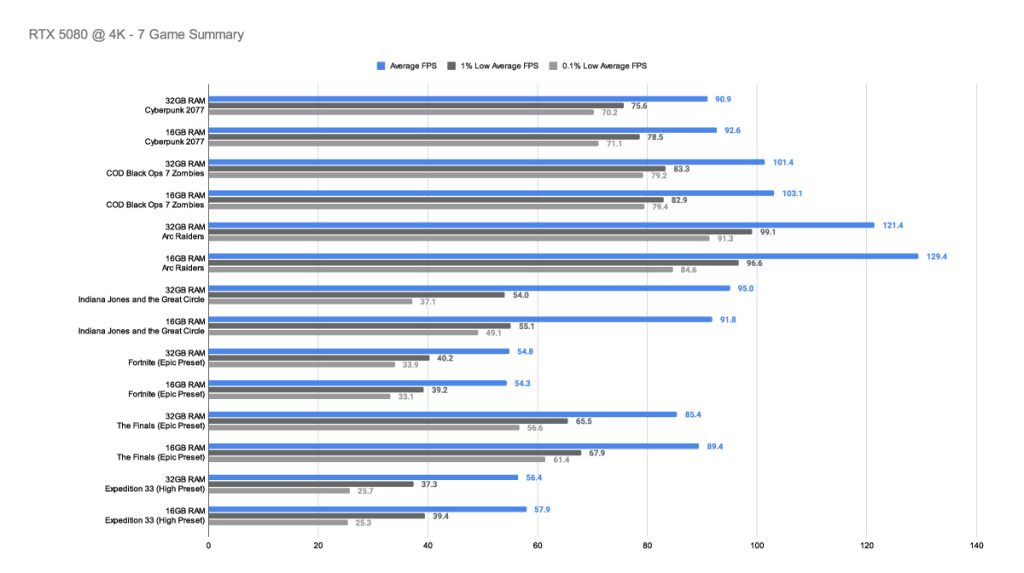
In our 4K testing, results show that using 16GB in a system built with higher-end components typically performs better. In all the games we tested, except for two (Fortnite and Indiana Jones and the Great Circle), the 16GB of RAM offered a higher framerate and better frame pacing. 32GB offered Indiana Jones and the Great Circle a slightly higher framerate and a more stable, improved one. In Fortnite, the average frame rate was similar, but we saw an improvement on the 1% Lows with 32GB of RAM. This suggests that the GPU becomes a slight bottleneck, and with 16GB of RAM, the configuration uses a single-channel bandwidth, which can force tighter sub timings, improving latency and affecting frame pacing and 1% Lows, which matter most at 4K.
Content Creation Performance
For this series of testing, we used an AMD Ryzen 9 7950X, an NVIDIA GeForce RTX 4080 Super, and we also used a maximum of 32GB (2x16GB) of DDR5 memory with a speed of 4800 MT/s and a minimum of the same RAM but only 16GB, by removing one stick of the pair. Both the CPU and GPU are powerful enough to avoid bottlenecks between them, so any cracks should show up at the RAM level during application runtime.
The goal of this benchmarking series is to replicate real-world workloads using scenarios we face day to day at Geekawhat.
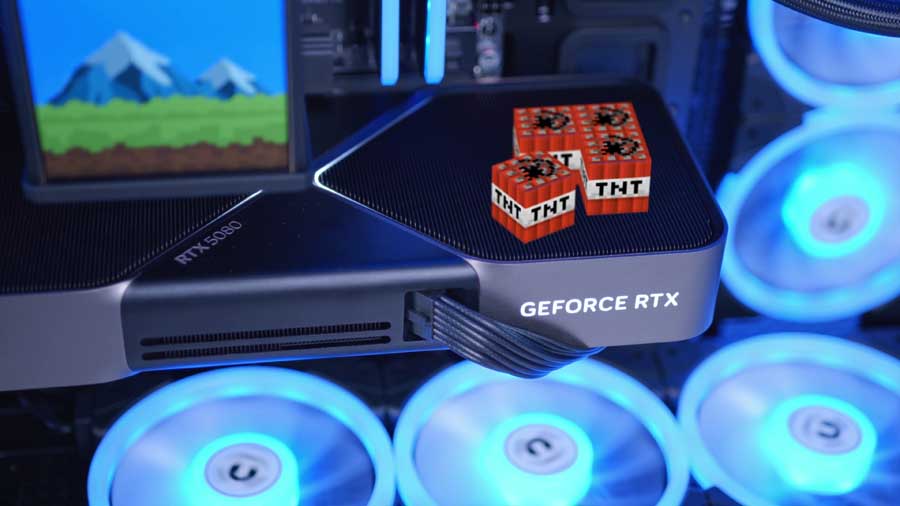
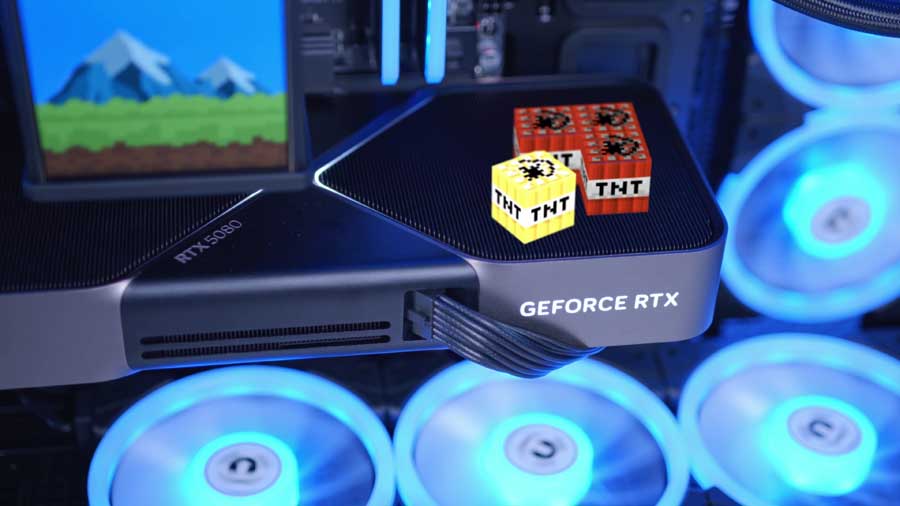
First, we rendered a small animation using 3D models and effects in which the above TNT cube “explodes” in a short clip. We rendered the short animation twice, once with 16GB of RAM and once with 32GB of RAM. The time taken to render each clip is short; the 16GB kit took 1 minute and 54 seconds, and the 32GB kit took 1 minute and 52 seconds. This is a 2-second difference for double the RAM, rendering at 4K resolution at 60 frames per second.
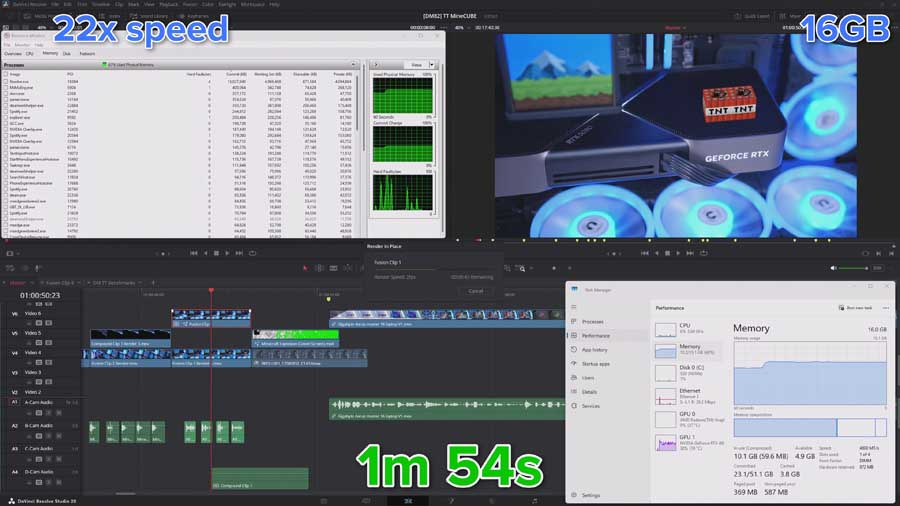
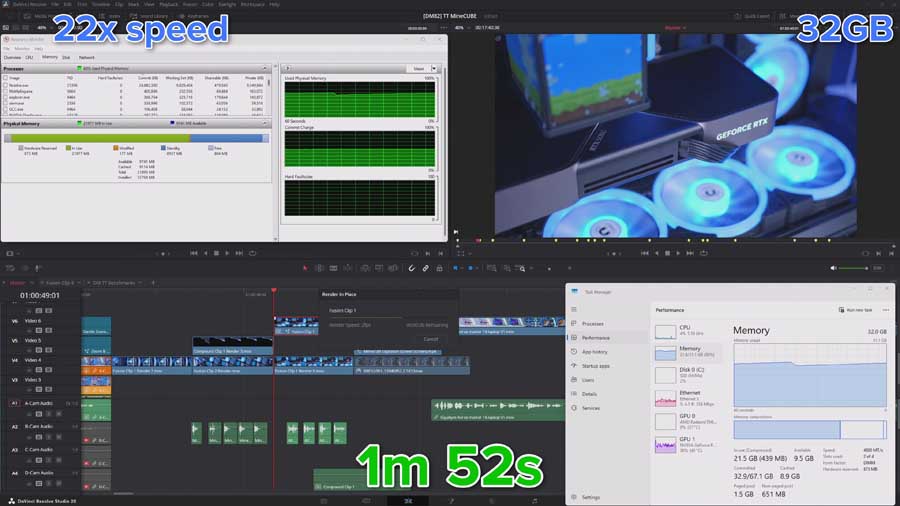
We then moved on to render a complete GeekaWhat video, which was similar to the workload for other content of this style, to demonstrate the impact of having either 16GB or 32GB of RAM when creating content with demanding applications such as DaVinci Resolve.
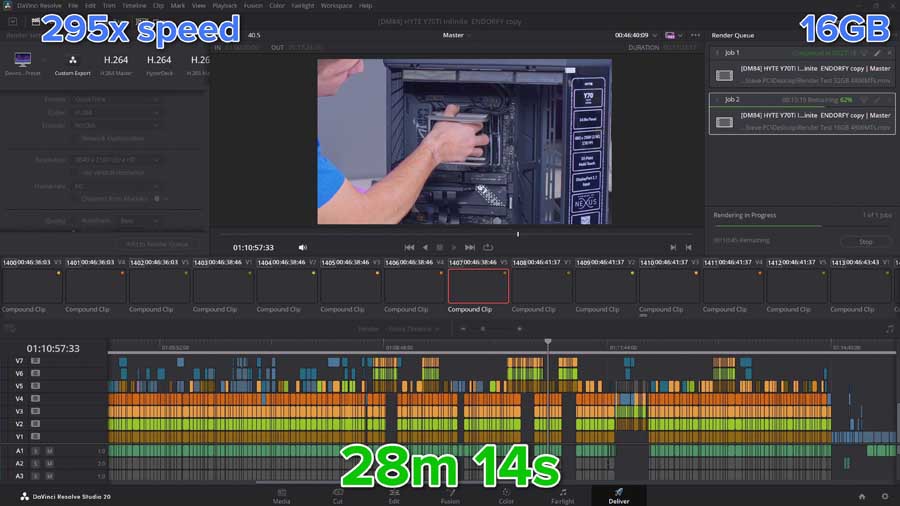
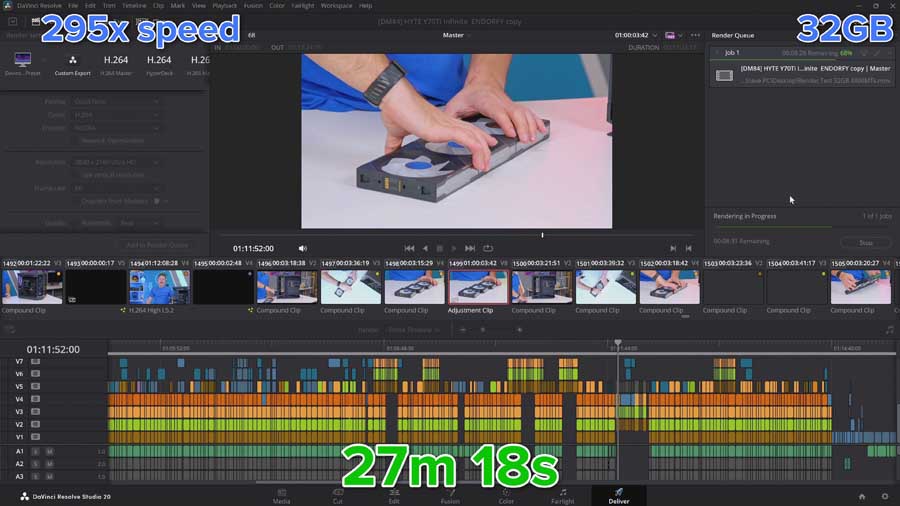
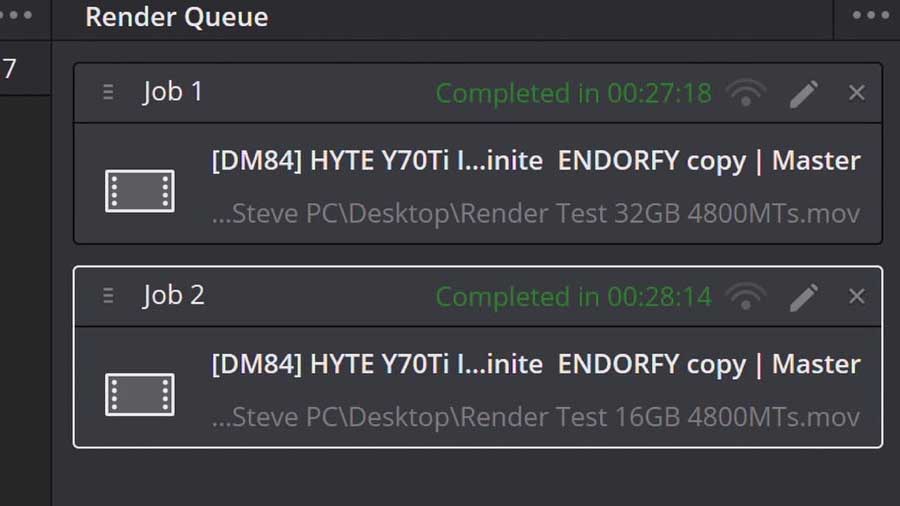
Again, when rendering this full clip at 4K resolution and 60 FPS, the difference between the two RAM capacities is minimal for a typical full-length YouTube video. The 16GB kit took 28 minutes and 14 seconds, and the 32GB kit took 27 minutes and 18 seconds. This is a 56-second difference for double the RAM, rendering a 17-minute and 24-second video.
You can check out the video we rendered below.
Conclusion
Overall, testing shows that with 32GB of DDR5 RAM in your gaming system, you benefit from improved frame stability and average framerate at 1080p. 1440p was the resolution where 16GB actually felt feasible and manageable, better, and potentially better for the system. Finally, in 4K, 16GB performed better due to architectural nuances; this would likely have been different if we were using two 8GB DDR5 sticks, allowing the system to switch back to a dual-channel configuration. We didn’t use two 8GB sticks to make a 16GB kit because a 16GB (2x8GB) kit isn’t common, and we wanted to reflect the situation most builders are facing right now. This situation is: should I buy a single 16GB RAM stick?
Testing for content creation shows that having 32GB of DDR5 RAM versus 16GB of DDR5 RAM to render a high-quality 4K, 60 FPS video made a slight difference, but nothing to write home about.
For all of our PC Gaming builds, we recommend at least 32GB of DDR5 RAM at 6000MHz with a CAS Latency of CL36 or lower. This is because it is the absolute sweet spot for high-performance gaming. However, given the current climate, if you absolutely must start with 16GB due to budget constraints, a single 16GB DIMM is workable – but dual‑channel (2×8GB or 2×16GB) is always preferable when available. We recommend you pick up a single 16GB DDR5 RAM DIMM from a widely available brand such as Corsair, TeamGroup, or G.Skill, so you can expand hassle-free when the time comes.

![FI_[SR190] HYTE X50 Ryzen 5 9600X & MSI RTX 5070 Ti](https://geekawhat.com/wp-content/uploads/2026/01/FI_SR190-HYTE-X50-Ryzen-5-9600X-MSI-RTX-5070-Ti-551x431.jpg)
![FI_[DP064] ASUS Prime AP303 + 9070XT](https://geekawhat.com/wp-content/uploads/2026/03/FI_DP064-ASUS-Prime-AP303-9070XT-551x431.jpg)
![FI_[DM93] Corsair 3200D Launch](https://geekawhat.com/wp-content/uploads/2026/03/FI_DM93-Corsair-3200D-LAUNCH-551x431.jpg)
![FI_[DM89] Phanteks Evolv + AORUS 5090 9850X3D Gallery (8)](https://geekawhat.com/wp-content/uploads/2026/02/FI_DM89-Phanteks-Evolv-AORUS-5090-9850X3D-Gallery-8-551x431.jpg)
![FI_[DM88] 16GB DDR5 9060 XT Build Gallery](https://geekawhat.com/wp-content/uploads/2026/02/FI_DM88-16GB-DDR5-9060-XT-Build-Gallery-551x431.jpg)