

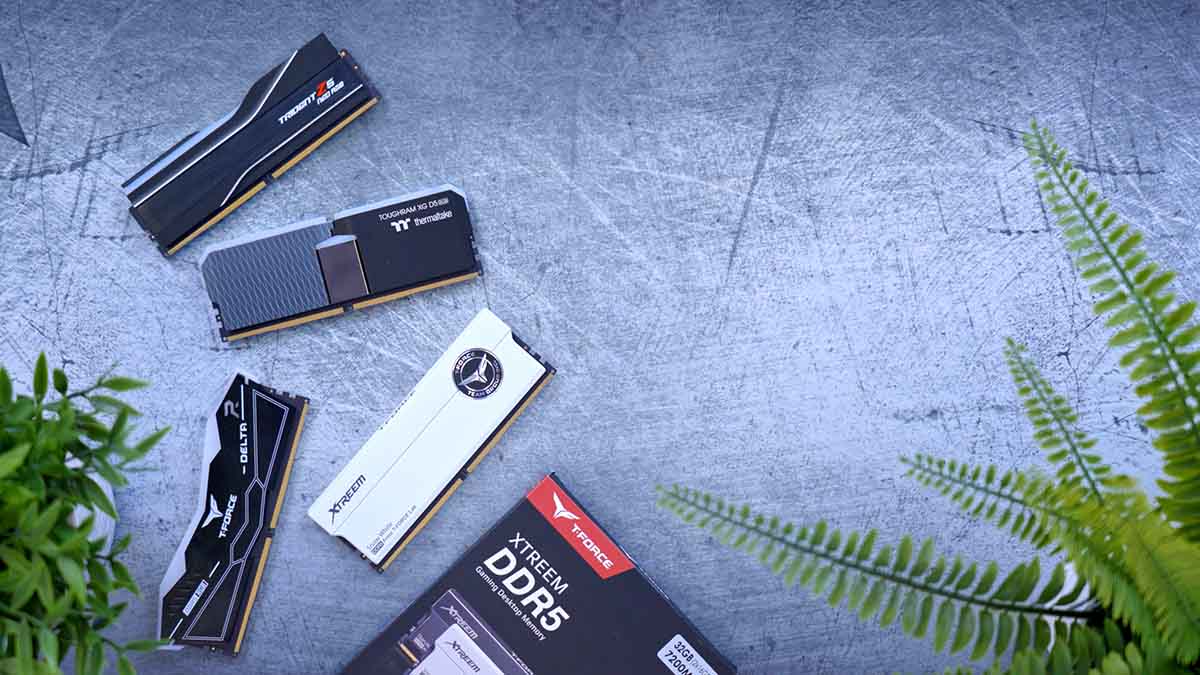
Some terms you may have seen floating around a lot are RAM Speed and CAS Latency. In this article, we are going to explore what these mean and how they affect your system, whilst also determining whether they really impact your gaming experience.
The Market
Taking a look at one of the most popular DDR5 RAM kits on the market, the Corsair Vengeance RGB DDR5 6000MHz 2x16GB, we can see that over the past year, the lowest price that PriceSpy has recorded was £75.16, in May of 2025. In January 2026, the same kit is priced at around £399.95. This is a shocking 432.13% increase.
It is important to note that this price hike isn’t necessarily a result of brand-level gouging. Companies like Corsair are downstream of the actual silicon fabrication; when the cost of the raw DRAM modules from suppliers like SK Hynix or Micron triples, that cost is inevitably passed through the supply chain to the final product on the shelf.
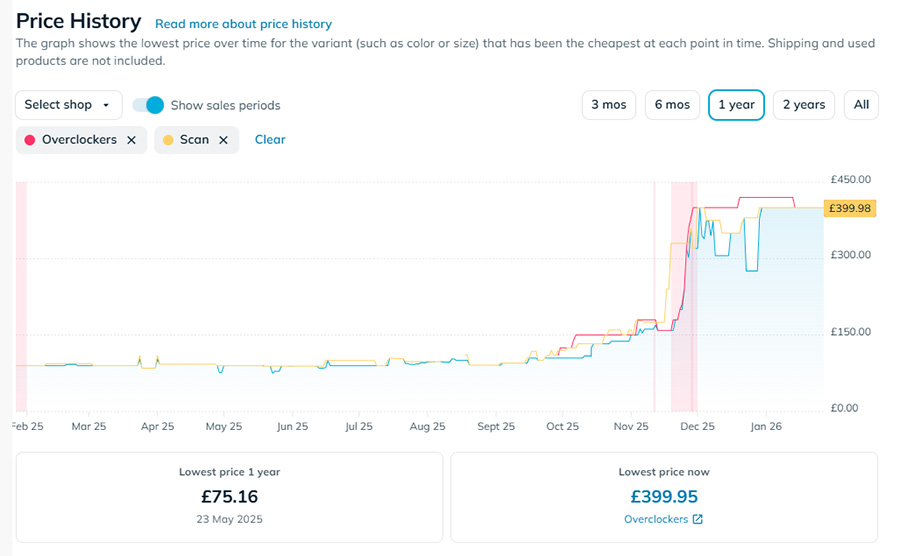
When configuring the graph using PriceSpy, we have selected only the brands we work with, as these will reflect the prices you see on the GeekaWhat channel and website. The price of RAM starts to climb in September 2025, and by October 2025, it becomes evident that prices are definitely climbing. This situation applies to all DDR5 ram, and it has affected DDR4 RAM kits as well.
DDR4 has taken a pricing hit because many budget-conscious builders have retreated to DDR4 to control costs while still building a PC capable of running the latest releases. And now, in some cases, high-end DDR4 kits are more expensive than DDR5 was six months ago. So, options are only reducing as time progresses.
Suggested Article: Best DDR5 RAM to Buy in 2025
The Bigger Picture
When it comes to choosing a RAM kit in 2026, the luxury of “trial and error” has vanished. With the market facing a massive supply squeeze – driven by AI data centres “cannibalising” consumer DRAM production – shoppers are left to choose between high-priced kits they aren’t entirely sure are a perfect match for their systems.
In this climate, an uninformed purchase isn’t just a technical oversight; it’s an expensive mistake. The following sections of this article will delineate the actual matches and the science behind major RAM specs. By quantifying their real-world value, you can ensure that even at today’s inflated prices, you are getting the absolute maximum performance for your budget.
The Maths Behind it All
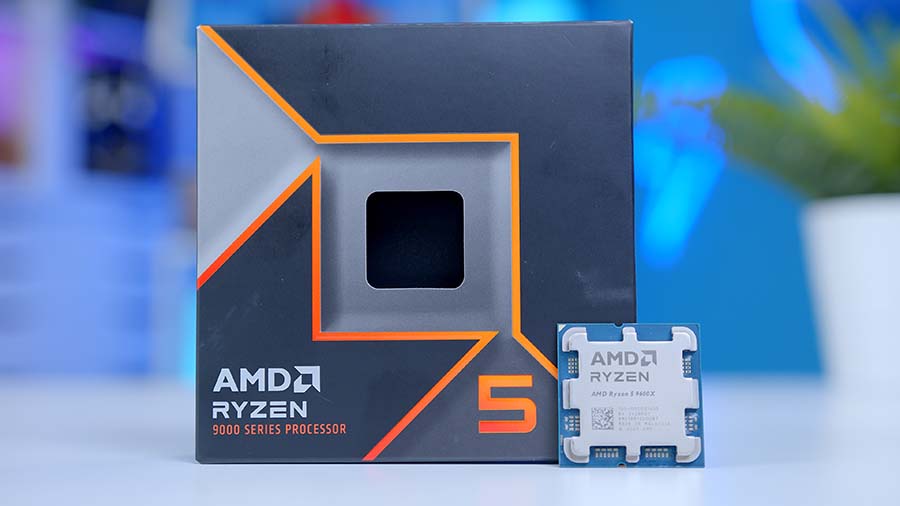
There are two key factors to consider when evaluating how RAM speed and CAS Latency affect system performance: CPU clock speeds and the calculation of CAS Latency. Your RAM’s real‑world performance is ultimately limited by your processor’s ability to handle and process data. To illustrate this relationship, we’ll use a well‑known example, CPU and walk through the maths behind it. In this case, we’ll reference the AMD Ryzen 5 9600X, a popular budget gaming processor with a base clock speed of 3.9 GHz.
| Key Specs | AMD Ryzen 5 9600X |
|---|---|
| Core Count | 6 |
| Thread Count | 12 |
| Base Clock Speed | 3.9GHz |
| Boost Clock Speed | 5.4GHz |
| Max Cache | 32MB |
| Default TDP | 65W |
| CPU Socket | AM5 |
| Overclockable | Yes |
What Is a Clock Cycle?
A clock cycle is an incredibly fast duration of time that lasts a couple of nanoseconds, and there can be billions of cycles in just a single second. It’s the fundamental timing unit of a computer’s operation, representing one electrical pulse, or “tick,” from the system clock, which synchronises the CPU’s operations. It might be easier to visualise the clock as the computer’s heartbeat, and the CPU as its brain; the CPU’s work is paced and coordinated by these constant, rhythmic pulses. Neither can function without the other.
To work out the length of a CPU’S clock cycle, we can use this formula:
double _clockCycleTime;
double _clockFrequency = 3,900,000,000; // 3.9GHz

_clockCycleTime = 1.0f / _clockFrequency;

//Result: 0.256 nanoseconds
Since one clock cycle on the Ryzen 5 9600X lasts about 0.256 nanoseconds, roughly 3.9 billion of these cycles can occur in a single second. This is exactly what a 3.9 GHz clock speed represents, and this is for the normal clock speed outside of gaming. In a gaming scenario, the CPU’s clock cycle time is reduced to 0.185 ns!
What is RAM Speed?
RAM speed is measured in either MHz or MT/s; both of these values translate to determining how quickly your computer’s memory can transfer data to and from the CPU. This value directly affects the responsiveness of your system, the load times of applications and games, and overall performance under demanding workloads. This number works in a ‘high equals better’ fashion, where you should want to aim for higher speeds, but lower CAS Latency (CL). What is important to know is that your RAM’s functionality is limited by your processor’s Integrated Memory Controller (IMC) to execute instructions quickly, which is determined by clock speed.
Another key bit of information is that RAM can be overclocked using your motherboard and CPU. When you first install your RAM kit, it will be capped to a speed lower than what the RAM kit advertises to run at, so to enable the RAM to run that it’s maximum speed, you can use the Intel XMP (eXtreme Memory Profile) and AMD EXPO (Extended Profiles for Overclocking) features to safely and easily tweak the RAM to it’s maximum Transfer Speed (MHz).
What is RAM CAS Latency?
Gamers will likely be familiar with the term ‘latency’, which is the time delay between an action and a system’s response; naturally, we desire low latency, as this means things happen more quickly. With RAM, the same logic applies: a lower CAS Latency results in a shorter time for the RAM to access data and complete tasks.
The term CAS Latency can also be referred to as CAS Timings, and it is composed of four numbers:
- CAS Latency (CL)
- Row Column Delay (tRCD)
- Row Precharge Time (tRP)
- Row Active Time (tRAS).
These four numbers are usually written in a sequence like 36‑38‑38‑80. For DDR5, the most important value for basic latency calculations is the first number, the CAS Latency (CL). To demonstrate how CAS Latency translates into real‑world timing, we’ll use a popular DDR5 kit as an example: Corsair Vengeance RGB 32GB (2x16GB) DDR5 PC5-48000C36 6000MHz Dual-Channel RAM Kit.
| Specifications | Corsair Vengeance RGB 32GB (2X16GB) DDR5 |
|---|---|
| RAM Generation | DDR5 |
| Capacity | 32GB (2 x 16GB) |
| Transfer Speed (Data Rate) | 6000 MT/s |
| Timings | 36-44-44-96 |
| CAS Latency | CL36 |
| Tested Voltage | 1.40V |

To work out the real-time latency of RAM, we can use this formula:
double _CASLatency = 36; //CL36
double _transferRate = 6000; //MT/s

double absoluteLatency = (_CASLatency * 2000) / _transferRate;

// Result: 12.0 nanoseconds
We use 2000 in the calculation because DDR (Double Data Rate) memory transfers data twice per clock cycle; the actual internal operating frequency is half the MT/s rating. The formula uses 2000 to divide the data rate by the actual clock speed and convert the result to nanoseconds. The real‑time latency of this RAM kit is about 12 nanoseconds, meaning it takes roughly 12 billionths of a second for the memory to deliver data after receiving a request. In other words, around 83 million of these tiny delays fit into a single second.
Now, if we take two different sets of RAM: a 6,000 MT/s CL30 kit and a 6,400 MT/s CL32, let’s see how the numbers compare.
double _CASLatency = 30; //CL30
double _transferRate = 6000; //MT/s

double absoluteLatency = (CASLatency * 2000) / _transferRate;

// Result: 10 nanoseconds
double _CASLatency = 32; //CL32
double _transferRate = 6400; //MT/s
double absoluteLatency = (CASLatency * 2000) / _transferRate;
// Result: 10 nanosecondsEven though the 6,400 MT/s kit has a “faster” speed, its higher latency means the actual time to fetch data (10 ns) is identical to that of the “slower” 6,000 MT/s kit. What this also means is that A faster transfer rate with high latency can perform worse than a lower transfer rate with lower latency.
CPU-to-RAM Synchronisation
AMD CPU Architecture:
At the heart of AMD’s CPU design is Infinity Fabric, a high‑speed interconnect that links the CPU cores, cache, I/O die, and memory controller. It is like a motorway system that connects all the districts of the CPU city. The CPU aims to balance the Memory clock, Memory controller clock, and Infinity Fabric clock, and when they have a 1:1:1 ratio, there is minimal latency.
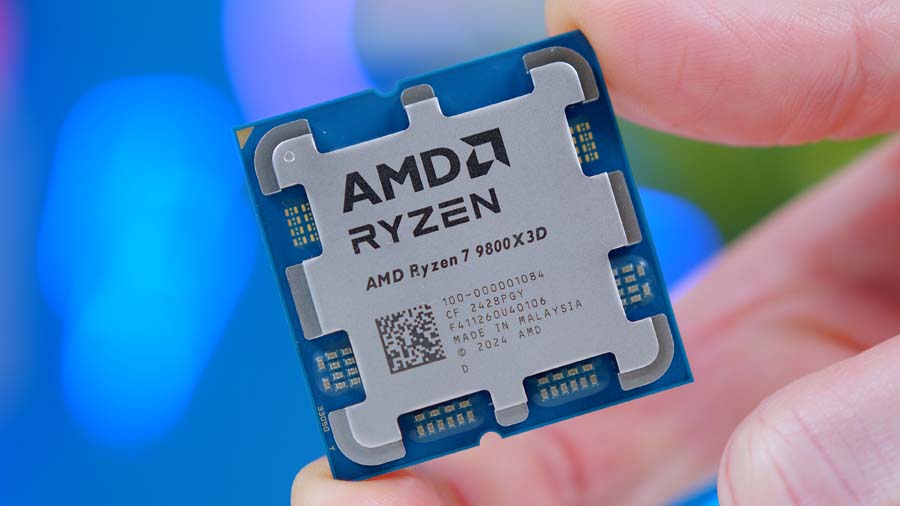
Alternatively, processors like the 7800X3D or 9800X3D have a massive L3 Cache thanks to AMD’s 3D V-Cache technology. This acts like a giant warehouse. Because the CPU finds what it needs in its own warehouse more often, it doesn’t have to travel to the “RAM store” as much, making RAM speed slightly less critical than on standard chips.
Intel CPU Architecture:
Intel uses “Gears”, like a manual car. Gear 1 is a 1:1 ratio (low latency), and Gear 2 is 1:2. Unlike AMD, Intel’s memory controllers can often handle much higher frequencies (7200 MT/s+) in Gear 2 without as much of a penalty because their internal ring bus architecture is designed for raw throughput. While Intel can hit higher Transfer Speeds, it often requires much more expensive motherboards and cooling to keep that high-speed data flow stable.
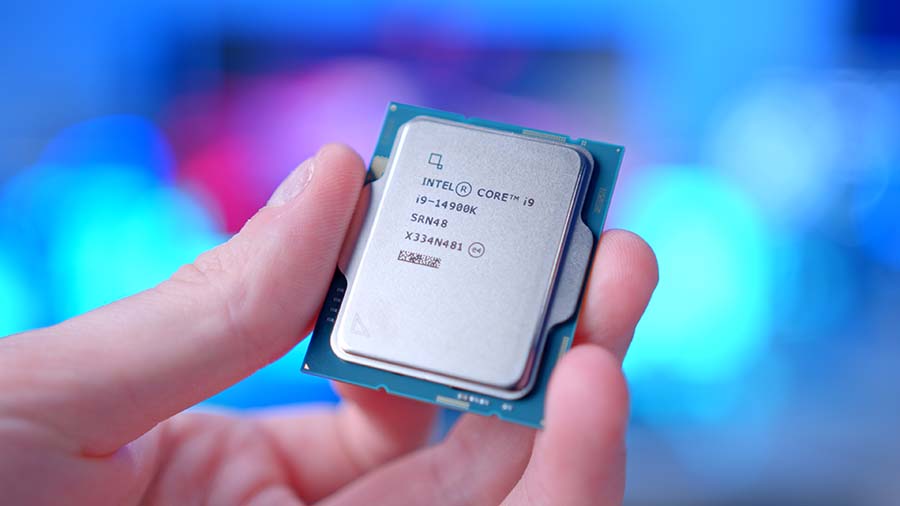
The final element in all of this throws a bit of a spanner into the works. If we revisit the heartbeat analogy – where the CPU ticks rhythmically – those ticks represent the only windows of time in which the CPU can actually “see” and handle the information the RAM provides.
However, choosing a RAM speed that is too high for your CPU’s internal controller can actually cause a performance drop. When the RAM moves too fast for the CPU to keep up, the ratio shifts to 1:2. Now, the “gears” are no longer locked; the RAM has to wait for the CPU to catch up, creating a significant latency penalty that can make a high-speed RAM kit perform worse than a slower, synchronised one.
To see how this works in practice, let’s look at the math for our chosen CPU and RAM kit. When the RAM is ready with data after 12ns, we divide that by the duration of a single CPU cycle: 12 / 0.256 = 46.88 cycles.
Because a CPU cannot process a “half-cycle,” data cannot be handled when it arrives. Instead, it must wait until the 47th tick of the clock before it is registered. This is often called “hidden latency.” If you overclock your CPU, these ticks occur more frequently; on a timeline, it physically shortens the time the data spends waiting, allowing your RAM to operate at its full potential.
Suggested Article: What is RAM & What Do You Need it For?
Gaming Performance Benchmarks
The goal is to figure out whether speed and latency really matter in gaming; however, there is another layer to this, as gamers prefer to play at different resolutions and have different system budgets. We chose to benchmark four games per test set: two GPU-intensive and two CPU-intensive. We also used three different systems that were optimised to alleviate any component bottlenecks, such as placing the AMD Ryzen 7 9800X3D with a NVIDIA GeForce RTX 5080 and then the RAM is the only component working at a possible detriment; and we also tested with a lower VRAM card to try and rule out any deviations based on GPU memory.
| System Budget | Budget (Designed for 1080p) | Mid-Range (Designed for 1440p) | High-End (Designed for 4K) |
|---|---|---|---|
| CPU | AMD Ryzen 5 7600 Boost clock: 5.1Ghz | AMD Ryzen 7 9800X3D Boost clock: 5.2Ghz | AMD Ryzen 7 9800X3D Boost clock: 5.2Ghz |
| GPU | AMD Radeon 9060 XT 8GB | AMD Radeon 9060 XT 16GB | NVIDIA GeForce RTX 5080 |
| SSD | Corsair MP600 GS | Corsair MP600 GS | Corsair MP600 GS |
| Motherboard | ASRock B850M Steel Legend WiFi | ASUS ROG Strix X870E-E Gaming WiFi | ASUS ROG Strix X870E-E Gaming WiFi |
We also calculated the absolute latency of each memory kit and the approximate CPU clock cycles required to access RAM, which you can reference when comparing the benchmark results.
| RAM Speed (MT/s) | CAS Latency (CL) | Absolute Latency (ns) | AMD Ryzen 5 7600 (Cycles) | AMD Ryzen 7 9800X3D (Cycles) |
|---|---|---|---|---|
| 5600 | 36 | 12.9 | 66 | 67 |
| 6000 | 28 | 9.33 | 48 | 49 |
| 6000 | 30 | 10 | 51 | 52 |
| 6400 | 32 | 10 | 51 | 52 |
| 6400 | 40 | 12.5 | 64 | 65 |
| 7200 | 34 | 9.44 | 49 | 50 |
For the budget system, we narrowed the testing to two memory kits to keep the results simple and realistic. If you’re building a budget‑focused PC, you’re unlikely to invest in a 7200 MT/s CL34 kit. Instead, we tested the 5600 MT/s CL36 kit, which is the slowest kit with the highest latency, and the 6000 MT/s CL28 kit, which is a faster, low‑latency kit commonly recommended for Ryzen 9000‑series CPUs. This gives a clear view of how much performance difference memory can make in a true entry‑level gaming setup. We will only test the budget kit at 1080p and 1440p, as the graphics card will not realistically handle 4K, and even 1440p is a slight stretch.
Budget Gaming PC System:
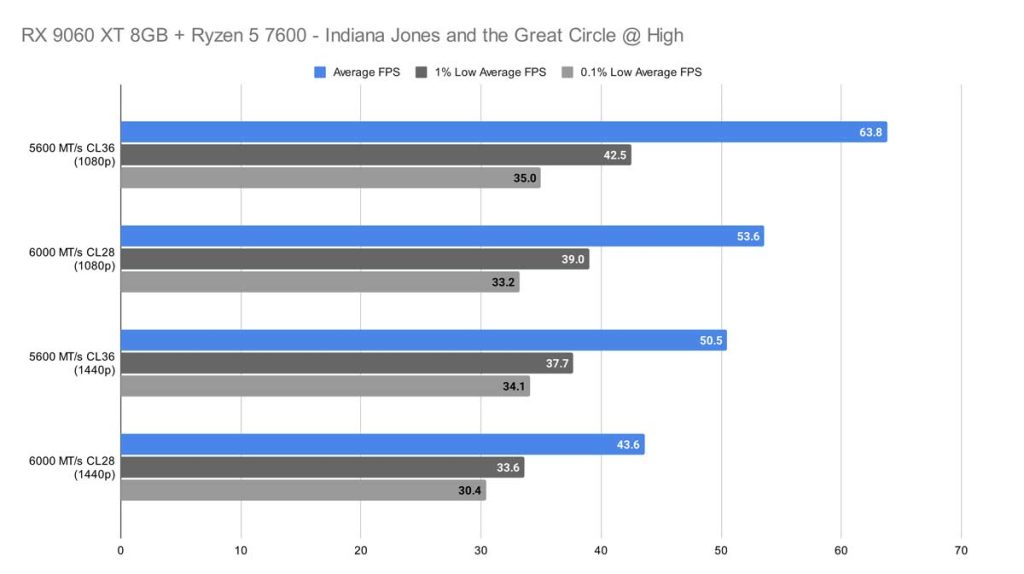
Indiana Jones and the Great Circle
Impressively, the 5600 MT/s CL36 kit offers some incredibly awesome performance. We were genuinely quite shocked to see this kit perform so well, with a 63.8 FPS on average, 42.5 FPS for the 1% lows and 35 FPS for the 0.1% lows. The 6000 MT/s CL28 kit produced 53.6 FPS on average, 39 FPS for the 1% lows and 33.2 FPS for the 0.1% lows. This puts the 5600 MT/s CL36 kit ahead on all accounts for 1080p. 1440p displays a similar trend, with the gaps tightening a little.
Cyberpunk 2077
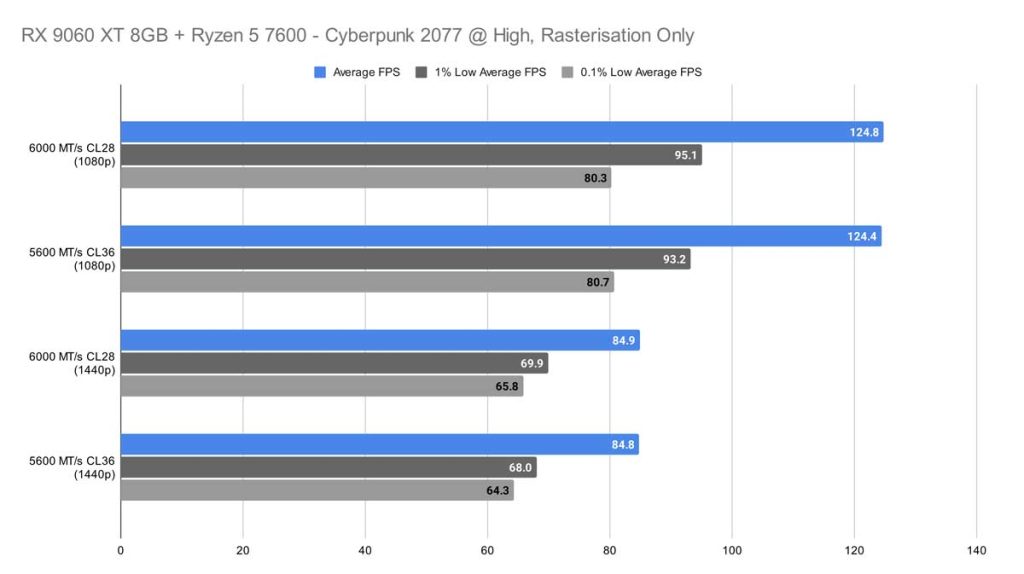
In our 1080p test, both memory kits performed almost identically. Their average framerates were separated by only fractions of a frame, landing at roughly 124.6 FPS for both. Even the 1% and 0.1% lows were extremely close, with the 6000 MT/s CL28 kit taking a very slight lead – a difference so small it would be impossible to notice during actual gameplay. Similar results are seen again in the 1440p test, with the 6000 MT/s CL28 kit taking the lead. This is no real surprise, given the absolute latency of this kit and the time it takes for the CPU to respond to it; either way, both kits perform very well.
Call of Duty: Black Ops 7 (Zombies)
Call of Duty: Black Ops 7 (Zombies) offered a completely different story than Cyberpunk 2077 did in 1080p, where, strangely enough, the 5600 MT/s CL36 kit offered more frames on average and much more stability than the 6000 MT/s CL28 kit did.
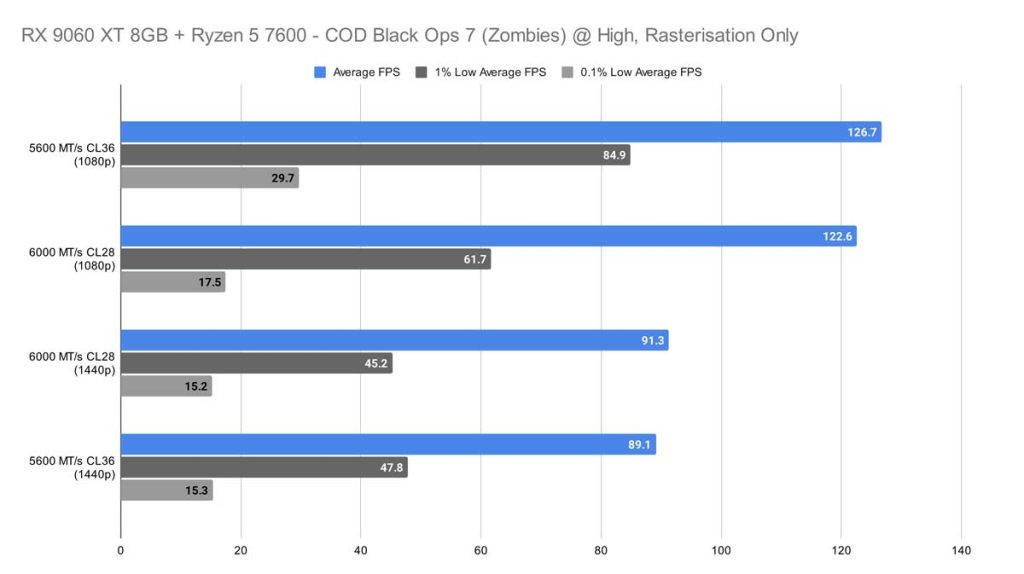
1440p, however, allowed the 6000 MT/s CL28 kit to function better, ever so slightly gaining on the other kit with a 2.2 FPS lead, but the 5600 MT/s CL36 still wins in terms of stability for both 1% and 0.1% lows.
Arc Raiders
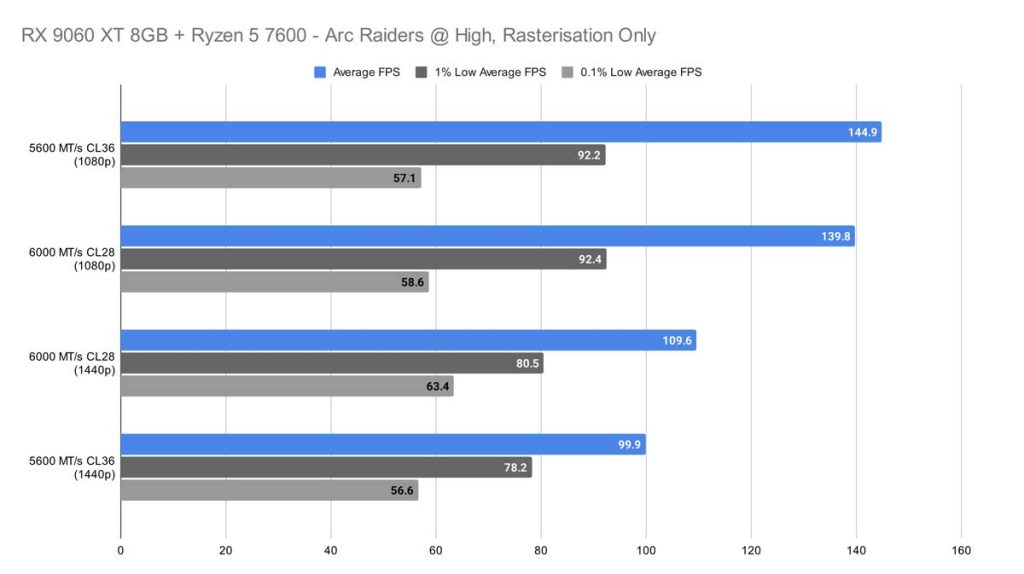
Again, at 1080p with High graphics settings, the 5600 MT/s CL36 kit beats out the 6000 MT/s CL28 kit, and it aided the system in producing 144.9 frames per second, putting it ahead of the other kit by about 5 frames. Similarly to COD, Arc Raiders in 1440p lets the 6000 MT/s CL28 kit shine, gaining 10 more frames than the 5600 MT/s CL36 kit, offering better frame pacing in even the most challenging moments.
It might be fair to say that a lower-speed, higher-latency RAM kit might be worth paying less for in a budget system!
Mid-Range Gaming PC System:
Indiana Jones and the Great Circle
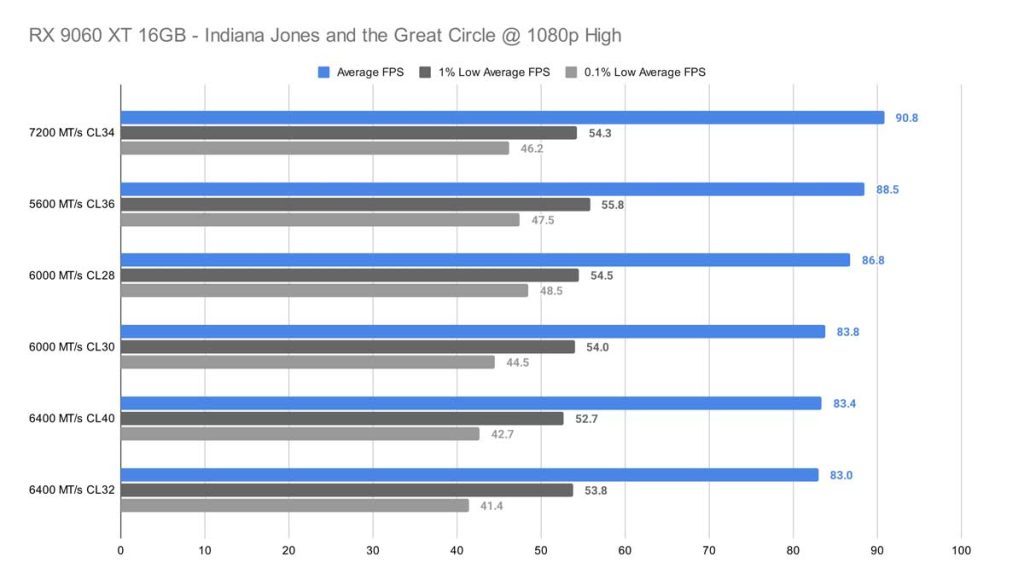
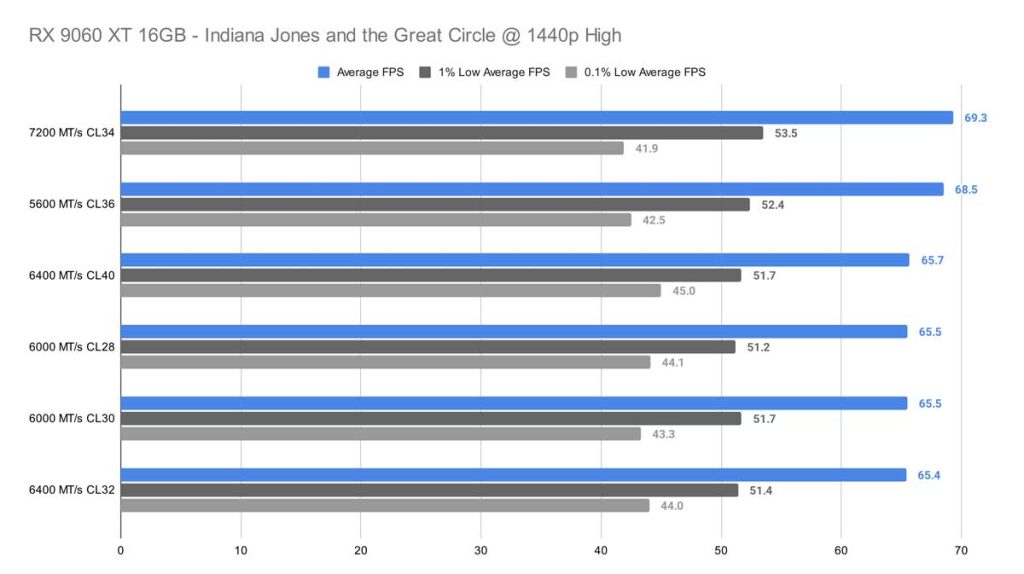
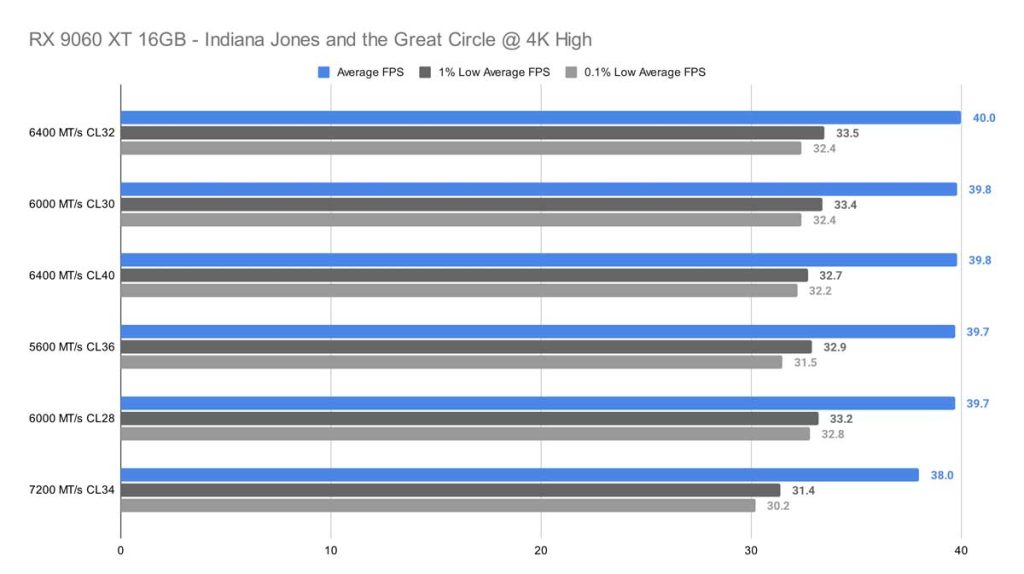
The 1080p runs for Indiana Jones show the 5600 MT/s CL36 kit and the 7200 MT/s CL34 ahead of the pack, with the 5600 MT/s CL36 kit earning a 90.8 FPS, the worst performing kit reeled in 83 FPS, which is still completely respectable, resulting in a difference of around 8 frames overall. Tuning the resolution to 1440p closes the gap, with the frame difference dropping to 3.9 FPS. And finally, in 4K, we see just a 2-frame difference, showing that you won’t gain any overall benefits from opting for higher speeds and lower latencies right now.
Cyberpunk 2077
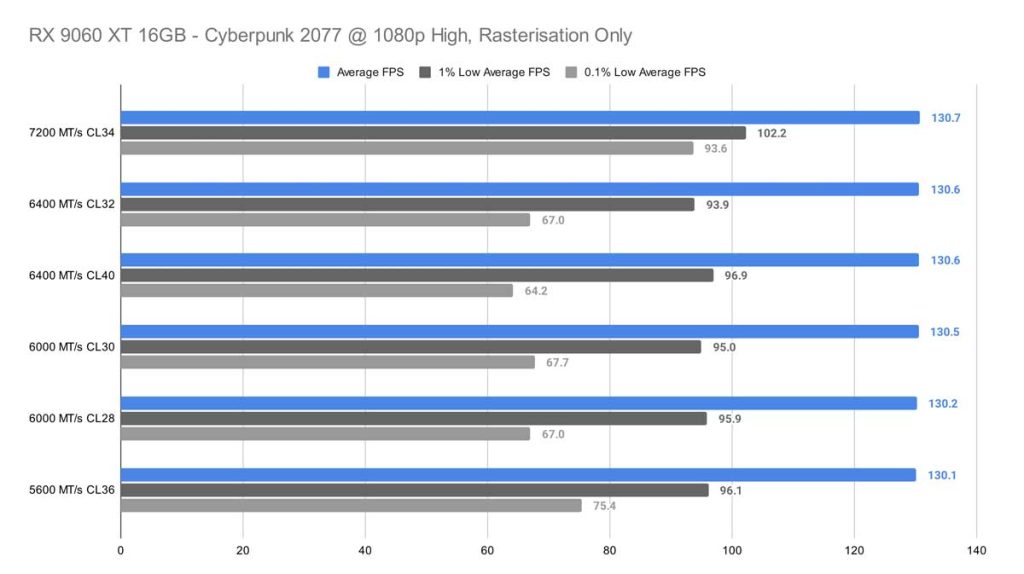
In our 1080p High test for Cyberpunk 2077, the differences between memory kits were surprisingly small. The top‑performing 7200 MT/s CL34 kit and the bottom‑performing 5600 MT/s CL36 kit were separated by only 0.6 FPS on average – essentially indistinguishable during gameplay. The real separation appeared in the 0.1% lows, where the 7200 MT/s kit pulled far ahead with 93.6 FPS, compared to 75.4 FPS from the 5600 MT/s CL36 kit. The next lowest 0.1% result dropped further to 67.7 FPS, showing that while average FPS remains flat, faster memory can still improve frame time stability in this title.
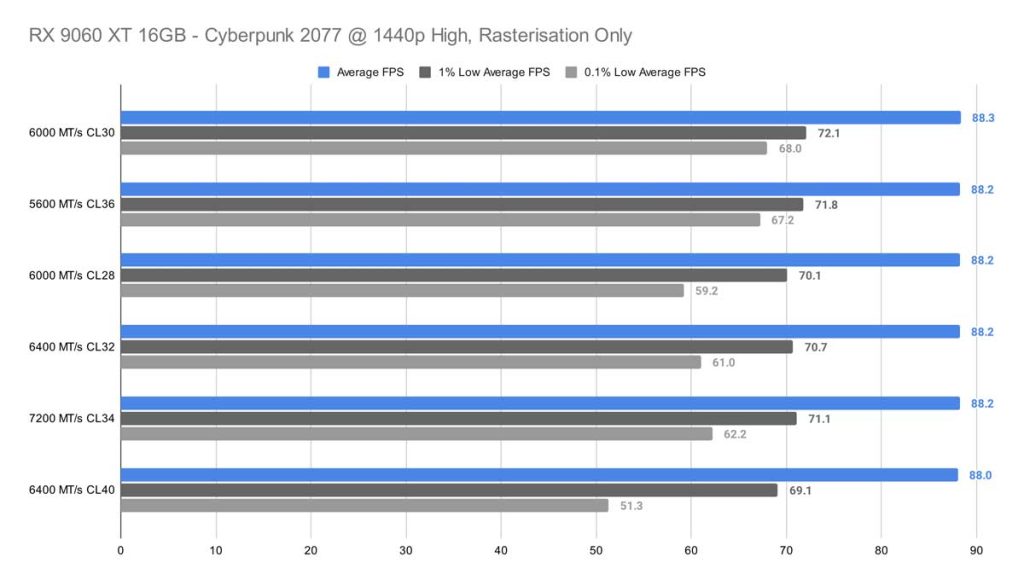
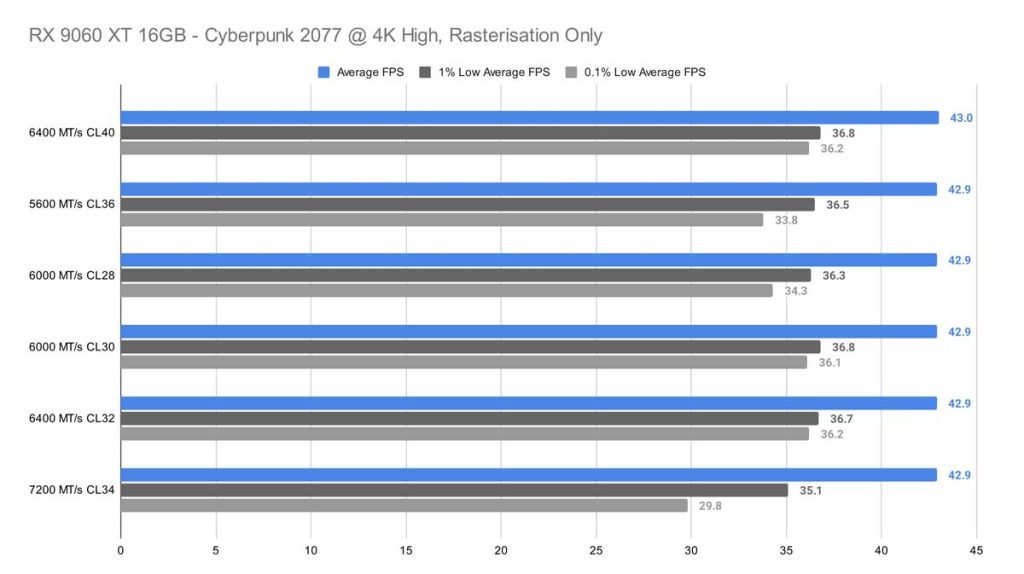
At 1440p High, the order of the graph shifts again, with the 6000 MT/s CL30 kit taking the top spot – but only by 0.3 FPS over the lowest result. This margin is far too small to be meaningful in real‑world play. By the time we reach 4K, the gap shrinks even further to just 0.1 FPS, with most kits clustering around 42.9 FPS. The consistency is impressive, even if the overall framerate isn’t ideal for smooth gameplay.
Call of Duty: Black Ops 7 (Zombies)
At 1080p in Call of Duty: Black Ops 7, the highest result comes from our 6400 MT/s kit CL40, with an average of 138.9 FPS, and our lowest result comes from the speedy 7200 MT/s CL34 kit, which has an average of 135.4 FPS. At 1440p, there is nearly no gap between our top results, with the exception of the 6400 MT/s CL32 kit, which took a slight hit across average FPS, 1% lows, and 0.1% lows, whereas the other kits stayed in and around the same ballpark.
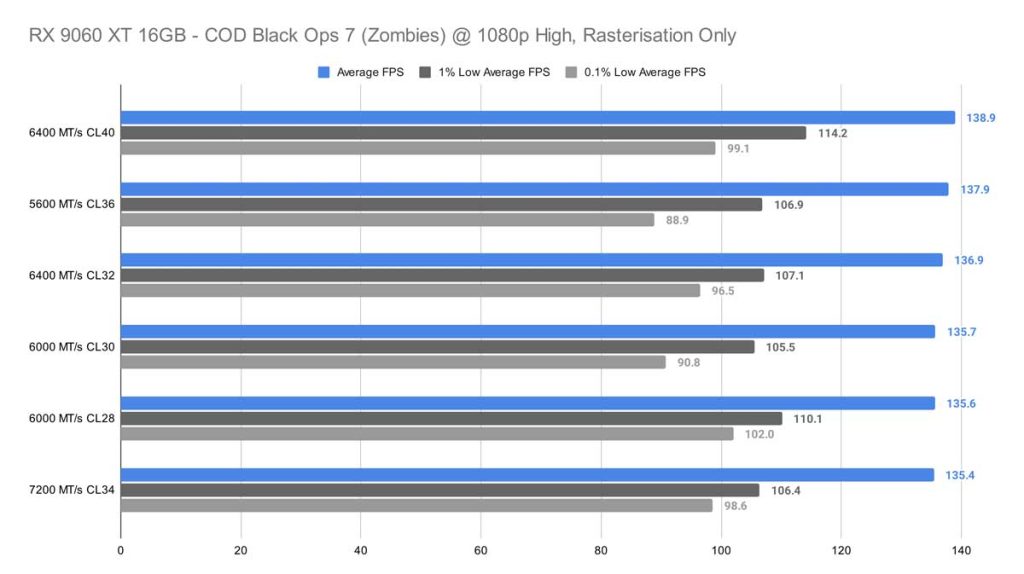
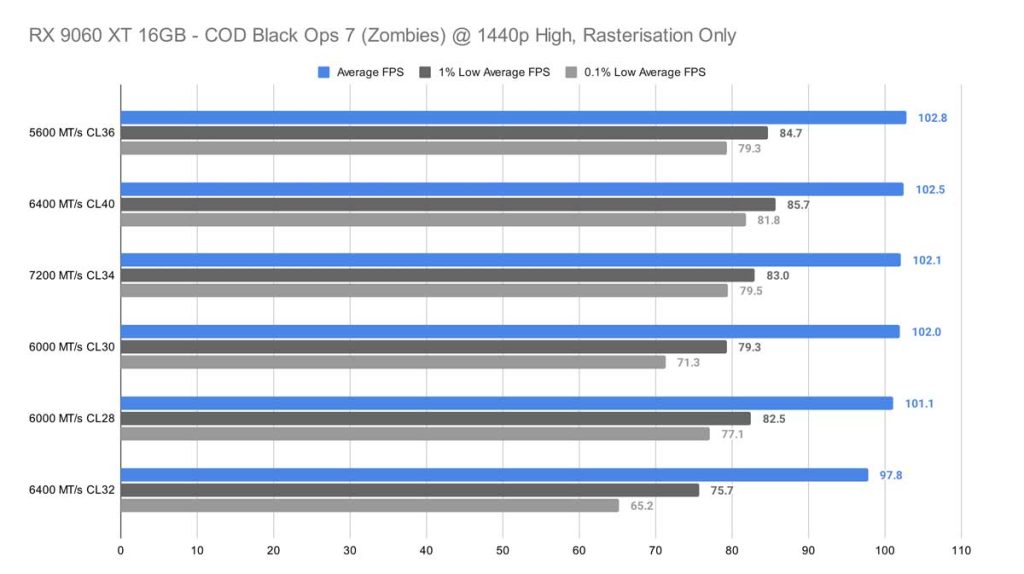
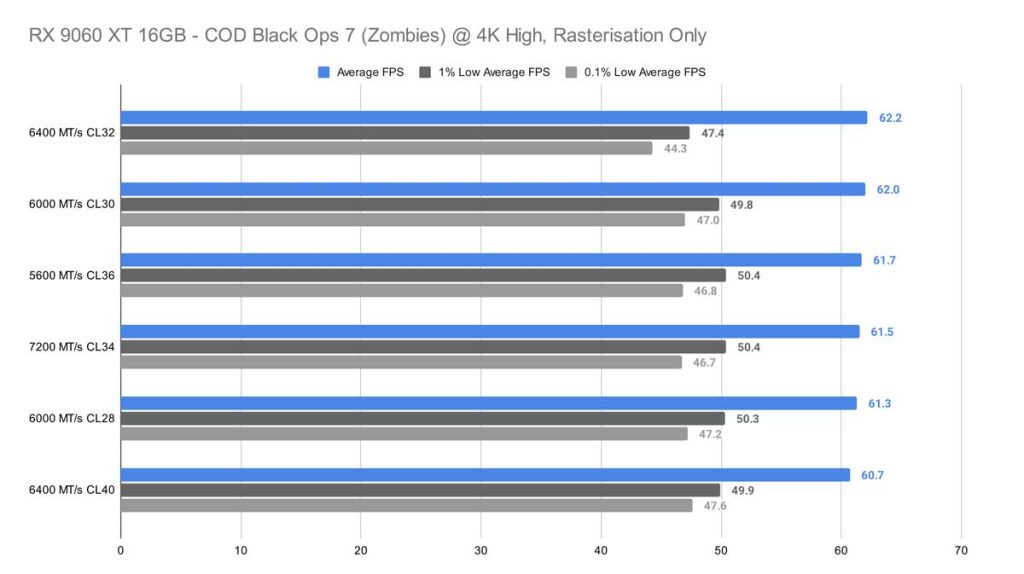
4K resolution shows us that the gaps between the different memory kits tighten, with a margin of 1.5 frames between all the kits together. The maximum framerate was achieved by the 6400 MT/s kit CL32 this time, averaging 62.2 FPS.
Arc Raiders
Arc Raiders probably show us our most exciting and interesting results from our testing, with noticeably large framerate differences between the different memory kits at 1080p. The 7200 MT/s CL34 kit soars ahead, delivering an average frame rate of 166.5 – this gains around 22.8 frames on our worst-performing kit, which was the 6400 MT/s kit CL40. We cannot put this down to absolute latency, though, as the 6000 MT/s kit CL28 offers the lowest latency of 9.3 ns, yet it sits in the middle of the graph.
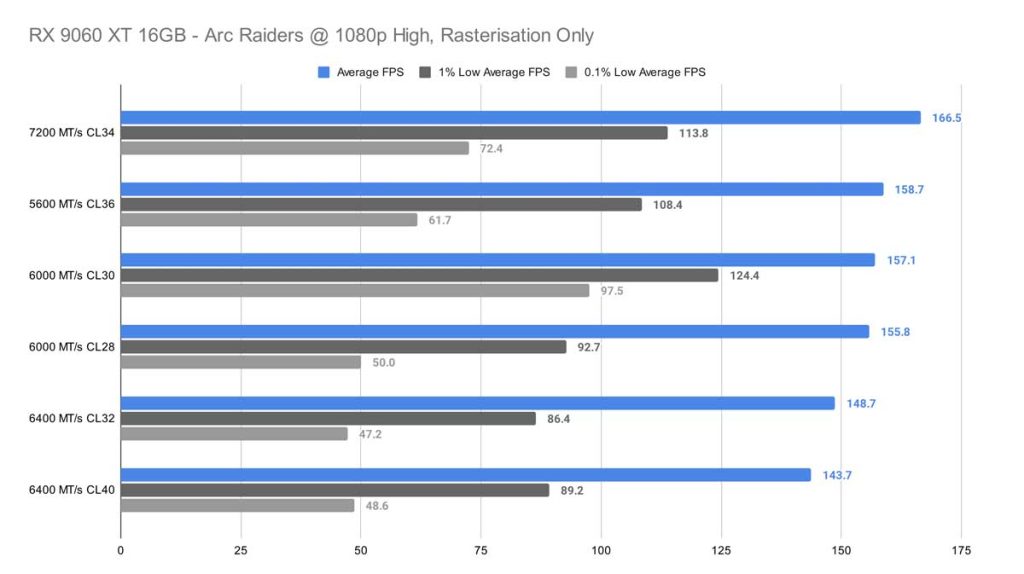
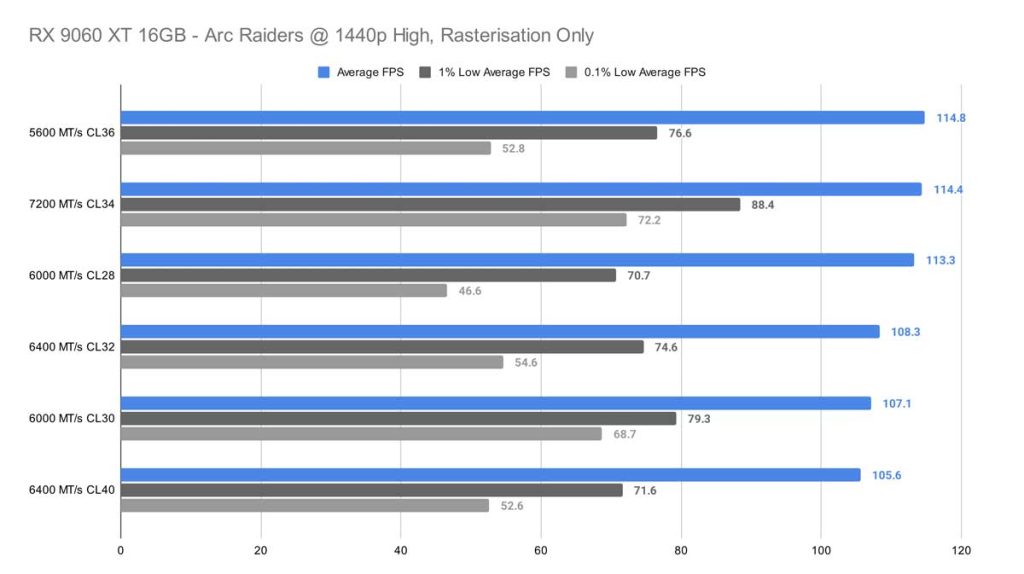
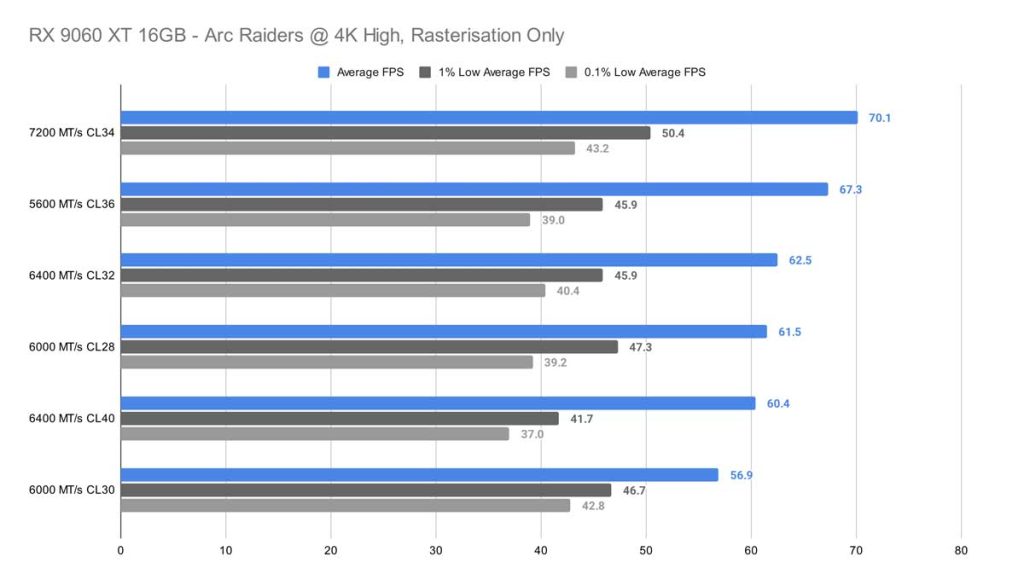
At 1440p we see yet another game with incredibly tight frame pacing – a 1.5 frame margin covering the top three results, including the 7200 MT/s CL34, 6000 MT/s kit CL28 and the 5600 MT/s kit CL26 at the top. And finally, at 4K, the bigger disparity between results returns. In this test, the 7200 MT/s CL34 kit and the 5600 MT/s CL36 hold the top places.
High-End Gaming PC System:
Indiana Jones and the Great Circle
Across all three resolutions – 1080p, 1440p, and 4K – Indiana Jones and the Great Circle shows very little variation between memory kits. At 1080p, after removing the weakest outlier (the 6000 MT/s CL30 kit), the remaining kits differ by only about 2 FPS on average, which is effectively indistinguishable in real‑world gameplay.
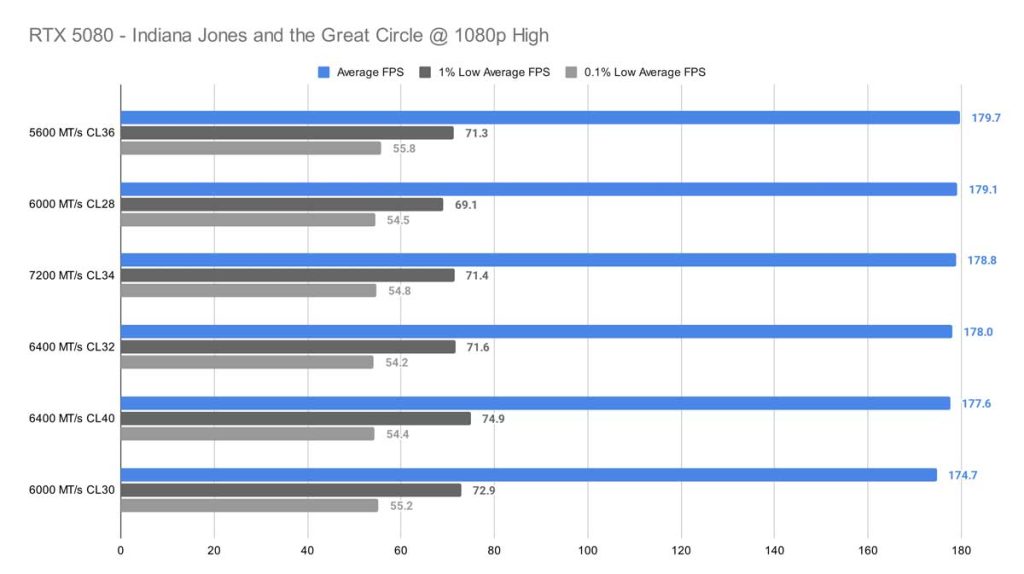
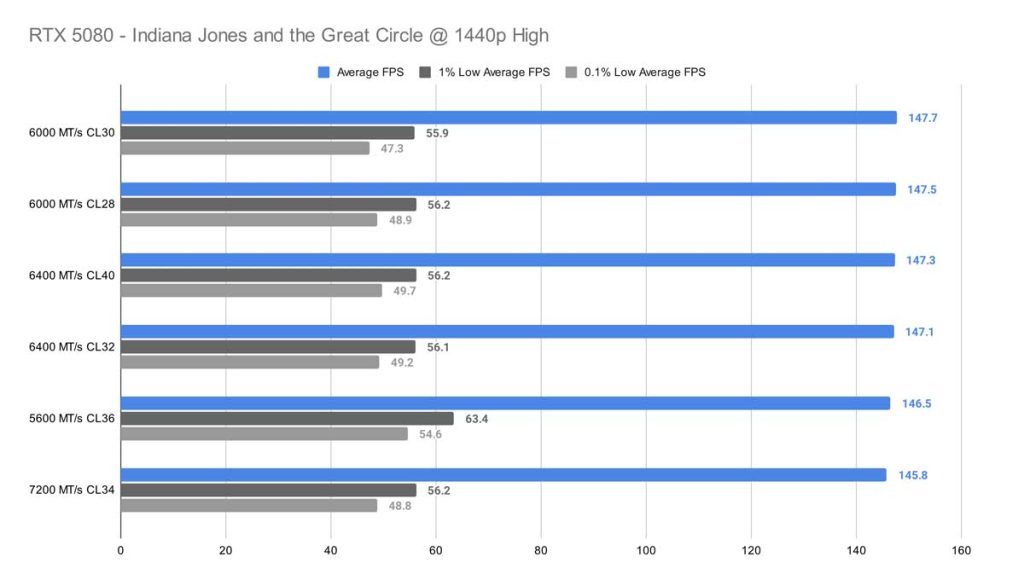
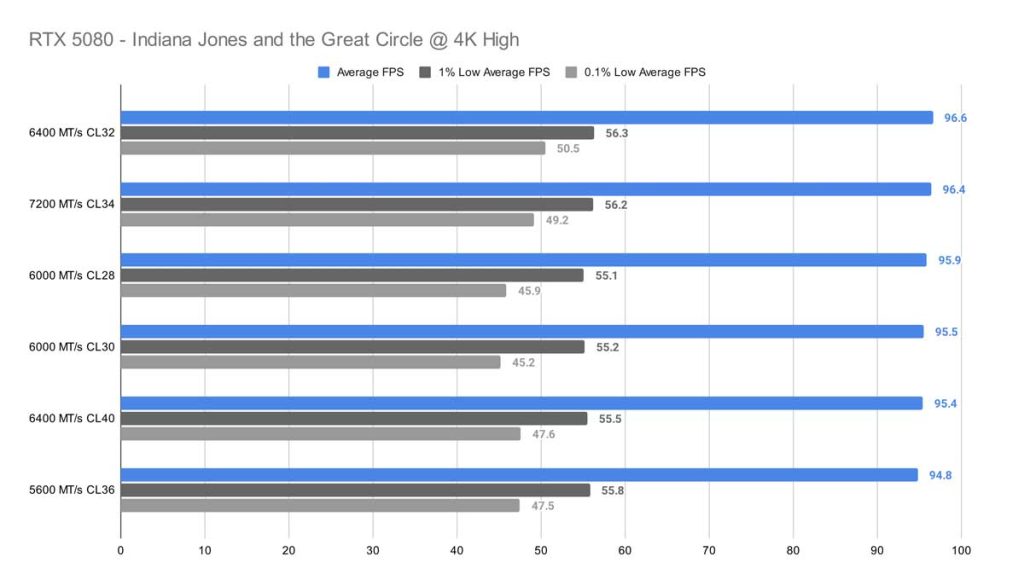
At 1440p (High settings), the story remains largely the same. A different kit – the 6000 MT/s CL30 – tops the chart here, but the spread is still only about 5 FPS from first to last place. Finally, at 4K, there’s no meaningful pattern at all. The difference between the top‑performing 6400 MT/s CL32 kit and the bottom‑performing 5600 MT/s CL36 kit is just 1.8 FPS, confirming that this game is not memory‑sensitive at higher resolutions.
Cyberpunk 2077
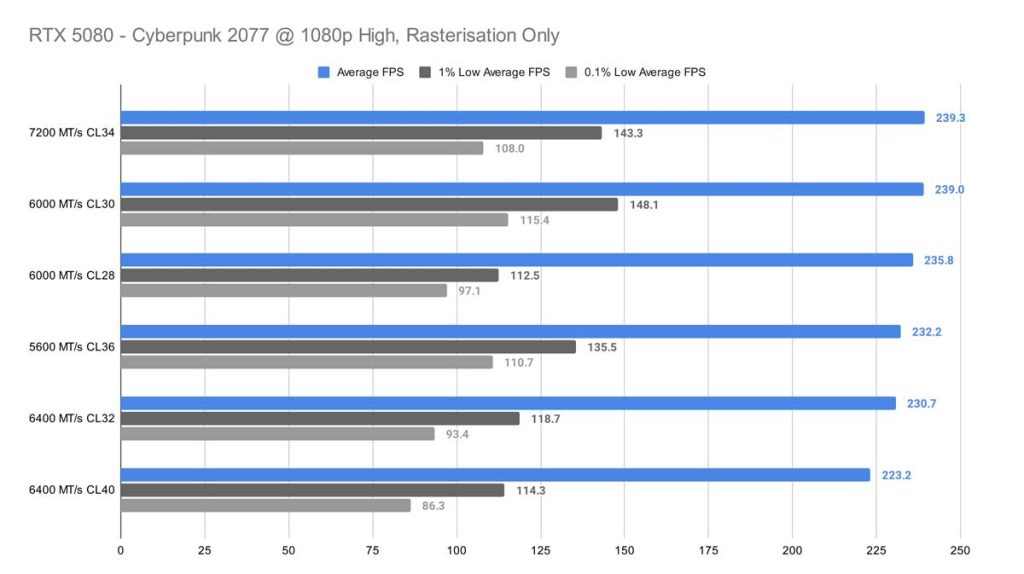
At 1080p, Cyberpunk shows a clearer preference for faster memory. Our highest‑speed kit leads the pack with an average of 239.3 FPS, and the gap between the best and worst results is roughly 16.1 FPS. Still, if we exclude the bottom two kits and focus on the top four, the deviation tightens to around 7 FPS, suggesting diminishing returns once you reach the higher‑end configurations.
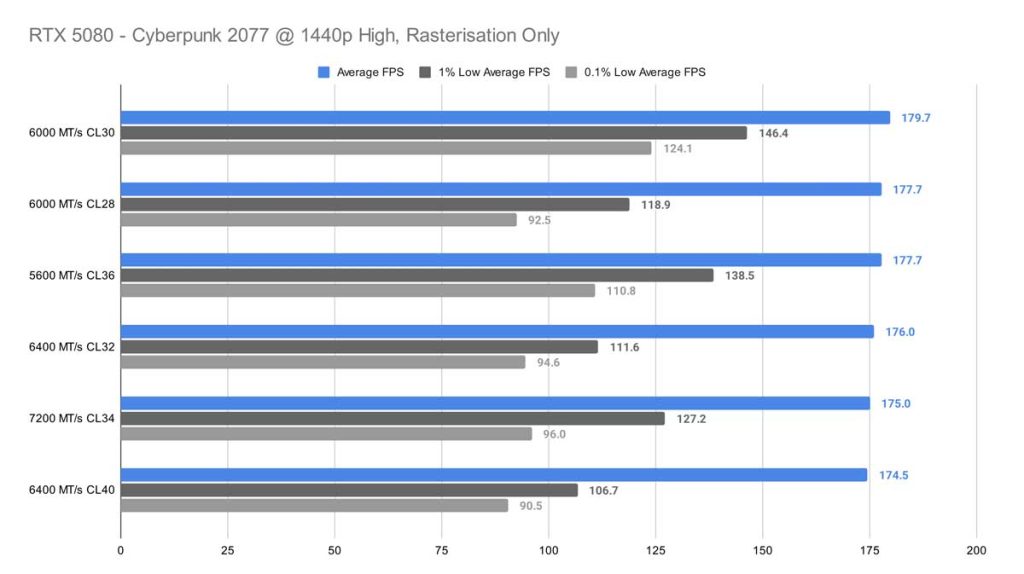
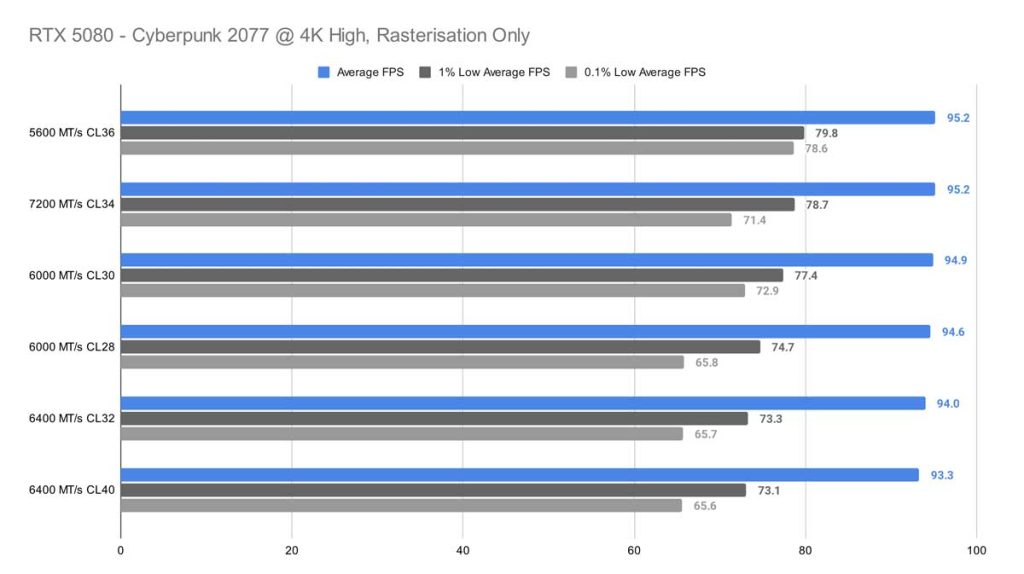
At 4K, the picture changes dramatically. The 5600 MT/s CL36 kit and the 7200 MT/s CL34 kit – despite having very different absolute latencies – tie for the top spot at 95.2 FPS. Even their lows remain healthy. The overall spread between the fastest and slowest kits is only 1.9 FPS, indicating a clear GPU bottleneck at this resolution.
Call of Duty: Black Ops 7 (Zombies)
At 1080p, the performance spread between the fastest and slowest memory kits is only about 4 FPS, which falls well within normal testing variance. Interestingly, our lowest‑latency kit – 6000 MT/s CL28 with a 9.3 ns absolute latency – actually lands at the bottom of the chart. Meanwhile, the 5600 MT/s CL36 kit tops the graph, despite having the lowest 0.1% lows at around 80 FPS, compared to something like the 6000 MT/s CL40 kit, which delivered 147 FPS in 0.1% lows. It’s a stark reminder that average FPS doesn’t always tell the whole story.
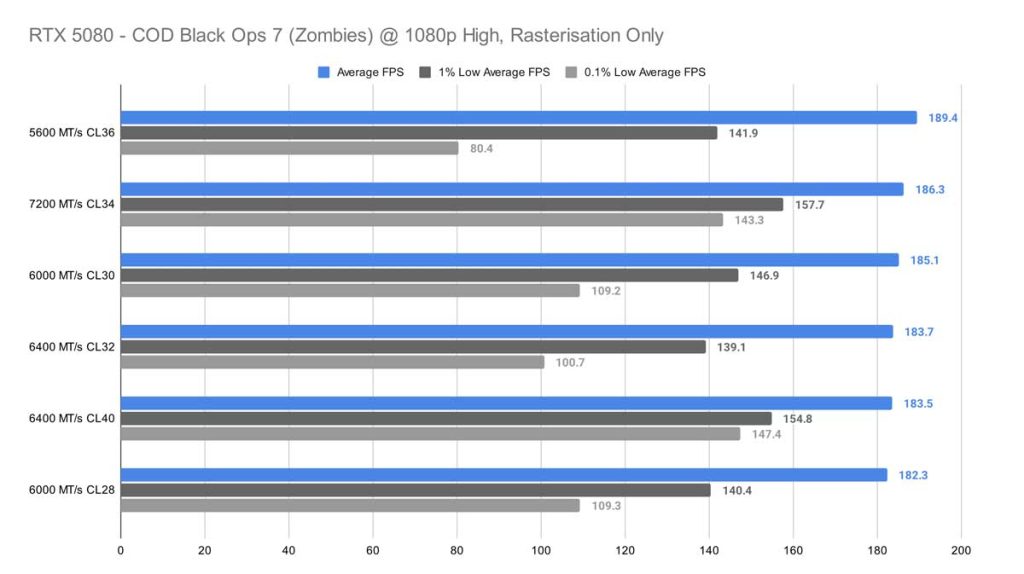
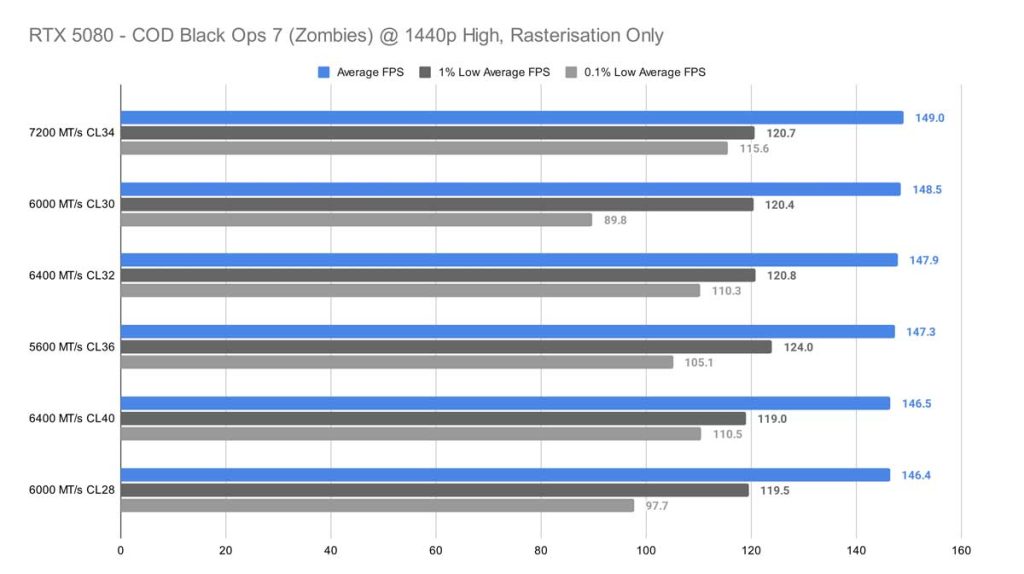
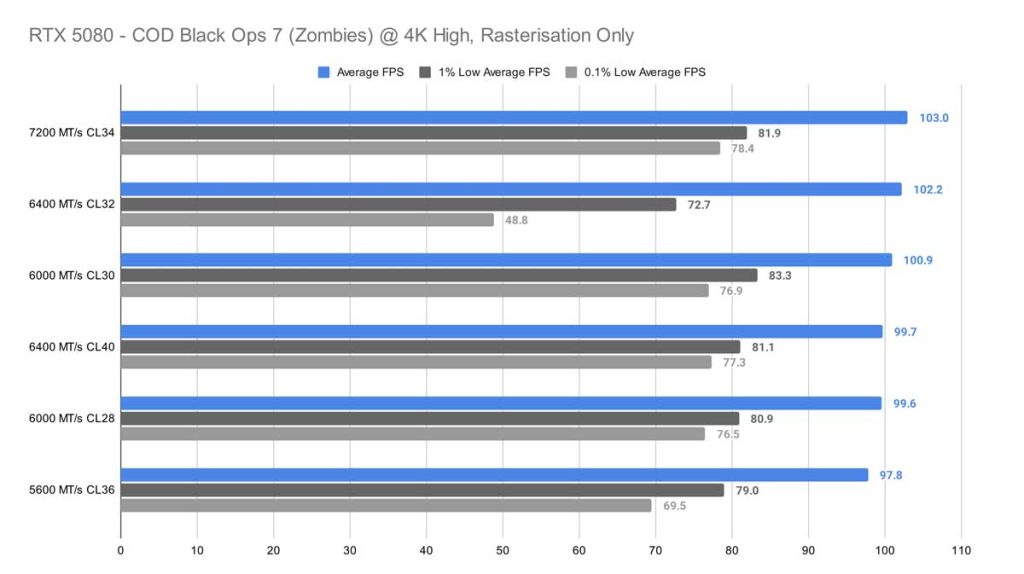
At 1440p, the differences shrink even further, with only a 2.6 FPS gap between first and last place. And at 4K (High settings), speed finally starts to matter. The higher‑frequency, lower‑latency kits rise to the top, averaging around 103 FPS, while the 5600 MT/s CL36 kit drops to the bottom at 97.8 FPS. Even so, the total spread is only about 5 FPS, which is noticeable but still modest.
Arc Raiders
At 1080p, Arc Raiders finally gives us something resembling a pattern. The 7200 MT/s CL34 kit pulls ahead by a noticeable margin, standing out as the clear top performer in this test. Surprisingly, the 6400 MT/s CL32 kit – which you’d normally expect to rank near the top thanks to its tighter timings and strong compatibility with Ryzen 9000‑series CPUs – doesn’t fare nearly as well here. Even if you sift through the 0.1% lows, there’s no real correlation to find here either.
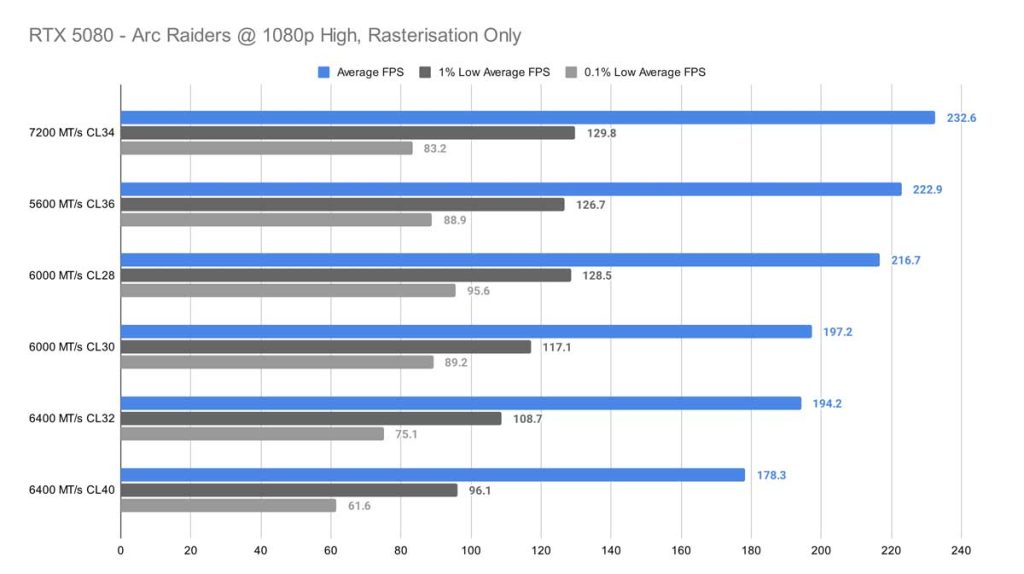
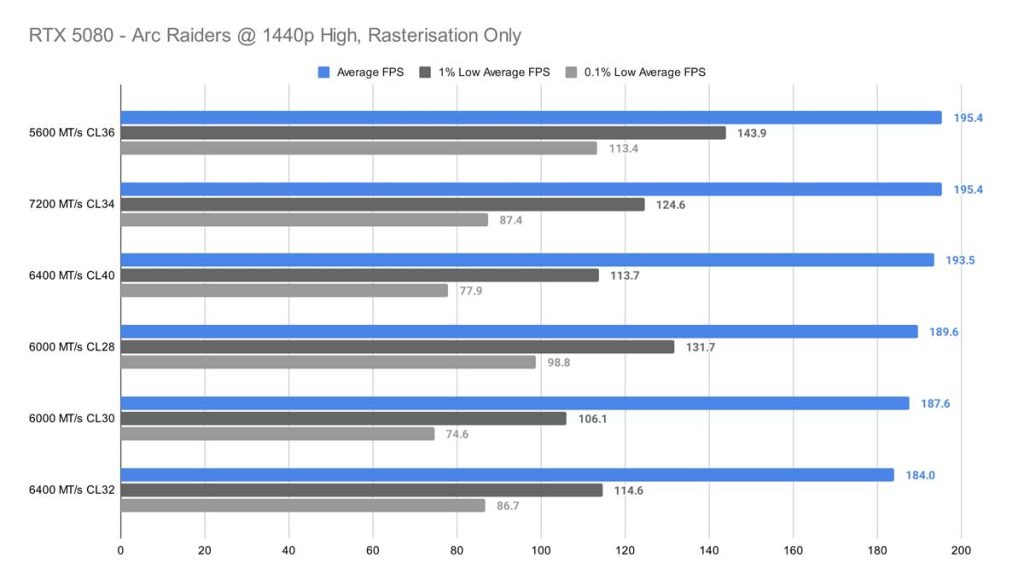
At 1440p, we started to see a potential GPU bottleneck, as GPU usage rose from 80% to 95%, but we also saw the numbers between the different kits tighten much more. In this test, the 5600 MT/s CL36 kit and the 7200 MT/s CL34 kit (both with completely different absolute latencies) took the lead in average framerate, but the faster, much lower-latency kit (7200 MT/s) performed worse at difficult times, yielding around 20 frames less on average for 1% and 0.1% lows. Looking at the first and last place results, the average difference in framerate is around 11 frames per second.
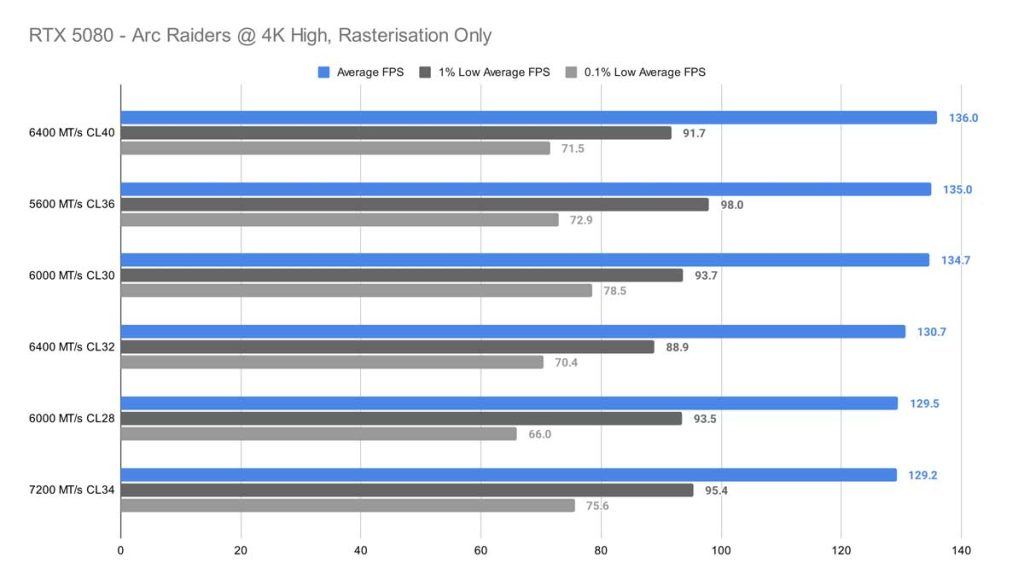
For 4K high, Arc Raiders sees around a 7 FPS difference between best and worst kits, and 1% and 0.1% lows are fairly consistent across the board as well – unfortunately, there’s not much of a pattern between our results for this test to give an indication of which kit is either best or worst for this game.
Conclusion
For our PC gaming builds, we recommend at least 32GB of DDR5 running at 6000MHz with a CAS Latency of CL36 or lower. This configuration consistently represents the best balance of performance, stability, and value for modern titles. That said, given current pricing and availability, starting with a single 16GB DIMM from a reputable brand such as Corsair, TeamGroup, or G.Skill is a practical approach. It makes adding a matching stick later far easier and avoids compatibility issues.
If your budget allows for higher‑speed, lower‑latency memory, it can certainly offer benefits – but our testing shows that results vary widely between games, resolutions, and engines. Different titles favour different combinations of speed and latency, and there’s no universally dominant kit across all scenarios. What matters most is how each game engine handles memory allocation, and that behaviour isn’t predictable or consistent enough to justify overspending.
In short: don’t chase extreme speeds or ultra‑tight timings unless you can comfortably afford them. Aim for a balanced system where the CPU, GPU, and memory complement each other for the best overall experience.

![FI_[DM93] Corsair 3200D Launch](https://geekawhat.com/wp-content/uploads/2026/03/FI_DM93-Corsair-3200D-LAUNCH-551x431.jpg)
![FI_[DM89] Phanteks Evolv + AORUS 5090 9850X3D Gallery (8)](https://geekawhat.com/wp-content/uploads/2026/02/FI_DM89-Phanteks-Evolv-AORUS-5090-9850X3D-Gallery-8-551x431.jpg)
![FI_[DM88] 16GB DDR5 9060 XT Build Gallery](https://geekawhat.com/wp-content/uploads/2026/02/FI_DM88-16GB-DDR5-9060-XT-Build-Gallery-551x431.jpg)
![FI_[DP059] Corsair Frame 4000 + 9070XT](https://geekawhat.com/wp-content/uploads/2026/01/FI_DP059-Corsair-Frame-4000-9070XT-551x431.jpg)