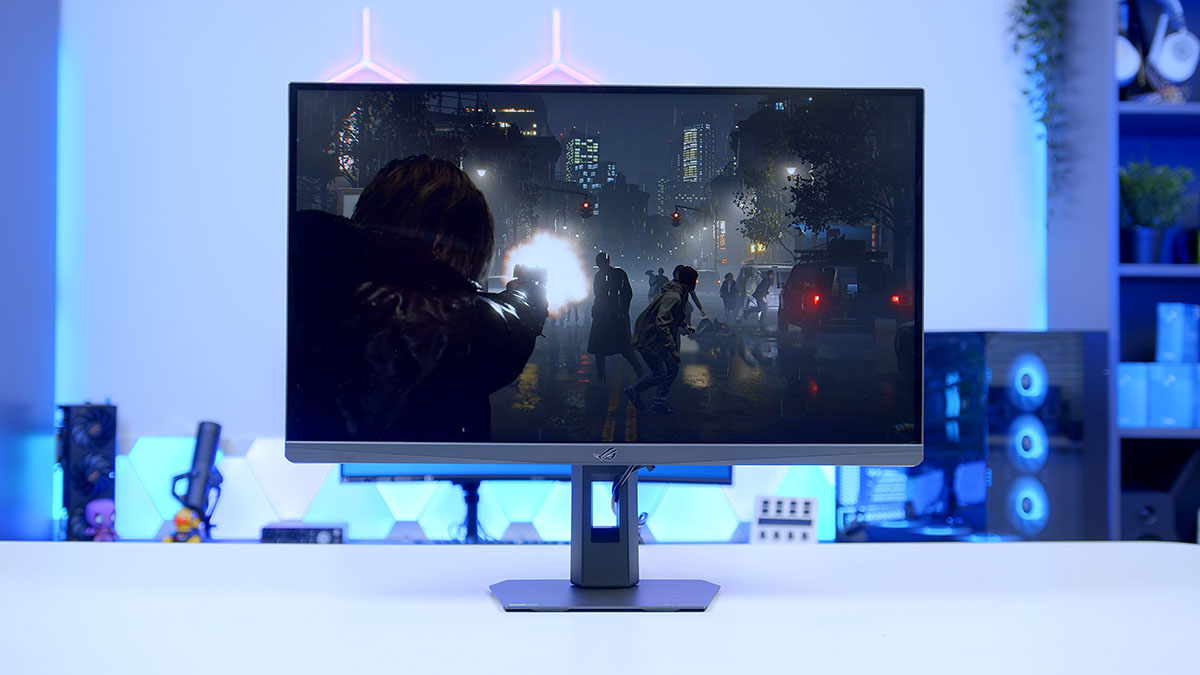
NVIDIA’s G-sync Pulsar technology has been a long time coming. First announced way back in January 2024, NVIDIA’s latest tech is finally making its way to the market through four launch monitor models, one from Acer, AOC, ASUS and MSI respectively. Designed to pair Ultra Low Motion Blur (ULMB) or Extreme Low Motion Blur (Sync) in ASUS’ case (ELMB) with Variable Refresh Rate technologies, Pulsar monitors look set to offer the best of both worlds, eliminating screen tearing and minimising motion blur. In this review we’ll be taking a look at the ASUS ROG Strix XG27AQNGV in particular.
Built around a brand new ‘Ultrafast IPS’ panel from AU Optronics, the XG27AQNGV is one of the world’s first G-sync Pulsar displays to reach consumers, arriving with a 360Hz refresh rate, an ambient light sensor, near-zero input lag, and motion clarity that redefines what an LCD monitor can offer. And with NVIDIA Pulsar tech compatibility on day dot, the XG27AQNGV has the early makings of a new go-to competitive display.
Buy the ASUS ROG Strix XG27AQNGV on:
Specification
The ASUS ROG STRIX Pulsar XG27AQNGV is a 27-inch 16:9 1440p flat monitor built around a new ‘Ultrafast IPS’ LCD panel from AU Optronics. While the jury is out on just how this panel stacks up on the market currently, ASUS are very confident. So confident, in fact, that they are billing this as the panel with the fastest response time of any 1440p monitor on the market. The combination of a new liquid crystal compound, with flow pattern optimised for efficiency and a dual-layer voltage driver, designed for a smooth and consistent image, is how they intend to back that up.
Pixel density sits at a comfortable 109 PPI on a 27-inch 1440p panel sharp without being so dense you need scaling and the standard RGB sub-pixel layout means you won’t encounter any of the text fringing that has dogged QD-OLED panels in the past.
HDR is one area where the IPS panel’s limitations are felt most, though comes as expected. Contrast ratio lands at a very typical 1129:1 and there is no local dimming. While the XG27AQNGV will happily accept a HDR signal and has the colour gamut to partially back it up, the viewing experience compared to modern OLED or Mini LED monitors is night and day. If HDR is a priority for you, this simply is not the monitor.
Monitor Specifications
-
Model
ASUS ROG Strix Pulsar XG27AQNGV
-
Panel Type / Screen Size
Ultrafast IPS / 27-inch
-
Resolution / Aspect Ratio
2560 × 1440 (1440p) / 16:9
-
Refresh Rate / Response Time
360Hz / 1ms GtG
-
Curvature / Viewing Angle
Flat / 178° (H) × 178° (V)
-
Brightness
SDR: 454 nits
HDR Peak: 500 nits -
Contrast Ratio / HDR
1129:1
HDR10 supported -
Colour Gamut
94% DCI-P3
90% DCI-P3 -
DisplayPort
1 × DisplayPort 1.4
1440p @ 360Hz -
HDMI
2 × HDMI 2.1 (40Gbps)
4K @ 120Hz / 1440p @ 120Hz -
USB / Audio
3 × USB-A 5Gbps
1 × Headphone out
1 × Micro USB-B -
VRR / Sync
NVIDIA G-sync
AMD VRR compatible
1–360Hz VRR range -
Features
G-sync Pulsar, ULMB 2,
Ambient Adaptive, Aura Sync RGB,
25″ Simulation Mode -
Warranty
Three-year
That’s not to say the image quality and particularly colour accuracy is horrendous on the XG27AQNGV, it’s in fact quite good. The measured 94% DCI-P3 coverage is actually a touch beyond the 90% spec and means colours are vivid and punchy without crossing into the hyper-saturated territory of some gaming panels. For gaming and low level editing, the panel on the XG27AQNGV is more than sufficient but if colour accuracy is the endgame, there are better panel options available.
ASUS ROG STRIX XG27AQNGV Design
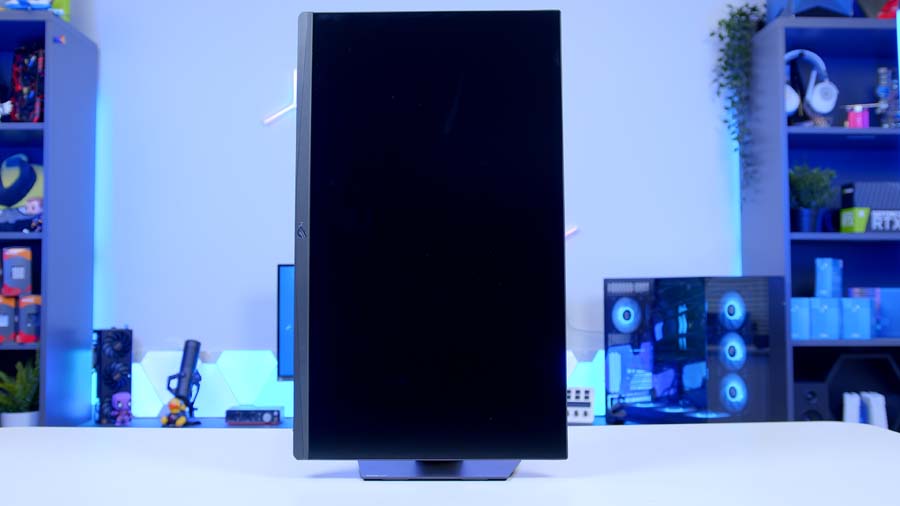
The overall design of the XG27AQNGV is clean and functional, though it won’t set any pulses racing aesthetically. The design almost takes the back seat in favour of letting the performance do the talking. It’s a monitor that looks functional rather than flashy which, admittedly, will suit many desks a great deal better than some of the more aggressive ROG aesthetic choices.
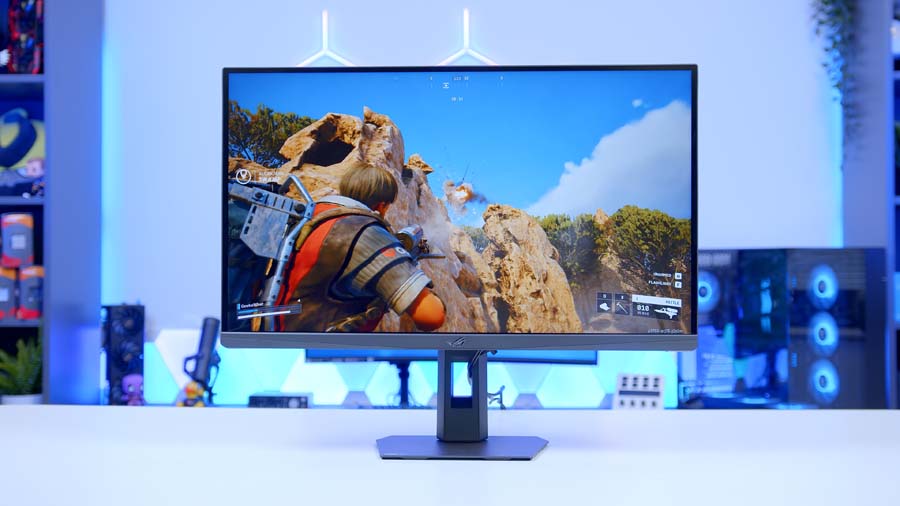
The stand is compact, and leaves plenty of space for your keyboard and mouse and the display maximises panel real estate, with a three-sided borderless design. Branding is kept to a minimum with a solitary ROG logo in view on the front and on the rear, a matte black finish with the ever-present ROG logo that can be synced with other Aura Sync devices or disabled entirely via the on-board OSD.
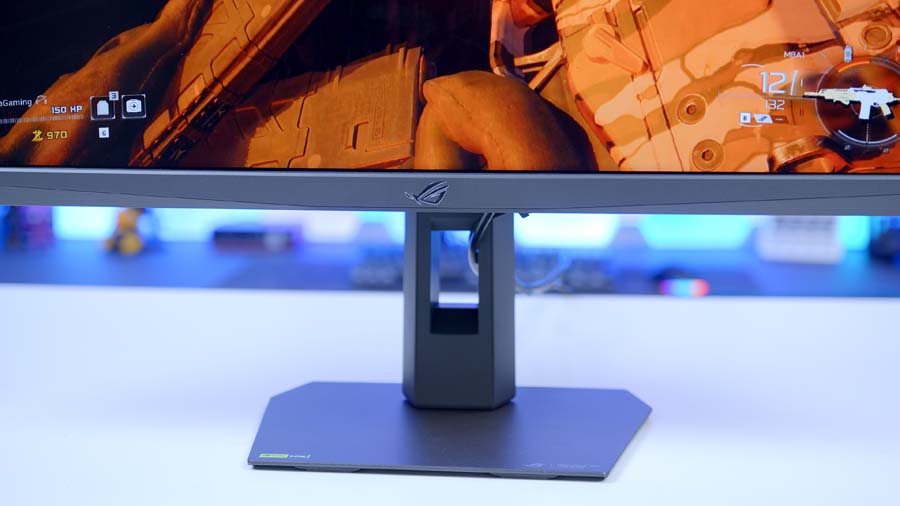
Day-to-day usability is in theory solid with the XG27AQNGV supporting the full range of viewing adjustments. Though in practice is slightly less impressive. The height and rotational adjustments are the main culprits here. View rotation, at least on our review sample, is not smooth and rather than being one fluid motion feels almost as if there are pre-determined rotational pre-sets and the height adjustment doesn’t offer enough height to meet my eye line neutrally, at least in my current day to set setup. VESA mounting, however is supported at the standard 100×100mm and does offer a viable solution to combat both of these niggles.
Features We Like
G-Sync Pulsar
So Pulsar, is it any good? Absolutely! No longer is it a choice between, smooth gameplay or sharp motion, with Pulsar enabled you get both. Historically, LCD monitors in particular but amongst others, typically struggle with what is known as sample and hold. Where by the panel displays each frame of an image and holds it lit until the next one arrives. Add in motion and to your eyes these lit frames are perceived as blur regardless of how fast the panel refresh rate is and as demonstrated in the right side of the image below.
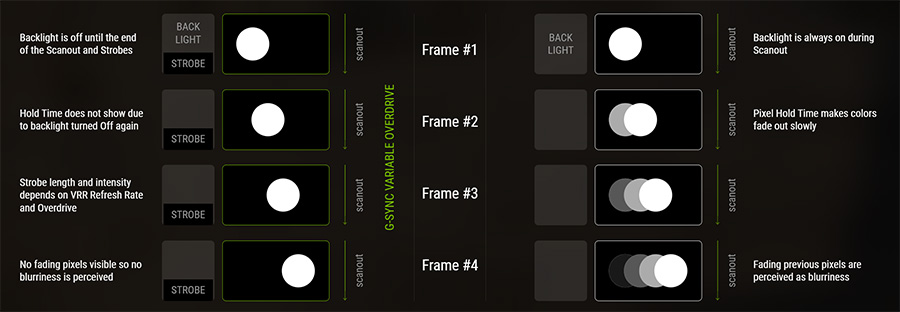
The standard fix in recent years has been strobe backlighting technology which works by rapidly flashing the backlight off between frames so that rather than holding the one frame until the next image arrives, your eyes see a brief flash of each frame and the perceivable image looks much smoother. This has largely been know as Ultra Low Motion Blur or ULMB and works very well when the monitor is set to a fixed refresh rate. The issue with ULMB however is that should you wish to enable Variable Refresh Rate to combat frame drops and screen tearing, the ULMB strobing technology has to turn off.
This is where Pulsar comes in to play. Pulsar takes the strobe backlighting methodology and takes it that next step further. Pulsar dynamically syncs the strobing to whatever frame rate is being delivered at any given moment. Rather than pulsing at a constant or fixed rate, Pulsar reads the Variable Refresh Rate (VRR) signal and adjusts the strobe timing on a per-frame basis to stay perfectly aligned. So, should you have VRR and Pulsar enabled and in an intense gunfight your frame rate drops from 200 down to 120, Pulsar will adapt its strobe timings in real-time to keep your gameplay tear-free but with the added motion clarity benefit.
ESports Dual Mode
Now, this wont be for everyone but for those who’s interest has been piqued, this could present a genuine new way to play. The 25″ simulation mode shrinks the active image down to a centred screen area with black borders, available in either a 16:9 default format or a 4:3 stretched layout, both with 1:1 pixel mapping for a clean, sharp result.
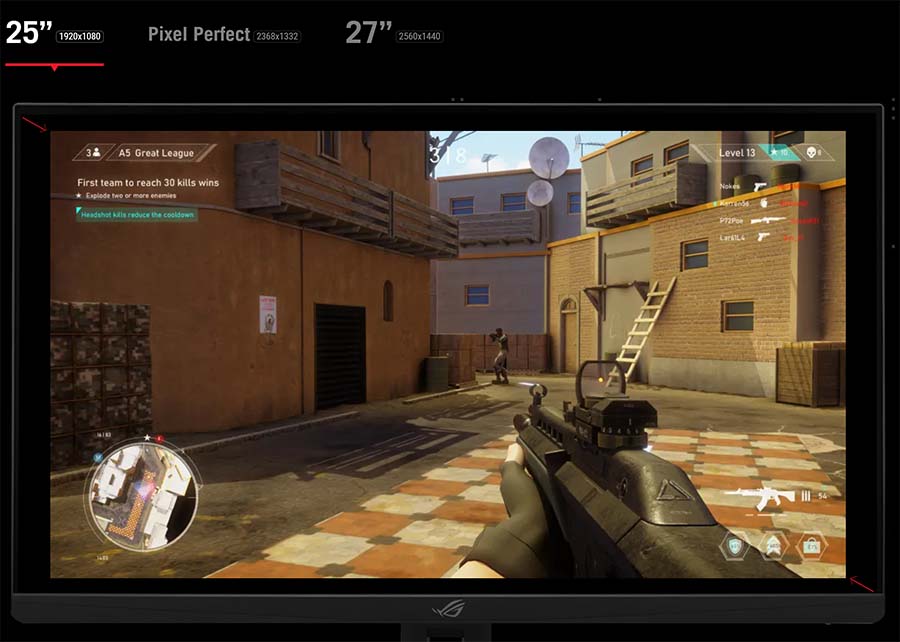
The smaller image area keeps everything tighter in your field of view, reducing the eye movement required to track enemies across the screen, while the lower resolution makes monster frame rates considerably easier to push to max out the refresh rate. For many E-sports pros, particularly in titles such as Counter-Strike and Valorant, tweaking the in game settings and monitor resolution to play with black bars has been the sworn by approach for as long as I can remember. Though, its always required a bit of faff, for want of a better word, to setup and dial in to the preferred settings. The Esports Dual mode on the XG27AQNGV removes all that friction and builds this right into the OSD. While this wont be for everyone and is at face value a fairly wacky way to play, in a world where the pros are sitting mere millimetres away from their screen to gain every miniscule advantage, there have been far more niche tactics gain traction. And when the ranked session is over, switching back to the full 27″ 1440p panel takes all of two seconds.
Features We Don’t Like
120Hz HDMI Cap
A rather frustrating niggle rather than an issue is the limitations to HDMI supported refresh rate. Yes, the 40Gbps HDMI 2.1 spec could theoretically handle more, but the G-sync scaler architecture means the full 360Hz experience is locked exclusively to DisplayPort, with HDMI support essentially being reserved for console use. In the grand scheme of things this wont be a major issue, it takes seconds to switch out the cable to a DisplayPort for PC users and if you’re plugging in a PS5 or Xbox Series X, since 120Hz is the ceiling there anyway it’s fine here too. Anyone hoping to run a second PC or a KVM-style setup over HDMI, however, will hit a wall immediately. On a monitor where connectivity is already a weak point, it’s another reminder that the XG27AQNGV has been engineered very specifically around a specific use-case and any variation from this often leads to frustrations.
NVIDIA GPU Only Pulsar Support
For those running AMD GPUs, this monitor isn’t the monitor for you as you are effectively locked out of the headline feature. While it doesn’t come as much surprise given traditional G-Sync monitors require NVIDIAs proprietary hardware module. With the move to the MediaTek scaler, a mainstream scaler, rather than NVIDIA’s own a small part of me hoped this would unlock full feature-set support for all GPUs, irrespective of brand but alas.
Colour Accuracy & Image Quality
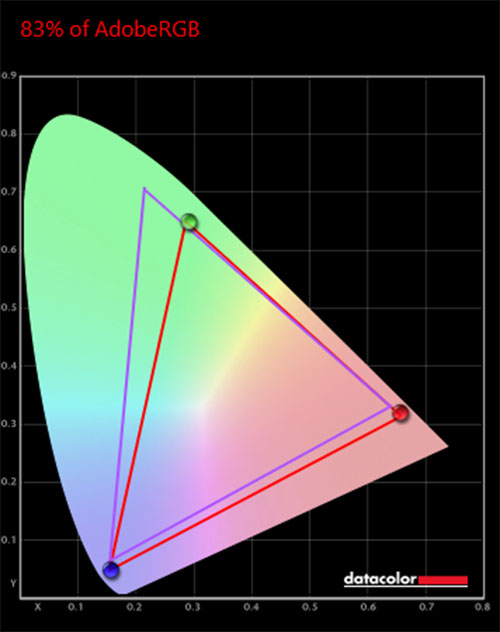
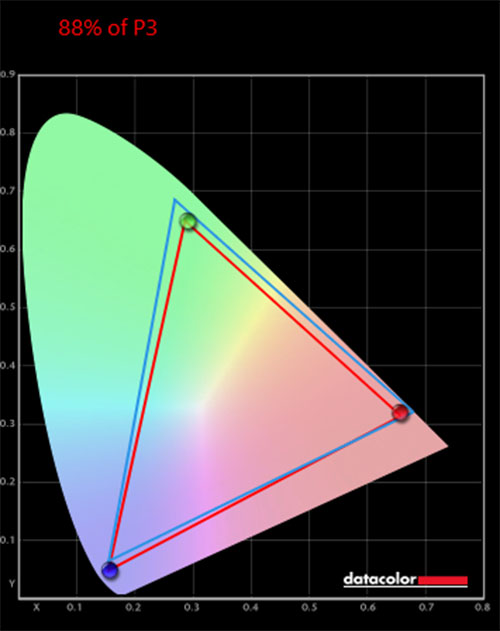
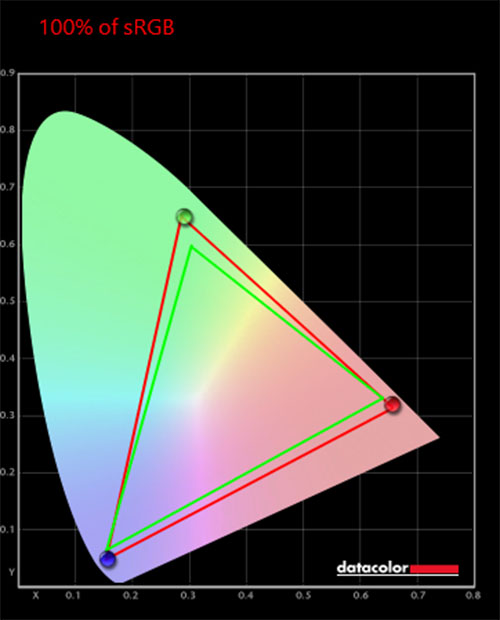
Alongside a traditional eye test, we used the Datacolor SpyderX Pro calibrator to precisely measure this display’s coverage of multiple colour gamuts. This approach gives us deeper insight into the ROG STRIX XG27AQGNV monitor’s image quality and provides a solid benchmark against other gaming monitors on the market. Below are the recorded percentages that illustrate the monitor’s visual fidelity across various tasks.
The XG27AQNGV puts in a solid colour performance for a gaming IPS panel. sRGB coverage hits a clean 100%, meaning SDR content and everyday desktop use are well served straight out of the box. P3 coverage lands at 88%, which is a touch below the 90% spec but still delivers noticeably vivid colours for gaming. AdobeRGB comes in at 83%, which is expected given the panel’s gaming-focused wide gamut backlight rather than a professional colour-accurate one. Nothing here is going to trouble a creative professional, but for gaming and general use the colour performance is confident and more than capable.


![FI_[DP064] ASUS Prime AP303 + 9070XT](https://geekawhat.com/wp-content/uploads/2026/03/FI_DP064-ASUS-Prime-AP303-9070XT-551x431.jpg)