PC Builds

Ultimate Ryzen 9850X3D & RTX 5090 Gaming PC Build

FI_[DM89] Phanteks Evolv + AORUS 5090 9850X3D Gallery (8)

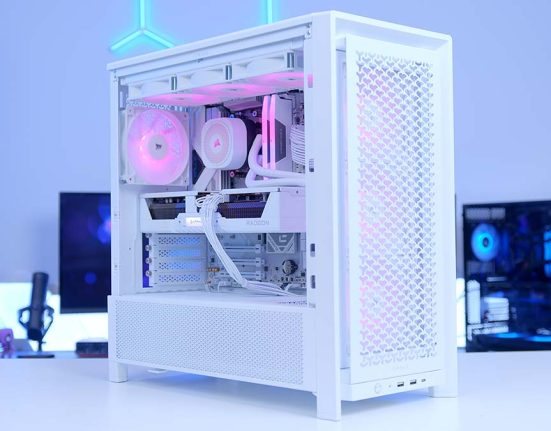
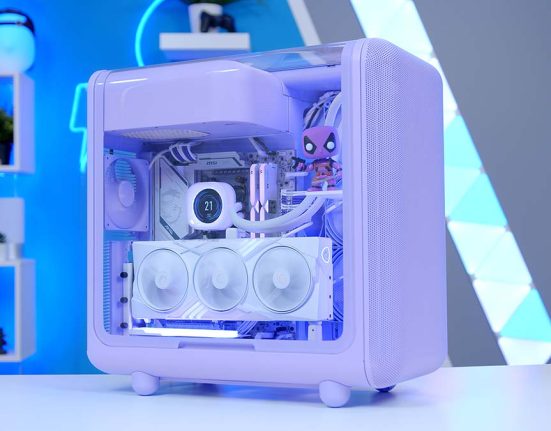
The AMD Ryzen 7 9850X3D has arrived, and we’re giving it the partner it deserves: the RTX 5090. In this build guide, we push the limits of 4K competitive gaming while showcasing some of Phanteks’ newest thermal tech. From the 8TB of blistering Samsung storage to the pristine white ‘Stealth’ motherboard, every part of this system was chosen for one reason: to be the best. So this build will be an interesting blend of raw performance, innovative products, and some seriously cool white aesthetics.

We’ll walk you through the parts we’ve chosen and explain what makes them really tick our boxes. We’ll show you how this gaming system performs across a range of relevant and popular titles. Finally, we’ll link our build guide video, so if this PC tickles your fancy, you can follow along with James as he shows you how to build it from start to finish.

Parts Overview

CPU

AMD Ryzen 7 9850X3D

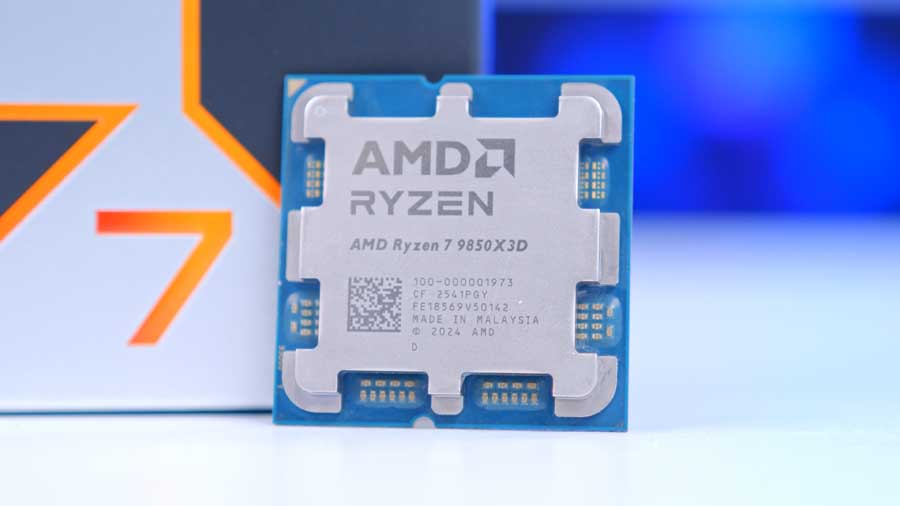
First up is our shiny new AMD Ryzen 7 9850X3D, which we are so excited to be including in this new gaming PC build. This processor packs a solid eight cores with sixteen threads, which is more than enough to game and handle medium multitasking workloads without issue. Its base clock speed is 4.7 GHz, and its boost clock is a whopping 5.6 GHz, making it currently the fastest X3D CPU on the AM5 socket with the latest Zen5 architecture. There’s something rather special about the X3D Chips, and it’s that they have more L3 cache than typical CPUs, which is especially important for competitive shooters and CPU logic-demanding games. This processor has 96MB of L3 cache, consisting of 64MB extra storage stacked vertically on top of the base 32MB.

When compared to the remainder of the Ryzen X3D lineup, the 9850X3D sits above the existing 9800X3D, but with fewer cores than the 9900X3D and 9950X3D:

CPU Comparison

Ryzen 7 7800X3D Competitor Comparison

Hover rows for highlight. Drag the :: handle to reorder specs, or tap/click a header title to sort.

CPU ::Cores ::Threads ::Base Clock Speed ::Boost Clock Speed ::TDP ::L3 Cache ::Where to Buy
AMD Ryzen 7 7800X3D product image

AMD Ryzen 7 7800X3D

Baseline gaming CPU in this build

8 16 4.2 GHz 5.0 GHz 120W 96MB [your-shortcode-7800x3d]
AMD Ryzen 7 9700X product image

AMD Ryzen 7 9700X

Zen 5 8-core alternative for mixed use

8 16 3.8 GHz 5.5 GHz 65W 32MB [your-shortcode-9700x]
AMD Ryzen 7 7700X product image

AMD Ryzen 7 7700X

Price-focused 8-core AM5 competitor

8 16 4.5 GHz 5.4 GHz 105W 32MB [your-shortcode-7700x]
Intel Core Ultra 7 265K product image

Intel Core Ultra 7 265K

Arrow Lake desktop rival in this class

20 (8P + 12E) 20 3.9 GHz (P-core) 5.5 GHz 125W 30MB [your-shortcode-core-ultra-7-265k]
Intel Core i7-14700K product image

Intel Core i7-14700K

High-core hybrid alternative for gaming + productivity

20 (8P + 12E) 28 3.4 GHz (P-core) 5.6 GHz 125W 33MB [your-shortcode-i7-14700k]

If the AMD Ryzen 7 9850X3D is out of your budget, these CPU are great alternatives that also work on the AM5 socket! Bear in mind that your performance may result in slightly different results.

CPU Cooler

Phanteks Glacier One 360D30 X2

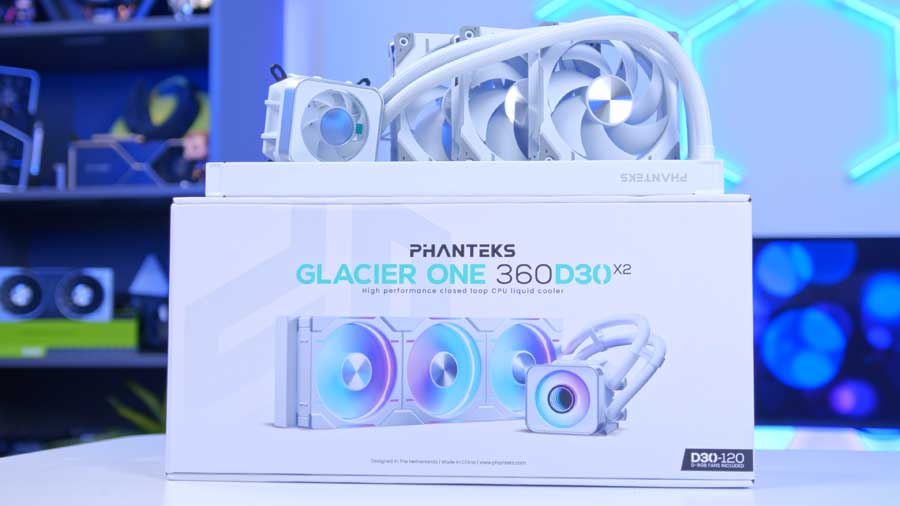
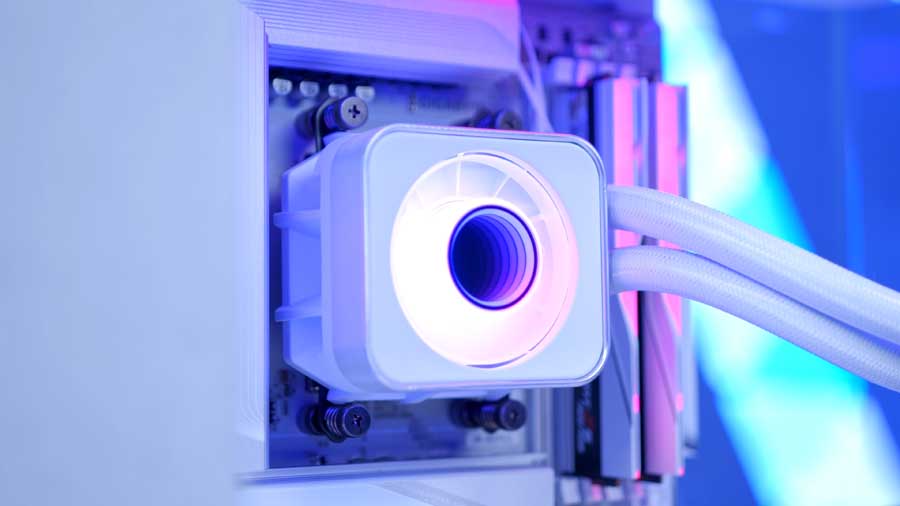
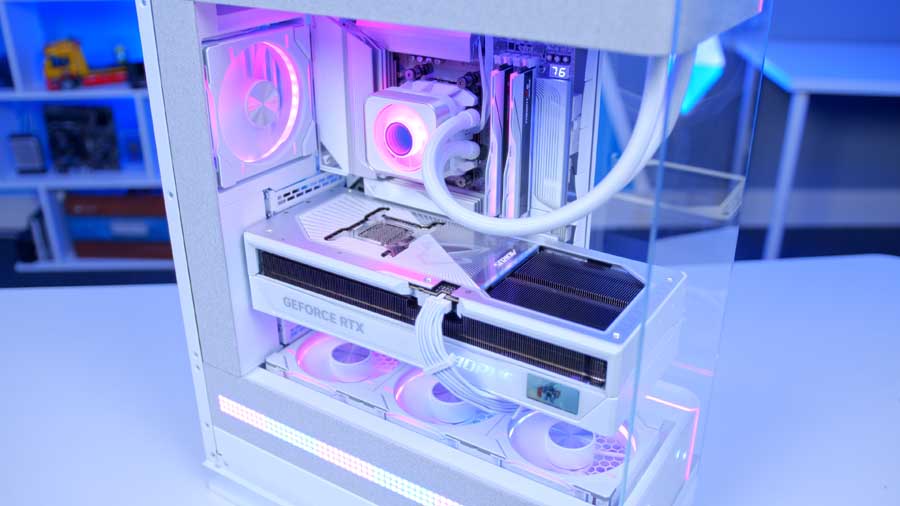
The AMD Ryzen 7 9850X3D is a powerhouse with a 120W TDP, making it a processor that is as thermally demanding as it is powerful. To maintain peak performance without throttling, the Phanteks Glacier One 360D30 X2 in white serves as a highly effective cooling partner. This liquid cooler utilises a 360mm aluminium radiator and three premium, interconnected Phanteks D30 fans that work in tandem to rapidly diffuse heat away from the CPU, ensuring your system remains stable even during the most intensive workloads or gaming sessions.

Beyond its core cooling capabilities, the Glacier One features a sophisticated brushed aluminium pump cover equipped with an integrated fan. This secondary airflow is vital for cooling the surrounding VRMs and M.2 SSDs, protecting the motherboard components that often get neglected in liquid-cooled builds. The aesthetic is topped off by a centre-mounted infinity mirror and fully customizable RGB lighting, which can be effortlessly synced via Phanteks' NEXLINQ Hub or standard motherboard software to create a cohesive, high-end look.

Motherboard

Gigabyte X870 AORUS STEALTH ICE

MPI_Gigabyte X870 AORUS STEALTH ICE Wide

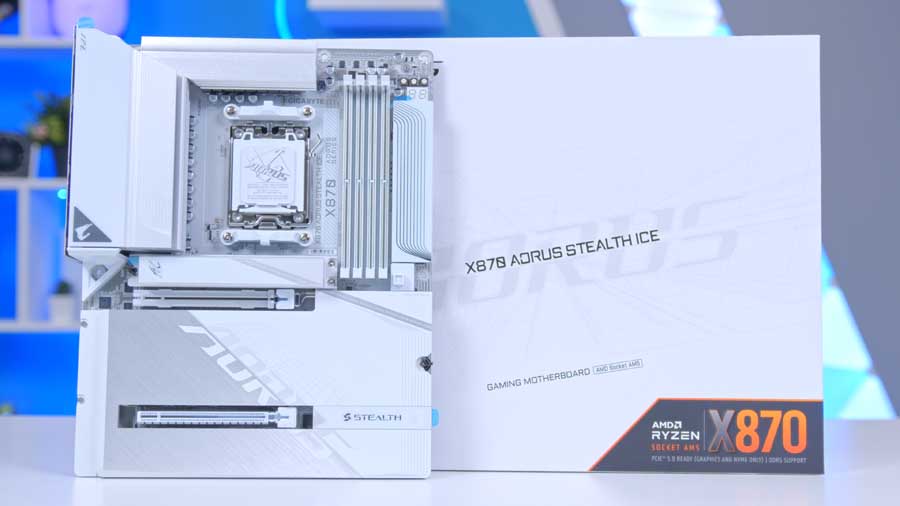
The icy white Gigabyte X870 AORUS STEALTH ICE was the definitive choice for this build, offering a refined, minimalist foundation that balances an otherwise complex hardware configuration. By opting for this sleek design, we ensure the build remains visually sophisticated without feeling overwhelmed by the surrounding components. The "Stealth" philosophy is truly realised through its reverse-connector design, which moves the majority of cable headers to the back of the PCB. This keeps the internal chamber virtually cable-free, allowing the clean lines of the hardware to take centre stage.

PCIe Lane Breakdown

PCIe 5.0 x16 (Top)

Mode
PCIe 5.0 x16 (Ryzen 9000/7000), PCIe 4.0 x8 (Ryzen 8000 Phoenix 1), PCIe 4.0 x4 (Ryzen 8000 Phoenix 2)
Supported Device
Graphics card or NVMe SSD
Lane Source
Direct CPU PCIe lanes
Notes
If only one graphics card is installed, Gigabyte recommends using PCIEX16.

PCIe 4.0 x16 (PCIEX4)

Mode
PCIe 4.0 x4 (physical x16 slot)
Lane Source
Chipset lanes
Notes
Shares bandwidth with M2D_SB. PCIEX4 becomes unavailable when a device is installed in M2D_SB.

M2A_CPU

Connector
Socket 3, M key
Supported Lengths
25110 / 22110 / 2580 / 2280
Interface
PCIe 5.0 x4/x2 (Ryzen 9000/7000), PCIe 4.0 x4/x2 (Ryzen 8000 Phoenix 1/2)
Lane Source
Direct CPU lanes

M2B_CPU

Connector
Socket 3, M key
Supported Lengths
22110 / 2280
Interface
PCIe 5.0 x4/x2 (Ryzen 9000/7000), PCIe 4.0 x4/x2 (Ryzen 8000 Phoenix 1)
Lane Source
Direct CPU lanes
Notes
Unavailable with Ryzen 8000 Series Phoenix 2 processors.
USB4 Interaction
Shares bandwidth with rear USB4 Type-C ports. With M2B installed, both run at up to PCIe 5.0 x2. Setting M2B to PCIe 5.0 x4 in BIOS disables the USB4 ports.

M2C_SB

Connector
Socket 3, M key
Supported Lengths
22110 / 2280
Interface
PCIe 4.0 x4/x2
Lane Source
Chipset lanes

M2D_SB

Connector
Socket 3, M key
Supported Lengths
22110 / 2280
Interface
PCIe 4.0 x4/x2
Lane Source
Chipset lanes
Notes
Shares bandwidth with PCIEX4. Installing a device in M2D_SB disables PCIEX4.

Performance and practicality are equally prioritised, as this board features an advanced thermal suite including a dedicated VRM heatpipe and a massive M.2 heatsink that spans the lower half of the PCB. This ensures that both the high-speed storage and power delivery remain cool under sustained loads. For the modern enthusiast, the board is entirely tool-less, extending even to the EZ-Plug WiFi antenna for a seamless assembly experience. On the connectivity front, the rear I/O is exceptionally well-equipped, featuring dual USB4 Type-C ports with 40Gb/s speeds and DP-Alt support, alongside cutting-edge WiFi 7 and 5G LAN for ultra-fast networking.

RAM

G.Skill Trident Z5 NEO RGB

MPI_G.Skill Trident Z5 NEO EXPO White

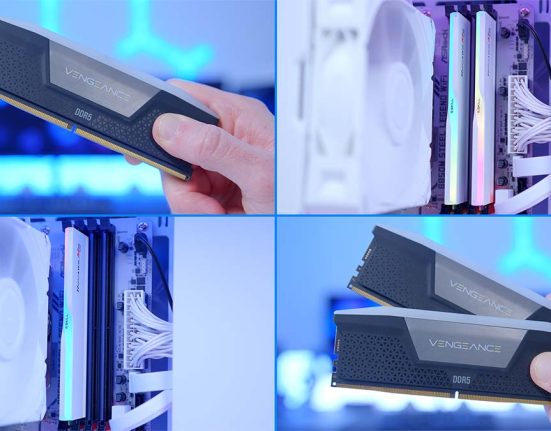
For the RAM, we’ve chosen the G.Skill Trident Z5 NEO EXPO kit. What’s great about this kit is that the EXPO memory is designed for AMD PC builds, with an onboard profile that optimises performance by increasing speeds where possible and lowering latency. Specifically, the G.Skill Trident Z5 NEO EXPO we’ve chosen offers a speed of 6000MT/s while latency sits around CL36, which is solid for this gaming PC build.

RAM Configuration

Speed

6000MHz

Latency

CL36

Generation

DDR5

DIMM Count

2 Sticks

Memory Speed Visual (DDR5 Scale)

4800MHz 6000MHz 8000MHz+

Recommended Motherboard Slot Population (4-Slot Board)

Slot 1 (A1)

Leave Empty

Slot 3 (B1)

Leave Empty

For 2-DIMM kits on 4-slot motherboards, install memory in slots 2 and 4 (A2 + B2) for dual-channel operation and best stability.

Aesthetically speaking, the G.Skill Trident Z5 NEO EXPO is a fantastic-looking kit. The black-and-white heat spreader looks sophisticated and complements the other white parts in the build. Each DIMM features a small RGB strip that can be synced with other components via various applications. Our Phanteks case will also allow us to showcase these gorgeous sticks from three different viewing positions.

SSD

Samsung 9100 Pro 8TB

MPI_Samsung 9100 Pro 8TB

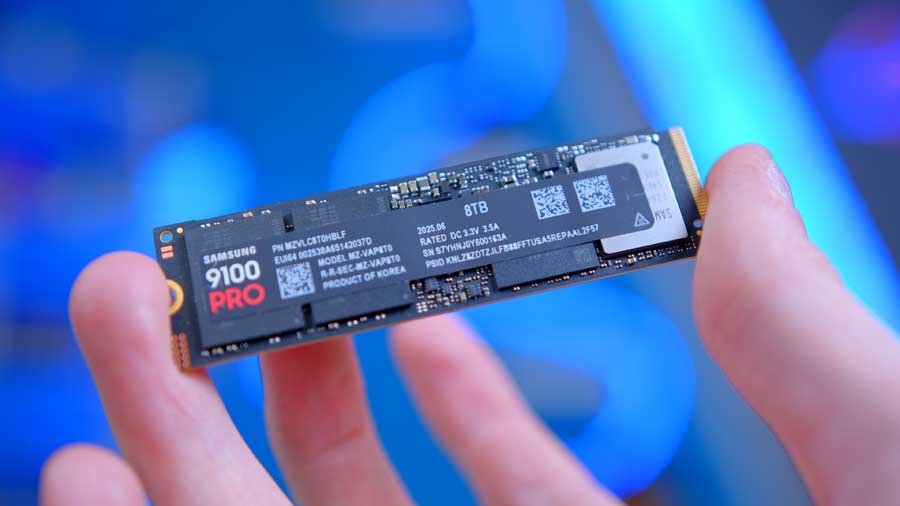
The Samsung 9100 Pro is built on the latest PCIe Gen5 interface, offering roughly double the speed of its predecessor, the Gen4-based Samsung 990 PRO. It’s available in four capacities ranging from 1TB to 8TB, making it suitable for demanding tasks like gaming and 4K video editing.

SSD Speed Results

All results below are produced by GeekaWhat in-house testing using the same bench and methodology for consistency.

Sequential Read

14,201 MB/s

Sequential Write

13,058 MB/s

Generation Speed Context

Read 14,201 MB/s Write 13,058 MB/s
Gen3 Gen4 Gen5 Maximum Speed: 15,754 MB/s

Scale uses PCIe/NVMe theoretical throughput ceilings (x4 link). Real-world speeds vary by controller, NAND, queue depth, thermals, and test tool.

For this build, we’ve opted for the 8TB model to maximise performance and long-term storage. In our testing, the 9100 Pro has proven to be one of the best SSDs we’ve used, delivering uncompromising performance and exceptional endurance.

Suggested Article: Best SSDs to Buy in 2026

GPU

Gigabyte AORUS GeForce RTX 5090 MASTER ICE 32GB
MPI_GIGABYTE AORUS GeForce RTX 5090 Master ICE

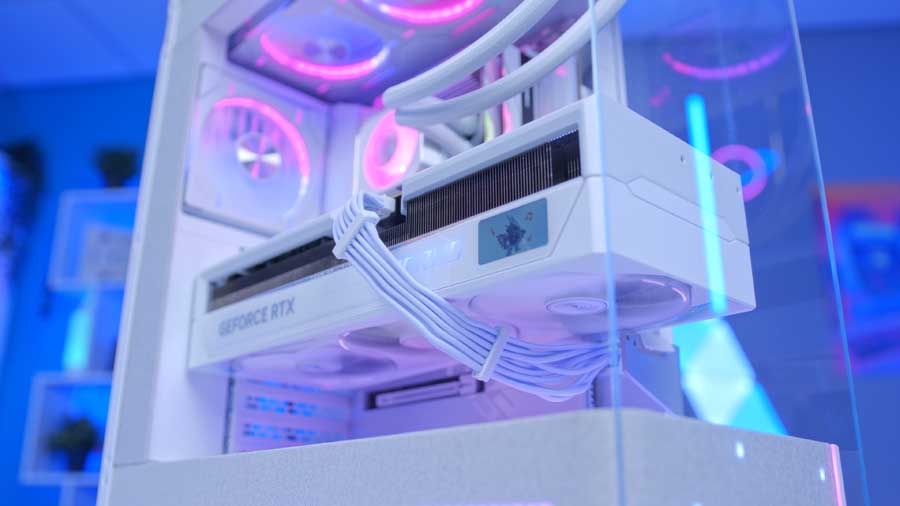
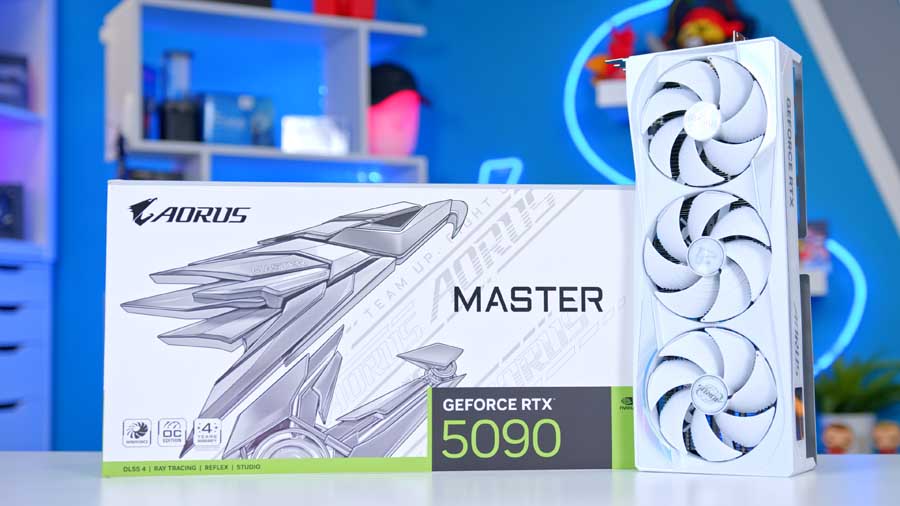
The Gigabyte AORUS GeForce RTX 5090 MASTER ICE 32GB is undeniably an overkill choice, but for this build, we are going completely all out. While the RTX 5090 itself is the key to sustaining elite frame rates at 4K ultra settings - thanks to its massive 32GB of GDDR7 VRAM and a wide 512-bit memory bus - Gigabyte has delivered a custom variant that effectively knocks other options off the shelf. It is a flagship in every sense of the word, designed for those who refuse to compromise on either raw power or visual presence.

The features of the AORUS MASTER ICE make it a true force to be reckoned with, characterised by the signature LCD Edge View for real-time monitoring and the striking RGB halo rings surrounding the fans. Under the hood, the powerhouse WINDFORCE cooling system ensures that the card remains frosty even when pushed to its absolute limits. Between the cutting-edge internal specs and the premium external aesthetics, it is hard to imagine anything else you could possibly want a graphics card to do.

Gigabyte AORUS RTX 5080

Alternative GPU Choice

Gigabyte AORUS GeForce RTX 5080 MASTER ICE 16GB

If you're looking for strong 4K performance without the crazy price tag associated with the RTX 5090, especially in the current market conditions, the RTX 5080 is a great alternative pick. For many people, the extra memory and raw horsepower of the 5090 are overkill and not actually required.

Buy This If:
You're looking for great 4K performance without the price tag associated with the RTX 5090.
Main Tradeoff:
Much less video memory, with 16GB vs 32GB found on the RTX 5090.
Case

Phanteks EVOLV X2 MATRIX

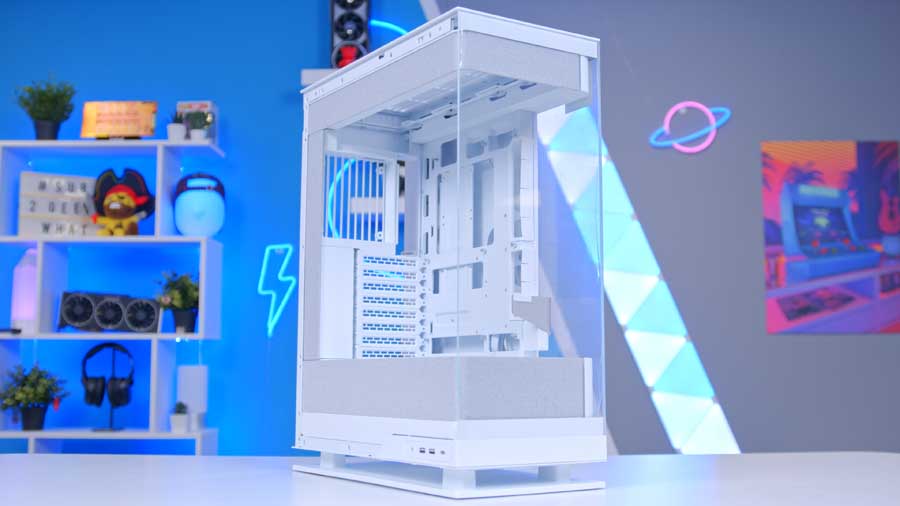
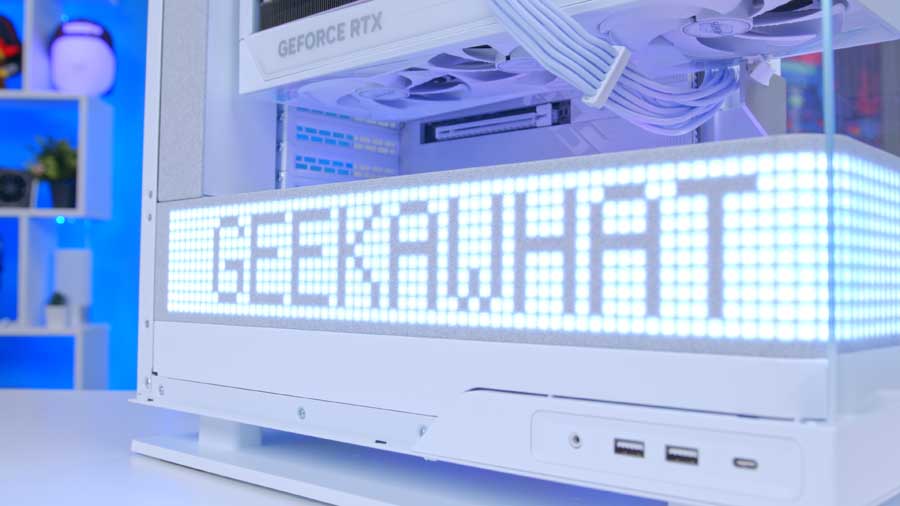
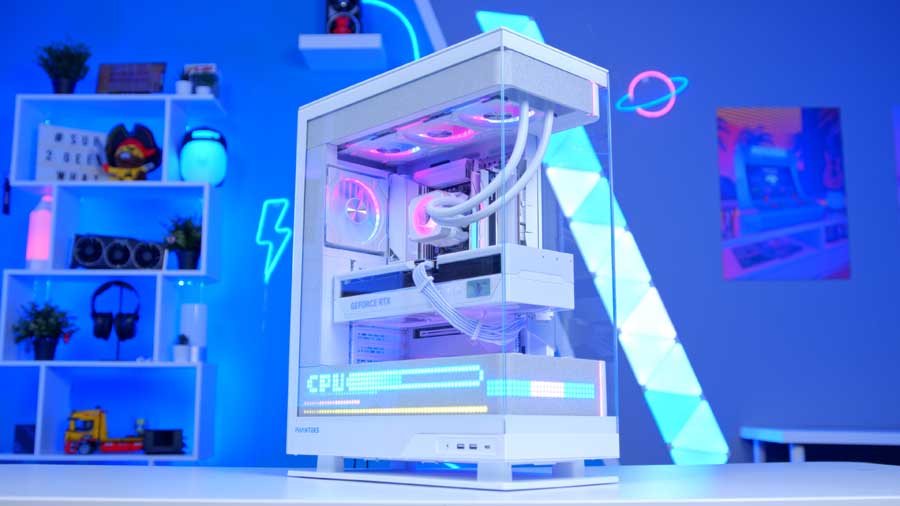
The EVOLV X2 MATRIX is a new case from Phanteks that introduces a bold new dimension to the EVOLV line, with an impressive integrated 900-LED Matrix display concealed behind a fabric interior layer. This unique feature transforms a typical fish-tank-style case into more than just a house for your components; it becomes a dynamic canvas that lets you personalise your build.

Phanteks EVOLV X2 MATRIX Specs

General

Form Factor
Mid-Tower
Dimensions
454 x 228 x 588 mm (17.87 x 8.98 x 23.15 in)
Materials
Steel chassis, aluminium panels, tempered glass window, ABS plastic, polyester
Color
Brushed aluminium
Expansion Slots
8
Vertical GPU
Supported (riser cable sold separately)
Front IO
2x USB 3.0, 1x USB-C 3.2 Gen2x2, 1x headset combo jack, power, reset

Mainboard Compatibility

Supported Boards
E-ATX, ATX, Micro-ATX, Mini-ITX
Max Board Width
Up to 280 mm
Rear-Connect
MSI Project Zero, ASUS BTF, Gigabyte Project Stealth
Layout Notes
Floating vertical airflow chassis with hidden cable routing door

Cooling Support

Total Fans
7x 120 mm
Fan Mounts
Top: 3x120 mm, Rear: 1x120 mm, Bottom: 3x120 mm (7 total)
Radiator Support
Top: up to 360 mm
Top Rad Max Size
415 x 130 x 32 mm (16.34 x 5.12 x 1.25 in)
Airflow Design
Bottom intake and top exhaust vertical cooling path

Storage

Internal 2.5" Positions
5 + 1x 3.5" HDD
Internal 3.5" Positions
2 + 3x 2.5" SSD
Side Bracket
Supports 3x 2.5" SSD
Bottom Bracket
Supports 2x 3.5" HDD or 1x 3.5" HDD + 2x 2.5" SSD

Clearance

CPU Cooler Height
170 mm (6.69 in)
GPU Length
380 mm (14.96 in)
GPU Width
170 mm (6.69 in)
PSU Length
250 mm (9.84 in)

Matrix Display Features

LED Count
900 integrated LEDs
Power Input
5V | 5.3A
Placement
Behind fabric interior panel for a clean hidden display look
Fabric Material
Polyester
Connectors
Mainboard USB 2.0 header (500 mm) and SATA (500 mm)
Controls
Configured through Phanteks NexLinq app (Windows)
Widget Types
System stats, time/date, text, animations, and layout widgets
RGB Integration
3x built-in D-RGB strips pre-installed; sync via compatible controller/mainboard

Extra

Net Weight
14.2 kg (31.3 lbs)
Gross Weight
16.5 kg (36.4 lbs)
Warranty
5 years limited

Measuring 454 x 228 x 588 mm, this case is taller than most other mid-towers to incorporate the LED panel whilst still providing enough room for airflow and cable management. We like that the front IO is on the side panel for easy access when the case is on a desk, and the LED lighting makes this case a proud showpiece. When paired with the CPU cooler, you'll achieve complete harmony between these two components using the NEXLINQ application.

PSU

Lian Li SX1200P

MPI_Lian Li SX1200WP

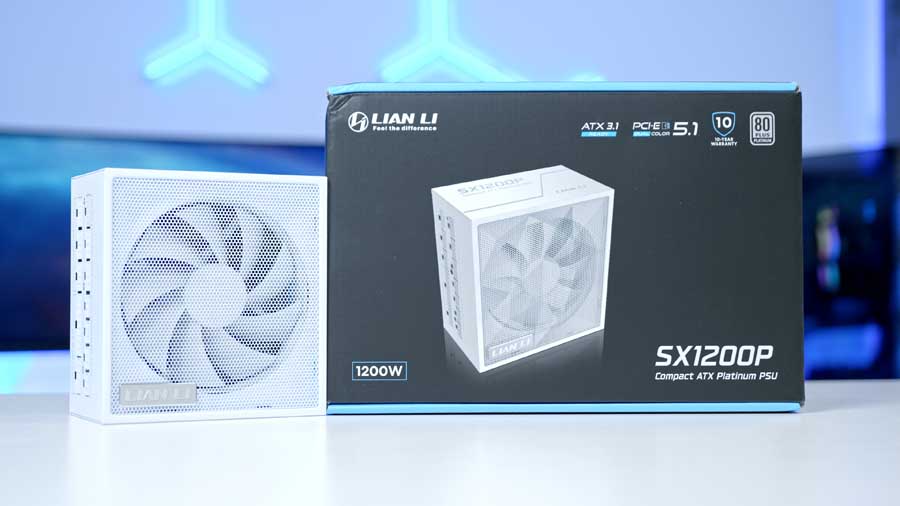
Our final component choice is the SX1200P; it's a newer release from Lian Li. We chose this PSU because it's white, the cables and cable tips are white, and, most importantly, it provides enough stable headroom to power the extremely power-demanding RTX 5090 we are using. It also offers extra wattage to support future upgrades without requiring a new PSU.

Included Cables

12+4-pin PCIe

Connector Type
12+4-pin PCIe
Quantity Included
1
Primary Use
High-power PCIe/GPU connection

12V-2x6

Connector Type
12V-2x6
Quantity Included
2
Primary Use
Modern GPU power connectors

ATX 12V (4+4)

Connector Type
4+4-pin ATX 12V
Quantity Included
2
Primary Use
CPU power (motherboard EPS headers)

PCIe (6+2 pin)

Connector Type
Standard GPU power
Quantity Included
3
Primary Use
Additional GPUs / PCIe devices

SATA (15-pin)

Connector Type
SATA
Quantity Included
8
Primary Use
SATA storage devices

Peripheral (Molex 4-pin)

Connector Type
Molex
Quantity Included
4
Primary Use
Fans / legacy devices

The power supply is fully modular for easier cable management. It's ATX 3.1 and PCIe 5.1 certified, and it has an 80 PLUS Platinum rating, meaning it is highly efficient and can save you money on your energy bills compared to lower efficiency ratings. We recently wrote that this PSU is one of the best white PSUs on the market right now.

Suggested Article: Best Power Supplies to Buy in 2026

Recommended Peripherals

Here are some peripherals we recommend for this build, as their quality and design perfectly complement the PC and its components.

A premium 75% pick with enthusiast-level build quality, smooth switches, and strong all-around gaming + daily use performance.

Switch Type
ROG NX Snow V2 (hot-swappable)
Layout
75% compact
Connectivity
2.4GHz / Bluetooth / USB-C
Best For
Premium gaming + typing setups

Esports-focused wireless mouse with strong sensor consistency and responsive click feel for FPS-heavy playstyles.

Sensor
High-performance optical sensor
Weight
Ultra-light class
Connectivity
Low-latency wireless + USB
Best For
Competitive shooters

The VIRTUOSO MAX WIRELESS adds active noise cancellation, simultaneous 2.4GHz + Bluetooth, and 50mm graphene drivers for a more premium all-round experience.

Connection
2.4GHz low-latency wireless + Bluetooth (simultaneous dual wireless)
Noise Control
Active Noise Cancellation + transparency mode
Audio
50mm graphene drivers, Dolby Atmos support, 20Hz-40kHz response
Battery
Up to 30 hours wireless (RGB off), plus fast-charge support

Top-end 32-inch 4K gaming display with OLED-level response times and excellent HDR impact.

Panel
32-inch 3840x2160 QD-OLED
Refresh Rate
240Hz
Response Time
0.03ms class
Best For
High-end 4K gaming builds

Performance

With the hardware side covered, it’s time to see what this system actually delivers in-game. For testing, we’ve focused on a mix of competitive shooters and visually demanding AAA titles to give a realistic spread of workloads. That means fast-paced, high-refresh experiences like Call of Duty: Black Ops 7, Battlefield 6, Arc Raiders, Fortnite and Apex Legends, alongside heavier cinematic titles including Indiana Jones & The Great Circle and Hogwarts Legacy. The idea is to look at both ends of the spectrum — raw FPS potential and GPU-heavy visual stress.

Performance Snapshot

Multi-Game Average FPS

Map: Dam Battlegrounds. Capture length: 4-7 mins.

1080p

168FPS

1440p

129FPS

4K

82FPS

Map

Dam Battlegrounds

Capture Length

4-7 Mins

Window Mode

Fullscreen

Display Resolution

3840x2160

NVIDIA DLSS Frame Generation

Off

VSync

Off

NVIDIA Reflex Low Latency

On

Frame Rate Limit

Unlimited

Upscaled Resolution

100% - 3840x2160

Resolution Scaling Method

TAAU

Render Resolution Scale Mode

Manual

Render Resolution

100% - 3840x2160

Field of View

90

Motion Blur

Off

Motion Blur Intensity

0

NVIDIA RTX Global Illumination

Static

Overall Quality Level

High

View Distance

High

Anti-Aliasing

High

Shadows

High

Post-Processing

High

Texture

High

Effects

High

Reflections

High

Foliage

High

Global Illumination Resolution

High

In-Game Performance Overlay

Off

Idle Energy Saving

On

Inactive Window Energy Saving

On

Learn More About How We Test
Driver Version: NVIDIA 572.xx

Capture length: 4-7 mins.

1080p

201FPS

1440p

152FPS

4K

97FPS

Capture Length

4-7 Mins

Target Display

1: AVT GC553G2

Display Mode

Fullscreen

Aspect Ratio

16:9

Display Resolution

3840x2160

AA and Super Resolution Type

TAAU

Render Scaling

100

Frame Generation Mode

Off

Low Latency Mode

Off

Brightness

50

Match FPS Cap

No Limit

Lobby FPS Cap

No Limit

Background FPS Cap

No Limit

Show FPS

On

V-Sync

Off

Game Language

English

Graphics Quality

High

Global Illumination

Lumen GI - High Quality

Reflection Quality

Screen Space Reflections

Model Detail

High

Post-Processing

High

Shadow Detail

High

Texture Detail

High

Effects Detail

High

Foliage Quality

High

Learn More About How We Test
Driver Version: NVIDIA 572.xx

One-resolution example (showing only 4K).

1080p

119FPS

1440p

86FPS

4K

61FPS

Benchmark Mode

Ran 2x

Monitor

1

VSync

Off

Maximum FPS

Off

Windowed Mode

Fullscreen

Resolution

3840x2160

HDR Mode

None

NVIDIA Reflex Low Latency

Off

Intel Xe Low Latency

Off

Quick Preset

Custom

Resolution Scaling

Off

Frame Generation

Off

Texture Quality

High

Ray Tracing

Off

Path Tracing

Off

Path Tracing in Photo Mode

Off

Crowd Density

Medium

Field of View

80

Film Grain

On

Chromatic Aberration

Off

Depth of Field

On

Lens Flare

On

Motion Blur

Off

Vignette

On

Contact Shadows

On

Improved Facial Lighting Geometry

On

Anisotropy

8

Local Shadow Mesh Quality

High

Local Shadow Quality

High

Cascaded Shadows Range

High

Cascaded Shadows Resolution

High

Distant Shadows Resolution

High

Volumetric Fog Resolution

High

Volumetric Cloud Quality

High

Max Dynamic Decals

High

SSR Quality

High

Subsurface Scattering Quality

High

Ambient Occlusion

High

Learn More About How We Test
Driver Version: NVIDIA 572.xx

Map: Empire State. Mode: Conquest. Capture length: 4-7 mins.

1080p

174FPS

1440p

131FPS

4K

84FPS

Map

Empire State

Game Mode

Conquest

Capture Length

4-7 Mins

Fullscreen Mode

Windowed

Fullscreen Device

Monitor 1 - AVT GC...

Fullscreen Resolution

3840x2160

Aspect Ratio

Auto

Refresh Rate

120Hz

Vertical Sync

Off

HDR Calibration

Edit

Field of View

90

Vehicle 3rd Person FOV

79

Weapon FOV

Wide

Weapon Motion Blur

0

World Motion Blur

0

Camera Shake Amount

50

Reduce Sprint Camera Bobbing

Off

Chromatic Aberration

On

Vignette

On

Film Grain

On

Performance Preset

Custom

Graphics Quality

High

Graphics Quality Settings

Edit

World Brightness

60

UI Brightness

50

Sharpness

50

Advanced

Edit

Texture Quality

High

Texture Filtering

High

Mesh Quality

High

Terrain Quality

High

Undergrowth Quality

High

Effects Quality

High

Volumetric Quality

High

Lighting Quality

High

Local Light and Shadow Quality

High

Sun Shadow Quality

High

Shadow Filtering

PCSS

Reflection Quality

High

Screen Space Reflections

High

Post Process Quality

High

Screen Space AO and GI

GTAO High

High Fidelity Objects Amount

High

Learn More About How We Test
Driver Version: NVIDIA 572.xx

4-7 mins loop through Hogwarts Castle.

1080p

142FPS

1440p

103FPS

4K

66FPS

Capture Length

4-7 Mins loop through Hogwarts Castle

Window Mode

Windowed Fullscreen

Select Monitor

AVX0056

Resolution

3840x2160

Rendering Resolution

3840x2160 - 100%

Anti Aliasing Mode

TAA High

Upscale Type

None

Upscale Mode

None

Upscale Sharpness

0

Frame Generation

Off

Ray Reconstruction

Off

Low Latency Mode

Off

VSync

Off

Framerate

Uncapped

HDR

Off

Image Calibration

Configured

Field of View

+20.0

Motion Blur

Off

Depth of Field

On

Chromatic Aberration

On

Film Grain

On

Global Quality Preset

High

Effects Quality

High

Material Quality

High

Fog Quality

High

Sky Quality

High

Foliage Quality

High

Post Process Quality

High

Shadow Quality

High

Texture Quality

High

View Distance Quality

High

Population Quality

High

Ray Tracing

Off

Learn More About How We Test
Driver Version: NVIDIA 572.xx

Zombies solo on Ashes of the Damned (Spawn Area). Capture length: 4-7 mins.

1080p

186FPS

1440p

142FPS

4K

89FPS

Game Mode

Zombies - Solo

Map

Ashes of the Damned - Spawn Area

Capture Length

4-7 Mins

Display Mode

Fullscreen

Display Monitor

AVT GC553G2

Display Adapter

NVIDIA GeForce RTX 5090

Screen Refresh Rate

Auto

Display Resolution

1920x1080

Aspect Ratio

Automatic

Restart Shaders Pre-Loading

Used

Display Gamma

2.2 (sRGB)

Gamma and Brightness

Configured

NVIDIA Reflex Low Latency

On

Eco Mode Preset

Efficiency / Custom

V-Sync Gameplay

Off

V-Sync Menus

Off

Custom Frame Rate Limit

Unlimited

Reduce Menu Render Resolution

Optimal

Pause Game Rendering

Off

Reduce Quality When Inactive

10 Minutes

Focused Mode

0

High Dynamic Range

Automatic

Graphic Preset

Custom

Render Resolution

100 (3840x2160)

Dynamic Resolution

Off

Upscaling / Sharpening

Off

NVIDIA DLSS Frame Generation

Off

AMD FSR Frame Generation

Off

Ray Tracing Reflections

Off

VRAM Scale Target

70

Variable Rate Shading

On

Texture Resolution

High

Texture Filter Anisotropic

High

Depth of Field

On

Detail Quality

High

Particle Resolution

High

Bullet Impacts

On

Persistent Effects

On

Shader Quality

High

On-Demand Texture Streaming

Optimized

Local Texture Streaming Quality

Default

Shadow Quality

High

Screen Space Shadows

High

Occlusion and Screen Space Lighting

High

Screen Space Reflections

High

Static Reflection Quality

High

Terrain Quality

High

Volumetric Quality

High

Deferred Physics Quality

High

Weather Grid Volumes Quality

High

Learn More About How We Test
Driver Version: NVIDIA 572.xx

Game mode: Zero-Build Battle Royale. Capture length: 4-7 mins.

1080p

238FPS

1440p

181FPS

4K

112FPS

Game Mode

Zero-Build Battle Royale

Capture Length

4-7 Mins

Learn More About How We Test
Driver Version: NVIDIA 572.xx

All testing is carried out at 1440p and 4K, which are the most relevant resolutions for a GPU of this class. 1440p lets us see how the system handles high-refresh gaming, where the CPU can still affect performance, while 4K shifts the load firmly onto the GPU to showcase what the 5090 is capable of under pressure. Settings are configured to reflect realistic enthusiast use — high or ultra presets, with ray tracing enabled where it makes sense — so the results mirror how someone would actually run this hardware day to day.

Video

PC Writer & Hardware Reviewer
Katherine Neul is part of our technical writing and reviews team for PC hardware and components. With a degree in Games Technology and over six years of hands-on experience in computer hardware testing and engineering, she brings a strong foundation in computer architecture, system optimising, and troubleshooting. Her expertise and interest spans across CPUs, GPUs and peripherals, enabling her to deliver detailed and insightful reviews for enthusiasts and everyday users alike. Katherine has a passion for demystifying complex technology, ensuring that her writing not only informs but also empowers readers to make confident decisions when building or upgrading their systems.