

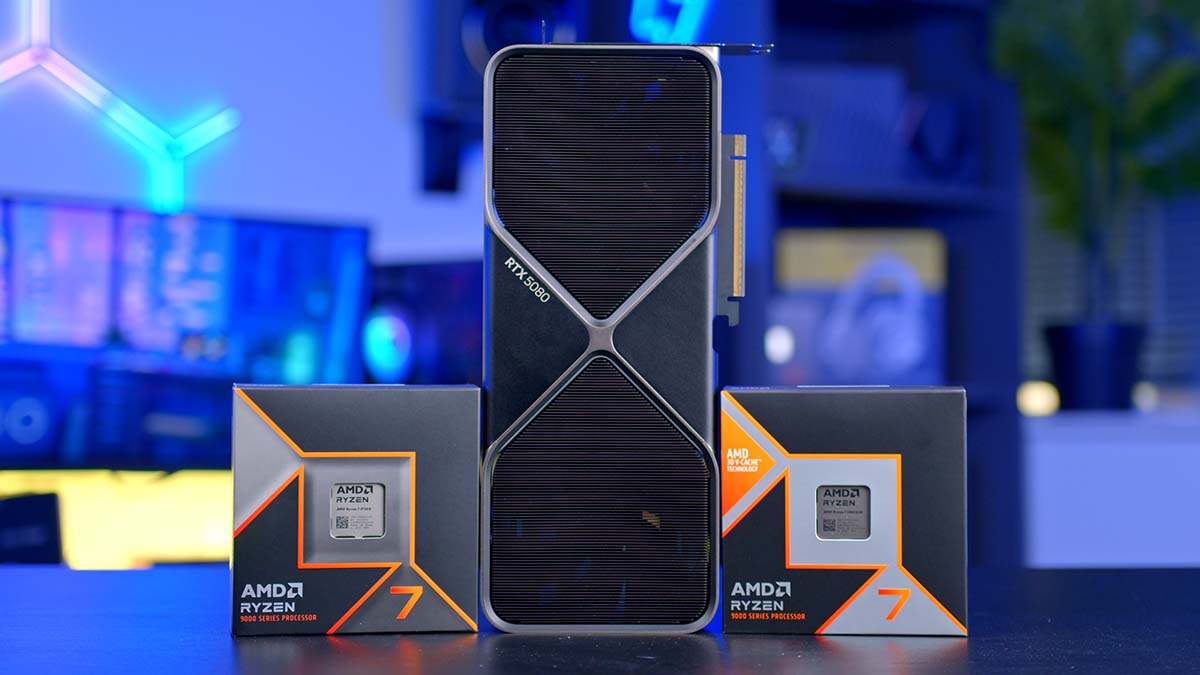
NVIDIA’s RTX 5080 was the second graphics card launched as part of the RTX 5000 series range. This GPU, on paper, looks to be solid, but the only true indicator of its strength can be seen with some comparative performance benchmarks, which is something we’ve covered in our dedicated RTX 5080 review. However, if you’re looking to build a new gaming PC with the RTX 5080, what are the best CPUs to pair up with this powerful graphics card? We’ve tested an excellent range of processors to determine the best options for the RTX 5080.
In this series of buyer’s guides, we’ll be going over the best CPUs, PC cases and power supplies for the RTX 5080, catering to a range of use cases and budgets for gamers to build the ultimate system. This article explores the best CPUs to pair with the RTX 5080, delving into each option’s specs, performance, and pricing.
Best CPUs for the RTX 5080
1. AMD Ryzen 5 9600X
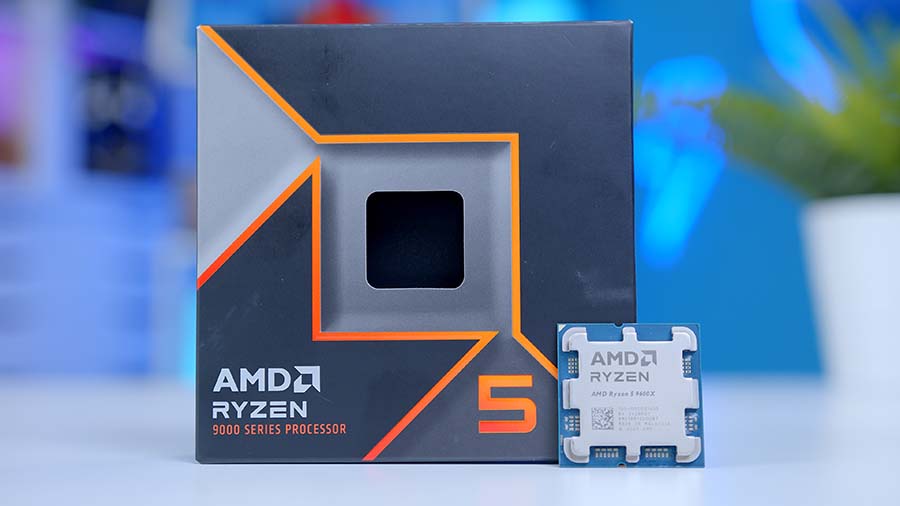
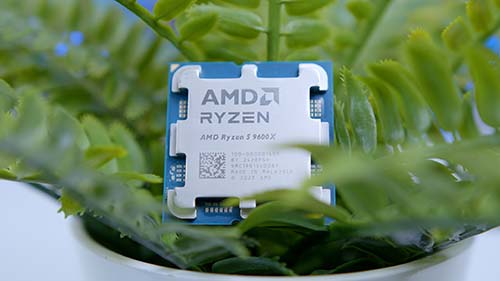
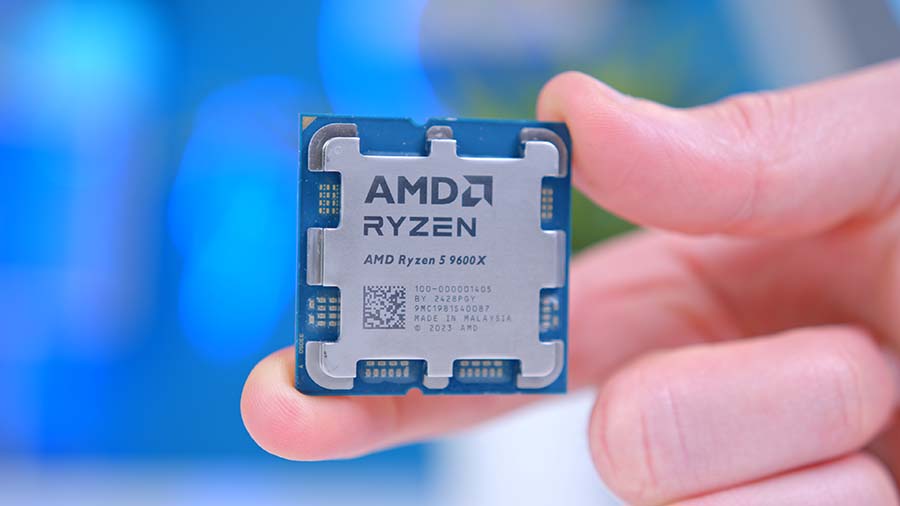
First on our list of recommendations is the AMD Ryzen 5 9600X. This CPU is regarded as the ultimate budget gaming CPU. With 6 cores and 12 threads, it delivers more than enough horsepower for modern titles, which typically lean on 4-6 cores during gameplay. This ensures the CPU isn’t a bottleneck, allowing the RTX 5080 to flex its strength across resolutions from 1080p to 4K.
| Key Specs | AMD Ryzen 5 9600X |
|---|---|
| Core Count | 6 |
| Thread Count | 12 |
| Base Clock Speed | 3.9GHz |
| Boost Clock Speed | 5.4GHz |
| Max Cache | 23MB |
| Default TDP | 65W |
| CPU Socket | AM5 |
| Overclockable | Yes |
Where this pairing shines is in efficiency. The Ryzen 5 9600X’s Zen 5 architecture and 5.4GHz boost clock keep draw calls flowing smoothly, so the GPU isn’t left waiting on the processor. In GPU-bound scenarios (particularly at 1440p and 4K), the RTX 5080 takes the lead, while the Ryzen 5 9600X ensures logic and background tasks are handled without stutter. The result is consistently high frame rates and fluid gameplay, even in demanding titles.
For gamers focused on pure play rather than heavy multitasking or content creation, this combination hits the sweet spot. The Ryzen 5 9600X keeps costs down while unlocking the RTX 5080’s full potential, making it one of the most compelling budget-to-midrange builds for enthusiasts who want uncompromised gaming without overspending on the CPU.

2. AMD Ryzen 7 9700X

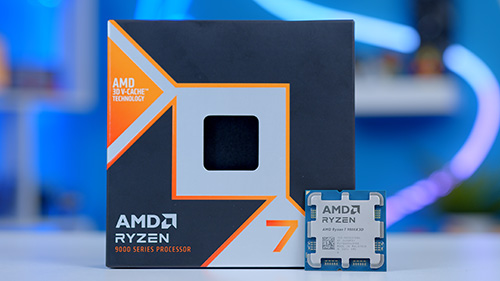
The AMD Ryzen 7 9700X is the next CPU we are recommending, and we’d say this is the second-best CPU after the Ryzen 7 9800X3D. It is one of AMD’s strongest mid-range CPUs, offering a similar set of specs to the 9800X3D but minus the 3D V-Cache. This means that performance is slightly weaker in areas where the Ryzen 7 9800X3D thrives (namely, games), but not by a huge margin.
One of the key factors that makes the Ryzen 7 9700X a strong competitor in the CPU space is its boost clock speed, which maxes out at 5.5GHz. This allows the 9700X to quickly process instructions, making it an excellent option for intense AAA titles. Additionally, the Ryzen 7 9700X has a low TDP of 65W, which means the 9700X can sustain this blazing-fast boost clock speed when cooled adequately.
| Key Specs | AMD Ryzen 7 9700X |
|---|---|
| Core Count | 8 |
| Thread Count | 16 |
| Base Clock Speed | 3.8GHz |
| Boost Clock Speed | 5.5GHz |
| Max Cache | 40MB |
| Default TDP | 65W |
| CPU Socket | AM5 |
| Overclockable | Yes |
Regarding the specs, the Ryzen 7 9700X shares a similar set of hardware to the Ryzen 7 9800X3D, with eight cores and sixteen threads, clocking in at a boost speed of 5.5GHz. This CPU is also overclockable, allowing enthusiasts to push the performance limits. Speaking of which, the Ryzen 7 9700X can handle 1440p and 4K gaming when paired up with a GPU like the RTX 5080. This CPU can also handle light workstation applications such as video or photo editing, thanks to its solid core count.
Much like the Ryzen 7 9800X3D, the biggest weakness of the Ryzen 7 9700X is its capability within more demanding workloads. While the Ryzen 7 9700X can handle lighter workstation applications such as video editing or Photoshop, rendering high-resolution footage or 3D modelling will prove much more burdensome for this CPU. If you’re looking for more of a workhorse processor, we’d recommend picking something with a better core count.


3. AMD Ryzen 7 7800X3D

The third CPU we recommend pairing with the RTX 5080 is the AMD Ryzen 7 7800X3D. Before the release of the Ryzen 7 9800X3D, the 7800X3D was our go-to recommendation for a top-end gaming PC build. Despite this CPU being superseded by its newer sibling, it’s still worth considering for a high-performance system.
One of the critical strengths of the Ryzen 7 7800X3D is its price point. While this CPU is still pricey two and a half years after its release, it’s a more affordable option than the Ryzen 7 9800X3D. This means those looking to leverage the superb performance of AMD’s 3D V-Cache technology can still do so at a lower price than the 9800X3D.
Another positive is that the AMD Ryzen 7 7800X3D no longer suffers from the stock issues we saw in late 2024 and early 2025. It is generally available for purchase now, but we encourage you to shop around, as prices can vary widely!
| Key Specs | AMD Ryzen 7 7800X3D |
|---|---|
| Core Count | 8 |
| Thread Count | 16 |
| Base Clock Speed | 4.2GHz |
| Boost Clock Speed | 5GHz |
| Max Cache | 104MB |
| Default TDP | 120W |
| CPU Socket | AM5 |
| Overclockable | No |
Regarding the specs, the Ryzen 7 7800X3D has a 5GHz boost clock but retains the 8 cores and 16 threads of the 9800X3D. This CPU has a slightly higher TDP of 120W, demonstrating the efficiency improvements of the Ryzen 9000 range. The Ryzen 7 7800X3D also isn’t overclockable, which will be a limiting factor to some enthusiasts. Despite this, the Ryzen 7 7800X3D can easily handle 4K gaming without issues.
In terms of caveats, the Ryzen 7 7800X3D’s most significant issue now is that it runs on the previous-generation Zen 4 architecture. While Zen 4 remains fully compatible with the AM5 platform and modern standards like DDR5 and PCIe 5.0, it means the 7800X3D won’t benefit from the efficiency gains and IPC improvements introduced with newer chips in the years to come, but it isn’t a deal-breaker.


4. AMD Ryzen 7 9800X3D

Again, AMD’s Ryzen 7 9800X3D is at the top of our recommendations for a new graphics card. This is our go-to option for a high-performance gaming build, thanks to its exceptional performance in modern titles. The 9800X3D and its predecessors are so strong because of the 3D V-Cache technology that AMD stacks on the CPU.
This cache acts as rapid storage for instructions to be read, written, and executed. Games require many instructions to be executed rapidly, so fast storage boosts frame rates even further when paired with the right graphics card. In terms of performance, the Ryzen 7 9800X3D easily handles 4K gaming without issues and is ideal for those with high-refresh-rate monitors.
| Key Specs | AMD Ryzen 7 9800X3D |
|---|---|
| Core Count | 8 |
| Thread Count | 16 |
| Base Clock Speed | 4.7GHz |
| Boost Clock Speed | 5.2GHz |
| Max Cache | 104MB |
| Default TDP | 120W |
| CPU Socket | AM5 |
| Overclockable | Yes |
Regarding the specs, the Ryzen 7 9800X3D offers a 5.2GHz boost clock speed, which is also unlocked for overclocking, a first for the 3D V-Cache range. This CPU has eight cores and sixteen threads, making it a solid competitor in multi-core workloads. The Ryzen 7 9800X3D also has a reasonably low TDP of 120W, allowing you to install a modest cooler to prevent throttling.
As we’ve addressed in our best CPUs for the 5090 buyer’s guide, the Ryzen 7 9800X3D’s biggest weakness is its capability in multi-core applications. There are better processors for threaded workloads that offer more cores and, often, a higher clock speed. A CPU like the Ryzen 9 9950X is a better alternative for workstation-style applications.


Performance
In this section, we’ll examine the performance of the CPUs we recommend in this buyer’s guide. Our in-house benchmarker, Harry Coleman, rigorously tests our data to ensure accuracy and fairness. The CPUs shown in the benchmarks below have been tested across a range of games and workstation-style applications to assess their performance in single and multi-threaded workloads.
In the following gaming graphs, all tests were conducted at 1080p resolution. This choice isn’t arbitrary. Running games at 1080p shifts more of the workload onto the CPU rather than the GPU. By reducing the GPU’s influence, we can better highlight how each processor handles demanding gaming scenarios, making differences in performance more apparent and easier to evaluate.
COD Black Ops 6 @ 1080p High
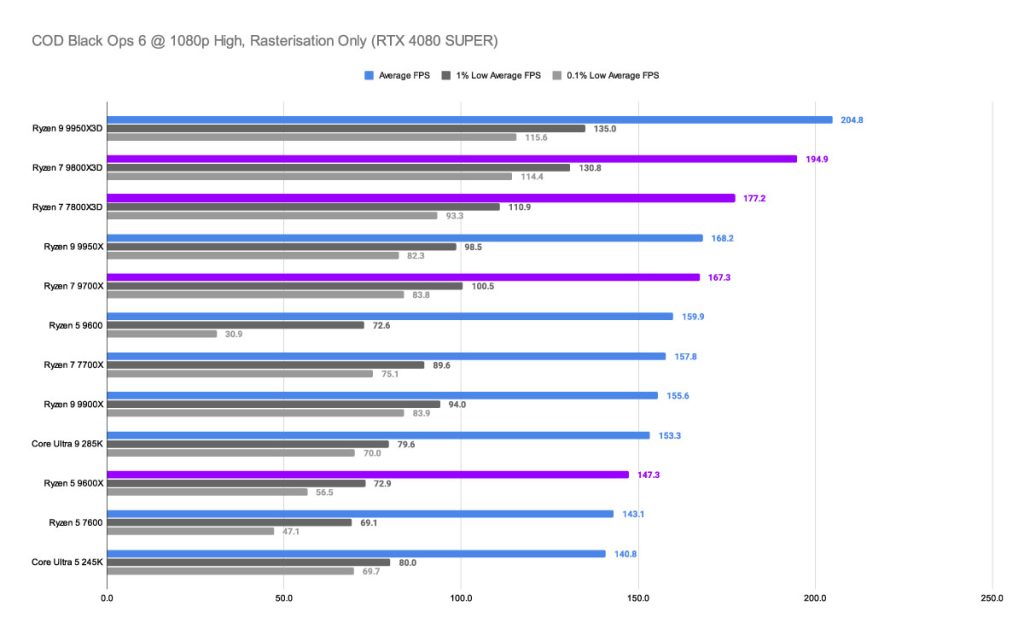
In this graph, the two CPUs equipped with AMD’s 3D V‑Cache stand above the 9600X and 9700X. Call of Duty: Black Ops 6 is a cache‑bound game, so processors with larger L3 caches can store and access more game data directly on the chip, reducing latency and boosting frame rates. The 9800X3D leads the pack with an average of 194.9 FPS, followed by the 7800X3D at 177.2 FPS. Then the 9700X produces a framerate of around 176, and lastly the 9600X pulls in a lower 147.3. What’s important to remember is that a framerate over 60 FPS in competitive games is more than enough to provide a fluid, enjoyable experience.
Alan Wake 2 @ 1080p High
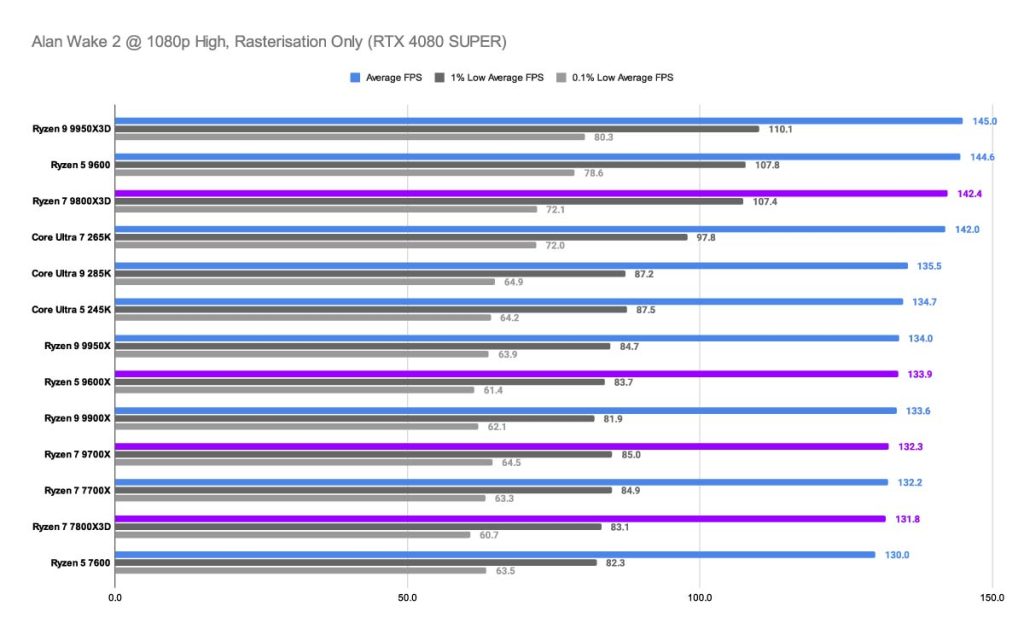
Even though the AMD Ryzen 7 9800X3D still leads with an impressive 142.3 FPS, the ranking among the other processors shifts compared to Call of Duty: Black Ops 6. Unlike Black Ops 6, which is heavily cache‑bound, Alan Wake 2 is far more graphically demanding. As a result, the newer Ryzen 9000‑series chips edge ahead of the 7800X3D, reflecting how modern titles are often optimised for the latest architectures. The Ryzen 5 9600X averaged 133.9 FPS, followed closely by the 9700X at 132.3 FPS. The 7800X3D trailed slightly at 131.8 FPS, but it’s worth noting that this is still an excellent framerate. In this case, performance is driven more by GPU power than by the CPU’s cache advantage, explaining why the 7800X3D sits lower in the chart despite its strong showing in cache‑sensitive workloads.
Cinebench R23 (Multi-Core)
Next up are the synthetic benchmark results, which show raw CPU performance. In our Cinebench test, we ran a threaded benchmark that tests all CPU cores by rendering a high-resolution image. Leading the group, the Ryzen 7 9800X3D scored 23,432 points, narrowly edging out the Ryzen 7 9700X at 23,393, showing that both chips deliver near-identical throughput in heavily threaded workloads.
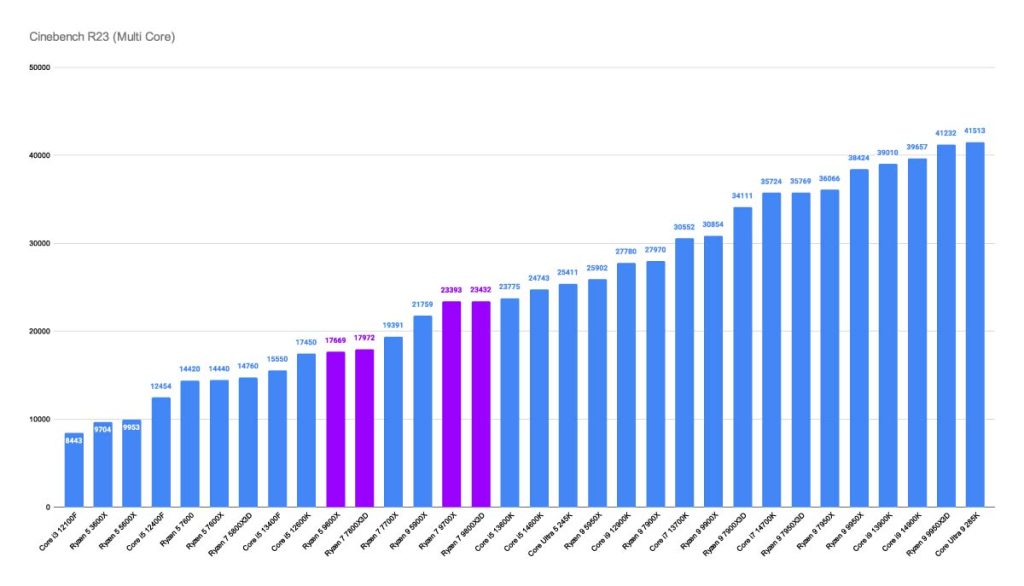
Stepping down a tier, the Ryzen 7 7800X3D posted 17,972 points, while the Ryzen 5 9600X followed closely at 17,669. This spread illustrates how AMD’s higher-core-count parts maintain a significant advantage in rendering tasks, while the midrange models still offer strong multi-core efficiency for their class. The near parity between the 9800X3D and 9700X suggests architectural refinements rather than cache size are driving performance at the high end, whereas the gap to the 7800X3D and 9600X underscores the scaling benefits of having additional cores and threads in workloads that require more cores.
3D Mark Timespy Extreme
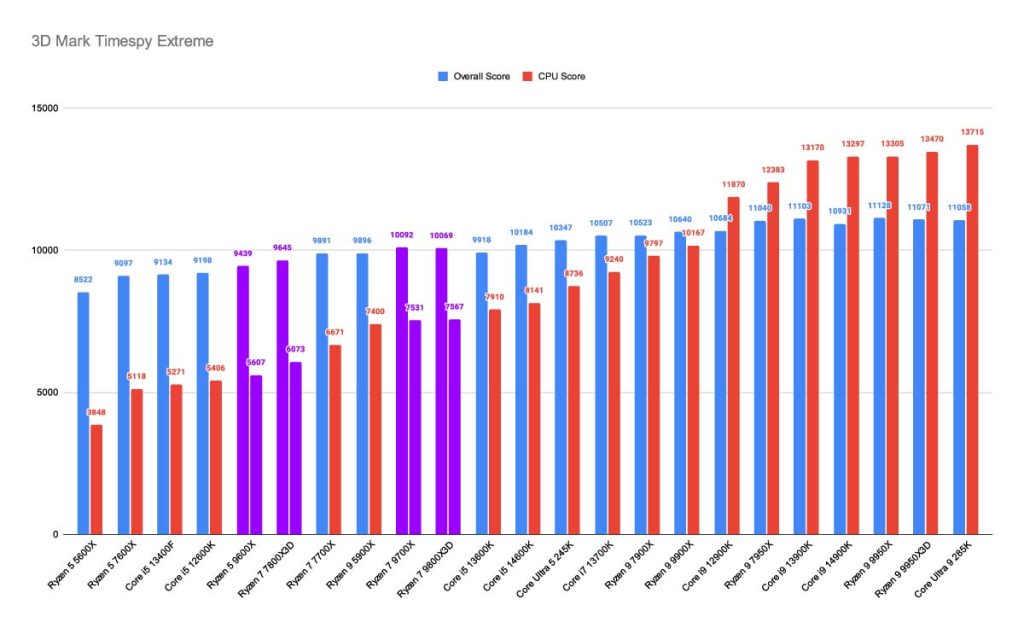
Our second-to-last benchmark is 3DMark’s TimeSpy Extreme, which is a 4K render workload equivalent to a video game. With an overall score of 10069 and a CPU score of 7567, the Ryzen 7 9800X3D edges ahead in raw compute throughput. Interestingly, the Ryzen 7 9700X posts a slightly higher overall score of 10092, though its CPU score of 7531 falls just short of the 9800X3D, highlighting how close the two chips really are in performance. The older Ryzen 7 7800X3D trails behind with an overall score of 9645 and a CPU score of 6073, while the Ryzen 7 9600X sits at the bottom with 9429 overall and 5607 on the CPU test. Taken together, these results show that while the non‑X3D 9700X can match or even surpass the 9800X3D in synthetic overall scoring, the extra cache of the X3D model still gives it a slight edge in CPU‑focused workloads, reinforcing its positioning as the RTX 5080’s best processing companion.
3D Mark FireStrike
3D Mark Timespy FireStrike is our final benchmark to show just how well-suited these CPUs are for the RTX 5080. The test runs two demanding DX12 game-like scenes packed with intense lighting, shadows, and particle effects, reflecting the realities of modern hardware. While FireStrike leans more heavily on the GPU than TimeSpy, it also highlights how efficiently a CPU manages multiple threads and exposes bottlenecks that can hold back GPU performance.
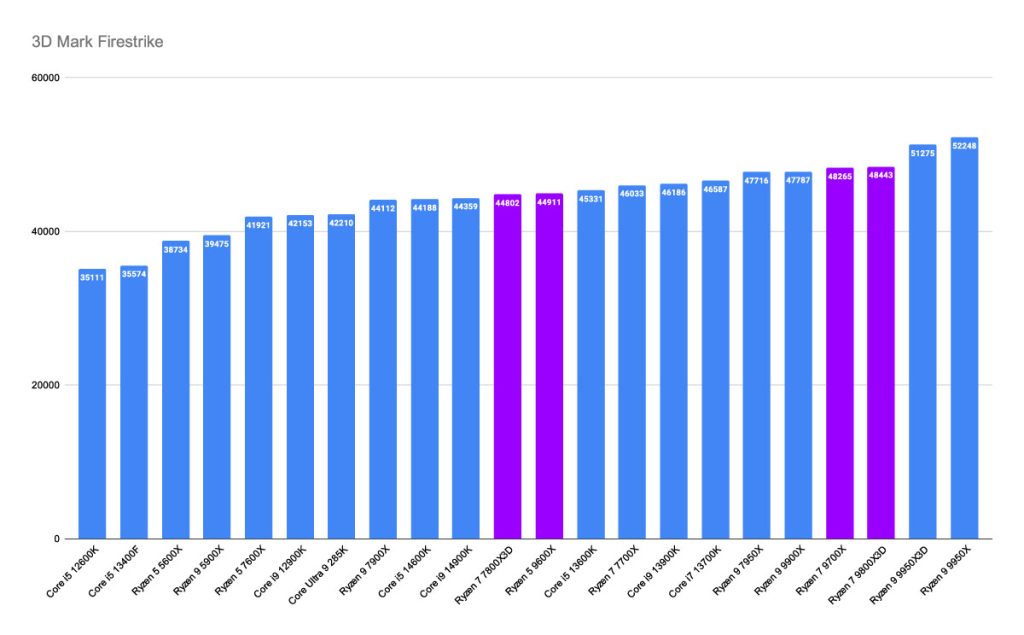
Here, the Ryzen 9000 series clearly outpaces the 7800X3D, thanks to its more substantial alignment with modern approaches to game logic programming. And if you’re wondering why even the Ryzen 5 9600X manages to outperform the Ryzen 7 7800X3D in this test, the answer lies in architecture. The 9600X, built on Zen 5, benefits from superior IPC, higher boost clock speeds, and excellent memory scaling. By contrast, the 7800X3D’s advantage is its 3D V‑Cache, but it isn’t required for this particular workload.
Ultimately, your choice depends on the resolution you target and the workloads you expect to run alongside gaming. If you’re satisfied with smooth 1440p gameplay and want a CPU that matches the RTX 5080 without overspending, the Ryzen 5 9600X is a brilliant option, excelling in single-threaded tasks and delivering consistent gaming performance. For those who plan to balance gaming with content creation or heavier multitasking, the Ryzen 7 9700X offers a mid-range sweet spot, adding extra cores and threads without breaking the bank. The Ryzen 7 7800X3D, built on Zen 4, remains a competent choice thanks to its massive 96MB cache, though it shows its age when paired with the RTX 5080 compared to newer Zen 5 chips. However, it is optimised to efficiently use multiple cores at once. At the top of the stack, the Ryzen 7 9800X3D combines high clock speeds, Zen 5 efficiency, and second-generation 3D V-Cache to deliver the most potent blend of gaming and productivity performance, making it the premium pick for those who want the best possible pairing with the RTX 5080.

![FI_[SR190] HYTE X50 Ryzen 5 9600X & MSI RTX 5070 Ti](https://geekawhat.com/wp-content/uploads/2026/01/FI_SR190-HYTE-X50-Ryzen-5-9600X-MSI-RTX-5070-Ti-551x431.jpg)
![FI_[DP064] ASUS Prime AP303 + 9070XT](https://geekawhat.com/wp-content/uploads/2026/03/FI_DP064-ASUS-Prime-AP303-9070XT-551x431.jpg)
![FI_[DM93] Corsair 3200D Launch](https://geekawhat.com/wp-content/uploads/2026/03/FI_DM93-Corsair-3200D-LAUNCH-551x431.jpg)
![FI_[DM89] Phanteks Evolv + AORUS 5090 9850X3D Gallery (8)](https://geekawhat.com/wp-content/uploads/2026/02/FI_DM89-Phanteks-Evolv-AORUS-5090-9850X3D-Gallery-8-551x431.jpg)
![FI_[DM88] 16GB DDR5 9060 XT Build Gallery](https://geekawhat.com/wp-content/uploads/2026/02/FI_DM88-16GB-DDR5-9060-XT-Build-Gallery-551x431.jpg)