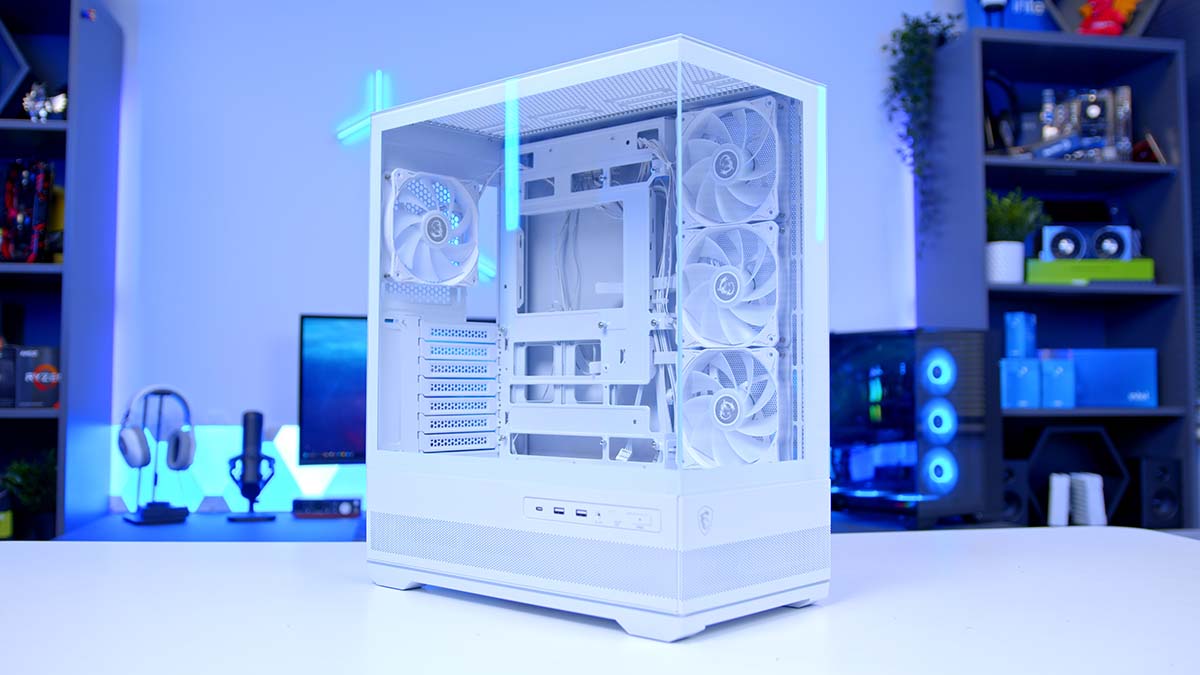
MSI has added a striking new entry to its case lineup with the MAG PANO 110R PZ, a chassis that blends modern minimalism with bold showcase appeal. Designed to highlight your hardware rather than hide it, the PANO 110R embodies the popular “fish-tank” aesthetic but trims away the physical bulk that usually comes with it.
Its panoramic tempered-glass panels wrap around the build, creating a clean, compact frame that offers a full view of your components without overwhelming your desk space. For builders who want the spectacle of an open display without committing to a massive footprint, this case delivers a fresh balance of style and practicality.
Buy the MSI MAG PANO 110R PZ on:
MSI MAG PANO 110R PZ in Black
MSI MAG PANO 110R PZ in White
Specification
This chassis is a mid-tower that leans toward the smaller side, at 420mm in depth, 225mm in width, and 485mm in length. Despite its smaller footprint, it can house ATX motherboards and also support Micro-ATX and Mini-ITX, as well as back-connect versions of ATX and Micro-ATX motherboards.
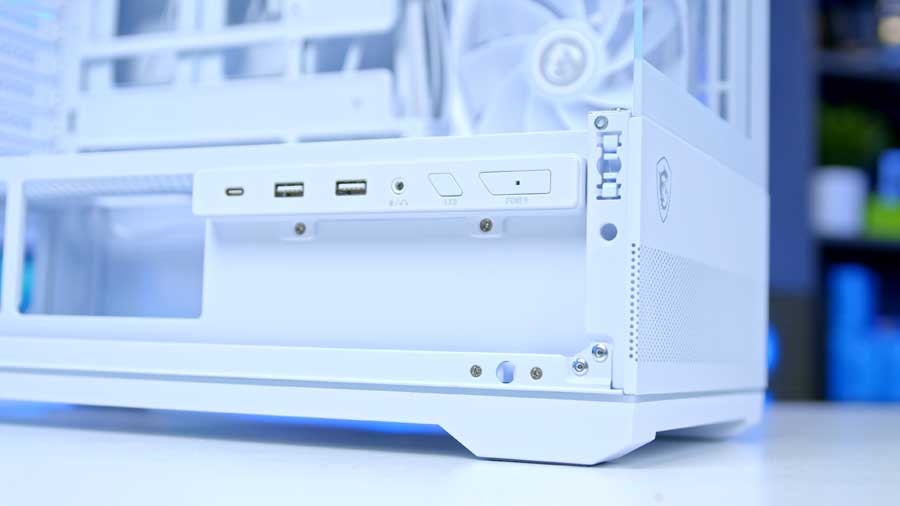
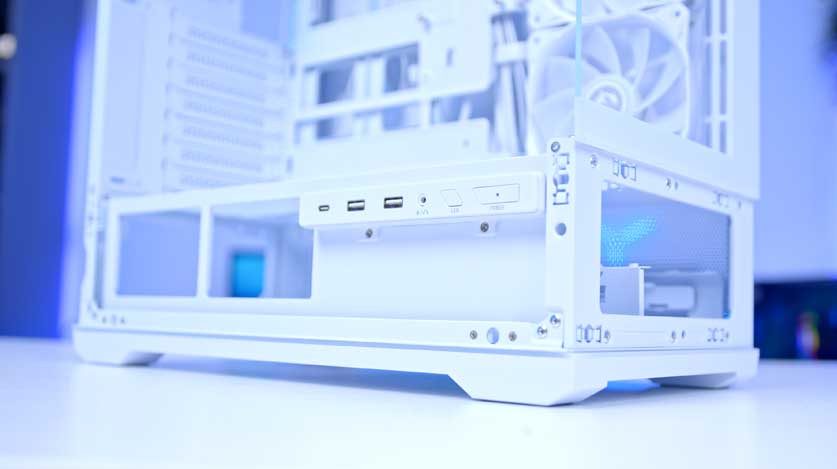
On the front panel, MSI has opted for a straightforward but functional I/O selection. You’ll find two USB Type‑A ports running at 5Gbps, alongside a faster USB Type‑C port capable of 20Gbps transfers. This combination covers everyday peripherals while offering headroom for high‑speed external drives or docking stations. A headset jack, LED controller button, and power button round out the selection, ensuring quick access to essentials without cluttering the design.
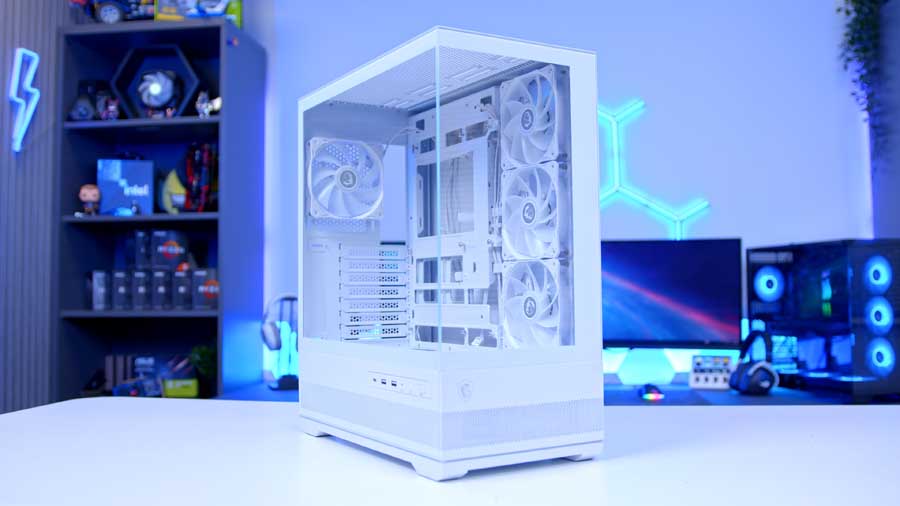
The PANO 110R supports all the latest graphics card lengths as of late 2025 and leaves enough space for coolers up to 160mm tall. A power supply up to 200mm long will fit within the dedicated PSU area.
| Specification | MSI MAG PANO 110R PZ |
|---|---|
| Form Factor | Mid-Tower |
| Motherboard Support | Regular: ATX / Micro-ATX / Mini-ITX Back-connect: ATX / Micro-ATX |
| Case Dimensions (D x W x H) | 420 x 225 x 485 mm |
| Front IO | 2 x USB Type-A 5Gbps, 1 x USB Type-C 20Gbps, 1 x Audio-Out / Mic-in, LED Button, Power Button |
| PCI-E Slots | 7 |
| Colour Options | Black | White |
| Max Clearance | CPU Cooler Height: 160mm GPU Length: 400mm PSU Length: 200mm |
| Drive Support | Up to 2 x 2.5 inch Up to 2 x 3.5 inch Or 2 x 2.5″/3.5″ combo |
| Fan Support | Front: No Support. Top: 3 x 120 or 2 x 140 mm Bottom: 3 x 120 mm Side: 3 x 120 or 2 x 140 mm Rear: 1 x 120 mm |
| Radiator Support | Front: No Support. Top: Up to 360 mm Bottom: No Support. Side: No Support. Rear: Up to 120 mm |
| Pre-Installed Fans | Side: 3 x ARGB Fan (Reverse Blades Fan) Rear: 1 x ARGB Fan |
The case comes with four pre-installed fans: three 120mm fans on the side panel and one 120mm fan on the rear panel. If you want to increase the number of fans in your system, the case can house up to 10 fans. And, if that’s not enough, the chassis can accommodate a maximum radiator size of 360mm on the top panel.
MSI MAG PANO 110R PZ Design
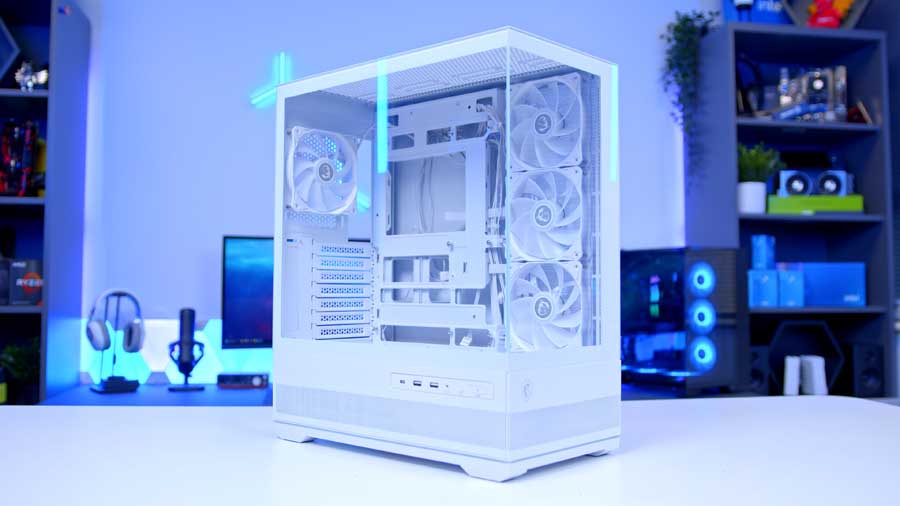
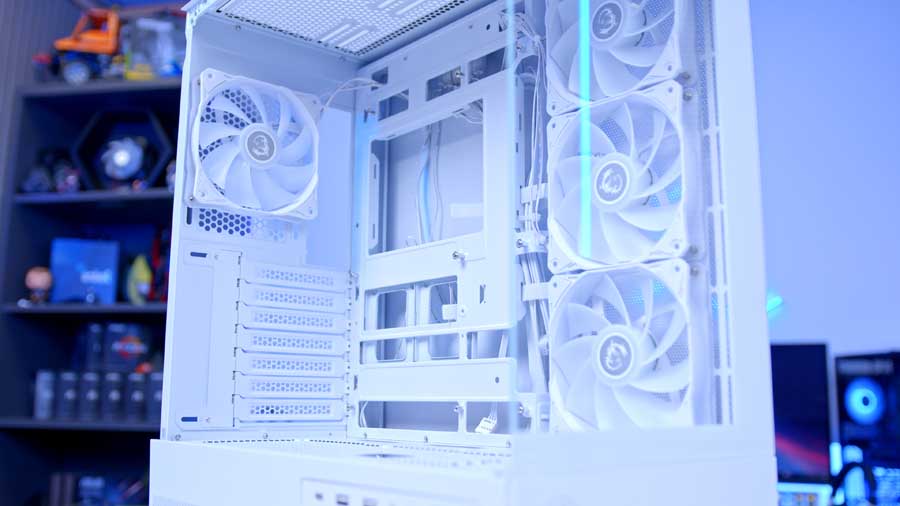
MSI’s PANO 110R PZ is available in either black or white. The chassis is constructed from steel and features a 270‑degree panoramic tempered‑glass design, giving builders an expansive view of their internal components. The bottom‑oriented metal panels on the front and side are removable, making it easier to clean and access hardware such as hard drives and power supplies.

Each of these panels is perforated to maximise fresh air intake, ensuring that cooling performance isn’t sacrificed for aesthetics. On the metal front panel, a minimalistic MSI dragon logo adds a subtle premium touch and branding.
The front I/O is mounted horizontally along the metal side panel, which does limit positioning options. Placing the case on the right side of a desk makes ports more accessible, but on the left side, they can be harder to reach and more prone to accidental nudges when devices are connected.
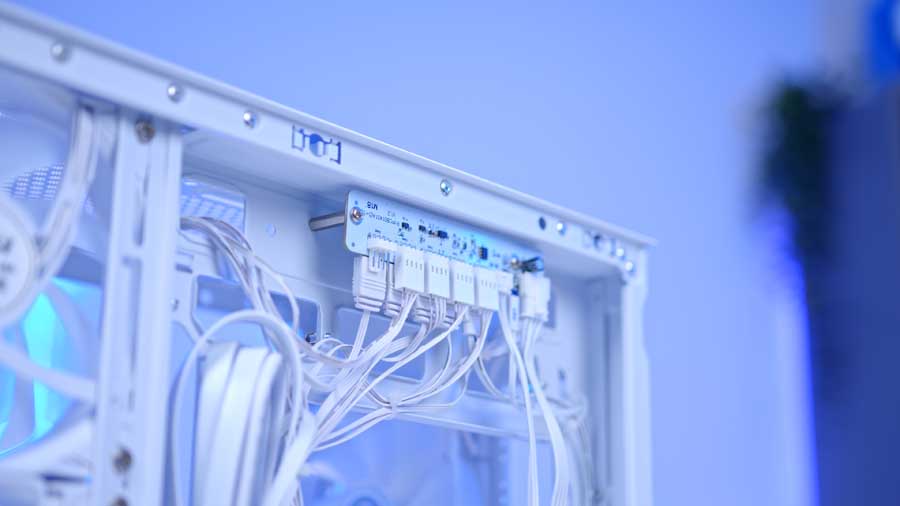
At the very bottom of the chassis, a discreet ARGB strip provides ambient lighting, controllable via the integrated fan and ARGB hub behind the motherboard or the LED button on the front panel.

The pre‑installed fans are also tied into this hub, and MSI has thoughtfully used reverse‑blade fans on the side to ensure their ARGB effects remain unobstructed by the fan frames. Cable management is aided by included Velcro straps and tie‑down points, though the hub does leave a fair number of cables to organise.
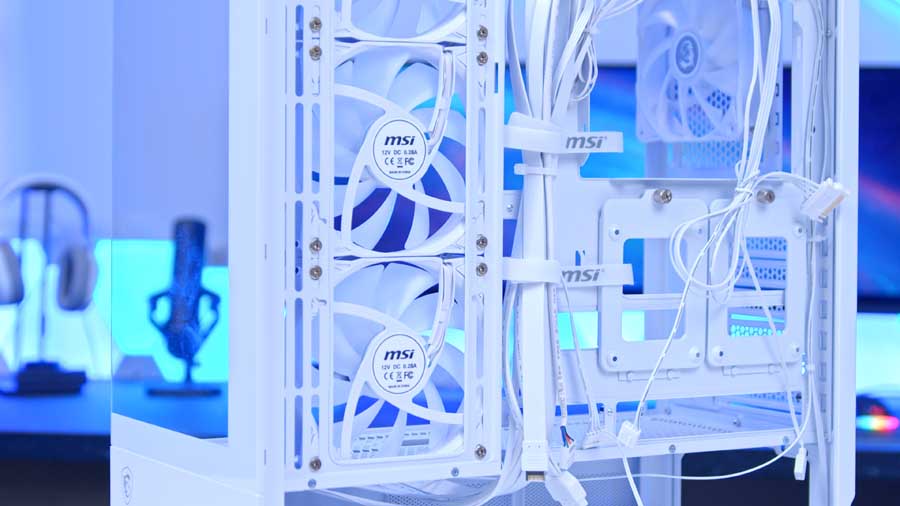
Airflow potential is another highlight. Unlike many fish‑tank‑style cases that only accommodate two 120mm fans, the PANO 110R can fit multiple 120mm units, giving it far greater cooling capacity than alternatives like the Montech XR or Phanteks XT Views.
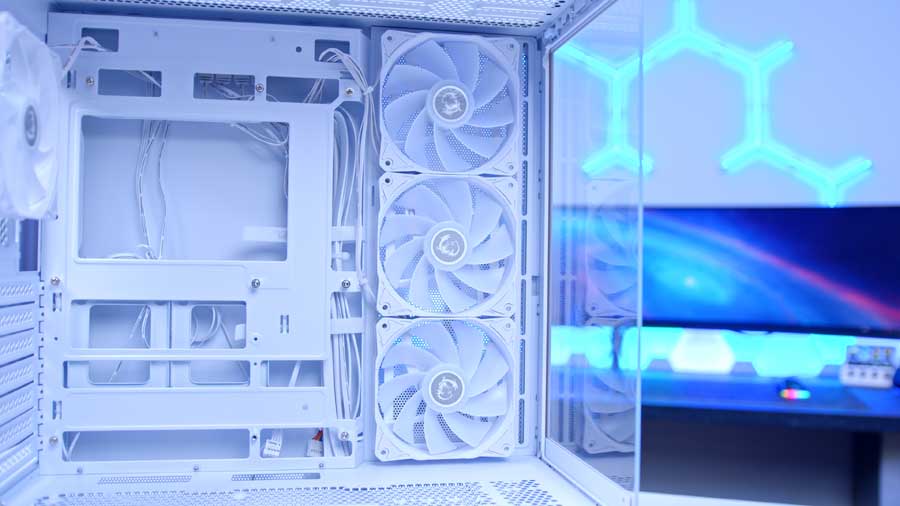
To complement this, MSI has included dust filters on both the top and bottom of the chassis: the top filter is magnetic for quick removal and cleaning, while the bottom filter is a simple slide‑out design. Together, they help keep dust buildup under control while maintaining strong airflow.

Building in the Case
We’ve built in this case over on our YouTube channel using a back-connect motherboard to show you just how clean you can get this chassis to look when you use it to its full potential. We really like how this build turned out, and if you want to recreate it, we linked all of the products we used in the video.
This case is designed to level up your PC building experience, saving time and making it easier to manoeuvre around the case and installed components, thanks to its toolless panels and a DIY-minded design.
Often, when installing a GPU or PCIe expansion hardware, you’ll have to remove the PCIe lane cover, and it can be a little fiddly and easy to drop. MSI has designed a sliding cover that tightens with screws, so it won’t just fall off the case when loosened, lessening frustration and speeding up the process.
MSI has simplified the front panel wiring by combining all the usual connectors into a single unified plug. Instead of dealing with multiple tiny 1‑pin or 2‑pin headers for power, reset, and LEDs, you can slot one cable directly into the motherboard header. This small change makes installation faster, tidier, and far less frustrating compared to cases that still rely on individual connectors.
The fan hub also comes pre-wired; however, if you’re adding extra ARGB-capable components, you might struggle because the fan hub doesn’t come with extra ARGB headers aside from the ones provided for the pre-installed fans. You could solve this with an ARGB splitter cable.
Features We Like
Toolless Design
Every removable panel on the MAG PANO 110R has been engineered for convenience. Instead of fumbling with screws, you can remove and reattach panels entirely by hand. The side panel uses a push‑latch mechanism that snaps securely into place while remaining easy to release when you need access. This screwless approach not only speeds up the building process but also makes ongoing maintenance like swapping out components far easier. It’s a design choice that puts flexibility and ease of use front and centre.
ARGB Strip
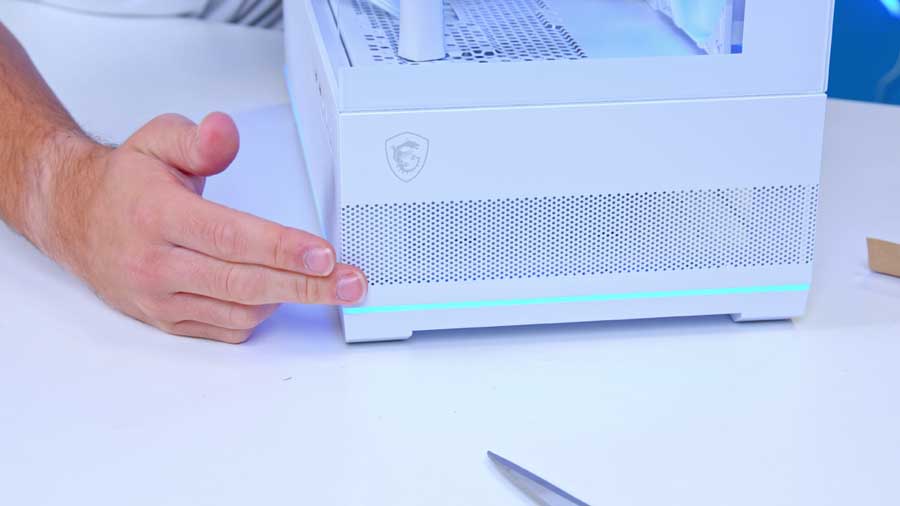
MSI has integrated a subtle ARGB strip into the chassis, elevating the case’s aesthetic beyond simple functionality. The lighting creates a soft, premium glow that feels closer to ambient mood lighting than the harsh RGB blasts you sometimes see. It’s reminiscent of the refined interior lighting found in high‑end cars, adding a touch of luxury to your setup. The strip helps the case feel more like a centrepiece than just a house for your components.
Compact Without Sacrifice
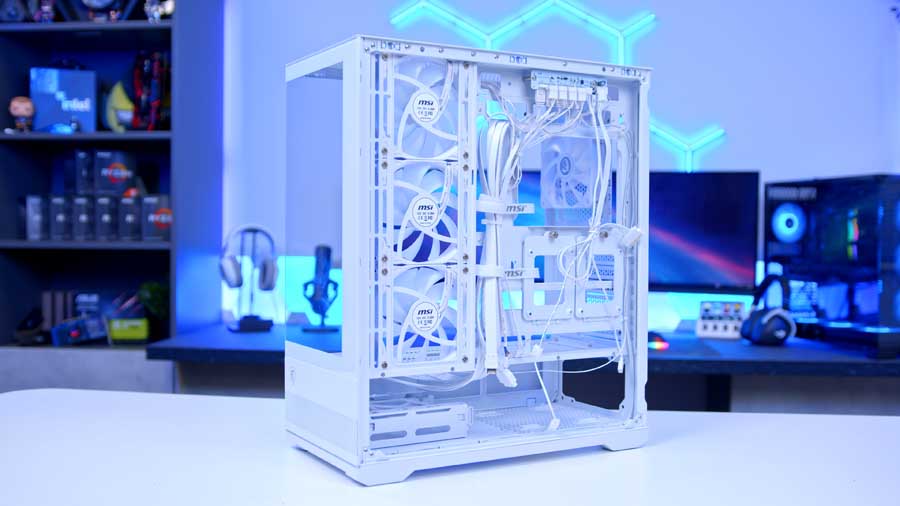
The PANO 110R proves that downsizing doesn’t mean compromising. Despite its smaller footprint, the case still accommodates full‑sized GPUs, efficient cooling solutions, and modern cable‑management options. The panoramic glass panels ensure that even in a compact build, your hardware is on full display, while the internal layout is optimised to keep airflow unobstructed. It’s a chassis that balances space‑saving practicality with the ability to house powerful components, making it ideal for builders who want a showcase rig without dedicating half their desk to it.
Pricing
Considering the features on offer, the MAG PANO 110R’s MSRP feels like a genuine advantage. While there are areas where refinement could enhance the experience, the case more than makes up for it with its build quality, aesthetic appeal, and functional design. This is a chassis where form and function move in harmony, delivering a premium feel without demanding a premium price, especially from a luxury brand like MSI.
Features We Don’t Like
The Fan Hub Lacks Extra ARGB Headers
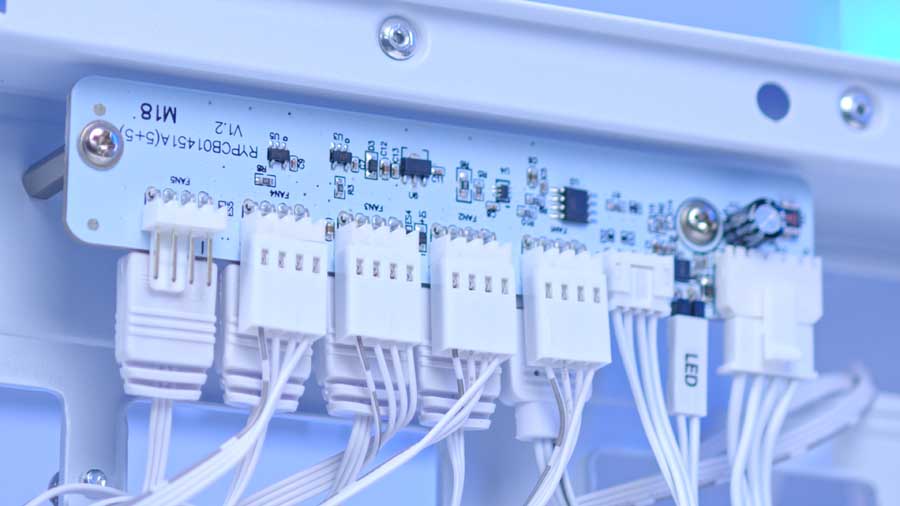
With the fan hub, you get five fan headers and five ARGB headers; four of the fan headers are already in use because of the four pre-installed fans. All five of the ARGB headers are in use, again because of the fans, but also because of the ARGB lighting strip on the case, leaving you no room to connect extra ARGB-capable components, like fans or coolers, to the fan hub to sync with the case, leaving you having to connect them to your motherboard.
Slightly Boring Front IO
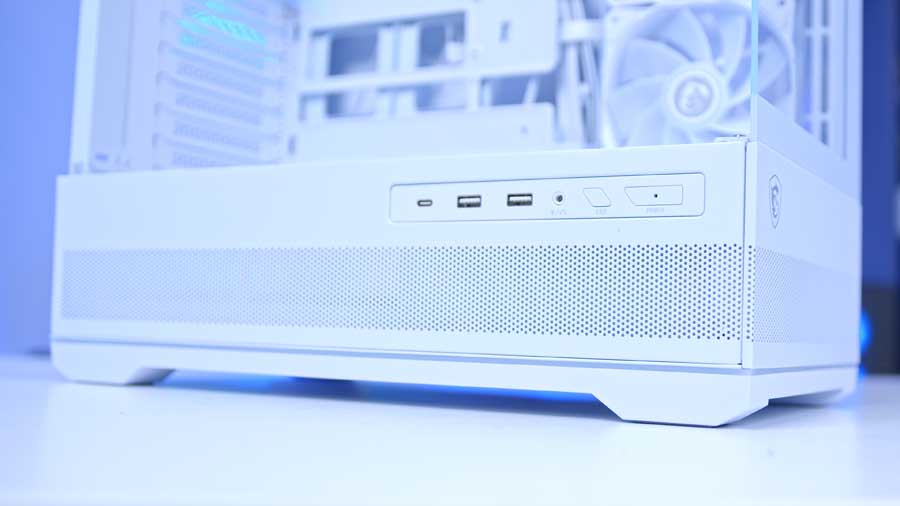
The front I/O delivers the essentials with two 5Gbps Type‑A ports and a 20Gbps Type‑C, striking a practical balance between legacy support and modern speed. Still, given how premium the rest of the case feels, the selection comes across as a little understated.
Conclusion
MSI MAG PANO 110R PZ Case
Product Name: MAG PANO 110R PZ
Brand: MSI
-
Features
-
Design
-
Performance
-
Value For Money
Summary
The MAG PANO 110R PZ delivers an enjoyable building experience, with toolless panels and a simplified layout that reduces build time and frustration. Its panoramic glass design and extra fan support give it standout aesthetics, though it’s ultimately more of an evolution than a reinvention of the fish‑tank‑style case.
MSI’s PANO 110R strikes a careful balance: future‑ready with back‑connect motherboard compatibility, yet grounded in the present with fairly standard front I/O. The open design makes cable management part of the visual story, so builders who want a polished look will need to be deliberate in keeping cables tidy.
There are areas where the chassis feels less forward‑thinking, such as the limited space for larger power supplies and the lack of additional fan hub headers to expand ARGB components. Yet these shortcomings are offset by thoughtful touches like removable panels, reverse‑blade fans for unobstructed lighting, and integrated cable‑management aids.
For its mid‑range price, the PANO 110R offers a premium look and feel without breaking the bank. It’s a strong option for builders who want a compact showcase case that balances style, usability, and value.
Pros
✅ Competitive price point
✅ Premium quality
✅ Easy to access
Cons
❌ PSU area is a little tight
❌ Lack of extra ARGB fan hub headers

![FI_[SR190] HYTE X50 Ryzen 5 9600X & MSI RTX 5070 Ti](https://geekawhat.com/wp-content/uploads/2026/01/FI_SR190-HYTE-X50-Ryzen-5-9600X-MSI-RTX-5070-Ti-551x431.jpg)