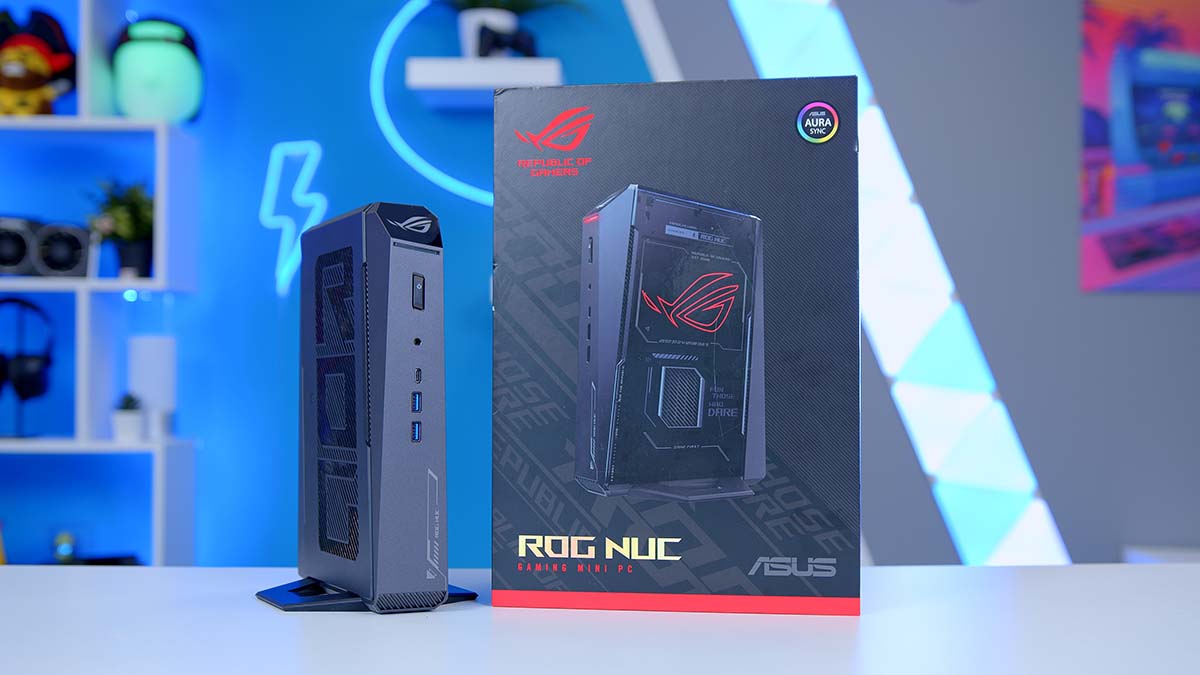
The NUC has been a mainstay of the desktop PC space for quite some time. Since ASUS’s takeover of the NUC model from Intel, they have set out to reinvent the NUC design with a more gamer-focused aesthetic and a larger push for performance that’ll last the next few years. This is where the ROG NUC 2025 comes in. A revitalised small form factor Mini desktop that offers modern components, offering solid performance for your setup at home.
But in recent times, as PC components have started to skyrocket in price, is the ROG NUC 2025 a saving grace for those looking to pick up a brand-new gaming PC? Or is it just another overpriced machine that doesn’t quite justify you spending your hard-earned cash on? In this review, we’ll assess the ROG NUC in detail, covering its specs, design, features, and performance to see whether it’s a worthwhile purchase in the current market.
Specification
To see how far the NUC has come since last year, we’ve compared the specs, which give an overview of what’s changed, improved, or stayed the same. Immediately from the dimensions, we can see that the ROG NUC 2025 is smaller. On the NUC webpage, ASUS boasts a compact form factor, and, as we’ll touch on in the design section, I’d say it definitely fits that description. One of the significant issues with Mini PCs is that they are often not ‘Mini’, so it’s great to see that we’re getting something easier to carry around.
As for the hardware, ASUS has chosen the Core Ultra 9 275HX CPU. Performance-wise, the 275HX and 185H are pretty similar, but the 275HX is definitely the standout of the two, with a 5.5GHz boost clock speed, 24 cores and 76MB of cache. While the hardware may look impressive, we’ll leave any speculation until the performance section, as laptop processors can often be ‘more bark than bite’.
For RAM, this model comes with 32GB of DDR5 RAM clocked at 6400 MT/s. ASUS doesn’t specify the latency on their website, but after firing up CPU-Z, we found that the RAM clocked in at CL52, which is pretty dire. I would be able to understand the justification for using a much higher-latency kit if the capacity were more than 64GB, but CL52 will hurt gaming and workstation performance due to the latency period during which the RAM will respond.
Moving on to storage, the NUC can come with a 1TB drive, up to 4TB, depending on the configuration you choose. Our NUC 2025 has 2TB of space, which is ideal for installing plenty of games. Again, ASUS doesn’t advertise which drive it uses on the NUC, but the one we’re reviewing utilised a Micron drive from the 3500 range. This isn’t a top-end SSD by any means, but it’ll do the job for gaming.
| Key Specs | ASUS ROG NUC 2025 | ASUS ROG NUC 970 |
|---|---|---|
| Dimensions (L x W x H) | 187mm x 282mm x 56mm | 270mm x 180mm x 60mm |
| CPU | Intel Core Ultra 9 275HX | Intel Core Ultra 9 185H |
| RAM | 32GB DDR5 6400MT/s | 32GB DDR5 5600MT/s |
| Storage | 2TB PCI-E Gen4 SSD | 1TB PCI-E Gen4 SSD |
| Graphics Card | RTX 5080 Laptop GPU | RTX 4070 Laptop GPU |
| Display Inputs | 1 x Thunderbolt 4 Type-C (DisplayPort 2.1) 2 x HDMI 2.1 2 x DisplayPort 2.1 | 2 x DisplayPort 1.4 1 x HDMI 2.1 1 x Thunderbolt 4 Type-C |
| Front IO | 2 x USB 3.2 Gen2 Type-A 1 x USB 3.2 Gen2 Type-C 1 x 3.5mm Combo Jack | 2 x USB 3.2 Gen2 Type-A 1 x 3.5mm Audio Jack 1 x SD Card Reader |
| Rear IO | 4 x USB 3.2 Gen2 Type-A 1 x 2.5Gb LAN | 2 x USB 3.2 Gen2 Type-A 2 x USB 2.0 Type-A 1 x 2.5Gb LAN |
Regarding the graphics card, the ROG NUC 2025 can come with either an RTX 5070 Ti Laptop GPU or an RTX 5080 Laptop GPU. Our model is the RTX 5080 variant, which should provide solid gaming performance. However, we’ll wait to see what framerates this card can output, as laptop cards are more constrained by the silicon they use.
For your IO, there are five display inputs to choose from. Two HDMI 2.1, two DisplayPort 2.1, and one Thunderbolt 4 Type-C port, which doubles as a DP 2.1 port. It’s great to see these options for displays. This further illustrates the portable design that ASUS is going for. Thunderbolt 4’s convenience lets you easily plug the ROG NUC into a portable monitor or display. The addition of traditional HDMI and DisplayPort ports also makes this convenient for home desktop users.
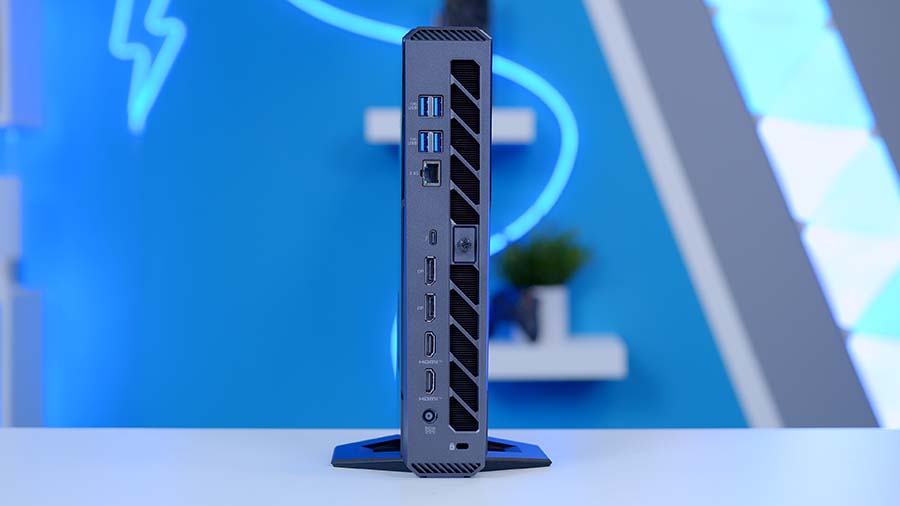
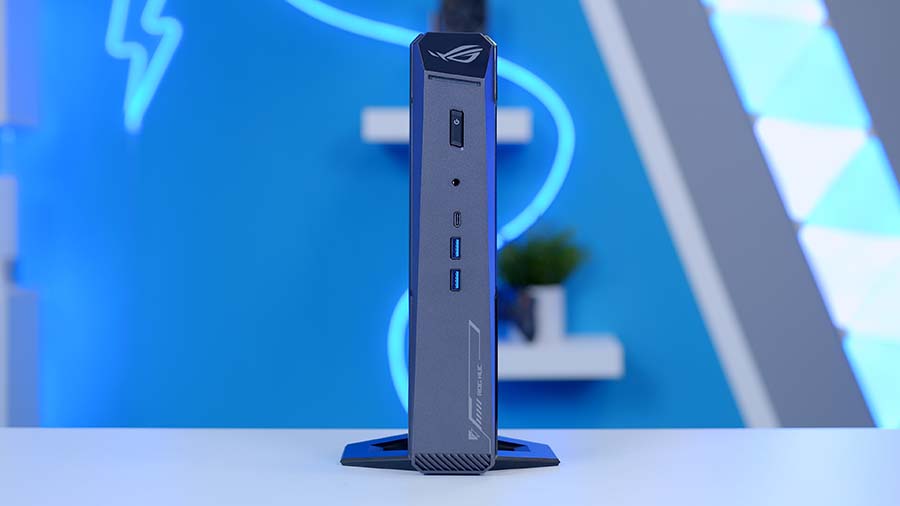
Covering the rest of the IO, there are seven USB ports, all of which are blazing-fast. Furthermore, on the front is a 3.5mm combo jack, which you can use as a line out for headphones or as a microphone. It’s a shame there isn’t a dedicated audio suite on the NUC, but I imagine this wasn’t included because of the limited space available. On the rear of the NUC 2025, you also have a 2.5 Gigabit LAN port and Wi-Fi 7, both excellent for high-speed networking.
There are some notable upgrades here compared to the ROG NUC 970 from 2024. The main ones to note here are the switch to the RTX 50-series, which will improve gaming performance, increased high-speed I/O (both USB and display inputs), and a reduction in overall physical volume. All of these should result in noticeable improvements in both the design and performance of the ROG NUC compared to the 2024 version.
ASUS ROG NUC 2025 Design
Opening the box for the ROG NUC 2025, you’re greeted by a rather hefty, slimline chassis that fits easily into a large backpack or laptop bag. In terms of its weight, the NUC is a hefty 3.12KG, so it’s definitely not considered light. However, if you’re on the go with additional luggage, I don’t think the NUC will make much difference to the ease of carrying your bag.
I like that ASUS has gone for a slimline approach to the dimensions. As shown in the specs, the NUC is about 29cm wide and 19cm long, with a pretty minuscule height of 6cm or so. To put that into perspective, a traditional home router from your ISP is about the same size, or for those who were gaming in the 90s, the original PlayStation 1 is also a similar size.
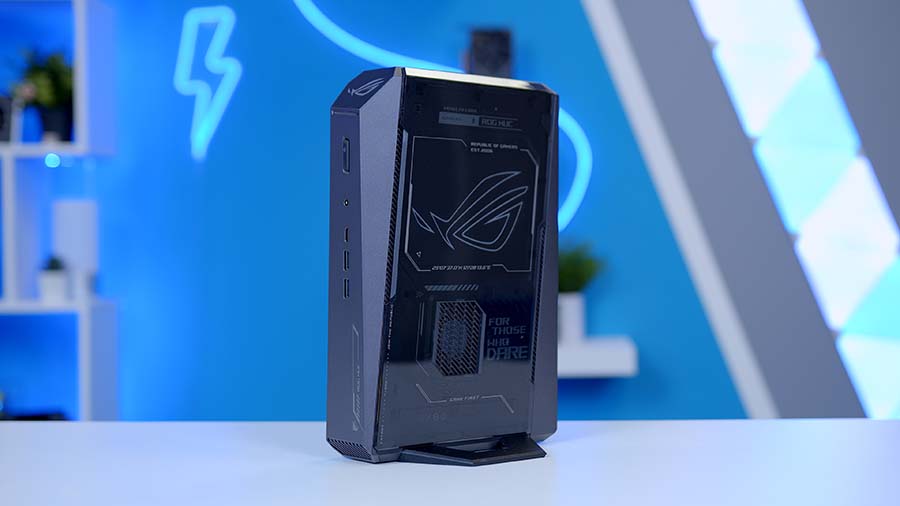
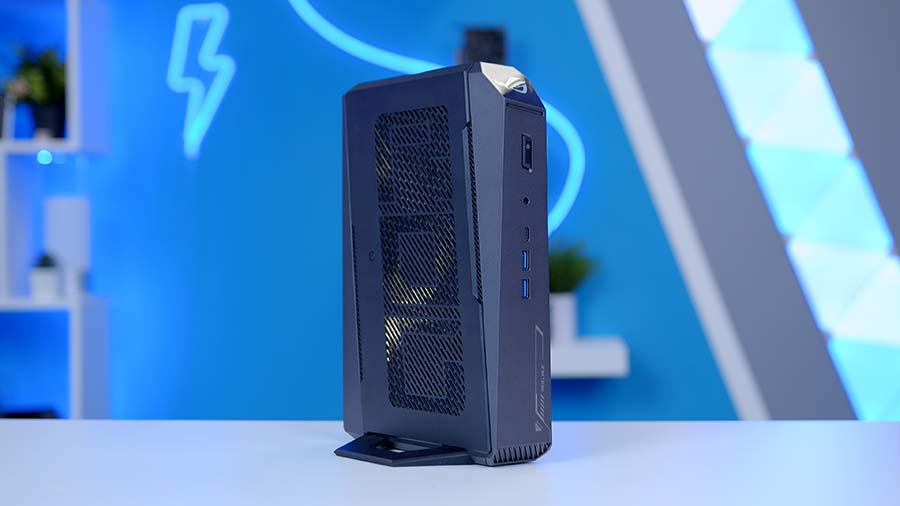
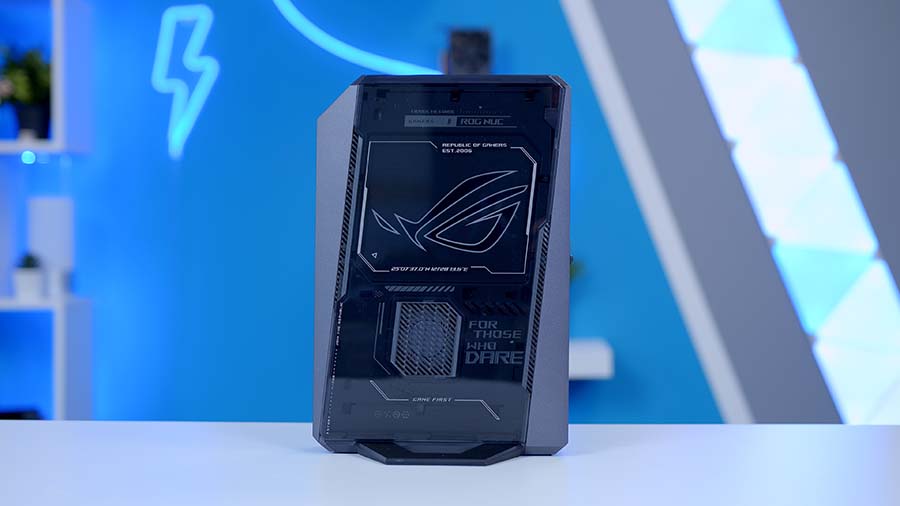
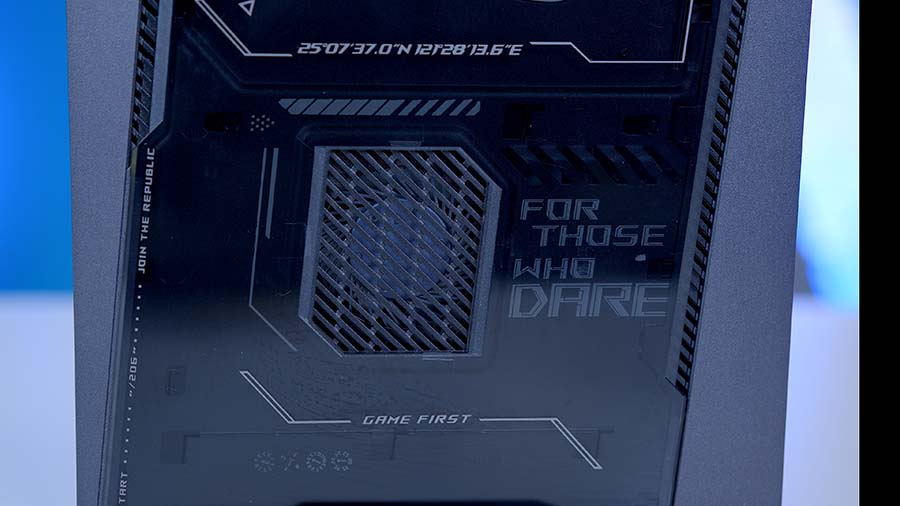
Aesthetically, as you can imagine, with the NUC being an ASUS ROG-branded product, it’s no surprise that ASUS are appealing to the gaming market rather than the workstation scene. The NUC has a unique angular design with various ROG livery popping up on different parts of the chassis, including the ROG logo on the bottom, which shines through with glorious red lighting. There’s also a small strip of illumination towards the top of the NUC near the power button.
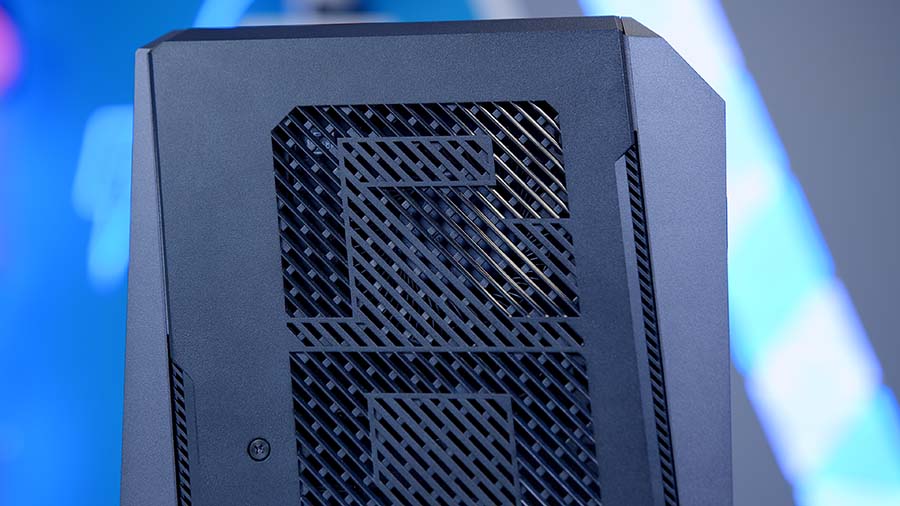
There are vents on the top, bottom, back, front, and sides to allow air to flow through and aid cooling. The top vents are particularly noteworthy as they spell out “ROG” on the chassis. ASUS includes a stand to position the ROG NUC upright, which makes the most sense logistically and for good airflow.
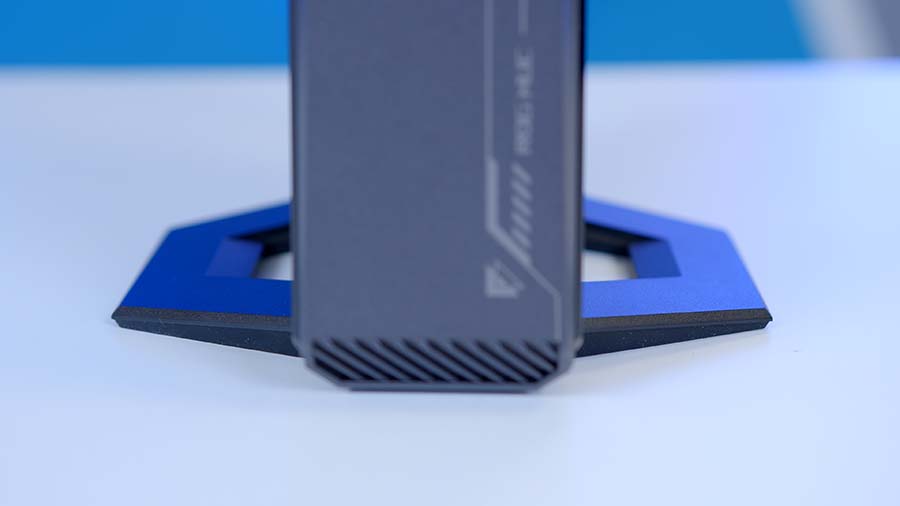
Personally, I think the overall aesthetic is fine. Generally, I believe most ROG products go a bit overboard on the “gamer aesthetic” and slapping on as many logos and bits of livery that you can doesn’t really appeal to me. However, I can fully understand that if you want something that looks like it is built for gaming, this will definitely attract a range of gamers.
I like that the NUC is versatile, because of its slimline chassis it caters to those with different setups, which is great to see. While it’s definitely not a laptop, I don’t think it would be too far-fetched to see some gamers carrying around the ROG NUC and a portable monitor in their bag to do some gaming on the go. That said, I do think the ROG NUC 2025’s weight will put some people off turning it into a portable rig, but as I said, it’s versatile, so as a home console or ‘on-the-go’ gaming setup, it will work well!
Gaming Performance & Thermals
To determine whether the ROG NUC 2025 can withstand the requirements of modern games, we’ve put it through the wringer in a series of benchmarks. We’ve tested three games at varying resolutions and settings to see where the performance sits compared to traditional desktop graphics cards. Across the board, the RTX 5080 laptop graphics card held up very well.
From the benchmarks below, we can see that the ROG NUC 2025 was able to output over 100FPS in pretty much every benchmark, except for Cyberpunk 2077 at 4K, which was a rasterised run, so there’s no additional benefits from DLSS or Frame Gen. Overall, I’m pretty impressed. To provide some further context, the performance here places the ROG NUC 2025 between the AMD Radeon RX 9070 XT and RTX 5070 Ti. So it’s not quite able to deliver RTX 5080-level performance, but both of the aforementioned cards are incredibly solid and great for 1440p and 4K gaming.
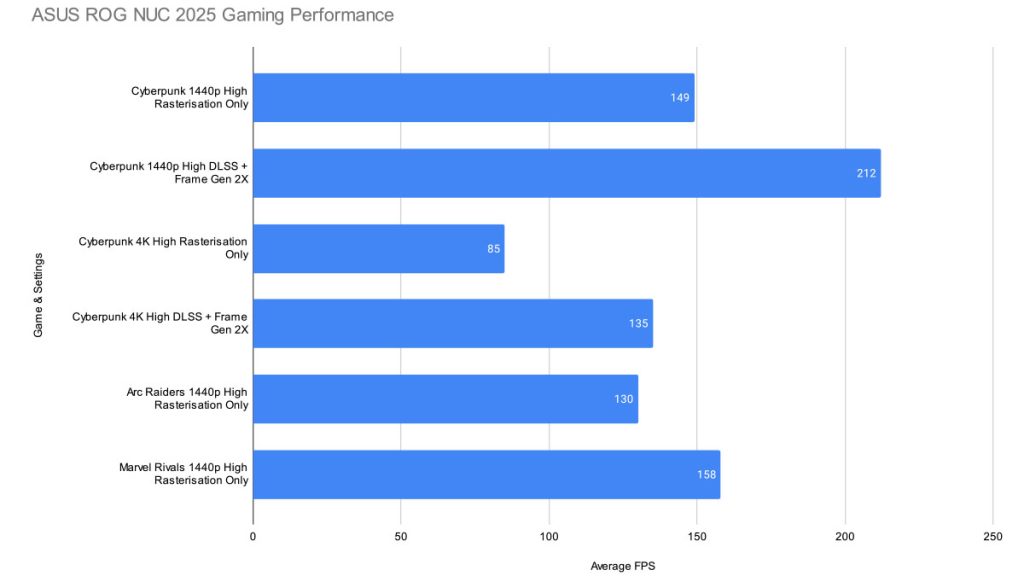
Note that your gaming performance across the board will vary. In titles that don’t support DLSS, you may have to rely on FSR, which isn’t as good as DLSS. Additionally, when throwing in things like Ray Tracing, performance will suffer. DLSS and Frame Gen can help, but Ray Tracing exacts a heavy toll when enabled.
In terms of thermals, the ROG NUC maintained a steady 82°C during our CPU-Z stress test. This was during an all-core load, which you’re not likely to hit unless you’re pushing the NUC with some rather intense workstation applications. But this benchmark gives you an idea of what a worst-case scenario is, which I’d argue is a positive result.
Features We Like
Slimline Form Factor
One of the more impressive features of the ROG NUC 2025 is its slimline chassis. In our review of the ROG NUC 970, we noted that the chassis was particularly compact, but ASUS has really pulled out all of the stops to make the ROG NUC 2025 as small as possible. It’ll easily fit into a variety of home setups, and its size makes it relatively straightforward to take on the go, so you can still play all your favourite games away from home.
Upgradeable Hardware
Another excellent feature is that the ROG NUC 2025 can be upgraded with new RAM or storage. The chassis opens by removing a thumbscrew and prying off the side panel. From there, you can access the storage and RAM to plug in additional components and enhance your performance. It’s worth noting that the design for removing the panel to access the internal hardware is very difficult to take off and will require some courage and prying power.
The reason this feature is so important is that the vast majority of proprietary hardware solutions, such as desktop machines, laptops, tablets, and mobile devices, are generally locked down or lack upgrade support. While manufacturers are entitled to lock down their hardware, providing an easy upgrade path shows they care about ease of use. Gamers who want to make simple changes, like adding another terabyte of storage, don’t have to pay a fortune; they can purchase the hardware and make the upgrade themselves.
Features We Don’t Like
Noisy Under Load
Unfortunately, one of the ROG NUC 2025’s most significant caveats is that it runs pretty loudly. Under load, the fans will ramp up quickly to keep components inside cool while performing their various tasks. While the ventilation definitely helps, it’s still a bit too noisy for my taste, and it will be much harder to drown out if you’re close to it or wearing some loose-fitting headphones.
Uses Low Latency RAM
The RAM that comes with the ROG NUC 2025 runs at 6400 MT/s with a CL52 latency. Two or three years ago, this would have aligned with what was available on the market, but now that we can get DDR5 kits with CL30 or lower, it feels a bit cheap to utilise such a weak kit. I do empathise that it’s difficult to pick up RAM during the shortage, the ROG NUC became available to purchase around July 2025, so there isn’t really an excuse.
Conclusion
ASUS ROG NUC 2025

Product Name: ROG NUC 2025
Brand: ASUS
-
Features
-
Design
-
Performance
-
Value For Money
Summary
After taking a look at the specs, design, performance, and features of the ROG NUC 2025, is it a worthwhile offering in the current market, or is it too pricey for what’s on offer? Overall, I’d say I’m on the fence. The significant advantages of the ROG NUC 2025 are its size and performance. Because it’s slimline, it’s easy to take with you on the go, and, based on our gaming benchmarks, this Mini PC offers RTX 5070 Ti-level performance, which is excellent for 1440p and 4K gaming.
The main caveat of the ROG NUC 2025 is its pricing. At the time of writing, the RTX 5080 version is purchasable for around £2650, which is exceptionally pricey. If we were to build an equivalent system (which would lack the benefit of portability), you could do this for around £2000. I really like the ROG NUC 2025, and I think its target market (though niche) is gamers who need a high-performance, low-profile desktop, and those who decide to purchase this Mini PC will not be disappointed. But just be aware that you could build or buy a similar-performing prebuilt for cheaper.
Pros
✅ Slimline chassis
✅ Easy to upgrade
✅ Solid gaming performance
Cons
❌ Noisy under load
❌ Uses high-latency RAM
❌ Somewhat edgy aesthetic




![FI_[DP064] ASUS Prime AP303 + 9070XT](https://geekawhat.com/wp-content/uploads/2026/03/FI_DP064-ASUS-Prime-AP303-9070XT-551x431.jpg)